FiPy LTE not connecting after Upgrade Firmware
-
@steve-williams Can you please try with:
from network import LTE
lte = LTE(carrier="telstra")
lte.attach()
Please do not send any commands starting with "AT!" to the modem unless expressly advised by Pycom. The command you are using has been discontinued in recent firmwares.
-
@xykon OK, I wasn't aware of that.. the code I am using has that instruction included and has done for months, and worked fine until recently? Where was the information on this provided -( so I can look for any other useful information)?
-
@xykon I tried that set of instructions - still doesn't attach.. :-(
-
@xykon do any of these updates location specific? Wouldn't think so but wanted to double check I am in the USA usually verizon. Tried the upgrade here and it still did not work.
-
@xykon I have also tried the "41065" firmware from your recent post
I still get No attach.
I'm in California this that an issue?.
It was working before I tried the firmware update. (but was not very stable)
I have two FiPy now that don't attach...
Can I roll back? or is there some extra setup I need to do to make it work?Ran this:
from network import LTE
import utime, os

print('instantiate the LTE object')
lte = LTE()

utime.sleep(4)
print(lte.send_at_cmd('ATI1'))
utime.sleep(5)
print(os.uname())
utime.sleep(4)
print('attemting attach')
lte.attach()
utime.sleep(10)
print(lte.send_at_cmd('AT+CEREG?'))
utime.sleep(30)
print(lte.send_at_cmd('AT+CEREG?'))
utime.sleep(60)
print(lte.send_at_cmd('AT+CEREG?'))
utime.sleep(10)
print(lte.send_at_cmd('AT+SQNMONI=9'))
Got this:
rst:0x1 (POWERON_RESET),boot:0x13 (SPI_FAST_FLASH_BOOT) configsip: 0, SPIWP:0xee clk_drv:0x00,q_drv:0x00,d_drv:0x00,cs0_drv:0x00,hd_drv:0x00,wp_drv:0x00 mode:DIO, clock div:1 load:0x3fff8028,len:8 load:0x3fff8030,len:2064 load:0x4009fa00,len:0 load:0x4009fa00,len:19208 entry 0x400a05f8 Initializing filesystem as FatFS! Pycom MicroPython 1.20.0.rc7 [v1.9.4-2833cf5] on 2019-02-08; FiPy with ESP32 Type "help()" for more information. >>> Running ***************\test5.py >>> >>> instantiate the LTE object UE5.0.0.0d LR5.1.1.0-41065 OK (sysname='FiPy', nodename='FiPy', release='1.20.0.rc7', version='v1.9.4-2833cf5 on 2019-02-08', machine='FiPy with ESP32', lorawan='1.0.2', sigfox='1.0.1') attemting attach +SYSSTART +CEREG: 2,0 OK +CEREG: 2,0 OK ERROR > Pycom MicroPython 1.20.0.rc7 [v1.9.4-2833cf5] on 2019-02-08; FiPy with ESP32 Type "help()" for more information. >>> -
@jason_gladen If you are using Verizon, you should use
lte = LTE(carrier='verizon')although the latest firmware should also detect this based on the SIM card.I see that the modem is restarting after attach, which should be because the modem is detecting a Verizon SIM card and restarts in "Verizon" mode. After that you need to run
lte.isattached()at least once because we need to tell the modem to re-enable the radio after the restart.Can you please also check if the carrier was set correctly:
print(lte.send_at_cmd('AT+SQNCTM?'))We have a large customer in the US who has been using the 41065 firmware successfully with Verizon for two weeks, so we know the firmware is working with Verizon.
@Steve-Williams Could you please provide the output of
print(lte.send_at_cmd('AT+CEREG?'))again after trying to attach with the new code I provided? You may also need to runlte.isattached()several times after the attach command as it's possible the modem restarted after running the attach() command.
Can you please also confirm the carrier was set correctly:print(lte.send_at_cmd('AT+SQNCTM?'))I'm also reviewing this case with Sequans and will let you know once I have more feedback.
-
@xykon said in FiPy LTE not connecting after Upgrade Firmware:
lte.isattached()
lte = LTE(carrier='verizon')from network import LTE import utime import sys utime.sleep(3) print( "{0}: lte=LTE()".format(utime.ticks_ms()) ) lte = LTE() try: utime.sleep(3) print( "{0}: lte.attach()".format(utime.ticks_ms()) ) lte.attach() except Exception as e: sys.print_exception(e) utime.sleep(3) print( "{0}: lte.isattached()".format(utime.ticks_ms()) ) ret = lte.isattached() print( "{0}: Ret = {1}".format(utime.ticks_ms(),ret) ) utime.sleep(10) print( "{0}: lte.isattached()".format(utime.ticks_ms()) ) ret = lte.isattached() print( "{0}: Ret = {1}".format(utime.ticks_ms(),ret) ) utime.sleep(10) print( "{0}: lte.isattached()".format(utime.ticks_ms()) ) ret = lte.isattached() print( "{0}: Ret = {1}".format(utime.ticks_ms(),ret) ) utime.sleep(10) print( "{0}: lte.send_at_cmd('AT+SQNCTM?')".format(utime.ticks_ms()) ) ret = lte.send_at_cmd('AT+SQNCTM?') print( "{0}: Ret = {1}".format(utime.ticks_ms(),ret) ) utime.sleep(10) print( "{0}: lte.isattached()".format(utime.ticks_ms()) ) ret = lte.isattached() print( "{0}: Ret = {1}".format(utime.ticks_ms(),ret) ) utime.sleep(10) print( "{0}: lte.send_at_cmd('AT+CEREG?')".format(utime.ticks_ms()) ) ret = lte.send_at_cmd('AT+CEREG?') print( "{0}: Ret = {1}".format(utime.ticks_ms(),ret) )>>> 6185: lte=LTE(carrier='verizon') 24403: lte.attach() Traceback (most recent call last): File "<stdin>", line 13, in <module> OSError: the requested operation failed 32385: lte.isattached() 32635: Ret = False 42638: lte.isattached() 42818: Ret = False 52821: lte.isattached() 53001: Ret = False 63004: lte.send_at_cmd('AT+SQNCTM?') 63037: Ret = +SQNCTM: standard OK 73040: lte.isattached() 73221: Ret = False 83224: lte.send_at_cmd('AT+CEREG?') 83257: Ret = +CEREG: 2,0 OK >Again with LTE(), this worked before I upgraded
18250: lte=LTE() 23112: lte.attach() 26724: lte.isattached() 26850: Ret = False 36853: lte.isattached() 37452: Ret = False 47455: lte.isattached() 47635: Ret = False 57638: lte.send_at_cmd('AT+SQNCTM?') 57671: Ret = +SQNCTM: standard OK 67674: lte.isattached() 67855: Ret = False 77858: lte.send_at_cmd('AT+CEREG?') 77891: Ret = +CEREG: 2,0 OK > -
@xykon Hi, so I put together this little routine, just so i can test various GPY and SEQUANS firmware combinations fairly quickly. I plan to test both CATM1 and NB modem firmware.
# Testing LTE connection
# Start with importing core modules for features, interfaces etc.
import uos
from network import LTE
from utime import sleep

print('Instantiate the LTE object to Telstra (AUS)')
lteM = LTE(carrier="telstra")
sleep(5)
print(lteM.send_at_cmd('ATI1'))
sleep(5)
print(uos.uname())
sleep(5)
lteset = lteM.send_at_cmd('AT+SQNCTM?')
print("LTE set to {}".format(lteset))
lteM.attach()
for l in range (0,10):
    lteM.isattached()
    sleep(1)
noltcon = 0
if not lteM.isattached():
    print("Attempting to attach to LTE ", end='')
    while(True):
        noltcon += 1
        if noltcon >= 50:
            # If not attached in 50 sec, flash error then try again
            print(" Failed after 50 attempts")
            break
        elif lteM.isattached():
            print(" Success")
            lteset = lteM.send_at_cmd('AT+SQNCTM?')
            print("LTE attached to {}".format(lteset))
            # Get the current LTE signal quality
            squallteM = lteM.send_at_cmd('AT+CSQ').strip().split()
            rquallteM = int(squallteM[1].split(',')[0])
            # Evaluate the returned signal quality Data
            rssilteM = 113 - ((rquallteM) * 2)
            ltesqual = ("LTE RSSI: -{} dbM".format(rssilteM))
            print(ltesqual)
            break
        print('.', end='')
        sleep(1)
sleep(10)
print(lteM.send_at_cmd('AT+CEREG?'))
sleep(10)
print(lteM.send_at_cmd('AT+CEREG?'))
sleep(10)
print(lteM.send_at_cmd('AT+CEREG?'))
sleep(10)
print(lteM.send_at_cmd('AT+SQNMONI=9'))
and get these results
#################Running C:\AE Projects\Atom Projects\GPy Projects\JANNE\lib\LTE_Tests.py
Instantiate the LTE object to Telstra (AUS)
UE5.0.0.0d
LR5.1.1.0-41065OK
(sysname='GPy', nodename='GPy', release='1.20.0.rc7', version='v1.9.4-2833cf5 on 2019-02-08', machine='GPy with ESP32')
LTE set to
+SQNCTM: telstraOK
Attempting to attach to LTE ................................................. Failed after 50 attempts
+CEREG: 2,4
OK
+CEREG: 2,4
OK
+CEREG: 2,4
OK
ERROR
##################Is the code OK, even if the results aren't what I am hoping for?
Question, is the carrier information for 'telstra' now embedded in the SEQUANS firmware? Used to use two AT commands
'AT+CGDCONT=1,"IP","telstra.internet"'
'AT!="RRC::addscanfreq band=28 dl-earfcn=9410"' (Note you advised NOT to use this)
to set that information for the carrier.As my code stands, I have a common config file holding the information requires for different countries/carriers/locations, so I will have to revisit that - provided i can get LTE to actually attach!
This is becoming a real concern for me as I am due to present a prototype for client review, but a prime requirement is the LTE capability. For me it is very strange that this has just recently stopped working, after trundling along 24/7 without a problem for more than 3 months (other than restarts from occasional code revisions). I haven't had any luck with reverting to previous firmwares either , which is strange?.
-
@xykon said in FiPy LTE not connecting after Upgrade Firmware:
although the latest firmware should also detect this based on the SIM card.
Does the new firmware detect all SIM's? If not, is there a way to do this in code - it would be a big help to me.
Also, given other comments about AT! commands etc, is the "monarch_4g-ez_lr5110_atcommands_referencemanual_rev3_noconfidential" document still valid? Is there a more up to date document?
-
Hello,
I try to connect to T-Mobile Germany DE(1nce SIM) with a GPy but I keep failing.
Here requested infos:
- T-mobile DE
- I tried multiple approaches, none works:
from network import LTE
lte = LTE()
lte.attach(band=8, apn="iot.1nce.net")
lte.send_at_cmd('AT+CFUN=0') lte.send_at_cmd('AT!="clearscanconfig"') lte.send_at_cmd('AT!="addscanband band=8"') lte.send_at_cmd('AT+CGDCONT=1,"IP","iot.1nce.net"') lte.send_at_cmd('AT+CEMODE=0') lte.send_at_cmd('AT+CFUN=1')lte.send_at_cmd('AT+CFUN=0') lte.send_at_cmd('AT!="clearscanconfig"') lte.send_at_cmd("AT!=\"RRC::addscanfreq band=8 dl-earfcn=3740\"") lte.send_at_cmd('AT+CGDCONT=1,"IP","iot.1nce.net"') lte.send_at_cmd('AT+CEMODE=0') lte.send_at_cmd('AT+CFUN=1')>>> print(lte.send_at_cmd('ATI1')) UE6.0.0.0 LR6.0.0.0-40343 OK>>> os.uname() (sysname='GPy', nodename='GPy', release='1.18.2', version='v1.8.6-849-743b7e7 on 2019-01-21', machine='GPy with ESP32', pybytes='0.9.6')>>> lte.attach(band=8, apn="iot.1nce.net") >>> print(lte.send_at_cmd('AT+CEREG?')) +SYSSTART >>> print(lte.send_at_cmd('AT+CEREG?')) +CEREG: 2,0 OK >>> print(lte.send_at_cmd('AT+CEREG?')) +CEREG: 2,0 OK>>> print(lte.send_at_cmd('AT+SQNMONI=9')) ERRORNeed help desperately :)
@xykon said in FiPy LTE not connecting after Upgrade Firmware:
I have discussed this with Sequans but before we can do any type of troubleshooting we need more details.
-
The network operator being used
-
The API commands used to setup the connection
-
The LTE firmware version currently installed (
print(lte.send_at_command('ATI1'))) -
The MicroPython firmware currently used (
os.uname()) -
The output of
print(lte.send_at_command('AT+CEREG?'))after trying to attach. -
The output of
print(lte.send_at_command('AT+SQNMONI=9'))after trying to attach (might return ERROR)
-
@ailnard It works for me with this little test script:
#
from network import LTE
import time

lte = LTE()
lte.attach(band=8, apn="iot.1nce.net")
while not lte.isattached():
    time.sleep(0.5)
    print(".", end="")

print("\nAttached!")

print(lte.send_at_cmd("AT+CSQ"))

lte.connect()       # start a data session and obtain an IP address
while not lte.isconnected():
    time.sleep(0.5)
    print("-", end="")

print("Connected!")
Tested wit Firmware 1.20.0.rc7, Modem firmware NB1-40343.
See also the discussion here: https://forum.pycom.io/topic/4079/fipy-nb-iot-1nce-telekom-de-germany-fails-no-band-8-support, where @bqpd has similar issues. Another user, @dom, seemed to have isolated the problem as SIM card connection issue. -
@steve-williams , your Code seems Ok, I actually tried your code on a
GPyv1.20.0.rc7with SQ FW40165on a private CAT-M1 Network here in office overband 28(earfcn = 9410) I just changedcarriertostandardas it is a private network and update tolteM.attach(band=28), and I attach successfully with the following output:rst:0x1 (POWERON_RESET),boot:0x13 (SPI_FAST_FLASH_BOOT) configsip: 0, SPIWP:0xee clk_drv:0x00,q_drv:0x00,d_drv:0x00,cs0_drv:0x00,hd_drv:0x00,wp_drv:0x00 mode:DIO, clock div:1 load:0x3fff8028,len:8 load:0x3fff8030,len:2064 load:0x4009fa00,len:0 load:0x4009fa00,len:19208 entry 0x400a05f8 Initializing filesystem as FatFS! Instantiate the LTE object to Telstra (AUS) UE5.0.0.0d LR5.1.1.0-41065 OK (sysname='GPy', nodename='GPy', release='1.20.0.rc7', version='v1.9.4-2833cf5 on 2019-02-08', machine='GPy with ESP32') LTE set to +SQNCTM: standard OK +CEREG: 2,1,"0001","01A2D001",7 OK +CEREG: 2,1,"0001","01A2D001",7 OK +CEREG: 2,1,"0001","01A2D001",7 OK +SQNMONI: Amarisoft Network Cc:001 Nc:01 RSRP:-89.00 CINR:0.00 RSRQ:-6.90 TAC:1 Id:1 EARFCN:9435 PWR:-74.32 PAGING:128 OK Pycom MicroPython 1.20.0.rc7 [v1.9.4-2833cf5] on 2019-02-08; GPy with ESP32 Type "help()" for more information. >>>The Sequans Firmware already have a profile set for Telstra you can check by
AT+SQNCTM=?
this is response from 40165 firmware :
+SQNCTM: ("3gpp-conformance", "att", "docomo", "kt", "lgu", "softbank", "standard", "telstra", "verizon")Actually what
+CEREG: 2,4implies is that most probably the modem is out of LTE coverage, but you mentioned that you attach successfully with older Sequanse Firmware, right? , do you use same setup when testing both Firmwares? -
@iwahdan Hi, thanks for your comments. When I first started having problems with LTE my first suspicion was antenna/LTE signal. Trying different locations, antennas etc made no difference and other 4G LTE devices worked fine in the same locations.
Using that code I put together as a common base, with some other parts of my developed code patched in to monitor results etc. I have tried all the GPY and SQ firmware combinations and I have no clear conclusion at all. The tests were run for many hours in each case and data collected as can be seen below.
Examples of the results are as follows:
***** LTE doesn't connect *****
2019-02-27 155030 Good 4.21 V, 26.9 C, 55 %, 1018.8 h, 24.5 m
Data written. 7.73328 GB free
FTP Start 1073468876
Set Allowed Comm's
Connect for FTP
Try preferred lteM service
LTE for telstra cid=1
Resetting LTE modem ... Modem Reset
Configure LTE OK
Attaching to LTE .................. Failed
System & Ambient data 58 1073632924
2019-02-27 155100 Good 3.81 V, 26.8 C, 56 %, 1018.8 h, 24.5 m
.Data written. 7.73328 GB free
.lteM unavailable
Try other Comm's Services
WiFi Client on External Antenna
Connecting to SWillyWL-NM2... Success
WL RSSI: -61 dbM
FTP Done. 47 secs elapsed.
FTP Complete @ 2019-02-27 15:51:30
Set Allowed Comm's
System & Ambient data 59 1073640972
Disable all Comms
2019-02-27 155130 Good 3.65 V, 26.8 C, 57 %, 1018.8 h, 24.5 m
WiFi Disabled
LTE Disabled
Data written. 7.73328 GB free
All Comm's Off.
System & Ambient data 60 1073468876
2019-02-27 155200 Good 4.20 V, 26.8 C, 57 %, 1018.8 h, 24.5 m***** LTE does connect *****
2019-02-27 170029 Good 4.07 V, 26.7 C, 48 %, 1019.1 h, 24.5 m
Data written. 7.73328 GB free
Setting RTC
Set Allowed Comm's
Connect for RTC set
Try preferred lteM service
LTE for telstra cid=1
Resetting LTE modem ... Modem Reset
Configure LTE OK
Attaching to LTE .... Success
LTE RSSI: -79 dbM
Connecting to LTE Success
Syncing RTC from au.pool.ntp.org
Syncing ..Synced
Adjusting Timezone
RTC Complete @ 2019-02-27 17:01:13
RTC synced, close comms.
Set Allowed Comm's
Disable all Comms
WiFi Disabled
LTE Disabled
All Comm's Off.
RTC Updated. Time change 27 secs
System & Ambient data 198 1073468508
2019-02-27 170122 Good 4.04 V, 26.7 C, 48 %, 1019.0 h, 24.5 m***** LTE doesn't connect *****
System & Ambient data 207 1073468508
2019-02-27 170530 Good 4.07 V, 26.8 C, 48 %, 1019.0 h, 24.5 m
Data written. 7.73328 GB free
FTP Start 1073468508
Set Allowed Comm's
Connect for FTP
Try preferred lteM service
LTE for telstra cid=1
System & Ambient data 208 1073632924
Resetting LTE modem ... Modem Reset
2019-02-27 170600 Good 3.99 V, 26.8 C, 48 %, 1019.1 h, 24.5 m
Data written. 7.73328 GB free
Configure LTE OK
Attaching to LTE ................... Failed
lteM unavailable
Try other Comm's Services
WiFi Client on External Antenna
System & Ambient data 209 1073640972
Connecting to SWillyWL-NM2.. Success
2019-02-27 170630 Good 3.87 V, 26.9 C, 48 %, 1019.1 h, 24.5 m
Data written. 7.73328 GB free
WL RSSI: -58 dbM
FTP Done. 46 secs elapsed.
FTP Complete @ 2019-02-27 17:06:42
Set Allowed Comm's
Disable all Comms
WiFi Disabled
LTE Disabled
All Comm's Off.
System & Ambient data 210 1073468508
2019-02-27 170700 Good 4.07 V, 26.9 C, 48 %, 1019.1 h, 24.5 mSo the first result is for no LTE connection - notice the VBatt dip: 'Good 3.65 V' ?
A bit over an hour later, in the same run of code, LTE DID connect - RSSI is -79dBm which is pretty good.... not so much of a VBatt voltage sag here...
Then a few minutes later LTE fails again, once more a greater VBatt sag at the same time...
So I feel that there is some excessive current draw causing the problem...
The test configuration (to eliminate the prototype construction, antenna etc.) is a GPY on an Expansion Board 3, with a 1000mA LiPoly, all running from a USB connection supplying power and connection to Atom.
Power is passed through a Schottky diode, to isolate the main USB connection from a secondary 'power only' USB port also routed through a Schottky. Nothing is connected to the secondary USB port. The only sensor connected is a BME280 via I2C for the testing.
The VBatt sensing is not the greatest, it seems to fluctuate a great deal, but with it disabled in code, the results don't change. I think the important factor there is the voltage sag when LTE is trying to attach.
During testing I have also had instances of the WLAN failing to connect (RSSI there is around -60 dBm
Not sure where to go from here, I have no conclusive evidence as to the cause, the results are the same regardless of the firmware combination in use - so I feel it is NOT firmware related. if anything, my suspicion is towards the Expansion Board 3? So I am ordering another one to try it all again. I don't have much time to resolve the issue - my client has advised me to look at an alternative microcontroller and seperate communications module so that they can progress this project (which would result in several tens of thousands of units being produced).
I believe that noticing this after a firmware update was just coincidental. The location of the prototype has been exactly the same since it was first powered up in mid Oct 2018 so is unlikely to be part of the issue.
Apologies for the long post, there is probably a better way to to it but I wanted to present it in an easy to read format.
-
@steve-williams , I did some power mesurements here on the same setup I mentioned in my previous post to give you a clear picture about the current consumption while the modem is trying to attach so as to help you identifying the problem , in first trial I intentionally powered off the CAT-M1 network in office and run a script on GPY trying to attach
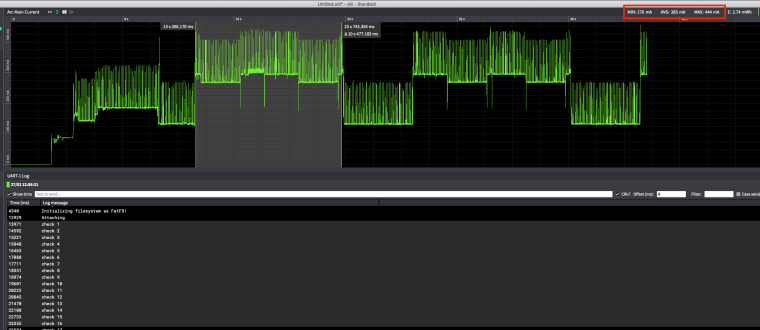
you can see that the modem current consumption increases after sending attach request and keep trying to attach periodically, you can see that the Avg.current consumption when trying to attach can reach 285mA (150mA more than normal).
The following image is when CAT-M1 network is back online and attaching is successful :
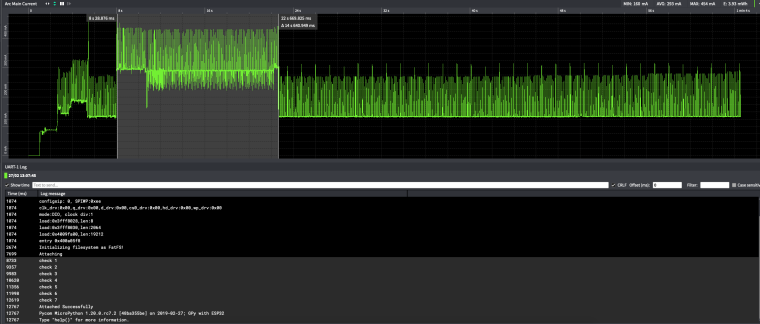

Hello! It looks like you're interested in this conversation, but you don't have an account yet.
Getting fed up of having to scroll through the same posts each visit? When you register for an account, you'll always come back to exactly where you were before, and choose to be notified of new replies (either via email, or push notification). You'll also be able to save bookmarks and upvote posts to show your appreciation to other community members.
With your input, this post could be even better 💗
Register Login