LoPy/FiPy starts rebooting every 11 minutes without any change to setup or code
-
Since saturday night (April 13th), 23h (EDIT : 21h UTC) 3 LoPy's deployed in the field started rebooting almost exactly every 11 minutes. We have no idea why, code didn't change or nothing changed in the setup.
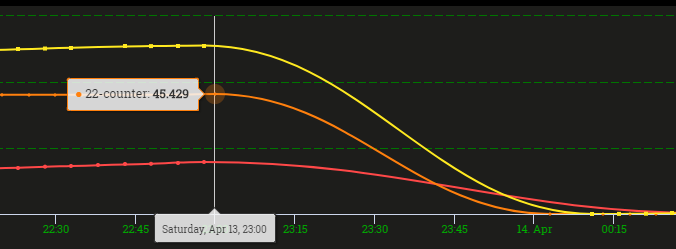
As you can see, they all crashed almost simultaneously and worked perfect before, they overflow on 65535, but we could work around that. The orange line seemed to reboot slower in the beginning (every few hours?) but atm it's at 11m cycles too.

Around 23h (EDIT : 21h UTC) all counters went to 0 (starting position when the pycom boots up again) and have been resetting every 11 minutes. I pushed an update to send a heartbeat when it boots, so the problem becomes more visible. This is a graph of those values. The values are pushed to our cloud over LoRa, which could explain why sometimes a reboot isn't shown when the 11 minutes is over.

I replicated the setup locally (with a FiPy instead of a LoPy) and it behaves the same way. They are all connected to pybytes, since it's a POC and it's a 2 hour drive, so we could push updates.. As I said we didn't change anything, but in our local setup I now disabled pybytes and it seems to keep working without rebooting (33 minutes and counting atm).
Since nothing on our end changed, did something change in the pybytes backend? I'm going to try with an almost empty sketch in a bit, but any help is welcome..
-
Update:
import time

i = 0
while True:
    print("Iteration:", i)
    time.sleep(60)
    i+=1
This code on a LoPy without pybytes runs for at least 18 minutes, put it on a FiPy crashes, every 11 minutes again..
So, was there an update to pybytes? I noticed the same 11m cycle with a LoPy that had bad wifi reception after flashing new code over pybytes.I update the file, the pycom restarts, doesn't come online, 11 minutes later, it pops up. Update the file again, same thing happens..
I think I can conclude that it is very related to pybytes, but what is wrong and why did it start this saturday, no clue..
-
Hi @Lonefish,
thank you for reporting this. I moved your post to the Pybytes section.We experienced some issues with mqttserver this week. We restarted the mqttserver and will closely monitor it.
Regarding restart after 11 minutes. We introduced the watchdog timer which restarts a device if a device won't receive Pong messages from Pybytes. It is described in detail here: https://forum.pycom.io/topic/4446/update-to-pybytes-firmware-1-18-2-r3-solving-device-wifi-connectivity-issues
This watchdog timer was added only to the Pybytes firmware (is absent if stable firmware).
A watchdog timer is initialized only if a device is trying to connect to Pybytes by WiFi or LTE. You can see the initialization in
connect_wififunction here: https://github.com/pycom/pycom-micropython-sigfox/blob/pybytes-master/esp32/frozen/Base/_pybytes_connection.py#L66Maybe in your example code, your FiPy restarted after 11 minutes because it was trying to connect to Pybytes on WiFi (but Pybytes couldn't be reached).
You can also enable more debug messages by these commands:
import pycom
pycom.nvs_set('pybytes_debug', 6)
Then you should see if watchdog timer was enabled or not by this debug message:
https://github.com/pycom/pycom-micropython-sigfox/blob/pybytes-master/esp32/frozen/Base/_pybytes_connection.py#L62 -
The watchdog timer seems to be related, testing it atm, opening the flash tab (then it shows "online") on pybytes seems to be able to lengthen the reboot-time.
Still gives the question as to why it started to reboot on saturday. I haven't seen this behaviour before, and now in 2 different places, with different hardware (4 LoPy's, 1 FiPy, of which 3 devices hadn't been touched at all, 2 completely different WiFi-networks ) simultaneously started rebooting..
We're not really using the MQTT server for data upload, just for some debugmessages, so I would think that that shouldn't be the problem
-
@jirkakrepl Is there any way to disable the rebooting over pybytes? Since our devices are still crashing..
-
@Lonefish Not at this moment, we will deploy a fix in the firmware to make this option configurable.
Hello! It looks like you're interested in this conversation, but you don't have an account yet.
Getting fed up of having to scroll through the same posts each visit? When you register for an account, you'll always come back to exactly where you were before, and choose to be notified of new replies (either via email, or push notification). You'll also be able to save bookmarks and upvote posts to show your appreciation to other community members.
With your input, this post could be even better 💗
Register Login