Pytrack and FiPy stalling with 18650 batteries
-
Hi people,
I am trying to run a FiPy with a Pytrack or Pysense on 4x18650 batteries (in parallel).
It is to be used to record from an external ADC 3 times then on the fourth it sends it using cellular.
It works well enough when powered by USB but when I put it on the batteries it seems to just stall at startup then just runs the battery down.
I put a shunt resistor in and this is the recording that I get, where the stall state is at about 300mA.
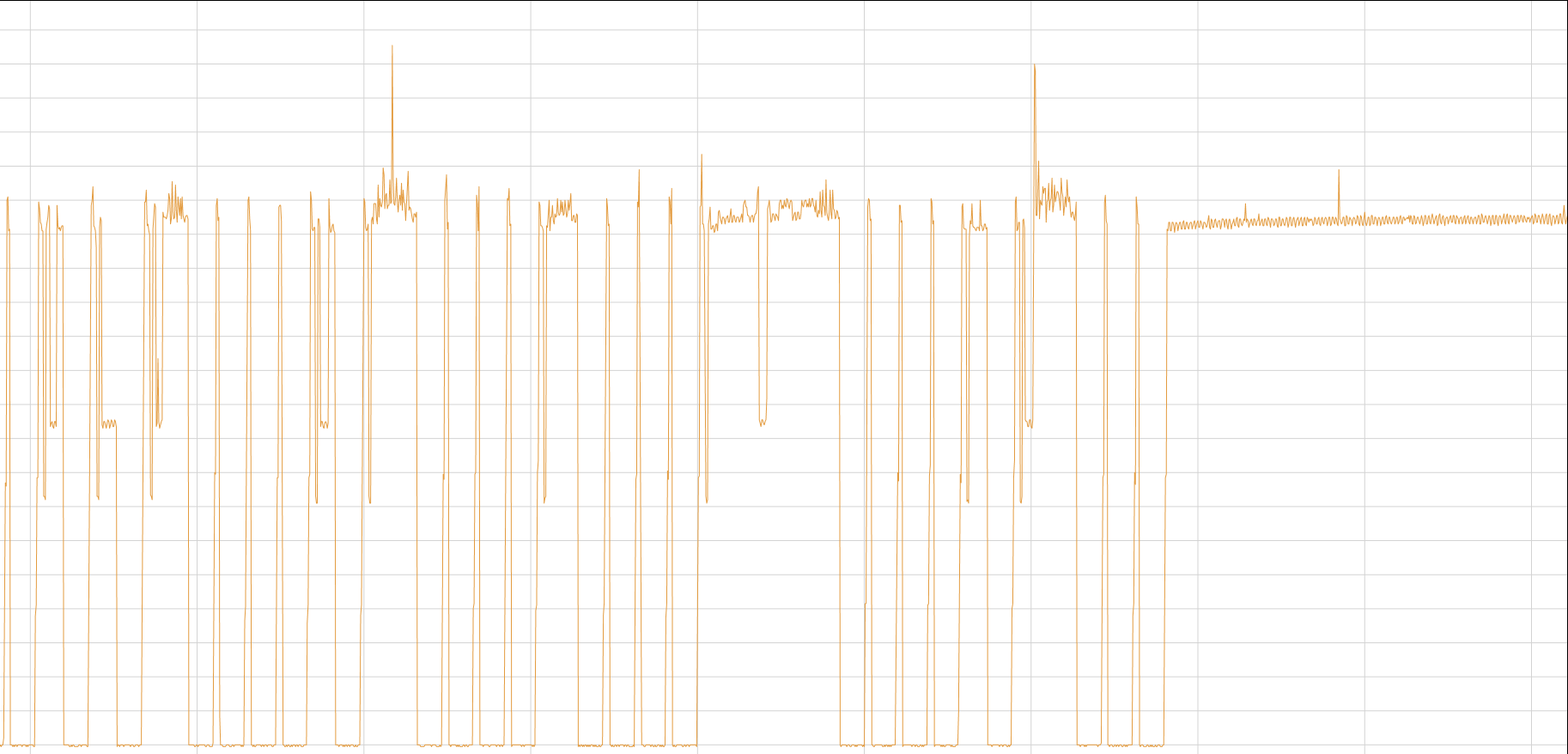
The problem is that I can't see if there is an error in my code because when it is in that stall state I can't connect to it over Wifi and when I connect it to serial then I don't get the error because it is powered by the USB.
Is there any way to check the diagnostics when using only battery? Is there anyway to connect to serial and power it only from the battery? Anyone have any idea what is causing this stall state and is there anything else that I could try that might give me more information?
I read this post and they say that they only get it with the pytrack but I am getting it on the pytrack and pysense.
https://forum.pycom.io/topic/2998/battery-operation-with-fipy-pytrack/6 -
I can’t answer your question, but one thing I’ve found handy is a USB cable that passes through data and ground only - not the +5v feed. Easy to make. Let’s you debug while on batteries.
I have used Fipy and Gpy in both Pysense and Pyscan, and in all cases running from a pair of 18650s in parallel with no issues. The units run for around a month in demo mode where it reports frequently and the production models are on track to run for about a year with real world reporting intervals.
I tried the Pytrack board but the lack of external GPS antenna connector and the poor performance of the onboard antenna ruled it out pretty quickly.
-
@Edward-Dimmack In addition to the data-only option, there are a few more things you can use:
- changing the LED color is easy and very useful to find out where things go wrong.
- you could save logs. Either just to a buffer you can print after connecting to the the module once you detect the issue, or even saving to a file, though you need to be careful with the latter option, especially if you use the Pytrack's deep sleep, as it could corrupt the FS.
When things go wrong and you connect the USB once it's "stuck", what is the sate of the device? REPL? REPL after a Ctrl-C? Nothing?
Do you have the watchdog set up? It's not perfect but still better than nothing.
-
@John-Baird Thanks for your advice and it is great to see that it can be reliable with the Pysense and the FiPy. How often are you sending and recording?
I had made a cable with the 2 data and ground wires but I was using a terminal program (teraterm) to view the data and when I remove the +5v I can't create a connection to the COM port. What are you using?
-
@jcaron Thank you for your advice. I will add the LED changes and see what happens.
I didn't see anything after plugging it in or CTRL+C.
I have a watchdog for when it is trying to attach to LTE but this seems to happen when it is just doing a record. I am not sure how to put the watchdog in.
On the other forum post that I linked it said that the current can spike to 2.6A. If I have introduced some resistance (shunt etc.) could that be causing the voltage to drop to a point that it struggles to operate? At 3.7V wouldn't it only need to drop 0.4V? Wouldn't that be just 0.2 Ohms. It looks like when it is in the stall state it spikes periodically as if trying to run?

Hello! It looks like you're interested in this conversation, but you don't have an account yet.
Getting fed up of having to scroll through the same posts each visit? When you register for an account, you'll always come back to exactly where you were before, and choose to be notified of new replies (either via email, or push notification). You'll also be able to save bookmarks and upvote posts to show your appreciation to other community members.
With your input, this post could be even better 💗
Register Login