Editing an ultrasonic sensor library
-
Hello guys, I'm having a problem implementing a code for my HC-SR04 ultrasonic sensor. I am using the Atom compiler and a Fipy.
import utime
import pycom
from machine import Pin, idle
# initialise Ultrasonic Sensor pins

echo = Pin('P19', mode=Pin.IN)
trigger = Pin('P20', mode=Pin.OUT)
trigger.value(0)

# Ultrasonic distance measurment
def distance_measure():
    # trigger pulse LOW for 2us (just in case)
    trigger.value(0)
    utime.sleep_us(2)
    # trigger HIGH for a 10us pulse
    trigger.value(1)
    utime.sleep_us(10)
    trigger.value(0)

    while echo.value() == 0:
        pass

    start = utime.ticks_us()

    while echo.value() == 1:
        pass

    finish = utime.ticks_us()

    distance = ((utime.ticks_diff(start, finish) * .034)/2)
    utime.sleep_ms(20)

    return distance

while True:
    distance = distance_measure()
    print(distance)
    time.sleep(1)
I'm using Core Electronics's code base: https://core-electronics.com.au/tutorials/the-things-network-ttn/hc-sr04-ultrasonic-sensor-with-pycom-tutorial.html
I haven't implemented the median distance function yet because I couldn't even calculate the instantaneous distance :(
I think the problem is in WHILE:
 while echo.value () == 0:
     pass
 start = utime.sticks_us()
 while echo.value () == 1
    pass
 finish = utime.sticks_us()
Because I changed the WHILE functions to IF and I was able to print some distances even if it's wrong.
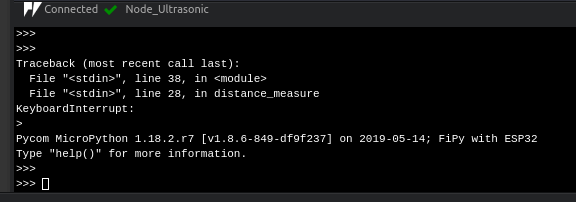
If anyone can help me solve this problem, I will be very grateful!
-
@Lucas_Vieira did you correctly take into account the fact that the FiPy runs at 3.3V while the sensor runs at 5V, as detailed in the tutorial?
Can you clarify how your power the FiPy and/or sensor and how you connected them together?
-
@jcaron
I used a voltage divider at the ECHO pin input to get the 3.3V signal.
Pinout:
Vcc H04C-SR -> Fipy's Vin (5Vcc);
Gnd HC-SR04 -> Gnd Fipy;
Trigger -> P20 Fipy;
Eco -> P19 Fipy. -
@Lucas_Vieira FiPy uses P19 and P20 for the LTE modem. That will block the signals. Please use other pins, like P21 and P22.
-
@robert-hh
Thank you. I changed the pinout, but nothing happened. -
@Lucas_Vieira Can you look at the signals, e.g. with a logic analyzer? You can get for about 10$, and the software from saleae.
Like this one: https://www.amazon.com/HiLetgo-Analyzer-Ferrite-Channel-Arduino/dp/B077LSG5P2/ref=sr_1_3?__mk_de_DE=ÅMÅŽÕÑ&crid=2I7VYOS7YP7KU&keywords=logic+analyzer&qid=1565038216&s=gateway&sprefix=logic+analy%2Caps%2C228&sr=8-3 -
This post is deleted!

Hello! It looks like you're interested in this conversation, but you don't have an account yet.
Getting fed up of having to scroll through the same posts each visit? When you register for an account, you'll always come back to exactly where you were before, and choose to be notified of new replies (either via email, or push notification). You'll also be able to save bookmarks and upvote posts to show your appreciation to other community members.
With your input, this post could be even better 💗
Register Login