Problems stopping alarm with KeyboardInterrupt
-
Hello.
I am testing out a FiPy along with the Pysense board. My current test-project is about reading the value of the ADC at a given interval, using the Alarm.Timer(). That part of the code is working (see my full main below):
#
from machine import ADC, Timer, idle
#from pysense import Pysense
import pycom
import utime
import _thread

print("Getting new readings from ADC every 10 ms!")
data = []
times = []

adc = ADC()
apin = adc.channel(pin='P16')
dataread = apin()

def adcread():
    try:
        while True:
            t1 = utime.ticks_us()
            dataread = apin()
            data.append(dataread)
            times.append(t1)
            print("Data: ")
            print(dataread)
            print("Times: ")
            print(t1)
    except KeyboardInterrupt:
        alarm.cancel()
        print("Handler stopped")

Timer.Alarm(lambda y: adcread(), ms = 10, arg = None, periodic=True)
However the KeyboardInterrupt does not let me stop the program. The REPL console does not react, and does not print the "handler stopped" message ever, when pressing Ctrl+C. I followed the documentation at https://docs.pycom.io/firmwareapi/pycom/machine/timer/, but still no success. Any help would be appreciated!
Another thing: When this code is running, i have a really hard time uploading another program to the FiPy, which otherwise would be a workaround to not being able to stop the program. Then it fails writing the individual files (lib's, boot and main). Any ideas?
Thanks in advance.
-
@railmonitor Which firmware are you using? Pushing Ctrl-B should show it. The PyBytes version had the habit of disabling Keyboard Interrupt.
About slow response: Busy loops like the one below have the tendency to block background tasks like FTP or Telnet. Just add a time.sleep_ms(1) to the loop. That should improve the response.
-
Hi @robert-hh
Thanks for replying.
The firmware version is here:

So it seems my pybytes is outdated, however i did just run the firmware update tool. Is there another method for updating that i may have overlooked?
I added the 1 ms. sleep:
def adcread():
    try:
        while True:
            t1 = utime.ticks_us()
            dataread = apin()
            data.append(dataread)
            times.append(t1)
            print("Data: ")
            print(dataread)
            print("Times: ")
            print(t1)
            utime.sleep_ms(1)
    except KeyboardInterrupt:
        alarm.cancel()
        print("Handler stopped")
but it still won't let me stop the handler when program is running on the FiPy.
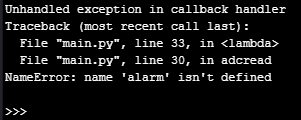
EDIT: I was able to stop the program by hitting the reset button, and then tapping Ctrl-C a few times. But still no print of the "Handler stopped" message. Doing this produced following output:
-
Dear @railmonitor,
indeed,
alarmis an undefined reference. You should probably sayalarm = Timer.Alarm(...)somewhere.
The REPL console does not react.
When this code is running, i have a really hard time uploading another program to the FiPyWhile the system is under heavy load, it lacks resources to be responsive for any file upload. You might want to increase the interval
ms = 10in order to reduce pressure.With kind regards,
Andreas. -
@robert-hh and @andreas Thank you for the help. Yeah the last one is kinda obvious now! :)

Hello! It looks like you're interested in this conversation, but you don't have an account yet.
Getting fed up of having to scroll through the same posts each visit? When you register for an account, you'll always come back to exactly where you were before, and choose to be notified of new replies (either via email, or push notification). You'll also be able to save bookmarks and upvote posts to show your appreciation to other community members.
With your input, this post could be even better 💗
Register Login