Pycom FiPy ADR not working on AS923 (TTN and Chirpstack)
-
@Gijs
How about if I set the spreading factor directly at lora.init() ? That should be an absolute hold right? -
The spreading factor in
lora.init()is only meant for the RAW lora connection, as the LoRaMAC uses the Datarate parameter in the socket to determine the spreading factor and bandwidth combination -
@Gijs
Hi Gijs, I flashed my FiPy with the firmware you provided and tried AS923 on TTN. See the debug prints below:[modlora] lora_init_helper: Giving semaphore 3 [LoRaMac] adr set enable: 1 datarate out 2, txpowout 0 [modlora] TASK_LoRa: taking semaphore 1 datarate out 2, txpowout 0 [LoRaMac] PrepareFrame: adrNext[LoRaMac] ScheduleTx: next channel 0, RX channel DR: 2 [RegionAS923] RegionAS923ComputeRxWindowParameters: datarate 2 [RegionAS923] RegionAS923ComputeRxWindowParameters: datarate 2 [LoRaMac] SendFrameOnChannel: channel 0 [LoRaMac] SendFrameOnChannel: uplink frequency 923200000 [RegionAS923] RegionAS923RxConfig: RX config channel 0, frequency 923200000, datarate 2 [RegionAS923] RegionAS923RxConfig: RX config channel 0, frequency 923200000, datarate 2 [modlora] McpsConfirm: Giving semaphore 4 datarate out 2, txpowout 0 [modlora] TASK_LoRa: taking semaphore 1 datarate out 2, txpowout 0 [LoRaMac] PrepareFrame: adrNext[LoRaMac] ScheduleTx: next channel 1, RX channel DR: 2 [RegionAS923] RegionAS923ComputeRxWindowParameters: datarate 2 [RegionAS923] RegionAS923ComputeRxWindowParameters: datarate 2 [LoRaMac] SendFrameOnChannel: channel 1 [LoRaMac] SendFrameOnChannel: uplink frequency 923400000 [RegionAS923] RegionAS923RxConfig: RX config channel 1, frequency 923400000, datarate 2 [RegionAS923] RegionAS923RxConfig: RX config channel 1, frequency 923200000, datarate 2 [modlora] McpsConfirm: Giving semaphore 4 datarate out 2, txpowout 0 [modlora] TASK_LoRa: taking semaphore 1 datarate out 2, txpowout 0 [LoRaMac] PrepareFrame: adrNext[LoRaMac] ScheduleTx: next channel 0, RX channel DR: 2 [RegionAS923] RegionAS923ComputeRxWindowParameters: datarate 2 [RegionAS923] RegionAS923ComputeRxWindowParameters: datarate 2 [LoRaMac] SendFrameOnChannel: channel 0 [LoRaMac] SendFrameOnChannel: uplink frequency 923200000 [RegionAS923] RegionAS923RxConfig: RX config channel 0, frequency 923200000, datarate 2 [RegionAS923] RegionAS923RxConfig: RX config channel 0, frequency 923200000, datarate 2 [modlora] McpsConfirm: Giving semaphore 4I could not find any prints showing LinkAdrReq. Could it be a problem with the configurations on my TTN account?
Can you please check if my micropython source code is fine?
lora = LoRa(mode=LoRa.LORAWAN, region=LoRa.AS923, adr=True  )
dev_addr = struct.unpack(">l", ubinascii.unhexlify(""))[0];
nwk_swkey = ubinascii.unhexlify("");
app_swkey = ubinascii.unhexlify("");
lora.join(activation=LoRa.ABP, auth=(dev_addr, nwk_swkey, app_swkey), dr=2)
s = socket.socket(socket.AF_LORA, socket.SOCK_RAW);
s.setsockopt(socket.SOL_LORA, socket.SO_DR, 6 )
#s.setsockopt(socket.SOL_LORA, socket.SO_CONFIRMED, True);
while( True ):
    try:
        # make the socket blocking
        # (waits for the data to be sent and for the 2 receive windows to expire)
        s.setblocking(True)

        # send some data
        s.send(bytes([0x00, 0x00, 0x00, 0x00, 0x00, 0x00, 0x00, 0x00, 0x00, 0x00, 0x00 ]))

        # make the socket non-blocking
        # (because if there's no data received it will block forever...)
        s.setblocking(False)

        # get any data received (if any...)
        data = s.recv(512)
        pycom.rgbled(0x00FF00)
        time.sleep(1)
        pycom.rgbled(0x000000)  # Green
        time.sleep(29)
    except Exception as e:
        print( e )
Thanks.
Wong
-
For me it took a while (like 100 packets while). Im using this script to test the setup on TTN, AS923: (very similar to yours)
from network import LoRa import socket import time import ubinascii # Initialise LoRa in LORAWAN mode. # Please pick the region that matches where you are using the device: # Asia = LoRa.AS923 # Australia = LoRa.AU915 # Europe = LoRa.EU868 # United States = LoRa.US915 lora = LoRa(mode=LoRa.LORAWAN, region=LoRa.AS923, adr=True) # create an OTAA authentication parameters, change them to the provided credentials app_eui = ubinascii.unhexlify('') app_key = ubinascii.unhexlify('') #uncomment to use LoRaWAN application provided dev_eui dev_eui = ubinascii.unhexlify('') # join a network using OTAA (Over the Air Activation) #uncomment below to use LoRaWAN application provided dev_eui #lora.join(activation=LoRa.OTAA, auth=(app_eui, app_key), timeout=0) lora.join(activation=LoRa.OTAA, auth=(dev_eui, app_eui, app_key), timeout=0) # wait until the module has joined the network while not lora.has_joined(): time.sleep(2.5) print('Not yet joined...') print('Joined') # create a LoRa socket s = socket.socket(socket.AF_LORA, socket.SOCK_RAW) # set the LoRaWAN data rate s.setsockopt(socket.SOL_LORA, socket.SO_DR, 5) while True: # make the socket blocking # (waits for the data to be sent and for the 2 receive windows to expire) s.setblocking(False) # send some data s.send(bytes([0x01, 0x02, 0x03])) # make the socket non-blocking # (because if there's no data received it will block forever...) s.setblocking(False) # get any data received (if any...) data = s.recv(64) print(data) time.sleep(5) -
Alright. Give me some time to work out the possible difference. The only obvious difference I can see now is the different activation modes. Mine is ABP and yours is OTAA. I will come back to you with more information.
-
Some more data points for you
This is the view from TTN node when we receive a ADR REQ
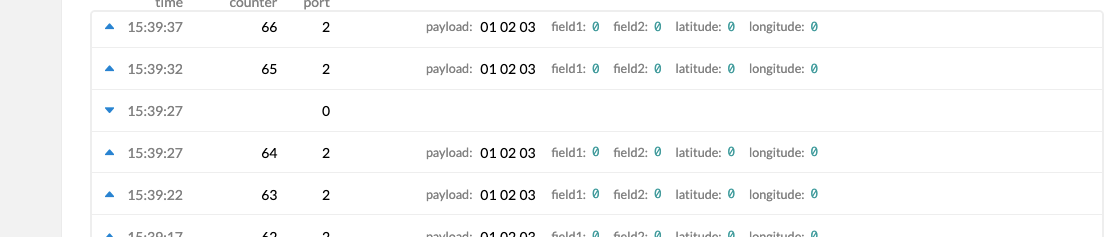 . There is no metadata in the packet visible.
This is the view from TTN Gateway, when we send a ADR REQ:
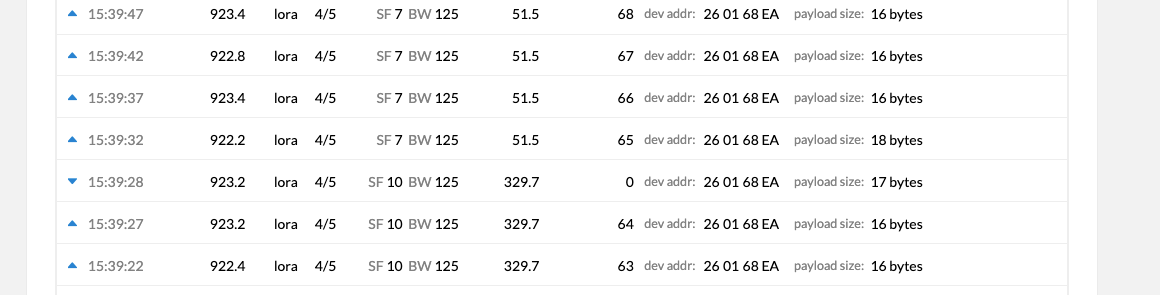
And this is the content of the packet: (not sure if that means anything to you)
60EA680126A5000003507F000136141F26It seems like this happens every 65 packets on my side now, I just got another one at 129. I have the gateway setup to ttn-router-jp on AS923-1
Another edit, I just used the regular firmware, and can agree that I do not get a downlink message listed anywhere to change the datarate in AS923. It does however work for EU868 at 65 packet-intervals, both again on TTN.
-
@Gijs
Hi, good news on my side as well. Using exactly your sample source employing either Activation via OTAA or ABP on Fipy flashed with the firmware your provided, I have successfully got ADR to work on both TTN and Chirpstack Server. On TTN server, the LinkAdrReq was transmitted by the gateway after every 65 packets (Exactly as what you shared). On Chirpstack server, the LinkAdrReq was transmitted by the gateway after every packet it had received. I would say that we have successfully solved the problem I was facing. However, can you please highlight again the changes that you have made to the source code of the firmware? Maybe these changes can be introduced in the next firmware version. Thank you very much and I appreciate your help greatly. -
@Gijs
Hi Gijs, I have been evaluating the ADR performance on the Chirpstack server. I found that the lorawan stack failed to change the data rate even when adr request was transmitted by the gateway. See the debug prints below. I have this feeling that there is still some kind of error somewhere. What is your advice?[LoRaMac] adr set enable: 1 Joined b'' datarate out 2, txpowout 0 [modlora] TASK_LoRa: taking semaphore 1 datarate out 2, txpowout 0 [LoRaMac] PrepareFrame: adrNext[LoRaMac] ScheduleTx: next channel 0, RX channel DR: 2 [RegionAS923] RegionAS923ComputeRxWindowParameters: datarate 2 [RegionAS923] RegionAS923ComputeRxWindowParameters: datarate 2 [LoRaMac] SendFrameOnChannel: channel 0 [LoRaMac] SendFrameOnChannel: uplink frequency 923200000 [RegionAS923] RegionAS923RxConfig: RX config channel 0, frequency 923200000, datarate 2 [RegionAS923] LinkAdrReq: status variables drOut: 5, txPowOut:1, nbRepOut 1, nbBytesParsed:5 [modlora] McpsConfirm: Giving semaphore 4 Trying to send uplink b'' datarate out 2, txpowout 0 [modlora] TASK_LoRa: taking semaphore 1 datarate out 2, txpowout 0 [LoRaMac] PrepareFrame: adrNext[LoRaMac] ScheduleTx: next channel 1, RX channel DR: 2 [RegionAS923] RegionAS923ComputeRxWindowParameters: datarate 2 [RegionAS923] RegionAS923ComputeRxWindowParameters: datarate 0 [LoRaMac] SendFrameOnChannel: channel 1 [LoRaMac] SendFrameOnChannel: uplink frequency 923400000 [RegionAS923] RegionAS923RxConfig: RX config channel 1, frequency 923400000, datarate 2 [RegionAS923] LinkAdrReq: status variables drOut: 5, txPowOut:2, nbRepOut 1, nbBytesParsed:5 [modlora] McpsConfirm: Giving semaphore 4 b'' datarate out 2, txpowout 0 [modlora] TASK_LoRa: taking semaphore 1 datarate out 2, txpowout 0 [LoRaMac] PrepareFrame: adrNext[LoRaMac] ScheduleTx: next channel 1, RX channel DR: 2 [RegionAS923] RegionAS923ComputeRxWindowParameters: datarate 2 [RegionAS923] RegionAS923ComputeRxWindowParameters: datarate 0 [LoRaMac] SendFrameOnChannel: channel 1 [LoRaMac] SendFrameOnChannel: uplink frequency 923400000 [RegionAS923] RegionAS923RxConfig: RX config channel 1, frequency 923400000, datarate 2 [RegionAS923] LinkAdrReq: status variables drOut: 5, txPowOut:2, nbRepOut 1, nbBytesParsed:5 [modlora] McpsConfirm: Giving semaphore 4``` No issue on TTN so far. -
I would love to help you out there, but I do not really have a clue there unfortunately..
Maybe somebody else on the forum has a better idea on what is happening here, or you could try the Chirpstack forum (I believe you mention its Chirpstack related?) -
@Gijs
Hi Gijs, Thanks for your reply. My concern was why: the next datarate out debug print still showing 2 even when the LinkAdrReq was clearly requesting for data rate = 5. Thanks -
Do you notice any other differences in that line between TTN and Chirpstack?
Comparing to mine:[RegionAS923] LinkAdrReq: status variables drOut: 5, txPowOut:2, nbRepOut 1, nbBytesParsed:5 <-- yours (Chirpstack?) [RegionAS923] LinkAdrReq: status variables drOut: 5, txPowOut:0, nbRepOut 1, nbBytesParsed:5 <-- mine (TTN)It could be the txPowOut set by Chirpstack is outside the bounds, its a stretch though..
-
@Gijs
In the source code, max_tx power out for AS923 is 0 and the min_tx power out is 7. So, they are within the bounds. If you dont mind, can you pinpoint to me the location where the source code interprets the linkadrreq? I believe that would be RegionAS923AdrNext. The reason why the next transmission defaulted to dr= 2 and tx=0 was because of the output of the ReguonAS923AdrNext function right? -
@Gijs
Chirpstack Debugging
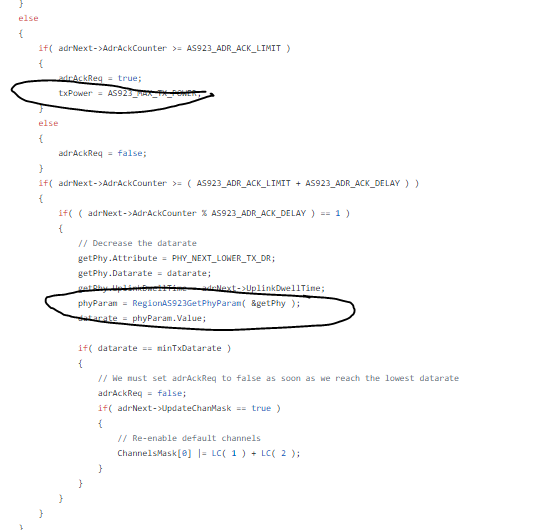
Hi Gijs, I think I have identified the lines in the function RegionAS923ADNext that have been invoked resulting in the data rate being defaulted to 2 and the Tx power being set to MAX. Can you please add a debug print to track the value of AdrNext->AdrAckCounter?
Thanks.
Wong
-
Hi,
Sorry for my late reply,
I'll add some additional debug statements, and I'll share the code I changed:bool RegionAS923AdrNext( AdrNextParams_t* adrNext, int8_t* drOut, int8_t* txPowOut, uint32_t* adrAckCounter ) { bool adrAckReq = false; int8_t datarate = adrNext->Datarate; int8_t txPower = adrNext->TxPower; GetPhyParams_t getPhy; PhyParam_t phyParam; // Report back the adr ack counter *adrAckCounter = adrNext->AdrAckCounter; printf("[RegionAS923] AdrNext: AdrAckCounter %d, AdrEnabled: %d, old datarate %d\n", adrNext->AdrAckCounter,adrNext->AdrEnabled, datarate); if( adrNext->AdrEnabled == true ) { if( datarate == AS923_TX_MIN_DATARATE ) { *adrAckCounter = 0; adrAckReq = false; } else { if( adrNext->AdrAckCounter >= AS923_ADR_ACK_LIMIT ) // ACK_LIMIT = 64 { adrAckReq = true; txPower = AS923_MAX_TX_POWER; } else { adrAckReq = false; } if( adrNext->AdrAckCounter >= ( AS923_ADR_ACK_LIMIT + AS923_ADR_ACK_DELAY ) ) { if( ( adrNext->AdrAckCounter % AS923_ADR_ACK_DELAY ) == 1 ) { // Decrease the datarate getPhy.Attribute = PHY_NEXT_LOWER_TX_DR; getPhy.Datarate = datarate; getPhy.UplinkDwellTime = adrNext->UplinkDwellTime; phyParam = RegionAS923GetPhyParam( &getPhy ); datarate = phyParam.Value; if( datarate == AS923_TX_MIN_DATARATE ) { // We must set adrAckReq to false as soon as we reach the lowest datarate adrAckReq = false; if( adrNext->UpdateChanMask == true ) { // Re-enable default channels ChannelsMask[0] |= LC( 1 ) + LC( 2 ) + LC( 3 ); //this line seems to be different! } } } } } } printf("datarate out %d, txpowout %d\n", datarate, txPower); *drOut = datarate; *txPowOut = txPower; return adrAckReq; }On my side, the AdrAckCounter increases to 64 (as specified by the AS923_ADR_ACK_LIMIT) and then does the AdrReq function. AS923_ADR_ACK_DELAY is 32.
I have attached the firmware with even more debug statements here
-
@Gijs
Thanks for your reply Gijs. Your addition of the debug prints helps me understand the flow better.
Okay, as you have pointed out earlier, the difference between the linkadrreq from TTN and Chirpstack is the Tx Power. On TTN, it was 0 and the on Chirpstack it was 2. Now I suspect the culprit is in function: RegionAS923LinkAdrReq
line:status = RegionCommonLinkAdrReqVerifyParams( &linkAdrVerifyParams, &linkAdrParams.Datarate, &linkAdrParams.TxPower, &linkAdrParams.NbRep );I need an additional debug print to find out if the status is true or false. I have a feeling that the status is false on Chirpstack, therefore, the data rate of the next frame did not change.
Can you also show me the location of the function RegionCommonLinkAdrReqVerifyParams which I believe in the underlying reason why ADR breaks on chirpstack. Best if you can pinpoint to me the exact piece of code that rejects Tx Power = 2.
P/S: My deployment in Singapore is now going smoothly with TTN, thanks to your help. However, I would also like for adr to work on Chirpstack for research purpose.
Thanks.
Wong
-
Great to hear your deployment on TTN is working! I'll check on integrating this feature in the firmware.
I cant quite get the hang of the whole ADR routine, I've added a check above this function:RegionCommonLinkAdrReqVerifyParams. I'm not sure whether it is caused by the TXPower setting, though it appears to be the only different setting..
I have compiled another firmware here -
Dear Gijs,
Many thanks for your importunate support. Alright, on TTN, the status returned by the RegionCommonLinkAdrReqVerifyParams function was "7". Whereas, on Chirpstack, the status returned by the function was "6".
The parent function RegionAS923LinkAdrReq which returns the status value from RegionCommonLinkAdrReqVerifyParams is called in function ProcessMacCommands.c in LoRaMac.c. I could see that the data rate and the tx power for the next frame will only be set if the status value is 7. See code:
 case SRV_MAC_LINK_ADR_REQ:
                {
                    LinkAdrReqParams_t linkAdrReq;
                    int8_t linkAdrDatarate = DR_0;
                    int8_t linkAdrTxPower = TX_POWER_0;
                    uint8_t linkAdrNbRep = 0;
                    uint8_t linkAdrNbBytesParsed = 0;

                    // Fill parameter structure
                    linkAdrReq.Payload = &payload[macIndex - 1];
                    linkAdrReq.PayloadSize = commandsSize - ( macIndex - 1 );
                    linkAdrReq.AdrEnabled = AdrCtrlOn;
                    linkAdrReq.UplinkDwellTime = LoRaMacParams.UplinkDwellTime;
                    linkAdrReq.CurrentDatarate = LoRaMacParams.ChannelsDatarate;
                    linkAdrReq.CurrentTxPower = LoRaMacParams.ChannelsTxPower;
                    linkAdrReq.CurrentNbRep = LoRaMacParams.ChannelsNbRep;

                    // Process the ADR requests
                    status = RegionLinkAdrReq( LoRaMacRegion, &linkAdrReq, &linkAdrDatarate,
                                               &linkAdrTxPower, &linkAdrNbRep, &linkAdrNbBytesParsed );

                    if( ( status & 0x07 ) == 0x07 )
                    {
                        LoRaMacParams.ChannelsDatarate = linkAdrDatarate;
                        LoRaMacParams.ChannelsTxPower = linkAdrTxPower;
                        LoRaMacParams.ChannelsNbRep = linkAdrNbRep;
                    }
So, now we know that the root cause in the conditional checking in function RegionCommonLinkAdrReqVerifyParams. The body of the function is in RegionCommon.c. There are two conditional evaluations in the function:
 if( RegionCommonChanVerifyDr( verifyParams->NbChannels, verifyParams->ChannelsMask, datarate,
                                      verifyParams->MinDatarate, verifyParams->MaxDatarate, verifyParams->Channels  ) == false )
        {
            status &= 0xFD; // Datarate KO
        }

        // Verify tx power
        if( RegionCommonValueInRange( txPower, verifyParams->MaxTxPower, verifyParams->MinTxPower ) == 0 )
        {
            // Verify if the maximum TX power is exceeded
            if( verifyParams->MaxTxPower > txPower )
            { // Apply maximum TX power. Accept TX power.
                txPower = verifyParams->MaxTxPower;
            }
            else
            {
                status &= 0xFB; // TxPower KO
            }
        }
I found that our suspicion earlier about the tx power from LinkAdrReq being out of range was wrong since the RegionCommonValueinRange works fine and will always return a value of "1" if the tx power in LinkAdrReq is between the value of 0 and 7. With a value of 1 returned, the status value will remain unmodified and will stay constant at the value of 0x07 set initially at the beginning of the RegionAS923LinkAdrReq function.
So, we know now the culprit has to be the RegionCommonChanVerifyDr function. I suspect now that the root cause may be the channel masks in the LinkAdrReq. Can you add on to the debug print, the channel mask variable for the parsed variables in the AdrReq packet? Also, can you also add some debug prints in the body of function RegionCommonLinkAdrReqVerifyParams to visualise how the value of the status variable changes.
I think we are getting very near to solving the problem with ADR on Chirpstack server. If I may ask for your kind assistance to try using the Chirpstack server to see if you can identify the root cause on your end. Thanks.
Regards,
Wong -
Hi,
Sorry for the long wait.I could see that the data rate and the tx power for the next frame will only be set if the status value is 7.
You're correct here. I added a debug statement in the
RegionLinkAdrReq(...)function, before calling theRegionCommonLinkAdrReqVerifyParams(...)to check the variable parameters, do you have an output there (it should be along the lines of[RegionAS923] LinkAdrReq: (before verify) linkAdrParams.Datarate %d, TxPower %d, NbRep %d\n". Then, we can (hopefully) figure out which parameter is the issue there. As the functionRegionCommonis the same for all regions.Though I think the
status = 0x06is caused by setting the channel masks before calling the verifyparams method, as 0x07 &= 0xFE is the only math that can result instatus = 0x06. It could then be only related to setting Chirpstack trying to set incorrect channelmasks (whatever that means).Let me know what you get! And while I enjoy trying to figure it out, it might be faster for you to add the debug statements in your own copy?
Gijs
-
@Gijs
Hi Gijs, adding my own debug prints means I need to compile the source code to generate the firmware file?I knew that you had added the debug print to check the linkadreq data before the verification function. However, I am afraid that the number of parameters included in the debug print is not exhaustive enough. Maybe, the status variable should be added at the end of LinkAdrReq: (before verify).... so that we can determine if the status variable is already set to "6" prior to the RegionCommonVerify function. Let me share with you the debug prints from TTN and Chirpstack as follows:
On TTN:
[RegionAS923] AdrNext: AdrAckCounter 64, AdrEnabled: 1, old datarate 2
datarate out 2, txpowout 0
[LoRaMac] PrepareFrame: adrNext[LoRaMac] ScheduleTx: next channel 0, RX channel DR: 2
[RegionAS923] RegionAS923ComputeRxWindowParameters: datarate 2
[RegionAS923] RegionAS923ComputeRxWindowParameters: datarate 2
[LoRaMac] SendFrameOnChannel: channel 0
[LoRaMac] SendFrameOnChannel: uplink frequency 923200000
[RegionAS923] RegionAS923RxConfig: RX config channel 0, frequency 923200000, datarate 2
[RegionAS923] RegionAS923RxConfig: RX config channel 0, frequency 923200000, datarate 2
[RegionAS923] LinkAdrReq: (before verify) linkAdrParams.Datarate 5, TxPower 0, NbRep 1
[RegionAS923] LinkAdrReq: status variables drOut: 5, txPowOut:0, nbRepOut 1, nbBytesParsed:5, status: 7
[modlora] McpsConfirm: Giving semaphore 4
[RegionAS923] AdrNext: AdrAckCounter 0, AdrEnabled: 1, old datarate 5
datarate out 5, txpowout 0
[modlora] TASK_LoRa: taking semaphore 1
[RegionAS923] AdrNext: AdrAckCounter 0, AdrEnabled: 1, old datarate 5
datarate out 5, txpowout 0
[LoRaMac] PrepareFrame: adrNext[LoRaMac] ScheduleTx: next channel 1, RX channel DR: 5
[RegionAS923] RegionAS923ComputeRxWindowParameters: datarate 5
[RegionAS923] RegionAS923ComputeRxWindowParameters: datarate 2
[LoRaMac] SendFrameOnChannel: channel 1
[LoRaMac] SendFrameOnChannel: uplink frequency 923400000
[RegionAS923] RegionAS923RxConfig: RX config channel 1, frequency 923400000, datarate 5
[RegionAS923] RegionAS923RxConfig: RX config channel 1, frequency 923200000, datarate 2
On Chirpstack:
[modlora] TASK_LoRa: taking semaphore 1
[RegionAS923] AdrNext: AdrAckCounter 0, AdrEnabled: 1, old datarate 2
datarate out 2, txpowout 0
[LoRaMac] PrepareFrame: adrNext[LoRaMac] ScheduleTx: next channel 0, RX channel DR: 2
[RegionAS923] RegionAS923ComputeRxWindowParameters: datarate 2
[RegionAS923] RegionAS923ComputeRxWindowParameters: datarate 0
[LoRaMac] SendFrameOnChannel: channel 0
[LoRaMac] SendFrameOnChannel: uplink frequency 923200000
[RegionAS923] RegionAS923RxConfig: RX config channel 0, frequency 923200000, datarate 2
[RegionAS923] LinkAdrReq: (before verify) linkAdrParams.Datarate 5, TxPower 2, NbRep 1
[RegionAS923] LinkAdrReq: status variables drOut: 5, txPowOut:2, nbRepOut 1, nbBytesParsed:5, status: 6
[modlora] McpsConfirm: Giving semaphore 4
[RegionAS923] AdrNext: AdrAckCounter 0, AdrEnabled: 1, old datarate 2
datarate out 2, txpowout 0
[modlora] TASK_LoRa: taking semaphore 1
The only different I can see is the different Tx Power, which I have confirmed that it is not the culprit in the failed ADR issue on Chirpstack. So the only culprit would be the few lines of code related to channel mask setup before the verify function.
Thanks.
Wong
-
Hi Gijs, adding my own debug prints means I need to compile the source code to generate the firmware file?
Yes, theres some instructions about that here: https://github.com/pycom/pycom-micropython-sigfox
Maybe, the status variable should be added at the end of LinkAdrReq: (before verify).... so that we can determine if the status variable is already set to "6" prior to the RegionCommonVerify function.
Well, what I determined looking at the code, is the status must be set to 0x06 before the
VerifyParamsmethod is called (From what I see, there is no way it can change to 0x06 in theVerifyParamsmethod, only to 0x05 and 0x04)Meaning the status changes from any of these:
    while( bytesProcessed < linkAdrReq->PayloadSize )
        {
            // Get ADR request parameters
            nextIndex = RegionCommonParseLinkAdrReq( &( linkAdrReq->Payload[bytesProcessed] ), &linkAdrParams );
            printf("[RegionAS923] LinkAdrReq: nextIndex %d \n", nextIndex);

            if( nextIndex == 0 )
                break; // break loop, since no more request has been found

            // Update bytes processed
            bytesProcessed += nextIndex;

            // Revert status, as we only check the last ADR request for the channel mask KO
            status = 0x07;

            // Setup temporary channels mask
            chMask = linkAdrParams.ChMask;
            printf("\t status %d, chMask %d\n", status, chMask);
            // Verify channels mask
            if( ( linkAdrParams.ChMaskCtrl == 0 ) && ( chMask == 0 ) )
            {
                status &= 0xFE; // Channel mask KO <-- HERE
                printf("\t chMaskCTRl1 == %d AND chMask == %d, status = %d\n", linkAdrParams.ChMaskCtrl, chMask, status);
            }
            else if( ( ( linkAdrParams.ChMaskCtrl >= 1 ) && ( linkAdrParams.ChMaskCtrl <= 5 )) ||
                    ( linkAdrParams.ChMaskCtrl >= 7 ) )
            {
                // RFU
                status &= 0xFE; // Channel mask KO <-- HERE
                printf("\t (RFU) chMaskCTRl == %d status = %d\n", linkAdrParams.ChMaskCtrl, status);
            }
            else
            {
                for( uint8_t i = 0; i < AS923_MAX_NB_CHANNELS; i++ )
                {
                    if( linkAdrParams.ChMaskCtrl == 6 )
                    {
                        if( Channels[i].Frequency != 0 )
                        {
                            chMask |= 1 << i;
                        }
                    }
                    else
                    {
                        if( ( ( chMask & ( 1 << i ) ) != 0 ) &&
                            ( Channels[i].Frequency == 0 ) )
                        {// Trying to enable an undefined channel
                            status &= 0xFE; // Channel mask KO <-- HERE
                            printf("\t Channels[%d].Frequency == %d, AND chMask == %d, status = %d\n",i, Channels[i].Frequency, chMask, status);
                        }
                    }
                }
            }
        }
        printf("\t exiting While loop, status %d\n", status);
I have no clue what function these methods have, but I'll add some debug statements there:
firmwareEdit: I just got the status 6 to appear on TTN as well, and the datarate did not update, but I forgot to keep the log :/ It has not occured since
Hello! It looks like you're interested in this conversation, but you don't have an account yet.
Getting fed up of having to scroll through the same posts each visit? When you register for an account, you'll always come back to exactly where you were before, and choose to be notified of new replies (either via email, or push notification). You'll also be able to save bookmarks and upvote posts to show your appreciation to other community members.
With your input, this post could be even better 💗
Register Login