FiPy FTP upload in C# returns (451) Local error in processing.
-
it should work but try different way:
using (Stream fileStream = File.OpenRead(appFilepath)) using (Stream ftpStream = request.GetRequestStream()) { fileStream.CopyTo(ftpStream); } -
@livius No luck, same error is thrown when exiting the using block.
I've also tried this way and get the same error from the UploadFile function:
                WebClient client = new WebClient();
                client.Credentials = new NetworkCredential(UserId, Password);
                client.UploadFile(deviceFilepath, appFilepath);
I can't figure out why it works fine for writing fipy.bin to flash/sys/appimg.bin for the firmware but it doesn't work for writing a .py/.txt/etc directly to the flash directory. I wondered if its maybe a permissions issue but the permissions looked fine and worked fine in Filezilla and I'm not sure how to check them directly on the fipy.
-
@Tasha-Weidler appimg.bin will not be written to the file system. Instead it is stored directly to the unused firmware partition. So the problem lies in the file name you use. Can you try just main.py as file name. Can you get hold of the raw ftp log to see, which ftp commands are generated.
-
@robert-hh Ah, I see, that makes sense. Thanks for your response!
I'm not sure what you mean, are you saying
var deviceFilepath = "ftp://192.168.4.1/flash/main.py";should bevar deviceFilepath = "ftp://192.168.4.1/main.py";?FTP Log:
System.Net Information: 0 : [28564] Current OS installation type is 'Client'. System.Net Information: 0 : [28564] FtpWebRequest#3741682::.ctor(ftp://192.168.4.1/flash/main.py) System.Net Information: 0 : [28564] FtpWebRequest#3741682::GetRequestStream(Method=STOR.) System.Net Information: 0 : [28564] RAS supported: True System.Net Error: 0 : [28564] Can't retrieve proxy settings for Uri 'ftp://192.168.4.1/flash/main.py'. Error code: 12180. System.Net Information: 0 : [28564] FtpControlStream#34640832 - Created connection from 192.168.4.2:62970 to 192.168.4.1:21. System.Net Information: 0 : [28564] Associating FtpWebRequest#3741682 with FtpControlStream#34640832 System.Net Information: 0 : [28564] FtpControlStream#34640832 - Received response [220 Micropython FTP Server] System.Net Information: 0 : [28564] FtpControlStream#34640832 - Sending command [USER micro] System.Net Information: 0 : [28564] FtpControlStream#34640832 - Received response [331 ] System.Net Information: 0 : [28564] FtpControlStream#34640832 - Sending command [PASS ********] System.Net Information: 0 : [28564] FtpControlStream#34640832 - Received response [230 ] System.Net Information: 0 : [28564] FtpControlStream#34640832 - Sending command [OPTS utf8 on] System.Net Information: 0 : [28564] FtpControlStream#34640832 - Received response [502 ] System.Net Information: 0 : [28564] FtpControlStream#34640832 - Sending command [PWD] System.Net Information: 0 : [28564] FtpControlStream#34640832 - Received response [257 /] System.Net Information: 0 : [28564] FtpControlStream#34640832 - Sending command [TYPE I] System.Net Information: 0 : [28564] FtpControlStream#34640832 - Received response [200 ] System.Net Information: 0 : [28564] FtpControlStream#34640832 - Sending command [PASV] System.Net Information: 0 : [28564] FtpControlStream#34640832 - Received response [227 (192,168,4,1,7,232)] System.Net Information: 0 : [28564] FtpControlStream#34640832 - Sending command [STOR flash/main.py] System.Net Information: 0 : [28564] FtpControlStream#34640832 - Received response [150 ] System.Net Information: 0 : [28564] FtpControlStream#34640832 - Received response [451 ] System.Net Information: 0 : [28564] FtpWebRequest#3741682::(Releasing FTP connection#34640832.) -
This post is deleted! -
@Tasha-Weidler No, it lloks okay. PWD is / so the file name has to be flash/main.py.
-
@Tasha-Weidler Looking into the code, it tells that the actual file open of flash/main.py succeeds, but writing to that file fails. That is strange. The port used for data transfer is 2024. Since filezilla works, that should not be a problem.
-
@robert-hh Right, I am stumped. And that error message is less than helpful. This is what the file structure looks like in FileZilla so the flash directory exists and there's a top level folder labelled "/" so that's where the slash for PWD comes from. Anything look fishy there?
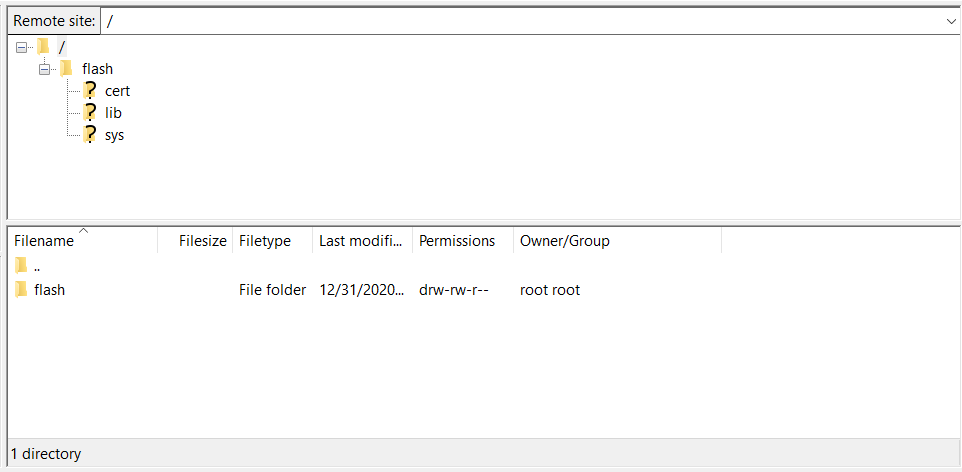
Then I tried
var deviceFilepath = "ftp://192.168.4.1//flash/main.py";to see if that helped anything with the file name and I got this output. STOR changed to /flash/main.py but PWD stayed as "/". Maybe I could try to manually set PWD to /flash?System.Net Information: 0 : [6548] Current OS installation type is 'Client'. System.Net Information: 0 : [6548] FtpWebRequest#3741682::.ctor(ftp://192.168.4.1//flash/main.py) System.Net Information: 0 : [6548] FtpWebRequest#3741682::GetRequestStream(Method=STOR.) System.Net Information: 0 : [6548] RAS supported: True System.Net Error: 0 : [6548] Can't retrieve proxy settings for Uri 'ftp://192.168.4.1//flash/main.py'. Error code: 12180. System.Net Information: 0 : [6548] FtpControlStream#34640832 - Created connection from 192.168.4.2:60371 to 192.168.4.1:21. System.Net Information: 0 : [6548] Associating FtpWebRequest#3741682 with FtpControlStream#34640832 System.Net Information: 0 : [6548] FtpControlStream#34640832 - Received response [220 Micropython FTP Server] System.Net Information: 0 : [6548] FtpControlStream#34640832 - Sending command [USER micro] System.Net Information: 0 : [6548] FtpControlStream#34640832 - Received response [331 ] System.Net Information: 0 : [6548] FtpControlStream#34640832 - Sending command [PASS ********] System.Net Information: 0 : [6548] FtpControlStream#34640832 - Received response [230 ] System.Net Information: 0 : [6548] FtpControlStream#34640832 - Sending command [OPTS utf8 on] System.Net Information: 0 : [6548] FtpControlStream#34640832 - Received response [502 ] System.Net Information: 0 : [6548] FtpControlStream#34640832 - Sending command [PWD] System.Net Information: 0 : [6548] FtpControlStream#34640832 - Received response [257 /] System.Net Information: 0 : [6548] FtpControlStream#34640832 - Sending command [TYPE I] System.Net Information: 0 : [6548] FtpControlStream#34640832 - Received response [200 ] System.Net Information: 0 : [6548] FtpControlStream#34640832 - Sending command [PASV] System.Net Information: 0 : [6548] FtpControlStream#34640832 - Received response [227 (192,168,4,1,7,232)] System.Net Information: 0 : [6548] FtpControlStream#34640832 - Sending command [STOR /flash/main.py] System.Net Information: 0 : [6548] FtpControlStream#34640832 - Received response [150 ] System.Net Information: 0 : [6548] FtpControlStream#34640832 - Received response [451 ] System.Net Information: 0 : [6548] FtpWebRequest#3741682::(Releasing FTP connection#34640832.) -
@Tasha-Weidler said in FiPy FTP upload in C# returns (451) Local error in processing.:
I guess the line below points at the problem.
System.Net Error: 0 : [6548] Can't retrieve proxy settings for Uri 'ftp://192.168.4.1//flash/main.py'. Error code: 12180.
-
@robert-hh Great..... I considered that when I first saw it but a quick google didn't come up with anything helpful. I'll look again. Any ideas for fixing it?
-
@robert-hh Looks like I can just disable proxy and that error in the log goes away. I have no clue if I need that to be enabled or not, disabling didn't seem to affect anything else, still getting the 451 error and the FTP Proxy settings in Filezilla are set to None so I don't think that's the issue.
System.Net Information: 0 : [24900] Current OS installation type is 'Client'. System.Net Information: 0 : [24900] FtpWebRequest#3741682::.ctor(ftp://192.168.4.1/flash/main.py) System.Net Information: 0 : [24900] FtpWebRequest#3741682::GetRequestStream(Method=STOR.) System.Net Information: 0 : [24900] FtpControlStream#43332040 - Created connection from 192.168.4.2:56579 to 192.168.4.1:21. System.Net Information: 0 : [24900] Associating FtpWebRequest#3741682 with FtpControlStream#43332040 System.Net Information: 0 : [24900] FtpControlStream#43332040 - Received response [220 Micropython FTP Server] System.Net Information: 0 : [24900] FtpControlStream#43332040 - Sending command [USER micro] System.Net Information: 0 : [24900] FtpControlStream#43332040 - Received response [331 ] System.Net Information: 0 : [24900] FtpControlStream#43332040 - Sending command [PASS ********] System.Net Information: 0 : [24900] FtpControlStream#43332040 - Received response [230 ] System.Net Information: 0 : [24900] FtpControlStream#43332040 - Sending command [OPTS utf8 on] System.Net Information: 0 : [24900] FtpControlStream#43332040 - Received response [502 ] System.Net Information: 0 : [24900] FtpControlStream#43332040 - Sending command [PWD] System.Net Information: 0 : [24900] FtpControlStream#43332040 - Received response [257 /] System.Net Information: 0 : [24900] FtpControlStream#43332040 - Sending command [TYPE I] System.Net Information: 0 : [24900] FtpControlStream#43332040 - Received response [200 ] System.Net Information: 0 : [24900] FtpControlStream#43332040 - Sending command [PASV] System.Net Information: 0 : [24900] FtpControlStream#43332040 - Received response [227 (192,168,4,1,7,232)] System.Net Information: 0 : [24900] FtpControlStream#43332040 - Sending command [STOR flash/main.py] System.Net Information: 0 : [24900] FtpControlStream#43332040 - Received response [150 ] System.Net Information: 0 : [24900] FtpControlStream#43332040 - Received response [451 ] System.Net Information: 0 : [24900] FtpWebRequest#3741682::(Releasing FTP connection#43332040.) -
In case someone else comes across this post looking for help:
I solved the issue by using a different third party FTP library that was suggested to me on the Stack Overflow post I made:
https://stackoverflow.com/questions/67011710/ftpwebrequest-to-microcontroller-always-results-in-451-local-error-in-processi/67079870#67079870Not exactly sure what the underlying issue was, it might've been that the fipy explicitly wants you to change your working directory to the flash directory before uploading or it might've been something else in the library that handled it better. Either way, my FTP log now more closely matches the one from FileZilla and no more errors!
My New Code:
        FtpClient client = new FtpClient("ftp://192.168.4.1");
        client.Credentials = new NetworkCredential(UserId, Password);
        client.DataConnectionType = FtpDataConnectionType.PASV;
        client.Connect();
        client.SetWorkingDirectory("/flash");

        client.UploadFile(appFilepath, "rwis_config.py", FtpRemoteExists.NoCheck);

        client.Disconnect();
New FTP Log Output:
# Connect()
Status:   Connecting to ***:21
Response: 220 Micropython FTP Server
Command:  USER ***
Response: 331
Command:  PASS ***
Response: 230
Command:  FEAT
Response: 211 no-features
Status:   Text encoding: System.Text.ASCIIEncoding
Command:  SYST
Response: 215 UNIX Type: L8

# SetWorkingDirectory("/flash")
Command:  CWD /flash
Response: 250

# UploadFile("rwis\rwis_config.py", "rwis_config.py", NoCheck, False, None)

# OpenWrite("rwis_config.py", Binary)
Command:  TYPE I
Response: 200

# OpenPassiveDataStream(PASV, "STOR rwis_config.py", 0)
Command:  PASV
Response: 227 (192,168,4,1,7,232)
Status:   Connecting to ***:2024
Command:  STOR rwis_config.py
Response: 150
Status:   Disposing FtpSocketStream...
Response: 226
Status:   Testing connectivity using Socket.Poll()...
Command:  QUIT
Response: 221
Status:   Disposing FtpSocketStream...

Hello! It looks like you're interested in this conversation, but you don't have an account yet.
Getting fed up of having to scroll through the same posts each visit? When you register for an account, you'll always come back to exactly where you were before, and choose to be notified of new replies (either via email, or push notification). You'll also be able to save bookmarks and upvote posts to show your appreciation to other community members.
With your input, this post could be even better 💗
Register Login