Welcome to the Pycom forum Forum
    • \[\[global:header.categories\]\]
    • \[\[global:header.recent\]\]
    • \[\[global:header.tags\]\]
    • \[\[global:header.popular\]\]
    • Login

    Explore Pybytes | Official Documentation | Report a Firmware Bug/Issue | GitHub

    Pymakr 1.1.13 does not work with VSCode 1.60.0
    Scheduled Pinned Locked Moved Software Tools
    24 Posts 11 Posters 197 Views 11 Watching
    Loading More Posts
    • Oldest to Newest
    • Newest to Oldest
    • Most Votes
    Reply
    • Reply as topic
    Log in to reply
    This topic has been deleted. Only users with topic management privileges can see it.
    • robert-hhR Offline
      robert-hh @Meric NESSANGE
      last edited by

      @Meric-NESSANGE Roll back VSCode.

      M 1 Reply Last reply Reply Quote 0
      • M Offline
        Meric NESSANGE @robert-hh
        last edited by

        Hi @robert-hh.
        till 1.1.12 ?

        robert-hhR 1 Reply Last reply Reply Quote 0
        • robert-hhR Offline
          robert-hh @Meric NESSANGE
          last edited by

          @Meric-NESSANGE If it ever worked, roll back to these versions. If you never used it, my personal opinion would be to stay away from it. According to the complaints in the forum, Pymakr has problems with almost every update of VSCode.

          G M 2 Replies Last reply Reply Quote 0
          • G Offline
            g0hww @robert-hh
            last edited by

            @robert-hh It seems to be permanently broken with Atom, which was when I last checked, apparently considered to be abandoned. Everything is falling apart around here.

            1 Reply Last reply Reply Quote 0
            • M Offline
              Meric NESSANGE @robert-hh
              last edited by Meric NESSANGE

              @robert-hh
              Thanks for answer.
              Yes, it barrely worked, but I update VSCode in order to solve some connexion issues.
              Noob error : I don't notice my previous version of VSCode.

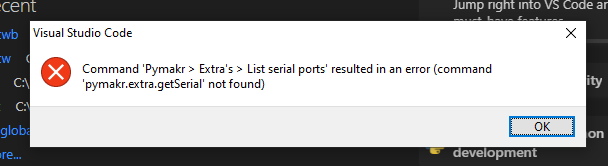
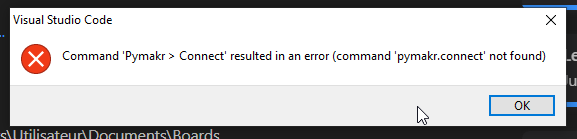
              ok, rolled back to a supposed functionnal version :
              25f7c008-2475-4587-8c1d-538a02f1cb6e-image.png
              šŸ¤¦ā€ā™‚ļø

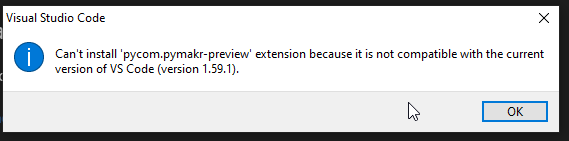
              ok, let's do it without the preview module :
              68551621-982a-416f-a84e-f75aa128390f-image.png
              šŸ¤¦ā€ā™‚ļø

              @g0hww It seems to be permanently broken with Atom
              šŸ¤¦ā€ā™‚ļø It was my B-plan.

              Anybody for a C-plan to be able to flash a board ?

              Everything is falling apart around here.
              Same sensation.
              And it's worrying.
              Really.

              robert-hhR 1 Reply Last reply Reply Quote 0
              • robert-hhR Offline
                robert-hh @Meric NESSANGE
                last edited by

                @Meric-NESSANGE To upload the firmware you can always use the Pycom updater tool. And to upload code to the device you can use:

                • ftp (by WiFi)
                • mpremote by USB
                  ....

                As terminal emulator you can use putty (windows), screen (mac), screen or picocom (Linux)
                As IDE you can as well try Thonny.

                M 1 Reply Last reply Reply Quote 0
                • M Offline
                  Meric NESSANGE @robert-hh
                  last edited by Meric NESSANGE

                  Hi @robert-hh,

                  OK, I'd some unsuccesful try.

                  Please, can you crosscheck my parameters :

                  • ftp (by WiFi)

                    • connect the PC to the micro wifi
                      • ssid : sipy-wlan-xxxx
                      • pw : www.pycom.io
                    • host name : 192.168.4.1
                    • port : 23
                    • user : micro
                    • pw : python
                    • protocol : FTP (w/o encryption)
                  • mpremote

                    • succesfully installed with pip
                    • got a "no device found" in the cmd panel. Seems not recognized as an application. Any idea ?

                  Thanks.

                  robert-hhR 1 Reply Last reply Reply Quote 0
                  • robert-hhR Offline
                    robert-hh @Meric NESSANGE
                    last edited by

                    @Meric-NESSANGE Ftp must be unencrypted and limited to 1 connection.

                    for mpremote you have to specify e.g. /dev/ttyUSB0 as interface. Shortcut is u0. E.g.

                    mpremote connect /dev/ttyUSB0 ls

                    or

                    mpremote u0 ls

                    For a windows machine, you have to specifiy the com port.

                    mpremote connect com3 ls

                    See also mpremote --help.

                    M 1 Reply Last reply Reply Quote 0
                    • M Offline
                      Meric NESSANGE @robert-hh
                      last edited by Meric NESSANGE

                      @robert-hh

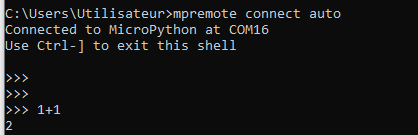
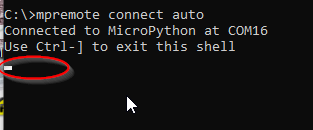
                      connected !!!
                      --help was the enabler ^^
                      Thanks.

                      Unfortunately, not any ">>>" in the prompt. So no way to do anything...
                      80c6e3b4-f1c0-4141-90a0-ee5ec987faeb-image.png

                      M robert-hhR 2 Replies Last reply Reply Quote 0
                      • M Offline
                        Meric NESSANGE @Meric NESSANGE
                        last edited by

                        EDIT : OK, wiring issue !

                        58043392-e309-470a-a735-2604fd037416-image.png

                        I'M CONNECTED ON A MICROPYTHON ^^

                        J 1 Reply Last reply Reply Quote 0
                        • robert-hhR Offline
                          robert-hh @Meric NESSANGE
                          last edited by

                          @Meric-NESSANGE looks like the wrong com port.

                          1 Reply Last reply Reply Quote 0
                          • J Offline
                            jchernandez @Meric NESSANGE
                            last edited by

                            @Meric-NESSANGE Hello, how can I upload files to a pycom board through mpremote? My atom and pymakr updated automatically and now no working anymore :/

                            robert-hhR 1 Reply Last reply Reply Quote 0
                            • robert-hhR Offline
                              robert-hh @jchernandez
                              last edited by robert-hh

                              @jchernandez mpremote has a --help option. For copying files, you have to use the cp subcommand. So as example for copying a file to the board:

                              mpremote connect /dev/ttyUSB0 cp myfile.py :myfile.py
                              or just
                              mpremote connect /dev/ttyUSB0 cp myfile.py :
                              for using : as a shortcut for the baord's local directory and . for the PC's one. Copying back similar as:
                              mpremote connect /dev/ttyUSB0 cp :myfile.py myfile.py
                              or
                              mpremote connect /dev/ttyUSB0 cp :myfile.py .

                              The device names at Windows are similar COM3, COM4, .... Shortcuts are:
                              u0 for connect /dev/tty/USB0

                              Unfortunately the mount command of mpremote does not work with the PyCom version of MicroPython. That version is too old.

                              To run a local script without copying it to the board use the run command. If you do not enter a command after the connect, mpremote opens a REPL session.

                              And before I forget it: With Pycom devices and WiFi active you can always use FTP for copying files. A good FTP client is FileZilla. But some file managers allow using FTP paths as well. User name is micro, password is python.

                              J B 2 Replies Last reply Reply Quote 1
                              • J Offline
                                jchernandez @robert-hh
                                last edited by

                                This post is deleted!
                                1 Reply Last reply Reply Quote 0
                                • B Offline
                                  Bernice McCarthy Banned @robert-hh
                                  last edited by Bernice McCarthy

                                  @robert-hh said in Pymakr 1.1.13 does not work with VSCode 1.60.0:

                                  @jchernandez mpremote has a --help option. For copying files, you have to use the cp subcommand. So as example for copying a file to the board:

                                  mpremote connect /dev/ttyUSB0 cp myfile.py :myfile.py
                                  or just
                                  mpremote connect /dev/ttyUSB0 cp myfile.py :
                                  for using : as a shortcut for the baord's local directory and . for the PC's one. Copying back similar as:
                                  mpremote connect /dev/ttyUSB0 cp :myfile.py myfile.py
                                  or
                                  mpremote connect /dev/ttyUSB0 cp :myfile.py .

                                  The device names at Windows are similar COM3, COM4, .... Shortcuts are:
                                  u0 for connect /dev/tty/USB0

                                  Unfortunately the mount command of mpremote does not work with the PyCom version of MicroPython. That version is too old.

                                  To run a local script without copying it to the board use the run command. If you do not enter a command after the connect, mpremote opens a REPL session cat mario

                                  And before I forget it: With Pycom devices and WiFi active you can always use FTP for copying files. A good FTP client is FileZilla. But some file managers allow using FTP paths as well. User name is micro, password is python.

                                  you can review the .py file, i think it has that problem

                                  1 Reply Last reply Reply Quote 0

                                  Hello! It looks like you're interested in this conversation, but you don't have an account yet.

                                  Getting fed up of having to scroll through the same posts each visit? When you register for an account, you'll always come back to exactly where you were before, and choose to be notified of new replies (either via email, or push notification). You'll also be able to save bookmarks and upvote posts to show your appreciation to other community members.

                                  With your input, this post could be even better šŸ’—

                                  Register Login
                                  • 1
                                  • 2
                                  • 2 / 2
                                  • First post
                                    Last post

                                  Pycom on Twitter

                                  Pycom