FiPy Pysense 2.0X not showing up on lsusb
-
Hi,
I am writing to gather some support after reading multiple other forum posts about not being able to access the REPL from VSCode anymore.
I am running:- MacOS BigSur 11.6.4
- FiPy
- PySense 2.0X
- VSCode with Pymakr extension
- Node.js v14.16.1 installed
After some time of not connecting the board to the PC I am retrying tweaking with this wonderful device and ecosystem, but I am unable to access the REPL anymore... The prev firmware loaded is still working, but now I need to update it with new features :-)
I tried these resolutions options:
-
Execute a Safe Boot following this procedure https://docs.pycom.io/gettingstarted/programming/safeboot/ with the "< 3", "3<t<6", "6<t<9" orange blinking cases but in all of those cases no success, the FiPy is entering in the blue heart-beat mode but the REPL does not show up on the VSCode Terminal
-
Checked troubleshooting https://docs.pycom.io/gettingstarted/troubleshooting-guide/ no luck
-
checked some issues on github and forum posts https://forum.pycom.io/topic/7432/cannot-connect-device-after-firmware-update and https://github.com/pycom/pymakr-atom/issues/102 and https://forum.pycom.io/topic/6817/pymakr-connection-timed-out-repl-accessible-via-screen/3 no luck either
-
the Firmware Update Tool is not recognising the device even when connected to usb in in safe mode (trying to flash the firmware from scratch)
-
my lsusb:
2022-04-01 17:45:21.535 system_profiler[15092:2246756] SPUSBDevice: IOCreatePlugInInterfaceForService failed 0xe00002be
2022-04-01 17:45:21.535 system_profiler[15092:2246756] SPUSBDevice: IOCreatePlugInInterfaceForService failed 0xe00002be
2022-04-01 17:45:21.535 system_profiler[15092:2246756] SPUSBDevice: IOCreatePlugInInterfaceForService failed 0xe00002be
2022-04-01 17:45:21.536 system_profiler[15092:2246756] SPUSBDevice: IOCreatePlugInInterfaceForService failed 0xe00002be
2022-04-01 17:45:21.536 system_profiler[15092:2246756] SPUSBDevice: IOCreatePlugInInterfaceForService failed 0xe00002be
2022-04-01 17:45:21.536 system_profiler[15092:2246756] SPUSBDevice: IOCreatePlugInInterfaceForService failed 0xe00002be
2022-04-01 17:45:21.537 system_profiler[15092:2246756] SPUSBDevice: IOCreatePlugInInterfaceForService failed 0xe00002be
Bus 000 Device 001: ID 05e3:0626 Genesys Logic, Inc. USB3.1 Hub
Bus 000 Device 002: ID 0bda:8153 Realtek Semiconductor Corp. USB 10/100/1000 LAN  Serial: 000001
Bus 020 Device 001: ID 05e3:0610 Genesys Logic, Inc. USB2.1 Hub
Bus 020 Device 002: ID 1a40:0801 TERMINUS TECHNOLOGY INC. USB 2.0 Hub
Bus 020 Device 004: ID 1a40:0801 TERMINUS TECHNOLOGY INC. USB 2.0 Hub
Bus 020 Device 005: ID 2000:dd00 2000 USB PnP Audio Device  Serial: U2dc0z7ws53a79rn
Bus 020 Device 003: ID 1d5c:7102 Fresco Logic Inc. Generic Billboard Device
Bus 128 Device 000: ID 05ac:8102 Apple Inc. Touch Bar Backlight  Serial: 0000000000000000
Bus 128 Device 000: ID 05ac:8302 Apple Inc. Touch Bar Display  Serial: 0000000000000000
Bus 128 Device 000: ID 05ac:027b Apple Inc. Apple Internal Keyboard / Trackpad  Serial: FM79056046YJ3VXAG+TTN
Bus 128 Device 000: ID 05ac:8103 Apple Inc. Headset  Serial: 000000000000
Bus 128 Device 000: ID 05ac:8262 Apple Inc. Ambient Light Sensor  Serial: 000000000000
Bus 128 Device 000: ID 05ac:8514 Apple Inc. FaceTime HD Camera (Built-in)  Serial: CC290138Y0GJ3Y33L
Bus 128 Device 000: ID 05ac:8233 Apple Inc. Apple T2 Controller  Serial: 0000000000000000
Bus 001 Device 001: ID 1d6b:CITR Linux Foundation USB 3.1 Bus
Bus 000 Device 001: ID 1d6b:CITR Linux Foundation USB 3.1 Bus
Bus 000 Device 001: ID 1d6b:0003 Linux Foundation 3.0 root hub
Bus 000 Device 000: ID 05ac:8102 Apple Inc. Apple T2 Bus
it seems it does not even see the device
Do You have any hints or help to share?
Thanks for Your time
Stef. -
PS: forgot to mention that I attempted also to connect with Atom on the same machine (MacOS) and also with another completely different machine too (a Windows 10 PC the Devices List is not even showing the unknown device for which is required to install the custom driver as reported from this guide https://docs.pycom.io/gettingstarted/software/drivers/)
-
Any help here? Please :)
-
Hi Stefano,
Can you check whether your USB cable is faulty or not? It seems that it isnot related to firmware.
You mentioned that the previous firmware works fine. Which firmware did you mention? Does it belong to pysense 2.0x or fipy firmware? Do you have any other shield from us to check usb cable and the connection?Best regards,
Meric -
@Meriç-SARIIŞIK thanks for the reply! I made some progresses here, hopefully this may help for the resolution:
Can you check whether your USB cable is faulty or not?
Checked and changed cable just to be sure, I am 100% sure that the cable I am using now is ok :-)
Do you have any other shield from us to check usb cable and the connection?
Unfortunately not, but eventually if I cannot fix this one I can buy a new one
You mentioned that the previous firmware works fine. Which firmware did you mention? Does it belong to pysense 2.0x or fipy firmware?
I meant the FiPy firmware, but actually the question You made allowed me to have a further idea on how to fix this: flash the PySense 2 firmware following this guide https://docs.pycom.io/updatefirmware/expansionboard/
After the flash finally thelsusbis recognising the Pysense board (with the new cable mentioned above)!sudo dfu-util -D pysense2_v16.dfu dfu-util 0.11 Copyright 2005-2009 Weston Schmidt, Harald Welte and OpenMoko Inc. Copyright 2010-2021 Tormod Volden and Stefan Schmidt This program is Free Software and has ABSOLUTELY NO WARRANTY Please report bugs to http://sourceforge.net/p/dfu-util/tickets/ Match vendor ID from file: 04d8 Match product ID from file: f011 Opening DFU capable USB device... Device ID 04d8:f011 Device DFU version 0100 Claiming USB DFU (Run-Time) Interface... Setting Alternate Interface zero... Determining device status... DFU state(2) = dfuIDLE, status(0) = No error condition is present dfu-util: WARNING: Device already in DFU mode? (bState=2 dfuIDLE) Claiming USB DFU Interface... Setting Alternate Interface #0 ... Determining device status... DFU state(2) = dfuIDLE, status(0) = No error condition is present DFU mode device DFU version 0100 Device returned transfer size 64 Copying data from PC to DFU device Download [=========================] 100% 16384 bytes Download done. DFU state(2) = dfuIDLE, status(0) = No error condition is present Done!lsusb ... Bus 020 Device 029: ID 04d8:f012 Microchip Technology Inc. Pysense Serial: Py244d42 ...Then I flashed the FiPy last firmware (1.20.2.r6)
Changed baud rate to 230400

Read 4 KiB from config in 0.18 seconds

Changed baud rate to 921600

File system type set to FatFS

Erased 4 MiB flash fs in 9.85 seconds

Erased 28 KiB at address 0x00009000

Wrote 28 KiB from bootloader.bin in 0.79 seconds

Wrote 4 KiB from partitions_8MB.bin in 0.08 seconds

Wrote 1.93 MiB from fipy.bin in 25.03 seconds

Booting from partition: factory

Wrote 4 KiB to otadata in 0.09 seconds

Wrote 4 KiB to config in 0.09 seconds

Device ID: ...

LoRa MAC: ...

Sigfox ID: ...

Sigfox PAC: ...
with success, now I am blocked on another point unfortunately, I cannot access the prompt using visual studio code :-(
code --version
1.67.2

# VSCode extension Pymakr v2.12.3

node --version
v14.16.1
When I add the new device using the Extension:
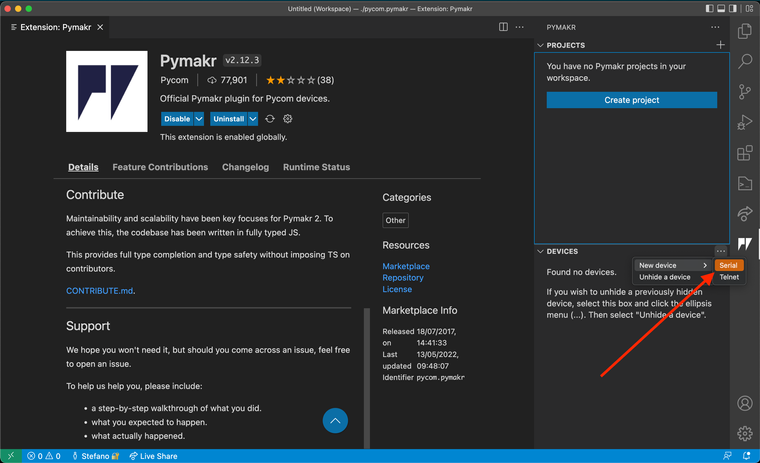

it does not connect returning the error below:

Also I tried to connect from the terminal directly with not success either:
node /Users/sordine/.vscode/extensions/pycom.pymakr-2.12.3/src/terminal/bin/client.js
events.js:292
      throw er; // Unhandled 'error' event
      ^

Error: connect ECONNREFUSED 127.0.0.1:5364
    at TCPConnectWrap.afterConnect [as oncomplete] (net.js:1146:16)
Emitted 'error' event on Socket instance at:
    at emitErrorNT (internal/streams/destroy.js:106:8)
    at emitErrorCloseNT (internal/streams/destroy.js:74:3)
    at processTicksAndRejections (internal/process/task_queues.js:80:21) {
  errno: -61,
  code: 'ECONNREFUSED',
  syscall: 'connect',
  address: '127.0.0.1',
  port: 5364
}
Actually the version of the extension available now on VS Code, is slightly different from the one described in the getting started guide https://docs.pycom.io/gettingstarted/software/vscode/ is there any other reference to follow with the new current version of extension?
-
@Stefano-Ordine Do you get a prompt if you use tools such as
screenorminicompointed to the/dev/tty.usbmodemXXXXdevice? -
@jcaron unfortunately I cannot, this is the output:
❯ screen /dev/tty.usbmodemPy244d421
Sorry, could not find a PTY.
[screen is terminating]
❯ minicom /dev/tty.usbmodemPy244d421 minicom: cannot open /dev/modem: No such file or directoryI really do not understand what's the point here 🤔
Do You have any other suggestion? -
@Stefano-Ordine In the case of
minicom, you need to specify the serial port via the-Dcommand line option.As for
screen... What operating system are you using? The "could not find a PTY" message is not related to the serial port, it's a different issue. What OS and and terminal interface are you using? -
In the case of minimum, you need to specify the serial port via the -D command line option.
🤦♂️ Oh thanks! I am not familiar with that binary, but I read the f...ing manual now that You mentioned that option ^^
❯ minicom -D /dev/tty.usbmodemPy244d421And the prompt attached everything is working now, also the VSCode extension now see the device I run the RGB test program just to be sure and every thing is workingas expected now! We can close this!
In the end I think that the problem was on the PySense firmware once reflashed from scratch all the rest has been quite easy to figure out :-)
Thanks for Your time and effort @jcaron
have a good one!Stefano
Hello! It looks like you're interested in this conversation, but you don't have an account yet.
Getting fed up of having to scroll through the same posts each visit? When you register for an account, you'll always come back to exactly where you were before, and choose to be notified of new replies (either via email, or push notification). You'll also be able to save bookmarks and upvote posts to show your appreciation to other community members.
With your input, this post could be even better 💗
Register Login