Welcome to the Pycom forum Forum
    • \[\[global:header.categories\]\]
    • \[\[global:header.recent\]\]
    • \[\[global:header.tags\]\]
    • \[\[global:header.popular\]\]
    • Login

    Explore Pybytes | Official Documentation | Report a Firmware Bug/Issue | GitHub

    Firmware upgrade troubleshooting - checklist/procedure

    Scheduled Pinned Locked Moved Firmware
    lopy
    24 Posts 13 Posters 16.5k Views 14 Watching
    Loading More Posts
    • Oldest to Newest
    • Newest to Oldest
    • Most Votes
    Reply
    • Reply as topic
    Log in to reply
    This topic has been deleted. Only users with topic management privileges can see it.
    • R Offline
      rskoniec @Frida
      last edited by rskoniec

      @Frida Thanx for sharing! Updated!

      The machine is working as good as it's code.

      1 Reply Last reply Reply Quote 0
      • R Offline
        rskoniec @mmarkvoort
        last edited by rskoniec

        @mmarkvoort said in Firmware upgrade troubleshooting - checklist/procedure:

        I don't know if it is relevant but when i wanted to update/connect through USB I had to install the USB driver manually. Mine called FTDI driver where VCP or D2XX are types of drivers. With one of the two it said it was installed but still i coudn't update/connect.

        OK, I took my notebook with Windows 10 Pro x64 with internet access and plug LoPy on Expansion Board to it for the very first time.
        Here is Device Manager just after connection:
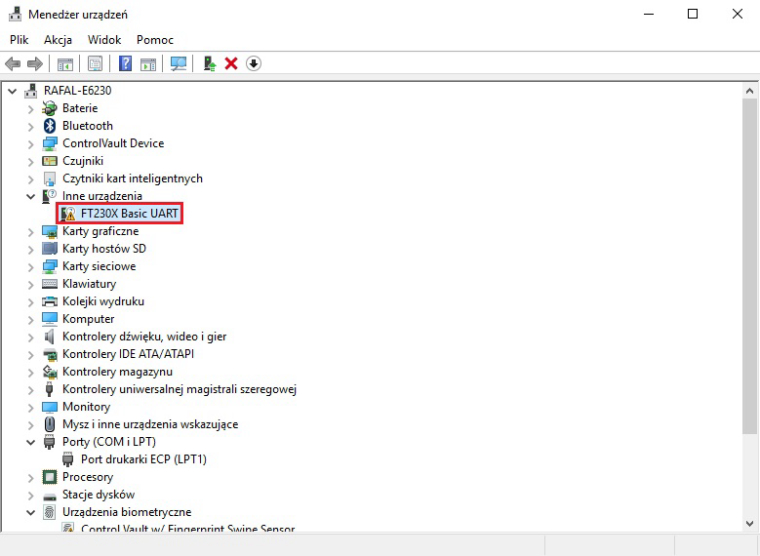
        0_1487970349956_1st_plug.jpg
        After about 30 seconds Windows Auto Update mechanism has done all the job:
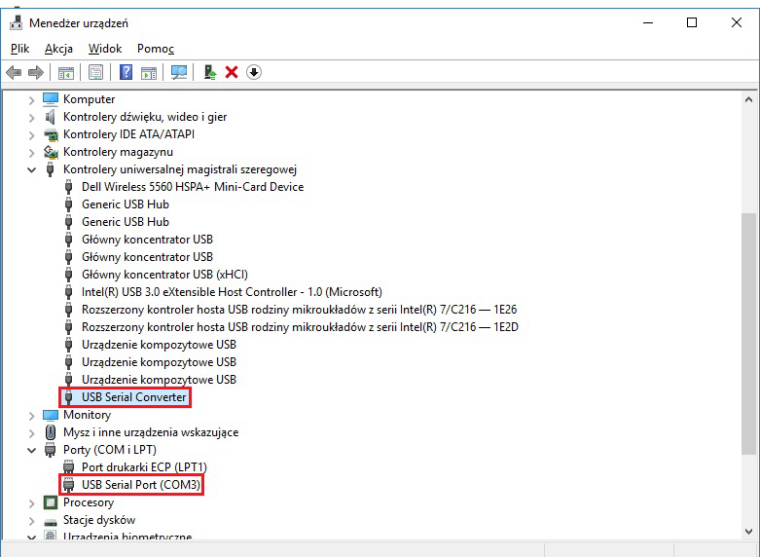
        0_1487970560498_1st_plug_wu.jpg
        As you can see it is pretty straightforward - at least on Windows 10.
        What OS are you using?

        The machine is working as good as it's code.

        M 1 Reply Last reply Reply Quote 1
        • M Offline
          mmarkvoort @rskoniec
          last edited by

          @rskoniec

          Aah thanks for the update. Really fast!!

          Now that u mention that windows installs the update automatic, I remember that I disabled windows update on my windows 10... that explans a lot! How stupid...

          Sorry for wasting your time, but thanks for the fast answer and for trying it out.

          R 1 Reply Last reply Reply Quote 0
          • M Offline
            maamar @rskoniec
            last edited by

            @rskoniec thank you
            I did my updated

            1 Reply Last reply Reply Quote 0
            • R Offline
              rskoniec @mmarkvoort
              last edited by

              @mmarkvoort @maamar You welcome. :o)

              The machine is working as good as it's code.

              1 Reply Last reply Reply Quote 0
              • Y Offline
                yunying
                last edited by

                Thank a lot.
                Reply just for feedback.

                Make sure your jumper at "TX"

                1 Reply Last reply Reply Quote 0
                • C Offline
                  colinza
                  last edited by

                  I had issues trying to update my wipy 2.0 with a standard TTL serial programmer I use for Arduino. For some reason the low baud rate update in the software selects 38400 but the WiPy sold with old broken firmware has it set to 115200 which isn't even an option through the firmware update tool.

                  To change this you can edit C:\Program Files (x86)\Pycom\Pycom Firmware Update\Upgrader\bin\updater.py and set "SLOW_BAUD_RATE=115200". Then the firmware updater works just fine.

                  1 Reply Last reply Reply Quote 0
                  • D Offline
                    daniel 0
                    last edited by

                    One should also check that all of the jumpers have tight connections. I couldn't get communication to work with my expansion board until I replaced the jumpers provided with new ones as the originals were quite loose.

                    1 Reply Last reply Reply Quote 0
                    • philwilkinsonP Offline
                      philwilkinson
                      last edited by

                      I stress the need to reset LoPy boards after they have been connected to pc by data USB cable, and before you try to run the upgrade....

                      1 Reply Last reply Reply Quote 0
                      • on4aaO Offline
                        on4aa
                        last edited by

                        Unfortunately, this is currently not working for upgrading a module through either the Pysense or Pytrack boards using any GNU/Linux distribution.


                        1 Reply Last reply Reply Quote 0

                        Hello! It looks like you're interested in this conversation, but you don't have an account yet.

                        Getting fed up of having to scroll through the same posts each visit? When you register for an account, you'll always come back to exactly where you were before, and choose to be notified of new replies (either via email, or push notification). You'll also be able to save bookmarks and upvote posts to show your appreciation to other community members.

                        With your input, this post could be even better 💗

                        Register Login
                        • 1
                        • 2
                        • 1 / 2
                        • First post
                          Last post

                        Pycom on Twitter

                        Pycom