Welcome to the Pycom forum Forum
    • \[\[global:header.categories\]\]
    • \[\[global:header.recent\]\]
    • \[\[global:header.tags\]\]
    • \[\[global:header.popular\]\]
    • Login

    Explore Pybytes | Official Documentation | Report a Firmware Bug/Issue | GitHub

    LoPy UART for GPS not reading data

    Scheduled Pinned Locked Moved LoPy
    lopy uart gps
    17 Posts 4 Posters 4.8k Views 4 Watching
    Loading More Posts
    • Oldest to Newest
    • Newest to Oldest
    • Most Votes
    Reply
    • Reply as topic
    Log in to reply
    This topic has been deleted. Only users with topic management privileges can see it.
    • L Offline
      livius @johnmcdnz
      last edited by

      @johnmcdnz
      P3 and P4 are valid

      You can test if UART1 work by changing boot.py from uart 0 to uart 1
      but you must have some TTL USB to UART converter to test if it work - or computer with native COM port.
      If you got repl on it than it should work for you with GPS also.

      I am quite sure that i have tested UART 1 before and it worked with converter.
      But it was with old firmware...
      What firmware version do you have? 1.6.5?

      And one more tip - did you tried connecting gps to uart0 instead of Uart1 without expansion board?
      To see if you can recive something?

      think about people first, then computers

      1 Reply Last reply Reply Quote 0
      • J Offline
        johnmcdnz
        last edited by

        Thanks for the quick reply.

        My test is now working. I can't explain why!
        I changed a few things, like removed the jumper pins, then replaced them.
        Changed the UART0 baudrate to 9600, and then back to 115200.
        None of this is relevant though, as from power up the unit is now receiving fine.

        Odd. I'd like to think I 'fixed' something, but don't believe I changed anything useful.

        Anyway, now I can proceed!

        L affoltepA 2 Replies Last reply Reply Quote 0
        • L Offline
          livius @johnmcdnz
          last edited by

          @johnmcdnz
          good to here that it work for you.
          Maybe there was some not linked to contacts.

          think about people first, then computers

          1 Reply Last reply Reply Quote 0
          • affoltepA Offline
            affoltep @johnmcdnz
            last edited by

            @johnmcdnz I did a post of a minimalistic NMEA parser. see here. Perhaps it might help you as well

            L J 2 Replies Last reply Reply Quote 0
            • L Offline
              livius @affoltep
              last edited by

              @affoltep @johnmcdnz
              just curious - what gps module do you use?

              And if you can tell why? :)

              think about people first, then computers

              J affoltepA 2 Replies Last reply Reply Quote 0
              • J Offline
                johnmcdnz @livius
                last edited by johnmcdnz

                @livius It's this
                http://www.addicore.com/NEO-6M-GPS-p/231.htm
                available and cheap :-)
                (I don't buy from that website, just a local supplier of the same thing)

                L 1 Reply Last reply Reply Quote 0
                • affoltepA Offline
                  affoltep @livius
                  last edited by

                  @livius This module here, as well cheap and with integrated antenna.

                  1 Reply Last reply Reply Quote 0
                  • L Offline
                    livius @johnmcdnz
                    last edited by

                    @johnmcdnz
                    thank you - yes it is really good

                    @affoltep
                    interesting - i didn't see it before -
                    is it fast and accurate? Looks really interestingly

                    think about people first, then computers

                    J 1 Reply Last reply Reply Quote 0
                    • J Offline
                      johnmcdnz @livius
                      last edited by

                      @livius Looks like a reasonable unit, claims 2.5m accuracy, <30s fix from cold and 1s from hot start.

                      1 Reply Last reply Reply Quote 0
                      • J Offline
                        johnmcdnz @affoltep
                        last edited by

                        @affoltep I have copied your code. Excuse my ignorance with Python, what's the correct way to pass the data string to the code and read the response.

                        e.g. if NMEA string is in 'data', and decode is to be in 'place'
                        place = NmeaParser.update(data)
                        I know this is incorrect, but what is right?

                        J 1 Reply Last reply Reply Quote 0
                        • J Offline
                          johnmcdnz @johnmcdnz
                          last edited by

                          Is this correct:

                              place = NmeaParser()
                              place.update(data)
                              print (place.longitude,  ":",  place.latitude)
                          
                          affoltepA 1 Reply Last reply Reply Quote -1
                          • affoltepA Offline
                            affoltep @johnmcdnz
                            last edited by

                            @johnmcdnz Here are some code fragments how I use:

                            #initialize UART interface to the GNSS module
                            gps_pps = Pin('P23',  mode = Pin.IN)
                            gps_enable = Pin('P8',  mode=Pin.OUT)
                            gps_enable(False)
                            gps_uart = UART(1, 9600)
                            gps_uart.init(9600,  bits=8,  parity=None,  stop=1)
                            
                            #Create NMEA structure
                            nmea = NmeaParser()
                            

                            ...

                                latitudebinary = 0
                                longitudebinary = 0
                                altitude = 0
                                hdop = 0
                                newpos = False
                            

                            ...

                             while not newpos:
                                    if gps_uart.any():
                                        nmea.update(gps_uart.readline())
                                    if nmea.fix_stat & nmea.valid_sentence:
                                        newpos = True
                                    if  (time.ticks_diff(start,  time.ticks_ms()) > GNSS_TRIAL):
                                        pycom.rgbled(red)
                                        print('No actual GNSS postition')
                                        time.sleep(0.2)
                                        pycom.rgbled(off)
                                        return
                                latitudebinary = int(((nmea.latitude + 90) / 180) * 16777215)
                                longitudebinary = int(((nmea.longitude + 180) / 360) * 16777215)
                                altitude = int(nmea.altitude)
                                hdop = int(nmea.hdop * 10)
                            

                            Hope it is understandable ;)

                            J 1 Reply Last reply Reply Quote 0
                            • J Offline
                              johnmcdnz @affoltep
                              last edited by

                              @affoltep Many thanks for the help. I'll carry on work with it tomorrow. Made good progress tonight. Cheers.

                              1 Reply Last reply Reply Quote 0
                              • J Offline
                                johnmcdnz @johnmcdnz
                                last edited by

                                I have completed this project and have posted on this topic:
                                https://forum.pycom.io/topic/819/lopy-gps-receiver-project
                                @affoltep

                                1 Reply Last reply Reply Quote 0
                                • R Offline
                                  raaden89
                                  last edited by raaden89

                                  hi @affoltep i tried to connect a gps to my lopy4 and use your code, but it's not working.. of course the gps led is blinking and the code is running well.
                                  this is my wired setup
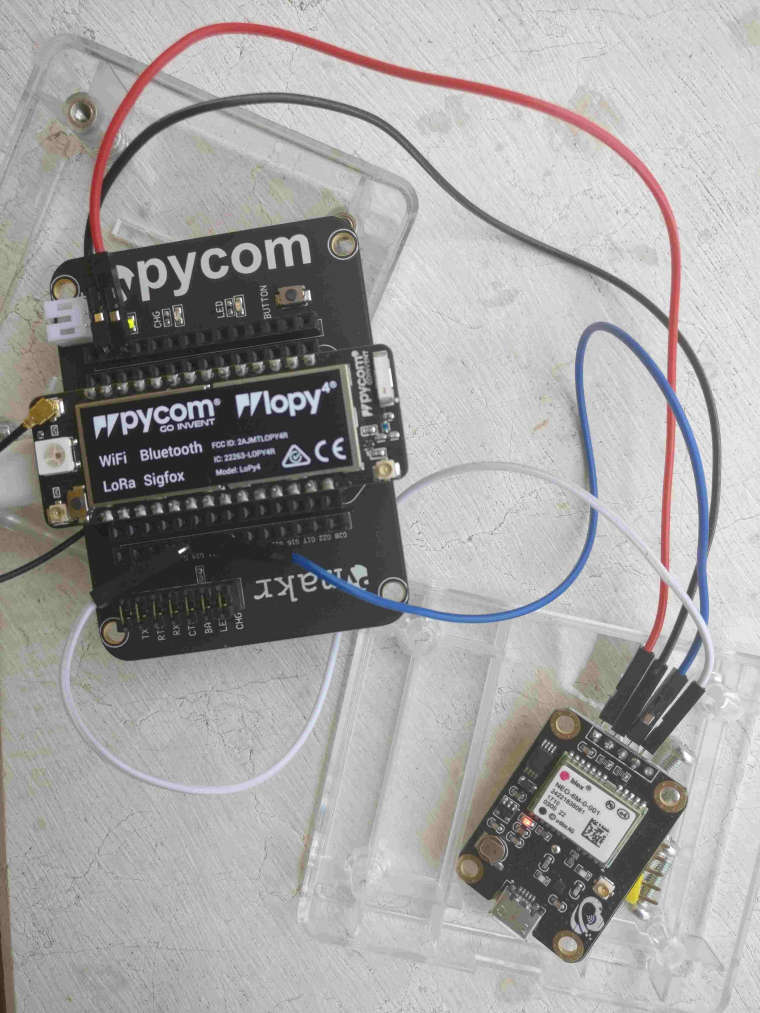
                                  0_1533114950592_connessionelopy.jpg

                                  can you help me please?

                                  1 Reply Last reply Reply Quote 0

                                  Hello! It looks like you're interested in this conversation, but you don't have an account yet.

                                  Getting fed up of having to scroll through the same posts each visit? When you register for an account, you'll always come back to exactly where you were before, and choose to be notified of new replies (either via email, or push notification). You'll also be able to save bookmarks and upvote posts to show your appreciation to other community members.

                                  With your input, this post could be even better 💗

                                  Register Login
                                  • 1 / 1
                                  • First post
                                    Last post

                                  Pycom on Twitter

                                  Pycom