Welcome to the Pycom forum Forum
    • \[\[global:header.categories\]\]
    • \[\[global:header.recent\]\]
    • \[\[global:header.tags\]\]
    • \[\[global:header.popular\]\]
    • Login

    Explore Pybytes | Official Documentation | Report a Firmware Bug/Issue | GitHub

    New firmware release 1.6.7.b1 (LoRaWAN Nano Gateway with TTN example!!)

    Scheduled Pinned Locked Moved Announcements & News
    firmware
    113 Posts 34 Posters 88.5k Views 32 Watching
    Loading More Posts
    • Oldest to Newest
    • Newest to Oldest
    • Most Votes
    Reply
    • Reply as topic
    Log in to reply
    This topic has been deleted. Only users with topic management privileges can see it.
    • D Offline
      daniel
      last edited by

      @robert-hh, no worries, our only focus from today onwards is code maturing and doing the migration to the MicroPython migration. We'll also update our own repo as we were sorting out the way to publish Sigfox libraries.

      1 Reply Last reply Reply Quote 1
      • D Offline
        daniel
        last edited by

        @johncaipa, for sure, I'll work on an example for US frequencies and will add to the same repo where the other are. We'll do our best to get it done today or tomorrow.

        Cheers,
        Daniel

        J 1 Reply Last reply Reply Quote 0
        • C Offline
          Colateral
          last edited by

          If Wipy WLAN is configured simply as STA-AP ... the ftp is not working.

          from network import WLAN
          wlan = WLAN(mode=WLAN.STA_AP, ssid='Cola', auth=(WLAN.WPA2, 'abc12345678'))
          wlan.ifconfig(id=1, config=('192.168.10.1, '255.255.255.0', '192.168.10.1', '192.168.10.1'))

          connect to 'Cola'
          and ftp(with micro/python) is connecting on 192.168.10.1 but fails on root dir (/flash)

          L 1 Reply Last reply Reply Quote 0
          • L Offline
            livius @Colateral
            last edited by

            @Colateral
            I also wait for this but still do not know how to work with it
            STA work but AP not able to connect
            https://forum.pycom.io/post/4202

            think about people first, then computers

            C 1 Reply Last reply Reply Quote 0
            • robert-hhR Offline
              robert-hh
              last edited by robert-hh

              @Colateral: I tried your setting and it worked fine for both addresses (STA and AP), using command line ftp on Linux. Did you use passive mode? Active mode is not supported.

              C L 2 Replies Last reply Reply Quote 0
              • C Offline
                Colateral @robert-hh
                last edited by

                @robert-hh Yes. It is passive mode. My environment is on Windows10. I tried with WinScp, TotalCommander and Windows10 ftp in passive mode. I saw that is working if I use the default 192.168.4.1 IP instead of the custom IP 192.168.10.1 .

                1 Reply Last reply Reply Quote 0
                • robert-hhR Offline
                  robert-hh
                  last edited by

                  @Colateral That sounds strange that 192.168.4.1 works, but not 192.168.10.1. The other thing that suprises me is, that you used command line ftp on WIndows 10 in passive mode. The one I have here does not support it. Do you have a special version?

                  C 2 Replies Last reply Reply Quote 0
                  • G Offline
                    gas @jmarcelino
                    last edited by

                    @jmarcelino
                    doesn't this in lower case
                    I tried the lorwan nano but no luck i don't see it connected
                    I changed the WiFi parameters and the use the code snippet to generate the gateway_id (i added .lower())
                    added the gateway on TTN using the same Id
                    but no lock i don't see pull/push arriving to TTN

                    do we need to change the router address too ?

                    Thanks

                    R 1 Reply Last reply Reply Quote 0
                    • L Offline
                      livius @robert-hh
                      last edited by

                      @robert-hh said in New firmware release 1.6.7.b1 (LoRaWAN Nano Gateway with TTN example!!):

                      I tried your setting and it worked fine for both addresses (STA and AP)

                      Did you tried WLAN.STA_AP? or separately? WLAN.STA and another try WLAN.AP. Separately it work but not as WLAN.STA_AP.
                      I have tested this and i can not connect to AP in that mode.
                      But i have while True: loop.
                      Inside loop i have machine.idle but this do not help.
                      I see Wipy on the list of networks but can't connect.

                      think about people first, then computers

                      1 Reply Last reply Reply Quote 0
                      • R Offline
                        rskoniec @gas
                        last edited by

                        @gas On the TTN gateway configuration you should use router.eu.thethings.network:1700 from config.py @jmarcelino addons generating GATEWAY_ID are OK.

                        The machine is working as good as it's code.

                        G 1 Reply Last reply Reply Quote 0
                        • robert-hhR Offline
                          robert-hh
                          last edited by

                          @livius Yes, I used STA_AP mode, and connected without rebooting the LoPy to the STA and AP, one after the other. At the same time it's not possible since only one connection at a time is allowed. But the behaviour was a little bit inconsistent. In active mode, trying the ls command, I got two different error messages, when it should be the same all the time.

                          1 Reply Last reply Reply Quote 0
                          • C Offline
                            Colateral @livius
                            last edited by

                            @livius I tried and STA_AP is working. I am connected with my laptop on AP (ftp getting files) and the WiPy is connected to local server sending data. I replied to your topic ... seems that is missing connect

                            1 Reply Last reply Reply Quote 0
                            • G Offline
                              gas @rskoniec
                              last edited by

                              @rskoniec
                              Thanks itis exactly what i have
                              I see push pull but nothing on the TTN
                              I'm missing something .. not sure where (wifi is connected )

                              G 1 Reply Last reply Reply Quote 0
                              • C Offline
                                Colateral @robert-hh
                                last edited by

                                @robert-hh I believe I know what was happening. If you jump from Wipy default AP to the new AP (as STA_AP) having the same MAC and you try to connect Wipy to the wifi router where computer is plugged with the Lan cable... . Windows 10 is going to be confused. After I restarted windows and unplugged the cable everything is working fine.

                                Z 1 Reply Last reply Reply Quote 0
                                • G Offline
                                  gas @gas
                                  last edited by

                                  @gas said:

                                  router.eu.thethings.network:1700

                                  we are talking at the TTN side right

                                  Description            lopyNanoGW
                                  Status                      not connected
                                  Frequency Plan      Europe868MHz
                                  Router      router.eu.thethings.network:1700
                                  
                                  J R 2 Replies Last reply Reply Quote 0
                                  • J Offline
                                    jmarcelino @gas
                                    last edited by

                                    @gas
                                    On TTN have you registered the gateway as "gateway connector" or "packet forwarder" under Protocol?

                                    You have to register as "packet forwarder"

                                    TTN will also automatically add a 'eui-' prefix to your gateway ID if you chose the correct one.

                                    G 1 Reply Last reply Reply Quote 1
                                    • R Offline
                                      rskoniec @gas
                                      last edited by rskoniec

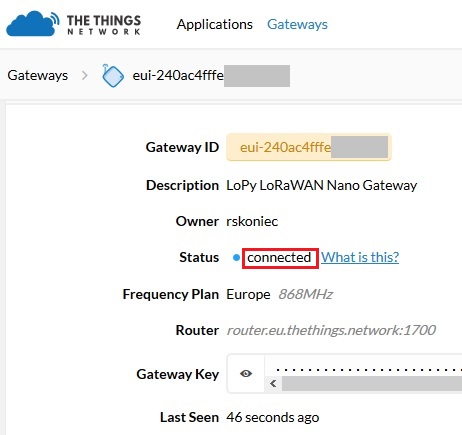
                                      @gas Here is my TTN config:

                                      0_1488837842948_ttn.jpg

                                      Gateway should be packet forwarder type.

                                      The machine is working as good as it's code.

                                      1 Reply Last reply Reply Quote 0
                                      • G Offline
                                        gas @jmarcelino
                                        last edited by

                                        @jmarcelino
                                        your right i was using the Gateway not the packet forwarder

                                        now it is connected cool
                                        but the exampe of otaa is wrong
                                        lora.join don't se deveui
                                        my node is connected over my Lopy LoRaWAN nanaGW OTAA

                                        github should be updated

                                        lora.join(activation=LoRa.OTAA, auth=(app_eui, app_key), timeout=0)
                                        
                                        1 Reply Last reply Reply Quote 0
                                        • D Offline
                                          daniel
                                          last edited by

                                          @gas, yes, the example force the deveui to some value, I'll update the code on githb to clarify that. Thanks!

                                          G 1 Reply Last reply Reply Quote 0
                                          • G Offline
                                            gas @daniel
                                            last edited by

                                            @daniel

                                            Thanks
                                            Great Job any and impressive both micropython and Pycom
                                            now let me try the range with my sample code of GPS ...

                                            1 Reply Last reply Reply Quote 0

                                            Hello! It looks like you're interested in this conversation, but you don't have an account yet.

                                            Getting fed up of having to scroll through the same posts each visit? When you register for an account, you'll always come back to exactly where you were before, and choose to be notified of new replies (either via email, or push notification). You'll also be able to save bookmarks and upvote posts to show your appreciation to other community members.

                                            With your input, this post could be even better 💗

                                            Register Login
                                            • 1
                                            • 2
                                            • 3
                                            • 4
                                            • 5
                                            • 6
                                            • 3 / 6
                                            • First post
                                              Last post

                                            Pycom on Twitter

                                            Pycom