Alex's Corner - Week 3 - LoPy LoRaWAN Nano-Gateway & TTN
-
@bucknall Hi Alex,
Thanks, that would be much appreciated. I understand that stuff related to the TTN backend is out of your control but anything that can make it more clear were the problem lies would be great!
Cheers,
Pierre
-
Hi,
I'm in exactly the same situation, latest firmware and so on.
After watching the video, I set up my lopy to act as a nano gateway and thanks to your post, I created a packet forwarder gateway at TTN in stead of the gateway connector. I actually tried both of them.
No success.
At this moment I have a packet forwarder gateway, but I'm wondering whether I should choose a router.
In the video, Alex doesn't choose a router when he adds the gateway, but later on you see the "router.eu.thethings.network" on the pre configured gateway. I wonder where that one comes from.
I know it's the same one as in the config.py file, but should I enter this one while adding the gateway at TTN or not?
It looks like the script is running; I get the push ack's and pull ack's, but no connection with TTN
At the TTN console, I get messages like: "could not subscribe to gateway status. NOC connection timed out" and "Status not connected".Is this going to work?
I really need a gateway, because there isn't one in my vicinity. -
@gerkez Currently my LoPy shows the same error without changing anything since this morning.
There are reports on the TTN network about the EU-router currently being down: https://www.thethingsnetwork.org/forum/t/lorawan-routers-down/6393
(or at least reports of people not being able to connect), so better wait until tomorrow.You should go for
Protocol: packet forwarder
Gateway EUI: should be the same as in the config.py
Description: think of something
Frequency Plan: Europe (if you are in Europe)
Location: pick your own house on the map
Antenna placement: indoorsAfter you create the gateway, in Settings there is also the option "Router" where at first nothing is selected, you can specifically set that to ttn-router-eu but AFAIK that doesn't matter.
For now, nothing to play / experiment with as long as the gateways are (apparently) down.
-
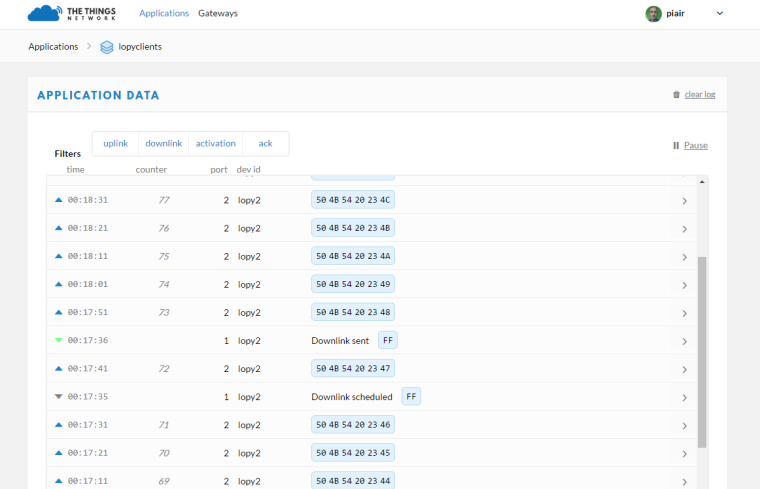
@gerkez It looks like the TTN backend is up again, so you should be able to get the LoPy Nano Gateway + the LoPy node working at the moment.
-
BTW, I just noticed that the LoPy Nano Gateway and node support downlink information....nice. :)
(now I just have to add some code on the client to actually do something with it and a payload function to do the encoding on the TTN side, see if only the TTN backbone works then testing is much more interesting).pfff....until I get another upvote I am only allowed one post per 600 seconds...
While I was waiting to post, I had another look at the abp_node.py code in the examples folder:
for i in range (200):
s.send(b'PKT #' + bytes([i]))
time.sleep(4)
rx = s.recv(256)
if rx:
print(rx)
time.sleep(6)It might be worthwhile to explain somewhere that this node example script sends 200 packages and then stops.
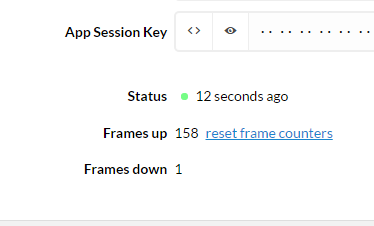
Now, resetting will restart the node, but because the devices on TTN by default do "Frame Counter Checks", the backend will ignore the packages after the reset because the node will start at 1 again and the backend will see them as duplicates.
You can reset the frames counter for the device to fix this.
-
@PiAir
Hi Pierre,
Thanks for your replies. I appreciate it a lot.
Who could have guessed that the ttn network / router was down?
Waited until today, have the same config as you described and guess what?
Today everything works. I'm happy, because now I have a gateway I can connect to without having to leave my house :-)
Thanks again. -
I combined a couple of my tests / results of this weekend in another blog post titled "LoRaWAN + The Things Network = Still some love left". Which shows that this weekend was better than last week when I wrote "LoRaWAN + The Things Network = Tough Love or No Love ?" ;-)
-
@daniel said in New firmware release 1.6.7.b1 (LoRaWAN Nano Gateway with TTN example!!):
@rskoniec I'm also seeing those and I'm investigating the cause together with Espressif.
@rskoniec said in New firmware release 1.6.7.b1 (LoRaWAN Nano Gateway with TTN example!!):
Sometimes I see series of
W (xxxxxxxxx) wifi: post pm rx bcn failedmessages on my LoRaWAN Nano Gateway:Push ack Push ack Push ack W (147750288) wifi: post pm rx bcn failed W (147750288) wifi: post pm rx bcn failed Pull ack Pull ack Pull ackWith the newest f/w 1.6.10.b1 I'm still seeing these messages. @daniel Any news from Espressif?
-
Thank you Alex and all the people here on the forum.
Thanks to all the information provided here I managed to connect my Lopy as nano gateway to TTN. The frontpage detected it although my console tells me it is not connected. I guess that will be fixed at some point in time too.
But the data is coming through from de OTAA node, so I guess it works. It has to, because my Lopy is the only gateway around.As I am completely new to lora, micropython and microprocessor programming, it is an exiting journey for me. But from here, I do have a great starting point to move on.
Kind regards,
Peter Lans -
@Peter-Lans
TTN is saying the gateway "not connected" and other issues should be fixed early next week. -
I've gotten around to pushing up the LoPy LoRaWAN Nano-Gateway Tutorial!
Check it out here - https://docs.pycom.io/pycom_esp32/pycom_esp32/tutorial/includes/lorawan-nano-gateway.html
-
Hi Alex, thanks for these videos.
I managed to get the nano-gateway working, using the Packet Forwarder protocol and finding out my Device EUI with these commands
import network
import binascii
binascii.hexlify(network.LoRa().mac())
However, I could not get the node working with the otaa_node.py example. I am getting this error:
ValueError: invalid argument(s) valueOn this line
lora.add_channel(0, frequency=915100000, dr_min=0, dr_max=5)Note I am on the 915 frequency (New Zealand). Has to be something to do with that aye?
Any advice appreciated.
Ps. I would love to see in an upcoming video how to pull data from sensors, and also push to nodes e.g. trigger led/servo.
-
@palmy-nz
For the 915Mhz region the dr_max parameter (LoRa datarate setting) has to be 4 and not 5.You'll also need to change the nano gateway script to match the frequencies and channel, please see this thread https://forum.pycom.io/topic/983/otaa_node-py-error/3
-
Hi @palmy-nz please try the settings that @jmarcelino suggested and let me know how you get on. If this fails, I have another idea of what might have been the issue!
Data acquisition is definitely an interesting topic! I'll make sure it's on the list for Alex's Corner!
Cheers,
Alex
-
Thanks @jmarcelino @bucknall
Changing the
dr_maxfrom5to4(for 915mhz) did fix this ValueError.Now I am just getting
Not joined yetMy gateway config.py looks like this
GATEWAY_ID = '70b3d54990c648be'

SERVER = 'router.au.thethings.network'
PORT = 1700

NTP = "pool.ntp.org"
NTP_PERIOD_S = 3600

WIFI_SSID = '***'
WIFI_PASS = '***'

LORA_FREQUENCY = 915100000
LORA_DR = "SF7BW125"   # DR_5
Anything glaringly obvious?
-
@palmy-nz looks fine :) - have you set up an application on the TTN yet?
-
-
@palmy-nz
Did you change your nanogateway.py line 41 as in that thread I linked?Where it says
"freq": 868.1should be"freq": 915.1Then in your otaa_node.py remove all 3 lora.add_channel() lines and replace with
for channel in range(0, 72):
    lora.remove_channel(channel)

lora.add_channel(0, frequency=915100000, dr_min=0, dr_max=4)
This is necessary for 915Mhz regions
-
@jmarcelino i had missed that change.
I have now changed the
freq:and added the remove channel loop.But still getting
Not joined yet.I tried changing
s.setsockopt(socket.SOL_LORA, socket.SO_DR, 4)value, without any luck.Here are my files...
Node - main py
NanoGateway nanogateway py
NanoGateway config py -
@palmy-nz Did you get a chance to complete this?
I was able to connect my nano gateway to TTN, but te node is still getting "Not joined yet".
I'm using 868100000 frequency.


Hello! It looks like you're interested in this conversation, but you don't have an account yet.
Getting fed up of having to scroll through the same posts each visit? When you register for an account, you'll always come back to exactly where you were before, and choose to be notified of new replies (either via email, or push notification). You'll also be able to save bookmarks and upvote posts to show your appreciation to other community members.
With your input, this post could be even better 💗
Register Login