Updating fimrware on wipy fails with OSX 10.12.3
-
Info: I have the WiPy plugged into the expansion board and the expansion board plugged into my laptop via a USB cable. I have a jumper cable plugged into GND & G23.
When launching the
pycom_update_1.1.1.b1.dmgit walks me through the steps and then it sits for a min saying "Please wait, reading information about board..." then it says:
"The upgrade failed, please check the connections and try the steps again.This is the log of the upgrading process:
Connecting.......................................
Failure!" -
In the order of the most common reasons for that:
- check the cable. Is it good for other purposes too, like connecting a phone and transmitting data.
- Install the right driver. You'll need a VCP driver.
- Use the right port. It should be of the /dev/cu.xxxx name range on OS X, /dev/ttyUSBx on Linux and COMx on Windows
- Make sure, that pyserial is installed (pip install pyserial)
- After connection the jumper cable, and before starting the upload, reset WiPy
- Make sure you have a connection to the Internet
If that all fails, scratch you head and start over at 1.
-
Hello,
I am running the following drivers:
CP210x USB to UART Bridge VCP Drivers For Mac OSX(V4)I believe this cable i am using to be fine since I was able to flash my Feather Huzzah ESP8266 with the latest version of Micropython with the same cable and had no issues.
My wiPy shows up on my Mac as follows:
(py2.7)The-Dudes-MacBook-Air:~ eldude$ echo "WiPy is connected:"; ls -l /dev/cu.*
WiPy is connected:
crw-rw-rw-  1 root  wheel   19,   1 Mar 26 22:22 /dev/cu.Bluetooth-Incoming-Port
crw-rw-rw-  1 root  wheel   19,  15 Mar 27 22:42 /dev/cu.usbserial-DQ0052WI
(py2.7)The-Dudes-MacBook-Air:~ eldude$ echo "WiPy is NOT connected:"; ls -l /dev/cu.*
WiPy is NOT connected:
crw-rw-rw-  1 root  wheel   19,   1 Mar 26 22:22 /dev/cu.Bluetooth-Incoming-Port
(py2.7)The-Dudes-MacBook-Air:~ eldude
When I run the updater(Pycom Firmware Update) program the Port: is set to
/dev/cu.usbserial-DQ0052WIwhich I think is correct.
I have followed the steps: 1 - 6 as explained above but I still get the same error. -
Also forgot to show that I am running the
pyserialmodule.(py2.7)The-Dudes-MacBook-Air:~ eldude$ pip list --format=legacy | grep [p]ys pyserial (3.3) (py2.7)The-Dudes-MacBook-Air:~ eldude$ -
Another two questions:
- If you are using the expansion board, are all jumpers in place?
- Did you try at lower speed?
Alternatively, you can try the manual method suggested for downgrading:
https://forum.pycom.io/topic/517/downgrading-firmware-advanced-users
The firmware images are here:
https://software.pycom.io/downloads/WiPy-1.6.9.b1.tar.gz
Other are also there, just change the version numbers.
Doing that, you split the various steps and can play a little bit with the speed, so it's not a black box any more. -
@robert-hh Since that was the problem in another discussion:
Verify the the jumper is between GND and G23. G23 IS NOT P23. Internally, this is GPIO0, also tagged as P2. If the heartbeat LED is still flash after setting the jumper, you're not at the right port.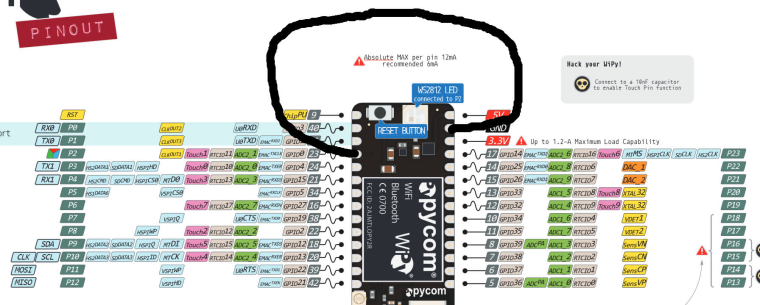

Hello! It looks like you're interested in this conversation, but you don't have an account yet.
Getting fed up of having to scroll through the same posts each visit? When you register for an account, you'll always come back to exactly where you were before, and choose to be notified of new replies (either via email, or push notification). You'll also be able to save bookmarks and upvote posts to show your appreciation to other community members.
With your input, this post could be even better 💗
Register Login