How to connect a LoPy to a moisture sensor?
-
@jeromemaquoi The sensor outputs an analog signal. You can connect it to any of the analog inputs at P13 .. P20, definitely NOT G16. There is an example in the docs (see https://docs.pycom.io/chapter/firmwareapi/pycom/machine/ADC.html). The basic code would look like:
import machine

adc = machine.ADC()             # create an ADC object
apin = adc.channel(pin='P13', attn = machine.ADC.ATTN_11DB)   # create an analog pin on P13, range 0..3.3V
val = apin()                    # read an analog value
In this example, P13 (alias G5) is used. The range you'll get in val is 0..4095. Whenever after these lines you call apin(), you get the new actual value. The calibration then is up to you.
-
Thanks for the answer! I did what you said and I succeeded in printing the value of the sensor but I have another issue. When I print apin(), I always have the number 1023 printed, even if I put the sensor into a glass of water. I don't understand what's happening.
Any idea? -
@jeromemaquoi two things: 1023 is the max value for a 10 bit setting, range 0..1023. For a 12 bit setting, which should be the default, you may change your script to
import machine

adc = machine.ADC()             # create an ADC object
adc.init(bits=12)
apin = adc.channel(pin='P13', attn = machine.ADC.ATTN_11DB)   # create an analog pin on P13, range 0..3.3V
val = apin()                    # read an analog value
That alone would only change the value you see to 4095. Be sure you have the attn=machine.ADC.ATTN_11DB set, because that sets the range of the adc to 0-3.3V. The sensor is told to have an output range of 0-3V, which should match then. And be sure to operate the sensor with 3.3 V.
And connect the sensor to P13, which is labeled G5 on the expansion board. -
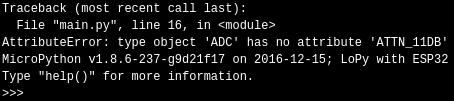
@robert-hh I changed the code but now, it's not working at all. I put your code on the LoPy and here is what I see when I launch it. :/
-
@jeromemaquoi Please update the firmware. You seem to have a state of December 2016.
-
@robert-hh Oh yes. Thank you ofr your answers, it works now! :D
-
@robert-hh Hi, Robert! Why I get the value more than 1000, but in the specification wrote that i can get value to 950.
Thank you for your answers,
Nichita -
@gruia-nichita This statement is just for the example setup with an arduino and maybe an 10 Bit ADC. Using Lopy, the maximum output value of the ADC in 12 bit mode is 4095.
-
@robert-hh So I have the same result in percentage?
-
@gruia-nichita The adc just returns a reading for a voltage. To get a percentage reading, you have to calibrate your set-up with the minimum and maximum reading. You get the minimum reading certainly when you just stick the dry sensor into the air. For the maximum reading you can stick the sensor either into wet soil or salted water. Then the perctentage reading is like:
act_reading/(maximum - minimum) * 100
assuming there is a linear relation between adc reading and humidity. -
@robert-hh Hi, I want to know if it is the same principle and operation for me to connect lopy with an ultrasonic sensor. I try your code but it reply nothing on the screen. I have two kind of sensors but I only use one to connect with lopy.
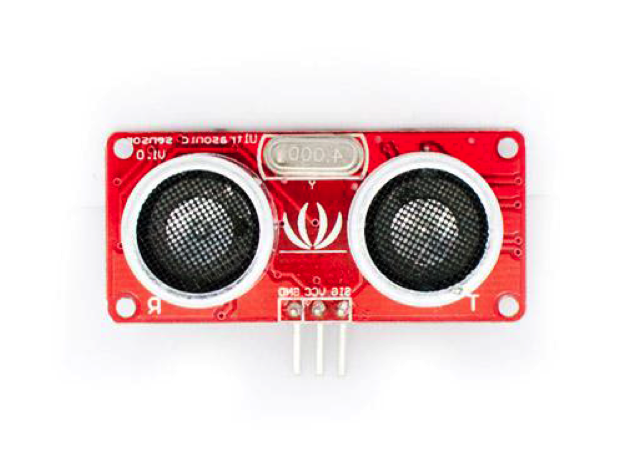
This is the model of my 2 senosrs. One is HC-SR04 with 4 feet: trig,echo,vcc,gnd; The other sensor has 3 feet: vcc,gnd,sig.
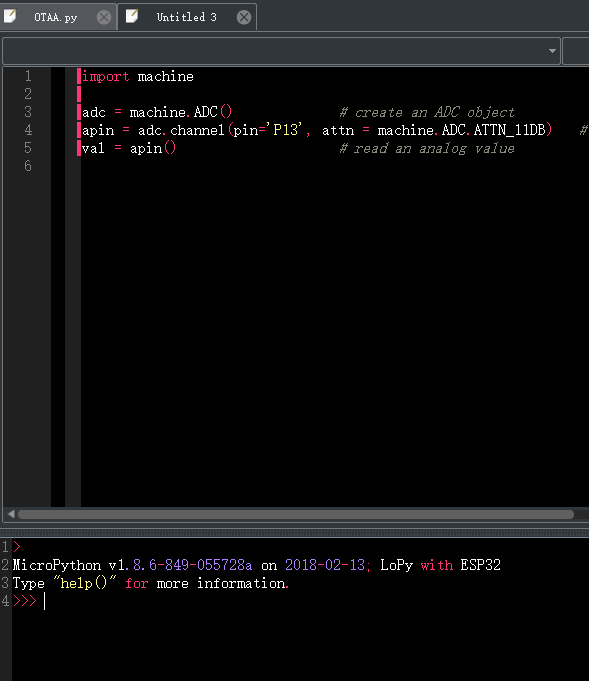
The screenshot from using the 3 feet sensor. If there is something missing of my code. I am beginner of this.
Thank you! -
@rachelsimida Yes, the principle is completely different. While for the humidity sensor you had to take an analog value, you have to determine here the length of a pulse. Would you mind to tell me the type of the other sensor which you try to use here?
I must say that w/o a snesor at hand I can give you only vague directions. -
This post is deleted! -
@robert-hh Thanks for your reply.
I only have two sensors at hand now. No matter which one I use, it's ok. Since the principle is completely different. For the two sensors, do you familiar with them? Can you teach me some direction about how to program if you know. It's hard to find the same topic in the website and I am extremely confused now. Thanks! This is the image of the sensor, which provided by my supervisor.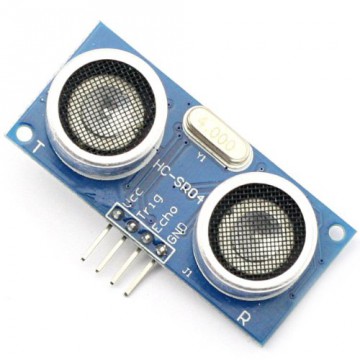

Hello! It looks like you're interested in this conversation, but you don't have an account yet.
Getting fed up of having to scroll through the same posts each visit? When you register for an account, you'll always come back to exactly where you were before, and choose to be notified of new replies (either via email, or push notification). You'll also be able to save bookmarks and upvote posts to show your appreciation to other community members.
With your input, this post could be even better 💗
Register Login