Welcome to the Pycom forum Forum
    • \[\[global:header.categories\]\]
    • \[\[global:header.recent\]\]
    • \[\[global:header.tags\]\]
    • \[\[global:header.popular\]\]
    • Login

    Explore Pybytes | Official Documentation | Report a Firmware Bug/Issue | GitHub

    LoPy Firmware updates fail on Win10

    Scheduled Pinned Locked Moved LoPy
    lopyfirmware
    18 Posts 4 Posters 4.9k Views 4 Watching
    Loading More Posts
    • Oldest to Newest
    • Newest to Oldest
    • Most Votes
    Reply
    • Reply as topic
    Log in to reply
    This topic has been deleted. Only users with topic management privileges can see it.
    • R Offline
      rskoniec
      last edited by rskoniec

      1. Is there any chance that LoPy board is fitting Expansion Board in wrong position? LoPy RGB LED should be above Expansion Board microUSB port.
      2. What kind of G23-GND connection is used? Male-male breadboard connector or just ordinary wire? I've experienced problems with UTP wire connection (was unstable causing connection errors).
      3. Could you provide a photo of your setup?

      The machine is working as good as it's code.

      1 Reply Last reply Reply Quote 0
      • J Offline
        jmarcelino @Jakko
        last edited by

        @Jakko said in LoPy Firmware updates fail on Win10:

        Yes, COM3 shows up as 'USB Serial Device'. However, this does not disappear when I unplug the LoPy from USB.

        Are you sure this COM3 is really the LoPy board? Can it be something else?
        The USB device should really disappear once unplugged.

        R 1 Reply Last reply Reply Quote 0
        • R Offline
          rskoniec @jmarcelino
          last edited by rskoniec

          Yes, COM3 shows up as 'USB Serial Device'. However, this does not disappear when I unplug the LoPy from USB

          @jmarcelino What I understand is that @Jakko is fully aware that COM3 is not a LoPy. ;)

          The machine is working as good as it's code.

          1 Reply Last reply Reply Quote 0
          • J Offline
            jmarcelino
            last edited by

            Oh OK sorry, I was going by the second screen where he tried it..

            Can you try another microUSB cable? I know you said it worked before but maybe it was another one. There are many "power only" cables out there which could explain these symptoms.

            I dont think Pycom actually send USB cables, at least I never got one.

            Also try connecting to a different port on your computer. Until it's detected as a device it won't really work.

            R 1 Reply Last reply Reply Quote 0
            • R Offline
              rskoniec @jmarcelino
              last edited by

              @jmarcelino said in LoPy Firmware updates fail on Win10:

              I dont think Pycom actually send USB cables, at least I never got one.

              Neither do I.

              The machine is working as good as it's code.

              1 Reply Last reply Reply Quote 0
              • R Offline
                rskoniec @Jakko
                last edited by

                @Jakko said in LoPy Firmware updates fail on Win10:

                For comparison, I checked what happens when I plug and unplug an arduino. Then, "Arduino Uno (COM6)" pops up in device manager when I plug it in, and it immediately disappears when I unplug it.

                I assume that for Arduino test you've used different USB cable as UNO have USB B type connector.
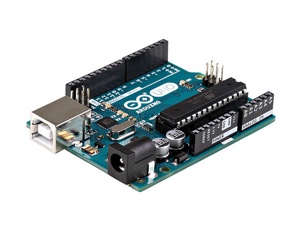
                0_1487923307922_Arduino-Uno.jpg

                The machine is working as good as it's code.

                1 Reply Last reply Reply Quote 0
                • J Offline
                  Jakko
                  last edited by

                  @rskoniec and @jmarcelino,

                  Just now I tried updating with a different USB cable (of my phone, of which I was sure the data channels were connected), and a couple of things happened:

                  • A new device popped up in device manager
                  • The firmware update worked perfectly fine
                  • I thanked you guys silently for preventing me from wasting any more time.

                  So, solved! It amazes me how such a tiny mistake can cost so much time (in total, I spend a whole day on this).

                  Thanks!

                  R 1 Reply Last reply Reply Quote 2
                  • R Offline
                    rskoniec @Jakko
                    last edited by

                    @Jakko We're happy for your success. It's pretty regular that small mistakes sometimes make huge problems. ;o)

                    The machine is working as good as it's code.

                    1 Reply Last reply Reply Quote 1
                    • R Offline
                      rskoniec
                      last edited by rskoniec

                      I've created a new topic https://forum.pycom.io/topic/763/firmware-upgrade-troubleshooting-checklist
                      I think it will be helpful for the others having similar issues.
                      I don't know if place in forum hierarchy is right - if not I hope Forum Admins will do the job. ;o)

                      The machine is working as good as it's code.

                      1 Reply Last reply Reply Quote 1
                      • D Offline
                        dClaus
                        last edited by

                        I have also the "Connecting ......... Failure !" problem with windows10 for the update of Lopy 1.4 to 1.6 !

                        The solution is :

                        • set the connection between G23 and GND,
                        • connect the LoPy expansion board to the computer with a USB cable
                        • !!! use the RESET buttom on the Lopy !!!
                        • use the firmware updater (1.1.1.b1)

                        It works for me on my 2 Lopy !

                        Damien

                        R D 2 Replies Last reply Reply Quote 1
                        • R Offline
                          rskoniec @dClaus
                          last edited by

                          @dClaus said in LoPy Firmware updates fail on Win10:

                          !!! use the RESET buttom on the Lopy !!!

                          Thanx! I've added this to my topic.

                          The machine is working as good as it's code.

                          1 Reply Last reply Reply Quote 0
                          • D Offline
                            dClaus @dClaus
                            last edited by

                            @dClaus said in LoPy Firmware updates fail on Win10:

                            I have also the "Connecting ......... Failure !" problem with windows10 for the update of Lopy 1.4 to 1.6 !

                            The solution is :

                            • set the connection between G23 and GND,
                            • connect the LoPy expansion board to the computer with a USB cable
                            • !!! use the RESET buttom on the Lopy !!!
                            • use the firmware updater (1.1.1.b1)

                            It works for me on my 2 Lopy !

                            Damien

                            "use the RESET buttom" is not necessary for the WiPy2

                            R 1 Reply Last reply Reply Quote 1
                            • R Offline
                              rskoniec @dClaus
                              last edited by

                              @dClaus said in LoPy Firmware updates fail on Win10:

                              "use the RESET buttom" is not necessary for the WiPy2

                              Thanx! Good to know. Topic updated!

                              The machine is working as good as it's code.

                              1 Reply Last reply Reply Quote 0

                              Hello! It looks like you're interested in this conversation, but you don't have an account yet.

                              Getting fed up of having to scroll through the same posts each visit? When you register for an account, you'll always come back to exactly where you were before, and choose to be notified of new replies (either via email, or push notification). You'll also be able to save bookmarks and upvote posts to show your appreciation to other community members.

                              With your input, this post could be even better 💗

                              Register Login
                              • 1 / 1
                              • First post
                                Last post

                              Pycom on Twitter

                              Pycom