Welcome to the Pycom forum Forum
    • \[\[global:header.categories\]\]
    • \[\[global:header.recent\]\]
    • \[\[global:header.tags\]\]
    • \[\[global:header.popular\]\]
    • Login

    Explore Pybytes | Official Documentation | Report a Firmware Bug/Issue | GitHub

    [SOLVED] How update LoPy firmware through PySense expansion board

    Scheduled Pinned Locked Moved Getting Started
    firmware updatelopypysense
    15 Posts 4 Posters 5.2k Views 4 Watching
    Loading More Posts
    • Oldest to Newest
    • Newest to Oldest
    • Most Votes
    Reply
    • Reply as topic
    Log in to reply
    This topic has been deleted. Only users with topic management privileges can see it.
    • A Offline
      alvaroBT
      last edited by alvaroBT

      Hello again,

      Is possible to update the firmware of a LoPy that it is connected to the PySense expansion board?
      How?

      Thaks a lot.

      edit-Conclusion: We need the Expansion Board 2.0 or a USB to TTL adapter (CP2104) to update the LoPy board.

      1 Reply Last reply Reply Quote 0
      • A Offline
        alvaroBT
        last edited by

        Any Idea?
        I installed the Windows PySense Driver from:
        http://metavurt.net/software/drivers/PySense_DFU.zip
        (see this post: https://forum.pycom.io/topic/1320/pytrack-and-pysense-firmware-release-0-0-2/9)
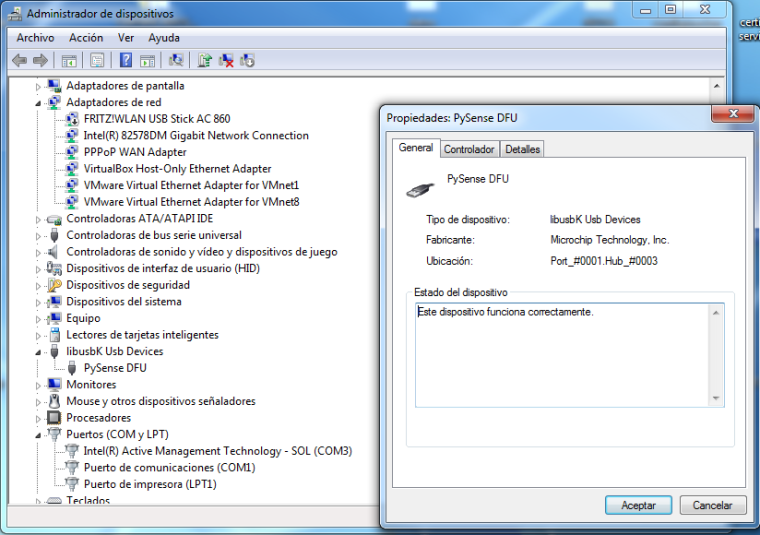
        0_1497262997902_upload-58ec0a63-c52e-46b7-a7cc-36effad67099
        I updated the PySense firmware to 0.0.2 version:
        https://software.pycom.io/downloads/pysense_0.0.2.dfu
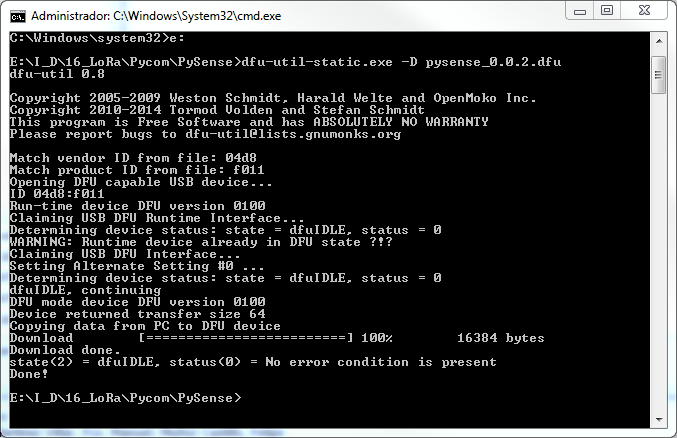
        0_1497262928049_upload-0181ca23-ba0d-4c68-ab72-ef48e459cf1f

        Then, How I acces to the LoPy attached to the PySense expansion board for update the LoPy's firmware? And how I connect the LoPy to PC (Atom COM port) for develop inside?

        Thanks!!

        1 Reply Last reply Reply Quote 0
        • J Offline
          jmarcelino
          last edited by jmarcelino

          Hi Alvaro,

          That driver is only for the PySense firmware update (DFU mode - which you get into by pressing the button at start)

          Outside of DFU mode (i.e. if you don't press the button at start, or after 7 seconds if you do) Windows 10 should pick it up as a COM port without anything else. Then you can use that COM port in Atom.

          If you still use Windows 7 then try the driver posted here https://forum.pycom.io/post/7912

          I haven't been able to update the LoPy firmware using it, I don't think it's possible both because of the driver (USB ACM is very limited) and also because it's extremely awkward to try and connect GND to G23 on the PySense/PyTrack. I suggest the Expansion board instead.

          A 1 Reply Last reply Reply Quote 0
          • A Offline
            alvaroBT @jmarcelino
            last edited by

            @jmarcelino
            OK, now works fine with this driver.

            But now, How do I update the LoPy firmware through PySense expansion board?
            When I attach the LoPy to the PySense expansion board to upload the LoPy, How do I conect a jumper cable between G23 and GND? How do I put the LoPy in update mode?
            Thanks a lot.
            Best Regards.

            J 1 Reply Last reply Reply Quote 0
            • J Offline
              jmarcelino @alvaroBT
              last edited by jmarcelino

              @alvaroBT
              As I was saying I don't think the PySense was designed to support updating the firmware on the LoPy, only to give you a Python REPL console.

              The easiest option is to pick up an expansion board: https://www.pycom.io/product/expansion-board-2-0/

              The cheapest is to get a 3.3V USB to TTL serial adapter (I recommend CP2104, plenty on Ebay for about $2-$5 ) and program the LoPy on a breadboard.

              A 2 Replies Last reply Reply Quote 0
              • A Offline
                alvaroBT @jmarcelino
                last edited by

                @jmarcelino
                Thanks a lot.
                I'm going to buy a USB to TTL adapter (CP2104)

                1 Reply Last reply Reply Quote 0
                • A Offline
                  alvaroBT @jmarcelino
                  last edited by

                  @jmarcelino
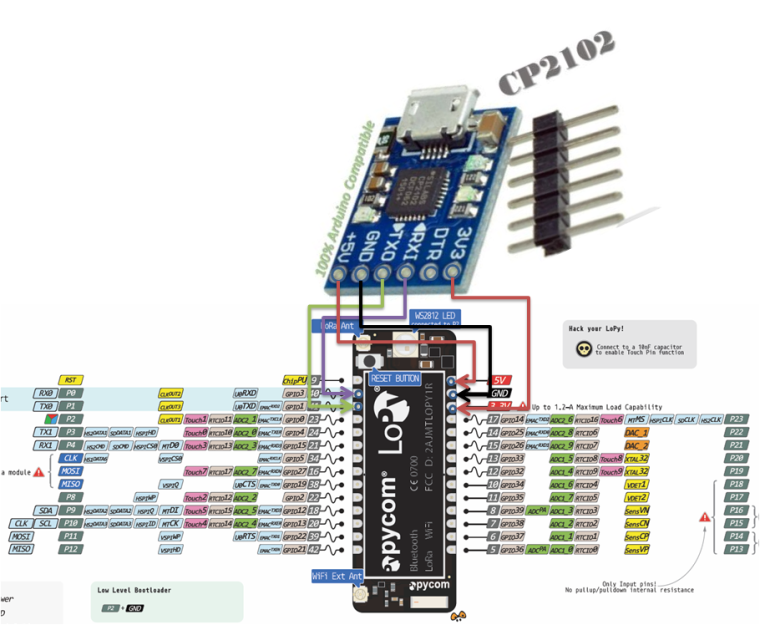
                  How do I conect the CP2104? Does the next picture is correct?
                  0_1497268278386_upload-d1354a6a-dc6b-4e65-ac38-390924bf05c7

                  The DTR pin Where I do conect it?

                  L 1 Reply Last reply Reply Quote 0
                  • L Offline
                    livius @alvaroBT
                    last edited by livius

                    @alvaroBT
                    No it is not correct
                    DO not connect 5V and in the same time 3V3
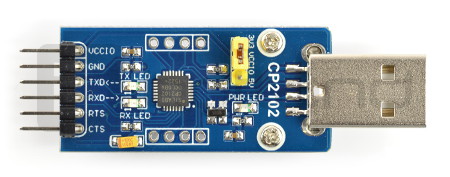
                    And also what is the level of signals from this CP2102 - have it some switch or jumper?
                    e.g. this one have jumper
                    alt text
                    You need 3V3 level on TX/RX pins.
                    DTR leave unconnected

                    think about people first, then computers

                    A 1 Reply Last reply Reply Quote 0
                    • A Offline
                      alvaroBT @livius
                      last edited by

                      @livius
                      ok, thanks.
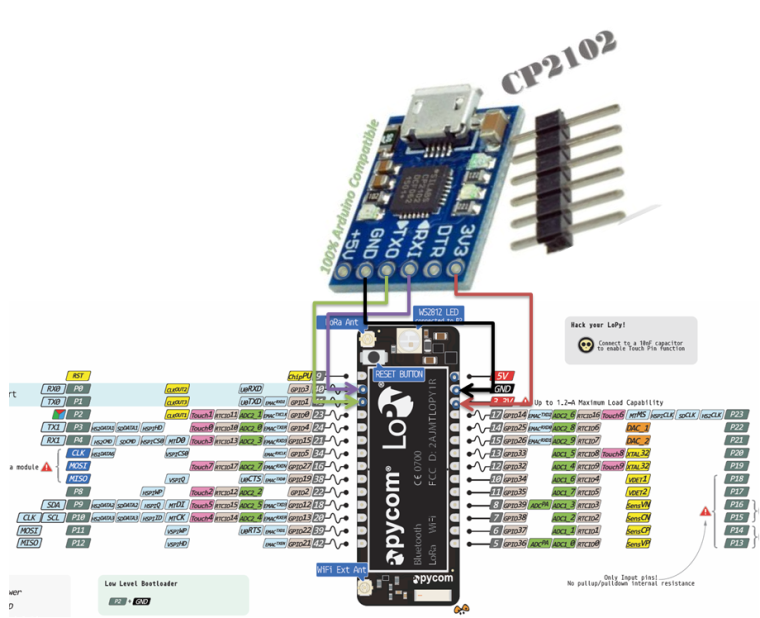
                      This is a correct version:
                      0_1497268885860_upload-50614d7c-3c57-4984-a2eb-8c4aa54625b9

                      Features:

                      1. The embedded USB transceiver, without external circuit
                      2. It contains the clock circuit, without an external circuit
                      3. Reset circuit embedded on electricity
                      4. Output voltage regulation can be within 3.3 V voltage
                      5. Accord with the requirement of USB2.0 specification
                      6. SUSPEND pin support USB state hung
                      7. Asynchronous serial data bus controller interface compatible with all shake hands and modulation signal
                      8. Support data format for the data of 8, 1, 2, and stop bit parity bit
                      9. The connotation of the 512 - byte receive buffer and 512 words
                      L 1 Reply Last reply Reply Quote 0
                      • L Offline
                        livius @alvaroBT
                        last edited by livius

                        @alvaroBT
                        Rx from CP2102 connect to TX
                        Tx from CP2102 to Rx

                        And connect 5V to 5V pin on Lopy
                        But still do not know what signal level is on Rx/Tx.
                        I do not see any jumper to change level on Tx/Rx to 3V3.
                        Are you sure it is capable to 3V3 level signals output?

                        think about people first, then computers

                        J 1 Reply Last reply Reply Quote 1
                        • J Offline
                          jmarcelino @livius
                          last edited by jmarcelino

                          That module uses 3.3V levels (native to the CP2102 - modules with that chip that do 5V I/O have voltage translation like e.g. extra FET you can easily spot )

                          @alvaroBT Connect 5V supply to LoPy 5V and RX/TX as @livius says.

                          I'd still recommend the CP2104 and not the CP2102 because the CP2104 (or the new confusingly named CP2102N) will support faster programming rates, but just nitpicking and the CP2102 will do anyway.

                          A 1 Reply Last reply Reply Quote 0
                          • A Offline
                            alvaroBT @jmarcelino
                            last edited by

                            @jmarcelino
                            Now only I have just one CP2102.
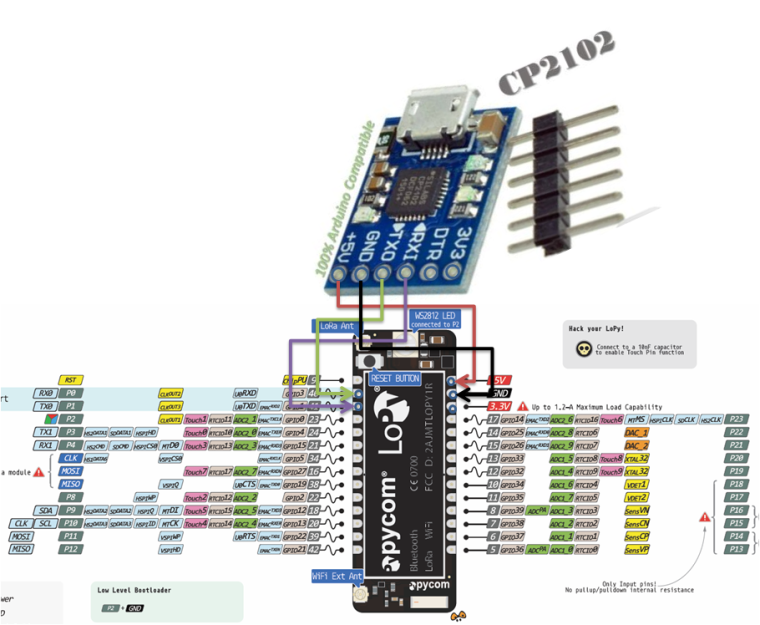
                            OK, then I use this connection:

                            CP2102 RX --> LoPy TX0 (P1)
                            CP2102 TX --> LoPy RX0 (P0)
                            CP2102 +5V --> LoPy 5V
                            CP2102 GND --> LoPy GND
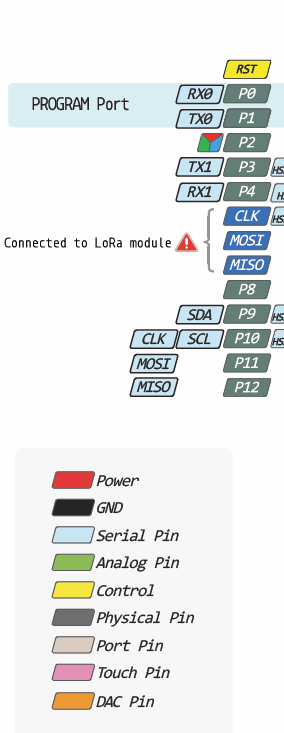
                            0_1497274697587_upload-c277d745-408c-44c4-aa57-0e59aefbc7fd

                            0_1497274608635_upload-5c138cc6-8b3a-4890-ac94-31881b1b84db

                            Best Regards.

                            J 1 Reply Last reply Reply Quote 1
                            • J Offline
                              jmarcelino @alvaroBT
                              last edited by

                              @alvaroBT
                              Yes that's it!

                              A 1 Reply Last reply Reply Quote 0
                              • A Offline
                                alvaroBT @jmarcelino
                                last edited by

                                @jmarcelino
                                Thanks!!!

                                1 Reply Last reply Reply Quote 0
                                • F Offline
                                  fkoran
                                  last edited by

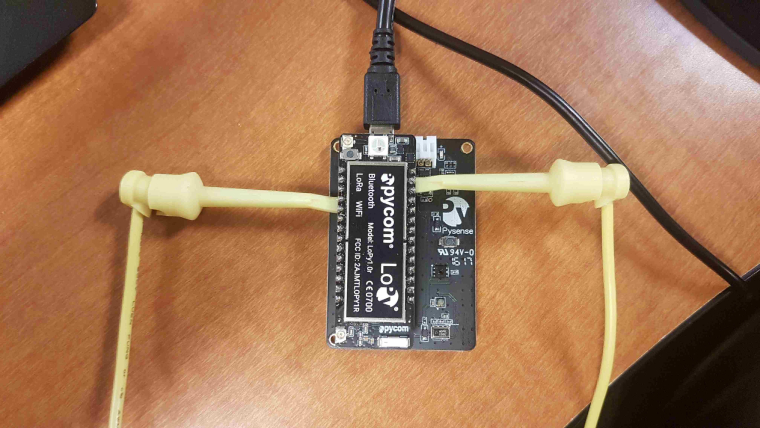
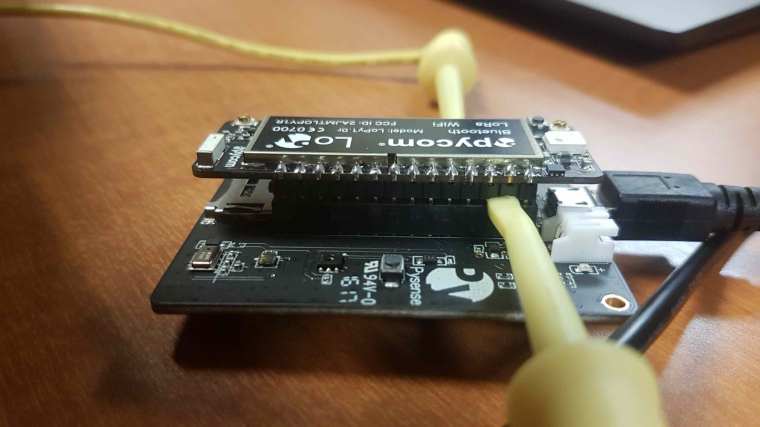
                                  This worked for me:

                                  1_1510282504647_yellow_s.jpg
                                  0_1510282504647_black_s.jpg

                                  1 Reply Last reply Reply Quote 1

                                  Hello! It looks like you're interested in this conversation, but you don't have an account yet.

                                  Getting fed up of having to scroll through the same posts each visit? When you register for an account, you'll always come back to exactly where you were before, and choose to be notified of new replies (either via email, or push notification). You'll also be able to save bookmarks and upvote posts to show your appreciation to other community members.

                                  With your input, this post could be even better ๐Ÿ’—

                                  Register Login
                                  • 1 / 1
                                  • First post
                                    Last post

                                  Pycom on Twitter

                                  Pycom