• 0 Votes
    17 Posts
    4k Views
    R
    @ambropete import binascii import pycom import socket import time import ujson # put that into the import section from network import LoRa from machine import Pin, Timer echo = Pin(Pin.exp_board.G7, mode=Pin.IN) trigger = Pin(Pin.exp_board.G8, mode=Pin.OUT) # Colors off = 0x000000 red = 0xff0000 green = 0x00ff00 blue = 0x0000ff # Turn off hearbeat LED pycom.heartbeat(False) # Initialize LoRaWAN radio lora = LoRa(mode=LoRa.LORAWAN) # Set network keys app_key = binascii.unhexlify('11 22 33 44 55 66 77 88 99 00 11 22 33 44 55 65'.replace(' ','')) app_eui = binascii.unhexlify('00 00 00 00 00 00 00 00'.replace(' ','')) # Join the network lora.join(activation=LoRa.OTAA, auth=(app_eui, app_key), timeout=0) pycom.rgbled(red) # Loop until joined while not lora.has_joined(): print('Not joined yet...') pycom.rgbled(off) time.sleep(0.1) pycom.rgbled(red) time.sleep(2) print('Joined') pycom.rgbled(blue) s = socket.socket(socket.AF_LORA, socket.SOCK_RAW) s.setsockopt(socket.SOL_LORA, socket.SO_DR, 5) s.setblocking(True) trigger(0) chrono = Timer.Chrono() while True: chrono.reset() trigger(1) time.sleep_us(10) trigger(0) while echo() == 0: pass chrono.start() while echo() == 1: pass chrono.stop() distance = chrono.read_us() / 58.0 s.send(str(distance).encode()) pycom.rgbled(green) time.sleep(0.5) pycom.rgbled(blue) time.sleep(0.5) print("Distance {:.0f} cm".format(distance)) time.sleep(5)

  • Short indoor range with LoPy

    LoPy lopy pytrack range lorawan lora
    16
    0 Votes
    16 Posts
    3k Views
    J
    Solved! Thanks again everyone. The problem was indeed that the antenna was mounted according to the specification for the LoPy1r, so it was actually on the LoRa 433-510 MHz antenna slot. After a quick range test I now receive packets at at least 400 meters distance. Many thanks, I thought I had gone crazy there for a while!
  • Changing port for sending data via LoRa

    LoPy lora lora lopy lopy lorawan otaa ttn
    3
    0 Votes
    3 Posts
    2k Views
    G
    @jmarcelino Thanks, it works!
  • 0 Votes
    8 Posts
    2k Views
    J
    @justin-binda the low side is the signal pin on the 3.3V side (the ESP32 / Pycom module), the high side is signal pin on the 5V side (the sensor). I think that sensor actually has two signal pins, one for trigger (MCU -> sensor) and the other for echo (sensor -> MCU) so you would need two level shifters.
  • LORA and 2 lopys problem

    MicroPython lora loramac lopy serial
    5
    0 Votes
    5 Posts
    1k Views
    J
    @monersss Raw LoRa is a best effort medium with absolutely no acknowledgements or retransmissions. If you want to be sure that data has been received, you will need to implement such a strategy. That involves adding frame counters (not absolutely needed in the most basic case, but it’s usually a good idea), sending back ACKs when you have received data, and resending data if you don’t get the ACK. Note that if your target scenario is not point to point but multiple senders to one receiver, LoRAWAN may be a simpler option as this can be handled by LoRaWAN. However be aware of the limitations on the band.
  • LoRa on 2 LOPYs plus serial

    LoPy lopy serial lora loramac
    5
    0 Votes
    5 Posts
    1k Views
    sebS
    @monersss Can you post a sample of the file stored on the SD card? I programmed the first lopy to constantly send hello, and this was my result: Hello Hello Hello Hello Hello Hello Hello Hello Hello Hello Hello Hello Hello Hello Hello Hello Hello Hello Hello ...
  • Fipy with OTAA node - Nano Gateway - TTN (not join)

    FiPy fipy lora otaa
    19
    3
    0 Votes
    19 Posts
    4k Views
    robert-hhR
    @apiwize after the join worked, the TTN server will send a list of frequencies to use. The node will uses these in a random matter. Unfortunately the nanogateway can listen only to one of these three frequencies, meaning that you will miss 2 of 3 messages. That is not related to timing. The best option then is to switch to abp mode, copying over from the TTN console the values for device address, network session key and app session key. See the discussion at this thread about 10 days ago. https://forum.pycom.io/topic/2728/lopy-and-nanogateway-example-inaccurate-timing-prevent-otaa-join
  • Two LoPys as a LoRa + TCP/IP bridge?

    LoPy lora
    3
    1
    0 Votes
    3 Posts
    2k Views
    L
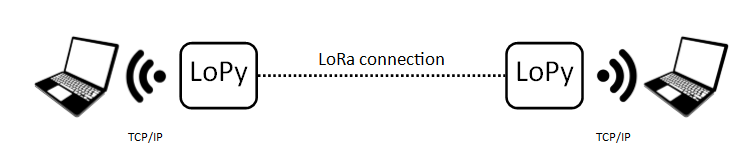
    @jmarcelino said in Two LoPys as a LoRa + TCP/IP bridge?: People have managed 10Km on such a setup. Only with udp kind "connection" modified wifi stack. I have self with normal wifi setup and directional antennas max ~600 m. But i have many wifi stations around and in industrial environment.
  • LoPy not obeying data rate requests from network

    LoPy lopy lora lorawan adr data rate
    13
    0 Votes
    13 Posts
    3k Views
    J
    Hi @daniel, just wanted to make sure these two issues will be addressed in the next release: save/restore channel mask fix MAC command buffers restore Let me know if you need/want issues filed in GitHub and/or PRs.
  • LoRa Multicast

    LoPy lora lorawan
    3
    0 Votes
    3 Posts
    1k Views
    F
    Yes, this is the way I was trying to implement it, without success until I realized there was an error with the device address. So now, it works fine many thanks !
  • Lora: Documentation vs. Example code regards OTAA

    LoPy lora otaa
    23
    0 Votes
    23 Posts
    6k Views
    A
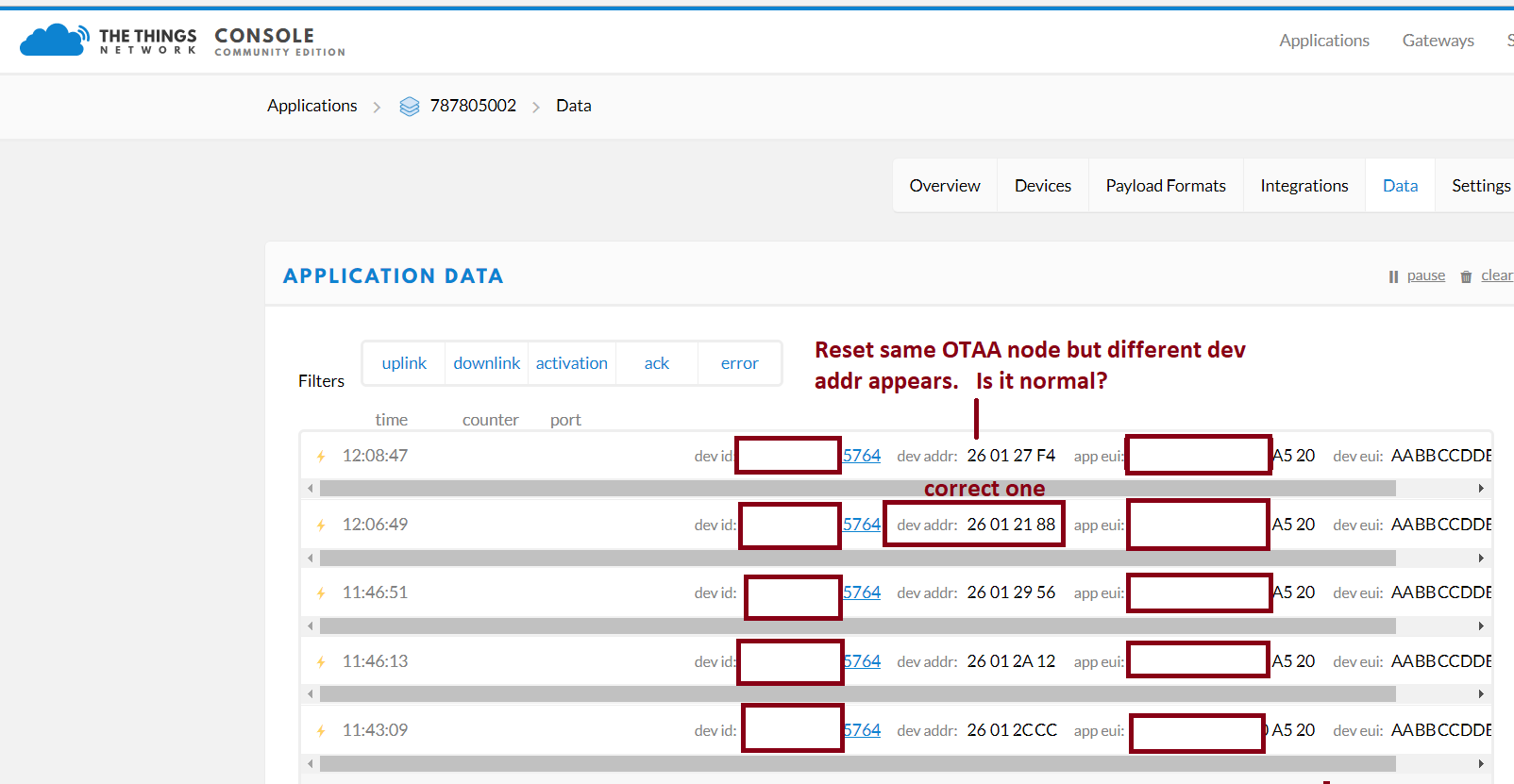
    Hello! I am having issue with activating using method otaa lopy with ttn gateway fot US915. whats correct code i should use I searched a lot of topics over weekend and could not find correct code. Thank you Same time using ttn node US915 with ttn gateway activation worked as shown.
  • LoraWan OTAA example without antenna

    LoPy lora ttn otaa
    12
    0 Votes
    12 Posts
    2k Views
    H
    @jmarcelino yup, thanks a lot.. i tried it outside and succeeded in getting the payloads as well..
  • Lopy LORAWAN/LORA standalone gateway

    LoPy lopy lora lorawan gateway raspberry pi
    12
    0 Votes
    12 Posts
    4k Views
    D
    I'm trying to use nano-gateway with loraserver.io but I can not downstream messages just upstream. Can you share if you had the same problem?
  • Multiple JOIN

    LoPy lora join nvramsave lorawan
    13
    0 Votes
    13 Posts
    2k Views
    B
    @brunos ! With s.setblocking (True) before s.send(), it's OK !!
  • Lopy & Pytrack sending data by Lora KPN network

    LoPy lora lopy
    9
    0 Votes
    9 Posts
    2k Views
    H
    Hello everybody, I have tested the Lopy with the gc.collect function. It isn`t giving a error message anymore! Thanks for the help.
  • LoPy4 LoRa Data Corruption

    LoPy lopy4 lora
    5
    0 Votes
    5 Posts
    1k Views
    sebS
    @ssmith Hi, You can find all the specs for the LoRa transceiver we're using on these modules here: LoPy: https://www.semtech.com/uploads/documents/sx1272.pdf LoPy4: https://www.semtech.com/uploads/documents/sx1276.pdf
  • Blynk on LoPy

    LoPy blynk lopy sensors android app lora
    2
    2 Votes
    2 Posts
    1k Views
    E
    Hi @gruia-nichita I'm using LoPy with Blynk via WiFi, but am also interested in using it with LoRa, let me know if you find a solution (I haven't looked at LoRa+Blynk with enough detail yet...) I'm using BlynkLib : https://github.com/vshymanskyy/blynk-library-python
  • How to update script on 100 boards

    LoPy lopy lora code firmware update firmware
    8
    0 Votes
    8 Posts
    2k Views
    G
    @seb It's my bad. I have missed that service was listening just on localhost, that's why I was not able to receive any file.