Welcome to the Pycom forum Forum
    • \[\[global:header.categories\]\]
    • \[\[global:header.recent\]\]
    • \[\[global:header.tags\]\]
    • \[\[global:header.popular\]\]
    • Login

    Explore Pybytes | Official Documentation | Report a Firmware Bug/Issue | GitHub

    I2C accelerometer model MMA7455
    Scheduled Pinned Locked Moved Getting Started
    lopyi2csensormma7455i2c bus error
    25 Posts 4 Posters 10.7k Views 4 Watching
    Loading More Posts
    • Oldest to Newest
    • Newest to Oldest
    • Most Votes
    Reply
    • Reply as topic
    Log in to reply
    This topic has been deleted. Only users with topic management privileges can see it.
    • P Offline
      pablocaviglia @jmarcelino
      last edited by

      @jmarcelino yes, but i have sdo pulled down

      1 Reply Last reply Reply Quote 0
      • L Offline
        livius @pablocaviglia
        last edited by livius

        @pablocaviglia
        Why 5V?
        in documentation is
        Supply voltage range: 2.0 V to 3.6 V

        and all Pycom boards are 3V3. 5V can crash your Lopy.

        And about other connections
        Where do you conect your SDA, SCL. Which pins on Lopy?
        You use default initialization then i suppose P9 - SDA, P10-SCL?

        think about people first, then computers

        robert-hhR 1 Reply Last reply Reply Quote 0
        • robert-hhR Offline
          robert-hh @livius
          last edited by

          @livius said in I2C accelerometer model MMA7455:

          Why 5V?

          The module has an internal 3.3V regulator RT9161.

          L 1 Reply Last reply Reply Quote 0
          • L Offline
            livius @robert-hh
            last edited by livius

            @robert-hh said in I2C accelerometer model MMA7455:

            RT9161

            Ah - i see now i ommit this on the first link with schematic

            Then two things @pablocaviglia
            Where do you conect your SDA, SCL. Which pins on Lopy?
            You use default initialization of i2c then i suppose P9 - SDA, P10-SCL?

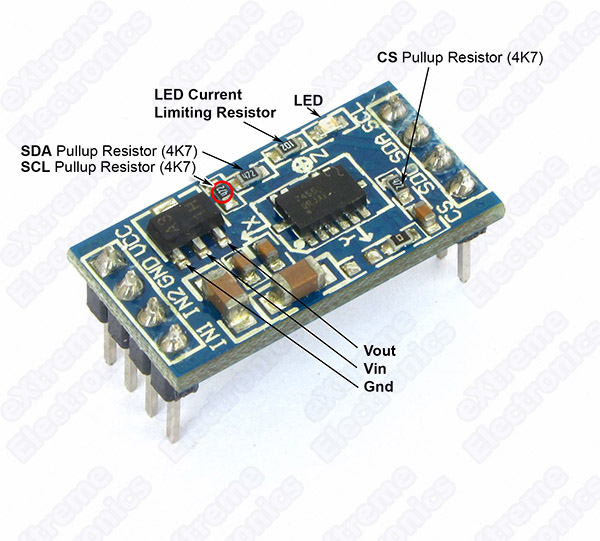
            I see on schematic that there is pull up resistor already on i2c
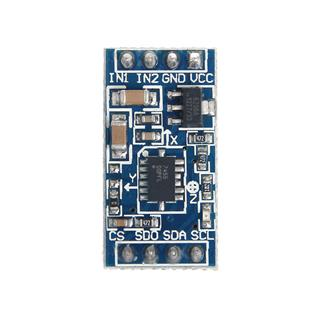
            This is better picture of it
            alt text

            think about people first, then computers

            P 1 Reply Last reply Reply Quote 1
            • J Offline
              jmarcelino
              last edited by jmarcelino

              If you look at the the schematic the CS pin on the board shouldn't be connected to 5V. It's comes from 3.3V.

              The chip pin is not made for that and also you're connecting the 5V supply to a regulated 3.3V via the 4.7K pull up...

              P 1 Reply Last reply Reply Quote 1
              • P Offline
                pablocaviglia @livius
                last edited by

                @livius
                Yes, just using the default initialization, P9 - SDA, P10-SCL

                1 Reply Last reply Reply Quote 0
                • P Offline
                  pablocaviglia @jmarcelino
                  last edited by

                  @jmarcelino
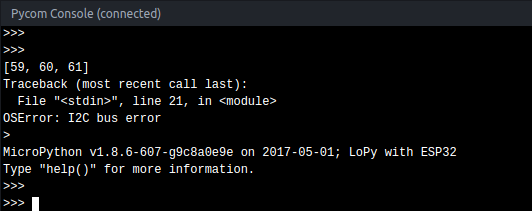
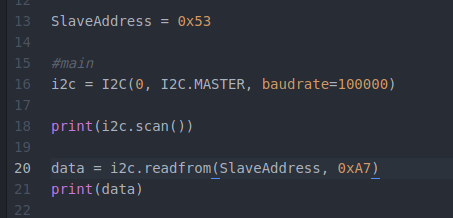
                  Very good point man! I've pulled up P23 on pycom to get 3.3v, then i plugged CS and SDO in there, and things got changed a lot.
                  0_1494417293941_upload-146110d1-9c50-4f53-b0d9-cb65b330b5c0

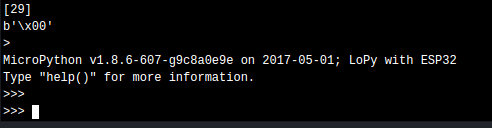
                  And i got this when running:

                  0_1494417319063_upload-d5491b18-5240-479c-be46-b806ea45183c

                  Much much better, no I2C Bus Error anymore.
                  Just to be sure i tried to pull down the pin P23 to verify if it stops working, and it does stop effectively.
                  Also another very good thing is that based on documentation, the slave port to start using is '1D', and now i'm effectively getting 29 (1D) while scaning ports, instead of 59,60,61.

                  <><><><><><><><><><><><><><><><><><><><><><><><><><><><><><>

                  0_1494417470711_upload-1a252864-b47f-4516-8e90-8e2130984be5 <><><><><><><><><><><><><><><><><><><><><><><><><><><><><><>

                  There's something that i dont understand from that document section. It says that the 0x1D followed by the R/W bit translates to 0X3A for write and 0x3B for read.... what does that mean?

                  robert-hhR 1 Reply Last reply Reply Quote 0
                  • robert-hhR Offline
                    robert-hh @pablocaviglia
                    last edited by

                    @pablocaviglia The I2C address is located in bits 1..7. Bit 0 is the R/W bit.
                    0x3a (58) is 0x1d (29) * 2, and 0x3b simply adds 1 in bit 0.

                    P 1 Reply Last reply Reply Quote 0
                    • P Offline
                      pablocaviglia @robert-hh
                      last edited by

                      @robert-hh So you say that the slave address would change from read to write.
                      If i want to read/write it would be:

                      i2c.readfrom_mem(0x3B, 0x0, 1)
                      i2c.writeto_mem(0x3A, 0x0, value)

                      Is that what you mean?

                      robert-hhR L 2 Replies Last reply Reply Quote 0
                      • robert-hhR Offline
                        robert-hh @pablocaviglia
                        last edited by robert-hh

                        @pablocaviglia No. It's just the way it has to be coded at the physical interface, not the API you are using. Setting the R/W bit is done by the underlying functions. All you have to do is use the address 29 in the call of python methods.

                        P 1 Reply Last reply Reply Quote 0
                        • L Offline
                          livius @pablocaviglia
                          last edited by

                          @pablocaviglia
                          to not starting from scratch try adapt this
                          https://github.com/alexismeneses/py-adxl345/blob/master/lib/adxl345/base.py

                          think about people first, then computers

                          P 1 Reply Last reply Reply Quote 1
                          • P Offline
                            pablocaviglia @robert-hh
                            last edited by

                            @robert-hh :+1:

                            1 Reply Last reply Reply Quote 1
                            • P Offline
                              pablocaviglia @livius
                              last edited by

                              @livius
                              I've checked that code, really nice!
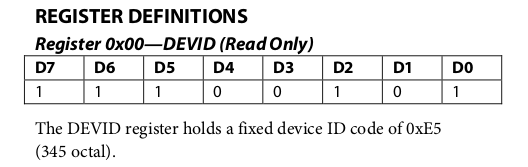
                              I'm not receiving the i2c bus error anymore, but based on docs, when querying the the DEVID registry i should get this:
                              0_1494429732216_upload-6ccf28b7-12b5-46a2-9911-a3d16f775972

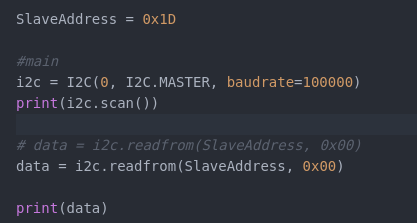
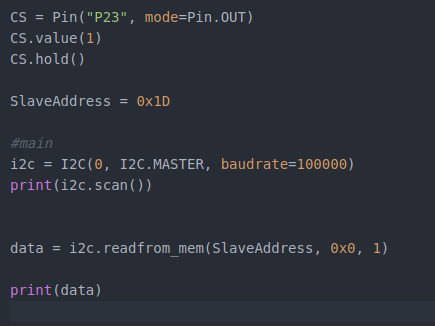
                              My code does this:
                              0_1494429760886_upload-8fc5d034-dac6-44b6-b937-d560865dc5bf

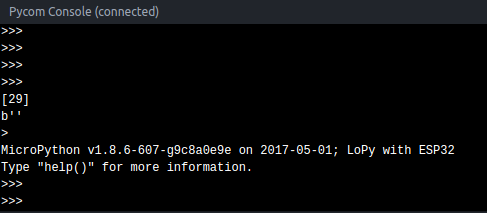
                              And i got this:

                              0_1494429775086_upload-315fda75-be65-4c03-82e3-93d294e22b3e

                              PD: By the way, how do i earn reputation points in this forum? I can only send 1 message each 10 minutes... boring!

                              1 Reply Last reply Reply Quote 2
                              • L Offline
                                livius @pablocaviglia
                                last edited by

                                @pablocaviglia
                                try this instead

                                data = i2c.readfrom_mem(SlaveAddress, 0x00, 1)
                                

                                think about people first, then computers

                                P 1 Reply Last reply Reply Quote 0
                                • P Offline
                                  pablocaviglia @livius
                                  last edited by

                                  @livius said in I2C accelerometer model MMA7455:

                                  data = i2c.readfrom_mem(SlaveAddress, 0x00, 1)

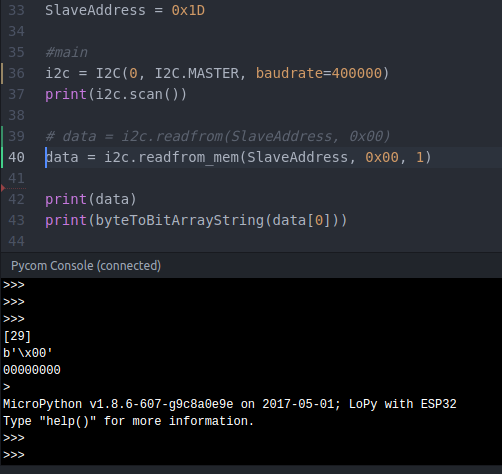
                                  Well... at least something changed!
                                  0_1494434698826_upload-1a5aab5e-1c1b-4e15-ac31-447f2d581053

                                  The 0000000 at the end is the way i found to show the byte in binary string. Btw is this way correct to do that ?

                                  def byteToBitArrayString(rcv):
                                  bitArrayStr = "1" if rcv&0 != 0 else "0"
                                  bitArrayStr += "1" if rcv&1 != 0 else "0"
                                  bitArrayStr += "1" if rcv&2 != 0 else "0"
                                  bitArrayStr += "1" if rcv&3 != 0 else "0"
                                  bitArrayStr += "1" if rcv&4 != 0 else "0"
                                  bitArrayStr += "1" if rcv&5 != 0 else "0"
                                  bitArrayStr += "1" if rcv&6 != 0 else "0"
                                  bitArrayStr += "1" if rcv&7 != 0 else "0"
                                  return bitArrayStr

                                  L 1 Reply Last reply Reply Quote 0
                                  • L Offline
                                    livius @pablocaviglia
                                    last edited by

                                    @pablocaviglia
                                    for bin formatthing use:

                                    >>> bin(5)
                                    '0b101'
                                    >>> "{0:b}".format(5)
                                    '101'
                                    >>>
                                    

                                    to see more in memory

                                    data = i2c.readfrom_mem(SlaveAddress, 0x00, 5) #increase value to 5 bytes from memory
                                    

                                    and look what you get

                                    think about people first, then computers

                                    P 1 Reply Last reply Reply Quote 1
                                    • P Offline
                                      pablocaviglia @livius
                                      last edited by

                                      @livius said in I2C accelerometer model MMA7455:

                                      "{0:b}".format(5)

                                      Uhhh good, looks much better than my awful function :D jajaja, sorry for breaking your eyes but didnt know that

                                      1 Reply Last reply Reply Quote 0
                                      • P Offline
                                        pablocaviglia
                                        last edited by

                                        @jmarcelino @livius @robert-hh
                                        Hey all, thx a lot for helping me this last days with this driver. This is the code i have until now... it's a shame that i didn't make it, but i think that i could have broken the sensor when i plugged CS to 5v instead of 3V3.
                                        I think i will buy another one, that will take some weeks until it gets to Uruguay :P

                                        Anyway, this is the code we've made until now, maybe it's useful for someone else. It's not throwing the ugly i2c bus error anymore, but the device id registry is returning always zero, and that's bad... not sure if the device is broken or what, but comparing this code with the implementation @livius has referenced, and with other implementations i found on google for other languages, it looks like the retrieval of the device id is the first action almost everyone does, so... i dont know.


                                        from machine import I2C
                                        from machine import Pin
                                        from machine import Timer
                                        import time

                                        def DelayUs(us):
                                        Timer.sleep_us(us)

                                        #i2c slave address
                                        SLAVE_ADDRESS = 0x1D

                                        #registers
                                        REG_POWER_CTL = 0x2D
                                        REG_BW_RATE = 0x2C

                                        #connected to SDO and CS of MMA7455
                                        CS = Pin("P23", mode=Pin.OUT)
                                        CS.value(1)
                                        CS.hold()

                                        DelayUs(1000)

                                        #main
                                        i2c = I2C(0, I2C.MASTER, baudrate=100000)
                                        print(i2c.scan())

                                        def setPowerCtrl(measure, wake_up=0, sleep=0, auto_sleep=0, link=0):
                                        power_ctl = wake_up & 0x03
                                        if sleep:
                                        power_ctl |= 0x04
                                        if measure:
                                        power_ctl |= 0x08
                                        if auto_sleep:
                                        power_ctl |= 0x10
                                        if link:
                                        power_ctl |= 0x20
                                        i2c.writeto_mem(SLAVE_ADDRESS, REG_POWER_CTL, bytes([power_ctl]))

                                        #*****************************
                                        #******* main logic **********
                                        #*****************************
                                        data = i2c.readfrom_mem(SLAVE_ADDRESS, 0x00, 1)
                                        print("DEVID: " + str(bin(data[0])))

                                        #set power characteristics
                                        setPowerCtrl(1, wake_up=0, sleep=0, auto_sleep=0, link=0)


                                        1 Reply Last reply Reply Quote 0

                                        Hello! It looks like you're interested in this conversation, but you don't have an account yet.

                                        Getting fed up of having to scroll through the same posts each visit? When you register for an account, you'll always come back to exactly where you were before, and choose to be notified of new replies (either via email, or push notification). You'll also be able to save bookmarks and upvote posts to show your appreciation to other community members.

                                        With your input, this post could be even better 💗

                                        Register Login
                                        • 1
                                        • 2
                                        • 2 / 2
                                        • First post
                                          Last post

                                        Pycom on Twitter

                                        Pycom