• i2c error numbers

    Issues & Bugs i2c bus error pytrack
    3
    0 Votes
    3 Posts
    428 Views
    C
    Thanks. I assume that I run into one of the ESP32 bugs related to memory problems with multicore or reading multiple times the same address. But therefore it is strange that the returning value is always 6. As long as it fails mainly on initilazing pytrack and WDT helps, I am fine. I will be happy. if the *Py can be configured so that ctrl-c stops the watchdog or sets wait time to max.
  • 0 Votes
    6 Posts
    932 Views
    M
    @robert-hh Thanks, I'll try that.
  • I2C bus error pytrack read_battery_voltage()

    LoPy i2c bus error
    2
    0 Votes
    2 Posts
    484 Views
    A
    @chvl I have the same issue with bus errors on battery read so I use a 'try' 'except' to catch the error and I limit my battery check to something reasonable - like every 10 minutes eg: batt_check_interval = 600 # check the battery voltage every 10 minutes def readBattery(): global vBatt global last_batt_check global batt_check_interval if(utime.time() - last_batt_check > batt_check_interval): try: vBatt = pytrack.read_battery_voltage() # keep track of time since last battery check last_batt_check = utime.time() print ('Battery read: ' + str(vBatt)) if (vBatt < lowBatt): # do more here print ('Battery voltage: LOW') except Exception as e: print ('Battery read: ERROR') return return
  • GPy with BNO055 - I2C bus error

    Discussion accelerometer gpy i2c bus error
    9
    0 Votes
    9 Posts
    2k Views
    M
    @sprasad said in GPy with BNO055 - I2C bus error: I2C(0, I2C.MASTER, baudrate=1000, pins=(Pin.exp_board.G15, Pin.exp_board.G16)) > ``` Expansion board G15 and G16 are P8 and P9. P8 is the SD_Data, but You don't use the SD card, the P9 on expansion board is the "led" pin. Try removing the led jumper "enable led signal" on expansion board to disable it.
  • 0 Votes
    2 Posts
    869 Views
    sebS
    Once the GPS module goes into standby the i2c stops working, you can no longer wake it up via i2c, all you can do is a reset via the pytracks deep sleep function.
  • LoPy and custom PCB with L76-L GPS module

    LoPy lopy gps quectel i2c i2c bus error
    11
    0 Votes
    11 Posts
    2k Views
    B
    @seb No luck with pull up resistors. There is also garbage when connected on P22/P21. PyTrack connected to the same pins with the same settings goes smooth. While connecting our L76-L there is no response on I2C ;-( only garbage response for i2c.scan(). Maybe you reconfigure L76-L chip through UART after mounting ? Will try to connect oscilloscope and/or logic analyzer
  • Reading BNO055

    WiPy 2&3 bno055 i2c i2c bus error
    13
    0 Votes
    13 Posts
    3k Views
    B
    @incognico said in Reading BNO055: Maybe try adding some lower value pullup resistors. From the FAQ page of your device BNO055 FAQ #4 "Depending on your system setup, you might need to adjust the pullups on the SCL and SDA lines to be a bit stronger. The BNO055 has very tight timing requirements on the I2C bus, requiring short setup and rise times on the signals. By default the breakout board has 10K pullups, which might be too weak on some setups." I had a similar problem. I'm not sure if it's been fixed or not, because I haven't tested it lately. Anyway, it had to do with I2C Clock Stretching. For me the solution was to set the I2C baud rate as low as it would go and work my way up until i found the fastest value that worked. Maybe give that a try, if you haven't already. =)
  • Pytrack and LoPy4 - I2C bus error

    LoPy lopy4 i2c i2c bus error pytrack firmware
    8
    4
    0 Votes
    8 Posts
    2k Views
    sebS
    address 0x08 in the PIC microcontroller on the Pytrack/sense so it is supposed to be there. When I tested this out on a LoPy4 with the latest firmware and a Pytrack with the latest firmware it worked fine the first time. So are you completely unable to talk to the PIC without errors?
  • I2C Bus Error

    LoPy lopy i2c bus error
    11
    0 Votes
    11 Posts
    4k Views
    D
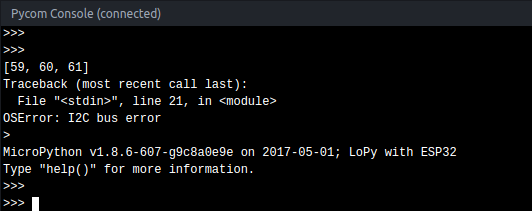
    @livius Thanks, that is now working. I am getting [] while everything is working, and it seems to say "None" just before a "Board not detected" error. No change on anything when receiving an I2C bus error message. @ledbelly2142 what do you mean by checking the pins? I've gone as far as removing the LoPy from the Pytrack and having a look haha, but it looks like normal pins to me. Hope everyone had a good Christmas and New Years
  • 0 Votes
    1 Posts
    810 Views
    No one has replied
  • 0 Votes
    5 Posts
    2k Views
    T
    By the way, one error which presists is, that I get a lot of false interrupts especially during wifi activity. The only workaround I found was to check in the isr if the pin really is low.. Not sure if this is an electrical problem or an sw problem...
  • 2 Votes
    4 Posts
    2k Views
    M
    @gertjanvanhethof odd, I had to change a few things: import for LIS2HH12 was in lower but file is upper "acc = LIS2HH12()" - was getting an error that it didn't want any parameter so I emptied that and it's working now I didn't need to change the pins. This is with WiPy 2.0. Odd, looking thru the documentation, the pins for I2C don't match between the pysense and any of the boards. Anyway, it's working for me on 9 and 10. - EDIT - Wondering if it's taken care of in the library now instead. I just commented out the line and it still works. Edit again - yes, looking in the libraries, it's actually set there which makes more sense anyway. Below is working fine: from machine import I2C from LIS2HH12 import LIS2HH12 import time acc = LIS2HH12() while True: print('----------------------------------') print('X, Y, Z:', acc.read()) print('Roll:', acc.roll()) print('Pitch:', acc.pitch()) print('Yaw:', acc.yaw()) time.sleep(1)
  • SiPy and BME280

    SiPy bme280 sipy i2c i2c bus error
    6
    0 Votes
    6 Posts
    2k Views
    A
    @robert-hh said in SiPy and BME280: i2c = I2C(0, I2C.MASTER, pins=(Pin("G9"), Pin("G10"))) Thank you soooo much, correct syntax for me is: i2c = I2C(0, I2C.MASTER, pins=("G9", "G10")) and thanks @bucknall for the library ;)
  • 1 Votes
    25 Posts
    11k Views
    P
    @jmarcelino @livius @robert-hh Hey all, thx a lot for helping me this last days with this driver. This is the code i have until now... it's a shame that i didn't make it, but i think that i could have broken the sensor when i plugged CS to 5v instead of 3V3. I think i will buy another one, that will take some weeks until it gets to Uruguay :P Anyway, this is the code we've made until now, maybe it's useful for someone else. It's not throwing the ugly i2c bus error anymore, but the device id registry is returning always zero, and that's bad... not sure if the device is broken or what, but comparing this code with the implementation @livius has referenced, and with other implementations i found on google for other languages, it looks like the retrieval of the device id is the first action almost everyone does, so... i dont know. from machine import I2C from machine import Pin from machine import Timer import time def DelayUs(us): Timer.sleep_us(us) #i2c slave address SLAVE_ADDRESS = 0x1D #registers REG_POWER_CTL = 0x2D REG_BW_RATE = 0x2C #connected to SDO and CS of MMA7455 CS = Pin("P23", mode=Pin.OUT) CS.value(1) CS.hold() DelayUs(1000) #main i2c = I2C(0, I2C.MASTER, baudrate=100000) print(i2c.scan()) def setPowerCtrl(measure, wake_up=0, sleep=0, auto_sleep=0, link=0): power_ctl = wake_up & 0x03 if sleep: power_ctl |= 0x04 if measure: power_ctl |= 0x08 if auto_sleep: power_ctl |= 0x10 if link: power_ctl |= 0x20 i2c.writeto_mem(SLAVE_ADDRESS, REG_POWER_CTL, bytes([power_ctl])) #***************************** #******* main logic ********** #***************************** data = i2c.readfrom_mem(SLAVE_ADDRESS, 0x00, 1) print("DEVID: " + str(bin(data[0]))) #set power characteristics setPowerCtrl(1, wake_up=0, sleep=0, auto_sleep=0, link=0)