Welcome to the Pycom forum Forum
    • \[\[global:header.categories\]\]
    • \[\[global:header.recent\]\]
    • \[\[global:header.tags\]\]
    • \[\[global:header.popular\]\]
    • Login

    Explore Pybytes | Official Documentation | Report a Firmware Bug/Issue | GitHub

    LoPy stops detecting BLE advertisements

    Scheduled Pinned Locked Moved Issues & Bugs
    lopybluetoothblebeaconibeacon
    123 Posts 15 Posters 84.1k Views 14 Watching
    Loading More Posts
    • Oldest to Newest
    • Newest to Oldest
    • Most Votes
    Reply
    • Reply as topic
    Log in to reply
    This topic has been deleted. Only users with topic management privileges can see it.
    • A Offline
      alanm101 @jmarcelino
      last edited by

      @jmarcelino This hack is working for me so far. If I don't detect a BLE event within 10 seconds, I machine.reset().

      from network import Bluetooth
      import machine
      import time
      import binascii
      import gc
      
      beaconlist = ['d3e0f6cd4ca9','e9f1db4814ef']
      beaconevents = []
      timelastdata = time.time()
      
      def new_adv_event(event):
          global beaconlist, beaconevents, timelastdata
          if event.events() == Bluetooth.NEW_ADV_EVENT:
              anydata = True
              while anydata:
                  adv = bluetooth.get_adv()
                  if adv != None:
                      timelastdata = time.time()
                      devid = binascii.hexlify(adv[0]).decode('utf-8')
                      rssi = str(adv[3]*-1)
                      if devid in beaconlist:
                          if len(beaconevents) > 5:
                              beaconevents.pop(0)
                          beaconevents.append([devid, rssi])  
                  else:
                      anydata = False
      
      print('Starting BLE scan')
      bluetooth = Bluetooth()
      bluetooth.callback(trigger = Bluetooth.NEW_ADV_EVENT, handler = new_adv_event)
      bluetooth.init()
      bluetooth.start_scan(-1)
      
      cycles = 0
      p_in = machine.Pin('G17',machine.Pin.IN, pull=machine.Pin.PULL_UP)
      
      while True:
          if p_in() == 0:
              print('pin')
              bluetooth.stop_scan()
              break
      
          cycles += 1
          # Run garbage collector every 20 cycles.
          if cycles%20 == 0:
              gc.collect()
          # If no BLE event for 10 seconds, hard reset
          if time.time() - timelastdata > 10:
              machine.reset()
      
      D 1 Reply Last reply Reply Quote 0
      • D Offline
        duffo64 @alanm101
        last edited by duffo64

        @alanm101
        This is a small Arduino sketch on ESP32 Thing (Sparkfun) running without a glitch since this morning.
        Moreover, it's happily seeing even my EMBC02 beacons. So, should I presume that in the end it's a micropython issue ?
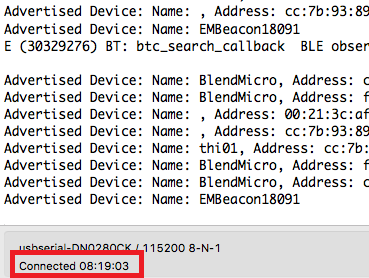
        0_1508254202656_uptime.png

        /Claudio

        D 1 Reply Last reply Reply Quote 1
        • D Offline
          duffo64 @duffo64
          last edited by duffo64

          Wow...

          On 1.10.1.b1 it's really, really, really better !

          ...did I say "really" ?

          /Claudio

          1 Reply Last reply Reply Quote 0
          • A Offline
            alanm101
            last edited by

            Thanks! I will test this weekend.

            D 1 Reply Last reply Reply Quote 0
            • D Offline
              duffo64 @alanm101
              last edited by duffo64

              @alanm101
              Despite my initial enthusiasm, I must say that the situation is slightly better using 1.10.2.b1. Basically I had two issues:

              • my beacons were not recognized, and this is solved
              • callback for advertisements stops firing after a while, but I know that the program is not frozen somewhere. This still unsolved

              The very same script is loaded on four WiPy 2.0, two WiPy 3.0 and one LoPy. Only one WiPy 3.0 survived after 18 hours. Sigh.

              /Claudio

              L 1 Reply Last reply Reply Quote 0
              • L Offline
                livius @duffo64
                last edited by

                @duffo64
                If it survived only on wipy3, this can point me that memory is here problem (only guess).
                Did you tried track it down and print gc.mem_free() in the code to see memory consumption?
                And do you have gc.collect() in the code or you have enabled automatic garbage collector?

                think about people first, then computers

                D 1 Reply Last reply Reply Quote 0
                • D Offline
                  duffo64 @livius
                  last edited by duffo64

                  @livius Hi,

                  Been there, done that. Unfortunately the culprit is not does not seem lack of memory (one WiPy3 still working, the other went south like all WiPy 2).
                  Anyway, I have collection in code as soon as a ble scan cycle ends.

                  /Claudio

                  D 1 Reply Last reply Reply Quote 0
                  • D Offline
                    duffo64 @duffo64
                    last edited by duffo64

                    Follow up:

                    I restarted both WiPy 3 giving them another chance without modifying code at all, and this time was better: more than 24 hours of normal behavior without reboots or BLE lockups. Still, BLE acts randomly in the long run.
                    BTW there is an IDF related issue on Github that could lead to weird results on the BLE side, as I read.

                    /Claudio

                    L 1 Reply Last reply Reply Quote 1
                    • L Offline
                      livius @duffo64
                      last edited by

                      @duffo64
                      good finding on github.
                      I saw this kind of assert on the forum.

                      think about people first, then computers

                      D 1 Reply Last reply Reply Quote 0
                      • D Offline
                        duffo64 @livius
                        last edited by duffo64

                        Yet another update:

                        This is a WiPy 1.0 with a not-so-recent firmware. Running since two weeks and counting. BLE, WiFi and MQTT are running without hiccups :D

                        {"ts":1517336479,"pmac":"24xxxxxxxxxx","up":1302802,"fw":"1.12.0.b1","ip":"192.168.0.111"}

                        /Claudio

                        J 1 Reply Last reply Reply Quote 0
                        • J Offline
                          jcaron @duffo64
                          last edited by

                          Hi @duffo64,

                          Can you clarify what was the change that made the difference in the end?

                          D 1 Reply Last reply Reply Quote 0
                          • D Offline
                            duffo64 @jcaron
                            last edited by

                            @jcaron Hi,

                            only the firmware :-)
                            I did not touch anything in my code because I was pretty sure it was working as is.
                            Now I am patiently waiting for the death (hope not) of two WiPy 3 with the very latest firmware that are running since 47 hours.

                            /Claudio

                            1 Reply Last reply Reply Quote 0
                            • T Offline
                              tudro
                              last edited by

                              Hello,

                              I'm having the same problems with reading the BT advs. My setup is a lopy with a deepsleep shield and 3 ruuvi tags that adv every second. The ruuvis are placed about 3 meters apart. The lopy is on 1.17.0.b1.

                              The process is: read BT data, go to deepsleep for 15 sec, wake up, read BT data, deepsleep, etc.

                              I have tried first with the BT example in the pycom docs. The scan was set to 20 seconds. In about 40% of the cases the lopy would not read the data from all the 3 ruuvis.

                              Then i tried with the deinit/init. Scan for 10 sec, if not all 3 ruuvis read, deinit/init, scan for another 10 sec. It reduced the loss to only about 10%.

                              In the real case the deepsleep interval will be 1 hour. So, if it doesn't read all the ruuvis, some results will be 2 hours apart or even more, depending on luck, i guess :)

                              Is there any plan or update on this problem?

                              Thank you

                              T 1 Reply Last reply Reply Quote 0
                              • T Offline
                                tudro @tudro
                                last edited by

                                My lopy4 arrived and i tested with it, too, although i was pretty sure it wouldn't make a difference. It didn't, it does the same thing.

                                I left my lopy running since yesterday noon and from 270 readings, 223 were correct. So that's around 17-18% loss.

                                1 Reply Last reply Reply Quote 0

                                Hello! It looks like you're interested in this conversation, but you don't have an account yet.

                                Getting fed up of having to scroll through the same posts each visit? When you register for an account, you'll always come back to exactly where you were before, and choose to be notified of new replies (either via email, or push notification). You'll also be able to save bookmarks and upvote posts to show your appreciation to other community members.

                                With your input, this post could be even better 💗

                                Register Login
                                • 1
                                • 2
                                • 3
                                • 4
                                • 5
                                • 6
                                • 7
                                • 5 / 7
                                • First post
                                  Last post

                                Pycom on Twitter

                                Pycom