Bluetooth services is not started
-
@nagarjuna-reddy
you removed it before loop but better here if you remove it from loop
only connect before (you have only one disconnect)think about people first, then computers
-
I have the exact same problem.
I am trying to connect two Wipys via bluetooth.
I get the connection on both sides.
But the programm frezzes with the line services = connection.services()Is this a bug or is it a problem with my code?
from network import Bluetooth import binascii bluetooth = Bluetooth() bluetooth.start_scan(-1) adv = None while True: adv = bluetooth.get_adv() if adv and bluetooth.resolve_adv_data(adv.data, Bluetooth.ADV_NAME_CMPL) == 'WiPy': if bluetooth.isscanning(): bluetooth.stop_scan() try: connection = bluetooth.connect(adv.mac) while not connection.isconnected(): pass if connection.isconnected(): print("Connected to device with addr = {}".format( binascii.hexlify( adv.mac ) ) ) print("and name = ", bluetooth.resolve_adv_data(adv.data, Bluetooth.ADV_NAME_CMPL)) break except: # start scanning again bluetooth.start_scan(-1) continue print('test1') services = connection.services() print('test2') -
@livius
i cannot understand livius so edit my code and send to me please........ -
i only mean that you must connect only once and for one connect you need one disconnect
below "fixed" code in this matter
i have also added small sleep time - look if it help somehow with your problem (i do not tested this self)def ble_reciever(self): bluetooth = Bluetooth() print("Scanning 4509 client") bluetooth.start_scan(-1) while True: adv = bluetooth.get_adv() #if adv: #print("Found adv in 4509 client") # try to get the complete name #print(bluetooth.resolve_adv_data(adv.data, Bluetooth.ADV_NAME_CMPL)) # try to get the manufacturer data (Apple's iBeacon data is sent here) #print(binascii.hexlify(bluetooth.resolve_adv_data(adv.data, Bluetooth.ADV_MANUFACTURER_DATA))) if adv and bluetooth.resolve_adv_data(adv.data, Bluetooth.ADV_NAME_CMPL) == 'LoPy': print("connecting rr Lopy in 4509 client") conn = bluetooth.connect(adv.mac) print("connected Lopy in 4509 client") services = conn.services() for service in services: time.sleep(0.050) print("start reading..") if type(service.uuid()) == bytes: print('Reading chars from service = {}'.format(service.uuid())) else: print('Reading chars from service = %x' % service.uuid()) chars = service.characteristics() for char in chars: if (char.properties() & Bluetooth.PROP_READ): print('char {} value = {}'.format(char.uuid(), char.read())) conn.disconnect() print("Disconnected 4509 client") break else: time.sleep(0.050) def ble_transmitter(self): print('Advertising Bluetooth...') bluetooth = Bluetooth() bluetooth.set_advertisement(name='LoPy', service_uuid=b'1234567890abcdef') def conn_cb (bt_o): events = bt_o.events() if events & Bluetooth.CLIENT_CONNECTED: print("Client connected") elif events & Bluetooth.CLIENT_DISCONNECTED: print("Client disconnected") bluetooth.callback(trigger=Bluetooth.CLIENT_CONNECTED | Bluetooth.CLIENT_DISCONNECTED, handler=conn_cb) bluetooth.advertise(True) #Create service and characteristic srv1 = bluetooth.service(uuid='0000000000000000', isprimary=True) chr1 = srv1.characteristic(uuid='0000000000000002', properties=Bluetooth.PROP_INDICATE | Bluetooth.PROP_BROADCAST | Bluetooth.PROP_READ | Bluetooth.PROP_NOTIFY, value='InitialValue') #Create callback for read events on the characteristic def char1_cb(chr): events = chr.events() if events & Bluetooth.CHAR_READ_EVENT : print('Bluetooth.CHAR_READ_EVENT') chr1.callback(trigger=Bluetooth.CHAR_READ_EVENT, handler=char1_cb) #Update the characteristic value very few seconds #i=0 while True: val = 'Value{}'.format(i) print('Setting value: {}'.format(val)) chr1.value(val) #Set the characteristic value - should trigger notification is a client has registered for notifications time.sleep(3) i+=1think about people first, then computers
-
@livius said in Bluetooth services is not started:
Bluetooth.CHAR_READ_EVENT
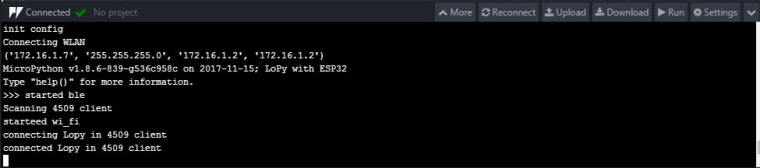
transmitter run in one LoPy and reciever LoPy is connected but not get any values from transmitter side i want to
bolded texti=0
while True:
val = 'Value{}'.format(i)
print('Setting value: {}'.format(val))
chr1.value(val) #Set the characteristic value - should trigger notification is a client has registered for notifications
time.sleep(3)
i+=1
this is a transmitter side loop this loop values is getting to once connected reciever is recieved that for loop values but in their not iam getting so please solve my problem -
@nagarjuna-reddy
livius you already edit my code but same problem i am getting what iam expected output is sending before message so please check and replay it arguently. -
ivius
you already edit my code but same problem i am getting what iam expected output is sending before message so please check and replay it urgently. -
hi i am also have a same problem if you success to execute please send your code to me.
Thank you -
@nagarjuna-reddy said in Bluetooth services is not started:
conn.disconnect()
Hi,
put a sleep time before service loop, that will make the services to read. I tried and it is working.time.sleep(1.0);
print('sleep resumed', conn.services())
services = conn.services()
print(services)
for service in conn.services(): -

Hello! It looks like you're interested in this conversation, but you don't have an account yet.
Getting fed up of having to scroll through the same posts each visit? When you register for an account, you'll always come back to exactly where you were before, and choose to be notified of new replies (either via email, or push notification). You'll also be able to save bookmarks and upvote posts to show your appreciation to other community members.
With your input, this post could be even better 💗
Register Login