VL6180X on LoPy I2C sensor driver
-
There were some examples of micropython 'drivers' (google it) for the VL6180X, I ran in circles for a while chasing what others did in examples. This gets nested in the subtle differences between CircuitPython and MicroPython as well as what works on the ESP8266 vs the ESP32... and of course what is (or is not) implemented in the LoPy firmware. The VL6180X uses 16 bit registers with Big endion. This means read/write requests must be specified with 'big', I think the default it 'little'. Also, the addrsize is set to 16, the default is set to 8. I think on the ESP8266 the addrsize is not enabled, so they have to use other ways to get reg values.
Read and write for this sensor look something like this:def myWrite16(self, register, regValue): """ write a byte to specified 16 bit register """ return self.i2c.writeto_mem(self._address, register, bytearray([regValue]), addrsize=16), 'big' def myRead16(self, register): """read 1 bit from 16 byte register""" # i2c.readfrom_mem(0x29, 0x0016, 1, addrsize=16) value = int.from_bytes( self.i2c.readfrom_mem(self._address, register, 1, addrsize=16), 'big' ) return value & 0xFFFFSo others can find this and benefit, here is an example for the VL6180 for the LoPy.
Adafruit had a really good driver conversion tutorial located HERE. The only issue I had was it uses CircuitPython instead of MicroPython, they used some libraries we can't use withe the LoPy.
To get the range import the lib I2C and other plus:
import ustruct
import struct
import time
from machine import I2C

# i2c = I2C(0, I2C.MASTER, baudrate=100000, pins=('P8', 'P9'))

class Sensor:
    def __init__(self, i2c, address=0x29):
        self.i2c = i2c
        self._address = address
        self.default_settings()
        self.init()

    def myWrite16(self, register, regValue):
        """ write a byte to specified 16 bit register """
        return self.i2c.writeto_mem(self._address, register, bytearray([regValue]), addrsize=16), 'big'

    def myRead16(self, register):
        """read 1 bit from 16 byte register"""
        # i2c.readfrom_mem(0x29, 0x0016, 1, addrsize=16)
        value = int.from_bytes(
            self.i2c.readfrom_mem(self._address, register, 1, addrsize=16),
            'big'
        )
        return value & 0xFFFF

    def init(self):
        if self.myRead16(0x0016) != 1:
            raise RuntimeError("Failure reset")

        # Recommended setup from the datasheet

        self.myWrite16(0x0207, 0x01)
        self.myWrite16(0x0208, 0x01)
        self.myWrite16(0x0096, 0x00)
        self.myWrite16(0x0097, 0xfd)
        self.myWrite16(0x00e3, 0x00)
        self.myWrite16(0x00e4, 0x04)
        self.myWrite16(0x00e5, 0x02)
        self.myWrite16(0x00e6, 0x01)
        self.myWrite16(0x00e7, 0x03)
        self.myWrite16(0x00f5, 0x02)
        self.myWrite16(0x00d9, 0x05)
        self.myWrite16(0x00db, 0xce)
        self.myWrite16(0x00dc, 0x03)
        self.myWrite16(0x00dd, 0xf8)
        self.myWrite16(0x009f, 0x00)
        self.myWrite16(0x00a3, 0x3c)
        self.myWrite16(0x00b7, 0x00)
        self.myWrite16(0x00bb, 0x3c)
        self.myWrite16(0x00b2, 0x09)
        self.myWrite16(0x00ca, 0x09)
        self.myWrite16(0x0198, 0x01)
        self.myWrite16(0x01b0, 0x17)
        self.myWrite16(0x01ad, 0x00)
        self.myWrite16(0x00ff, 0x05)
        self.myWrite16(0x0100, 0x05)
        self.myWrite16(0x0199, 0x05)
        self.myWrite16(0x01a6, 0x1b)
        self.myWrite16(0x01ac, 0x3e)
        self.myWrite16(0x01a7, 0x1f)
        self.myWrite16(0x0030, 0x00)

#  writeReg System__Fresh_OUT_OF_Reset
        # self.myWrite16(0x0016, 0x00),

    def default_settings(self):
        # Enables polling for ‘New Sample ready’ when measurement completes
        self.myWrite16(0x0011, 0x10)
        self.myWrite16(0x010A, 0x30)  # Set Avg sample period
        self.myWrite16(0x003f, 0x46)  # Set the ALS gain
        self.myWrite16(0x0031, 0xFF)  # Set auto calibration period
        # (Max = 255)/(OFF = 0)
        self.myWrite16(0x0040, 0x63)  # Set ALS integration time to 100ms
        # perform a single temperature calibration
        self.myWrite16(0x002E, 0x01)

        # Optional settings from datasheet
        self.myWrite16(0x001B, 0x09)  # Set default ranging inter-measurement
        # period to 100ms
        self.myWrite16(0x003E, 0x0A)  # Set default ALS inter-measurement
        # period to 100ms
        self.myWrite16(0x0014, 0x24)  # Configures interrupt on ‘New Sample
        # Ready threshold event’

        # Additional settings defaults from community
        self.myWrite16(0x001C, 0x32)  # Max convergence time
        self.myWrite16(0x002D, 0x10 | 0x01)  # Range check enables
        self.myWrite16(0x0022, 0x7B)  # Eraly coinvergence estimate
        self.myWrite16(0x0120, 0x01)  # Firmware result scaler

    def identify(self):
        """Retrieve identification information of the sensor."""
        return {
            'model': self.myRead16(0x0000),
            'revision': (self.myRead16(0x0001), self.myRead16(0x0002)),
            'module_revision': (self.myRead16(0x0003),
                                self.myRead16(0x0004)),
            'date': self.myRead16(0x006),
            'time': self.myRead16(0x008),
        }

    def address(self, address=None):
        """Change the I2C address of the sensor."""
        if address is None:
            return self._address
        if not 8 <= address <= 127:
            raise ValueError("Wrong address")
        self._set_reg8(0x0212, address)
        self._address = address

    def range(self):
        """Measure the distance in millimeters. Takes 0.01s."""
        self.myWrite16(0x0018, 0x01)  # Sysrange start
        time.sleep(0.01)
        return self.myRead16(0x0062)  # Result range valueimport ustruct
You can import the above as a lib and in the main.py add the import statements plus something like:
vl61b = vl6180xb.Sensor(i2c) print("Getting sensor range...") print(vl61b.range()) -
@ledbelly2142 Hey, thank you for your detailed post. I've got it running with a SiPy, but there is a problem: I can only measure ranges up to approx. 70cm. Above this value I just get "255". With an arduino the range was much higher (with the same sensor module and same conditions). Does anyone know how to solve this? Thanks!
-
@kdehmelt I'm not sure what the max distance the 6180X will read. The only thing I saw in the datasheet was:
Ranging beyond 100 mm is possible with certain target reflectances and ambient conditions but not
guaranteed.Anything over 10cm is gold, apparently. In this presentation by ST HERE the 6180X ranges up to 40cm and the 53L0X ranges up to 2 meters. The 53L0X has 3 API modes, one of which is long distance, it may be a better option for you.
-
By the way, both the 6180X and 53L0X will be significantly influenced by whatever optical window you 'may' use to cover the IR emitter. There are application notes from ST HERE
Basically it says no more tan 2mm including air gap. -
@ledbelly2142 Thank you! You are right, that's written in the datasheet. But I just tried it again with a simple Arduino Nano and under same conditions: The range goes up to 200mm and above. There is no cover material used and the reflection works on wood, paper, plastic and even my hand. It also doesnt matter, if VIN is 3.3V or 5V.
Unfortunately, the 53L0X is not an option, because I need the range less than 50mm as well.Could it be, that there is a problem with micropython reading 32bit registers? I tried to read all 'data relevant' registers with the SiPy, but especially convergence time and signal count is zero at all time (32bit register).
With 0x66 register adress I get values above 10cm, but it is inverted and not linear. Application Note from page 9 onwards. -
@ledbelly2142 ...for your interest: I've got it working now constantly with the SiPy, 20cm are no problem. If anyone is interested I can post the code.
-
@kdehmelt What did you do different? Please paste code.
-
@ledbelly2142 I transcribed the python lib from Adafruit into Micropython mixed with your version. Not quite sure where the difference is but I think the read_range routine must be exactly like this. Also an error handling is included.
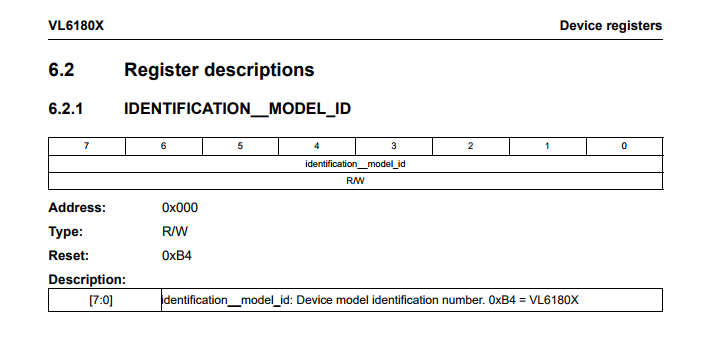
This could be the lib:VL6180X_DEFAULT_I2C_ADDR = 0x29 VL6180X_REG_IDENTIFICATION_MODEL_ID = 0x000 VL6180X_REG_SYSTEM_INTERRUPT_CONFIG = 0x014 VL6180X_REG_SYSTEM_INTERRUPT_CLEAR = 0x015 VL6180X_REG_SYSTEM_FRESH_OUT_OF_RESET = 0x016 VL6180X_REG_SYSRANGE_START = 0x018 VL6180X_REG_SYSALS_START = 0x038 VL6180X_REG_SYSALS_ANALOGUE_GAIN = 0x03F VL6180X_REG_SYSALS_INTEGRATION_PERIOD_HI = 0x040 VL6180X_REG_SYSALS_INTEGRATION_PERIOD_LO = 0x041 VL6180X_REG_RESULT_ALS_VAL = 0x050 VL6180X_REG_RESULT_RANGE_VAL = 0x062 VL6180X_REG_RESULT_RANGE_STATUS = 0x04d VL6180X_REG_RESULT_INTERRUPT_STATUS_GPIO = 0x04f VL6180X_ALS_GAIN_1 = 0x06 VL6180X_ALS_GAIN_1_25 = 0x05 VL6180X_ALS_GAIN_1_67 = 0x04 VL6180X_ALS_GAIN_2_5 = 0x03 VL6180X_ALS_GAIN_5 = 0x02 VL6180X_ALS_GAIN_10 = 0x01 VL6180X_ALS_GAIN_20 = 0x00 VL6180X_ALS_GAIN_40 = 0x07 VL6180X_ERROR_NONE = 0 VL6180X_ERROR_SYSERR_1 = 1 VL6180X_ERROR_SYSERR_5 = 5 VL6180X_ERROR_ECEFAIL = 6 VL6180X_ERROR_NOCONVERGE = 7 VL6180X_ERROR_RANGEIGNORE = 8 VL6180X_ERROR_SNR = 11 VL6180X_ERROR_RAWUFLOW = 12 VL6180X_ERROR_RAWOFLOW = 13 VL6180X_ERROR_RANGEUFLOW = 14 VL6180X_ERROR_RANGEOFLOW = 15 class VL6180X(object): def __init__(self, i2c): self.i2c = i2c self._addr = VL6180X_DEFAULT_I2C_ADDR self.setup() def write_byte_data(self, register, regValue): return self.i2c.writeto_mem(self._addr, register, bytearray([regValue]), addrsize=16), 'big' def read_byte_data(self, register): """read 1 bit from 16 byte register""" value = int.from_bytes( self.i2c.readfrom_mem(self._addr, register, 1, addrsize=16), 'big' ) return value def setup(self): if self.read_byte_data(VL6180X_REG_IDENTIFICATION_MODEL_ID) != 0xB4: return False self.load_settings() self.write_byte_data(VL6180X_REG_SYSTEM_FRESH_OUT_OF_RESET, 0x00) return True def load_settings(self): # private settings from page 24 of app note self.write_byte_data(0x0207, 0x01) self.write_byte_data(0x0208, 0x01) self.write_byte_data(0x0097, 0xfd) self.write_byte_data(0x0096, 0x00) self.write_byte_data(0x00e3, 0x00) self.write_byte_data(0x00e4, 0x04) self.write_byte_data(0x00e5, 0x02) self.write_byte_data(0x00e6, 0x01) self.write_byte_data(0x00e7, 0x03) self.write_byte_data(0x00f5, 0x02) self.write_byte_data(0x00d9, 0x05) self.write_byte_data(0x00db, 0xce) self.write_byte_data(0x00dc, 0x03) self.write_byte_data(0x00dd, 0xf8) self.write_byte_data(0x009f, 0x00) self.write_byte_data(0x00a3, 0x3c) self.write_byte_data(0x00b7, 0x00) self.write_byte_data(0x00bb, 0x3c) self.write_byte_data(0x00b2, 0x09) self.write_byte_data(0x00ca, 0x09) self.write_byte_data(0x0198, 0x01) self.write_byte_data(0x01b0, 0x17) self.write_byte_data(0x01ad, 0x00) self.write_byte_data(0x00ff, 0x05) self.write_byte_data(0x0100, 0x05) self.write_byte_data(0x0199, 0x05) self.write_byte_data(0x01a6, 0x1b) self.write_byte_data(0x01ac, 0x3e) self.write_byte_data(0x01a7, 0x1f) self.write_byte_data(0x0030, 0x00) # Recommended : Public registers - See data sheet for more detail self.write_byte_data(0x0011, 0x10) # Enables polling for 'New Sample ready' when measurement # completes self.write_byte_data(0x010a, 0x30) # Set the averaging sample period (compromise between # lower noise and increased execution time) self.write_byte_data(0x003f, 0x46) # Sets the light and dark gain (upper nibble). Dark gain # should not be changed. self.write_byte_data(0x0031, 0xFF) # sets the # of range measurements after which auto # calibration of system is performed self.write_byte_data(0x0040, 0x63) # Set ALS integration time to 100ms self.write_byte_data(0x002e, 0x01) # perform a single temperature calibration of the ranging # sensor # Optional: Public registers - See data sheet for more detail self.write_byte_data(0x001b, 0x09) # Set default ranging inter-measurement period to 100ms self.write_byte_data(0x003e, 0x31) # Set default ALS inter-measurement period to 500ms self.write_byte_data(0x0014, 0x24) # Configures interrupt on 'New Sample Ready threshold event' def read_range(self): # wait for device to be ready for range measurement while not (self.read_byte_data(VL6180X_REG_RESULT_RANGE_STATUS) & 0x01): pass # Start a range measurement self.write_byte_data(VL6180X_REG_SYSRANGE_START, 0x01) # Poll until bit 2 is set while not (self.read_byte_data(VL6180X_REG_RESULT_INTERRUPT_STATUS_GPIO) & 0x04): pass # read range in mm range = self.read_byte_data(VL6180X_REG_RESULT_RANGE_VAL) # clear interrupt self.write_byte_data(VL6180X_REG_SYSTEM_INTERRUPT_CLEAR, 0x07) return range def read_range_status(self): return self.read_byte_data(VL6180X_REG_RESULT_RANGE_STATUS) >> 4 def read_lux(self, gain): reg = self.read_byte_data(VL6180X_REG_SYSTEM_INTERRUPT_CONFIG) reg &= ~0x38 reg |= (0x4 << 3) # IRQ on ALS ready self.write_byte_data(VL6180X_REG_SYSTEM_INTERRUPT_CONFIG, reg) # 100 ms integration period self.write_byte_data(VL6180X_REG_SYSALS_INTEGRATION_PERIOD_HI, 0) self.write_byte_data(VL6180X_REG_SYSALS_INTEGRATION_PERIOD_LO, 100) # analog gain if gain > VL6180X_ALS_GAIN_40: gain = VL6180X_ALS_GAIN_40 self.write_byte_data(VL6180X_REG_SYSALS_ANALOGUE_GAIN, 0x40 | gain) # start ALS self.write_byte_data(VL6180X_REG_SYSALS_START, 0x1) # Poll until "New Sample Ready threshold event" is set while 4 != ((self.read_byte_data(VL6180X_REG_RESULT_INTERRUPT_STATUS_GPIO) >> 3) & 0x7): pass # read lux! lux = self.read_word_data(VL6180X_REG_RESULT_ALS_VAL) # clear interrupt self.write_byte_data(VL6180X_REG_SYSTEM_INTERRUPT_CLEAR, 0x07) lux *= 0.32 # calibrated count/lux if gain == VL6180X_ALS_GAIN_1: pass elif gain == VL6180X_ALS_GAIN_1_25: lux /= 1.25 elif gain == VL6180X_ALS_GAIN_1_67: lux /= 1.76 elif gain == VL6180X_ALS_GAIN_2_5: lux /= 2.5 elif gain == VL6180X_ALS_GAIN_5: lux /= 5 elif gain == VL6180X_ALS_GAIN_10: lux /= 10 elif gain == VL6180X_ALS_GAIN_20: lux /= 20 elif gain == VL6180X_ALS_GAIN_40: lux /= 20 lux *= 100 lux /= 100 # integration time in ms return luxand the main.py:
from machine import I2C import vl6180xb i2c = I2C(0, I2C.MASTER, baudrate=100000, pins=('P11', 'P10')) vl61b = vl6180xb.VL6180X(i2c) print("Getting sensor range...") print(vl61b.read_range()) -
@kdehmelt Looks good, did you get the read_lux to work?
-
@ledbelly2142 Yes, it seems to work. Maybe it must be calibrated.
You just have to change:
lux = self.read_word_data(VL6180X_REG_RESULT_ALS_VAL)
to
lux = self.read_byte_data(VL6180X_REG_RESULT_ALS_VAL)
and call it with read_lux(gain in hex). -
@kdehmelt Hello
Do you have a working code for VL53L0x to rich 200 cm ?
if yes ...could you share?Thank you !
H -
@chumelnicu Hey, you can look it up here (scroll down) or try to transcribe the Adafruit library

Hello! It looks like you're interested in this conversation, but you don't have an account yet.
Getting fed up of having to scroll through the same posts each visit? When you register for an account, you'll always come back to exactly where you were before, and choose to be notified of new replies (either via email, or push notification). You'll also be able to save bookmarks and upvote posts to show your appreciation to other community members.
With your input, this post could be even better 💗
Register Login