Pycom Upgrade Tool Issue
-
Hello - I have been having trouble upgrading the firmware on my LoPy.
I have been following the steps in the upgrade utility for windows and doubled checked it with with the manual. https://docs.pycom.io/chapter/gettingstarted/installation/firmwaretool.html
However the upgrade tool gets stuck here
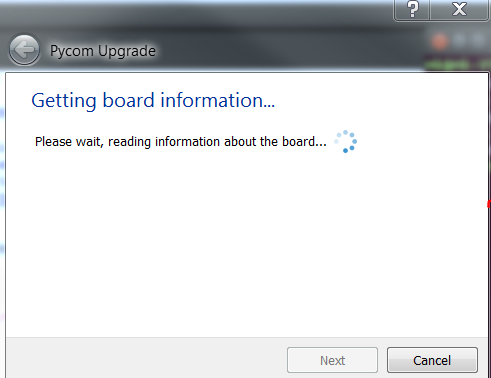
I would appreciate if someone could shed some light on this issue.
Thank you!
-
@az311 Are you sure you
a) connected G23 (=P2) to GND and pushed reset then?
b) specified the right COM port? -
@az311 are you able to connect to the REPL with same setup beside the short for the update?
In this case check, if no other pins are set to GND or 3.3V. Update failed for my device when pluged in a pytrack with pin 10 connected to 3.3V. Worked fine without this connection.
-
a) Yes, 2nd pin and 4th pin on the other side and are clearly labeled GND and G23
b) Yes, I'm using the same COM port with TeraTerm to run a script... So it must be the right one -
@az311 Cited:
"If you check with Putty on Windows you should see a message "Waiting for download" if P2/G23 is pulled to GND while you press the reset button on the module.If you see that message, close Putty and the firmware update tool should detect the device."
If you do not see this "Waiting for download", then check the connection again. -
Issue is resolved. The utility is not compatible with windows 7. I tired it with windows 10 and it worked fine.
-
@az311 said in Pycom Upgrade Tool Issue:
Issue is resolved. The utility is not compatible with windows 7. I tired it with windows 10 and it worked fine.
disagree. Runs on my Win7 machine. But it need sometimes a few tries to get a connection. Maybe something else was wrong or you had simply more luck on your Win7 machine.
The updater consits of some python scripts using Qt for the GUI. So there shall be no difference between Win 7 and 10. The USB driver may the only difference, but I think it will be the same. Maybe the combination of drivers and USB hardware works on your Win10 machine better than on your Win7.
Pycom changed the USB stack on *Pys a lot. Maybe you upgraded from an older firmware version which had some problems establishing connections. The USB stack of 1.10.2 works way better compared against 1.8.x
-
@crumble There is no USB stack on the *Py devices. They are connecetd by UART0 of the ESP32 through an USB/UART bridge chip. The driver for that chip used to make problems, but mostly on OS X.

Hello! It looks like you're interested in this conversation, but you don't have an account yet.
Getting fed up of having to scroll through the same posts each visit? When you register for an account, you'll always come back to exactly where you were before, and choose to be notified of new replies (either via email, or push notification). You'll also be able to save bookmarks and upvote posts to show your appreciation to other community members.
With your input, this post could be even better 💗
Register Login