Pytrack + FiPy setup on Win7
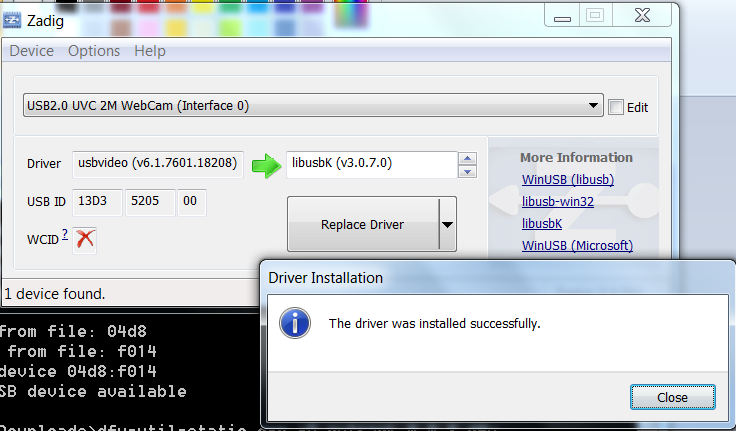
-
Hi, I'm on a Mac and I to experience the "no FiPy device is detected when I connect the Pytack+Fipy via USB to the computer" ...
I've done the installation procedure before on a LoPy+PyTrack combination ... and it worked like a charm.
But when I try now with the FiPy+PyTrack combo ... I don't get a usb-serial connection ...
The only way I can get it work is:
1st) Connect only the PyTrack to usb
2nd) I get a usb-serial device
3rd) I then plug the FiPy device into the PyTrack ...
4th) Now I see the FiPy boot up and run the "pycom.heartbeat(True)" ... Led blinking blue ...To re-cap, if I try to power on the FiPy+Track (combo) via usb, it doesn't even boot up (no Led blinking blue) ...
-
I also just tried it with a JST LiPo Battery (FiPy+PyTrack+Lipo-Battery combo) ... and now it boots up and I get a usb-serial...
So the odd thing is, why does it try to boot-up in DFU-mode when FiPy+PyTrack is connected?
But it boots as usb-serial-device when only the Pytrack is connected? or when adding a battery, FiPy+PyTrack+Battery ...
I find this a little bit of strange logic ... and It's a little bit odd ... and I do think there is some sort of issue in the Firmware code (pytrack_0.0.8.dfu)
Where might one find the Firmware code (pytrack_0.0.8.dfu)? ... so one might have an investigative look at boot sequence of the PyTrack :-)
-
Could you try measuring
Vinand3.3of the FiPy + Pytrack combo that does not show the USB serial? We have had a few customers facing issues that are fixed by using a high quality usb cable that can deliver enough current, the fact it works with a battery suggests this could be the issue.As for the code for the pytrack/pysense, at the current time we have not made this open source. This may be something that happens in the future but I can't give any more details at this time.
-
A) FiPy+PyTrack+LiPo-Battery (Not-Attached-to-USB3.0)
Vin = 4.09~4.10 V
3V3 = 3.32 VB) PyTrack+USB-Serial-device (Attached-to—USB3.0)
- same port as A)
Vin = 4.85 V
3V3 = 0.23 V
C) PyTrack+USB-Serial-device (Attached-to—USB3.0) + Hotswap-in-FiPy
- same port as A) & B)
Vin = 4.55 V
3V3 = 3.32 V
D) PyTrack+FiPy+NO-USB-Serial-device (Attached-to—USB3.0)
-
same port as A) & B) & C)
-
same combo as C)
-
Just unplugged USB from PyTrack, and re-attached it…
Vin = 1.69~2.51 V
3V3 = 1.15~1.91 V -
Also, worth nothing is that if my hand slips with the measuring probes, I get it to “boot-up” by accidentally shorting GROUND & 3V3, and I get a USB-Serial-Devices on my computer [ergo like A), B) & C) …] …
-
And then, I get the same Vin & 3V3 as C)
-
Which makes me conclude that you’ve guys have a Firmware issue!!! … and not a “bad usb-cable” or “bad usb-port” … etc etc.
-
For some reason, in the boot-sequence of the PyTrack Firmware, it choose not to boot-up FiPy and enable USB-Serial …
-
And, again, it’s odd that I can short GROUND & 3V3 with my measuring probes, and then it boots up FiPy and enables USB-Serial…
- same port as A)

Hello! It looks like you're interested in this conversation, but you don't have an account yet.
Getting fed up of having to scroll through the same posts each visit? When you register for an account, you'll always come back to exactly where you were before, and choose to be notified of new replies (either via email, or push notification). You'll also be able to save bookmarks and upvote posts to show your appreciation to other community members.
With your input, this post could be even better 💗
Register Login