Welcome to the Pycom forum Forum
    • \[\[global:header.categories\]\]
    • \[\[global:header.recent\]\]
    • \[\[global:header.tags\]\]
    • \[\[global:header.popular\]\]
    • Login

    Explore Pybytes | Official Documentation | Report a Firmware Bug/Issue | GitHub

    Lopy with pytrack, how connect/use GPS?

    Scheduled Pinned Locked Moved LoPy
    gpslopypytrack
    76 Posts 5 Posters 33.6k Views 5 Watching
    Loading More Posts
    • Oldest to Newest
    • Newest to Oldest
    • Most Votes
    Reply
    • Reply as topic
    Log in to reply
    This topic has been deleted. Only users with topic management privileges can see it.
    • Z Offline
      zceld @livius
      last edited by zceld

      @livius

      I also tried to execute this code and it gives me an error.
      but I do not know what it means?
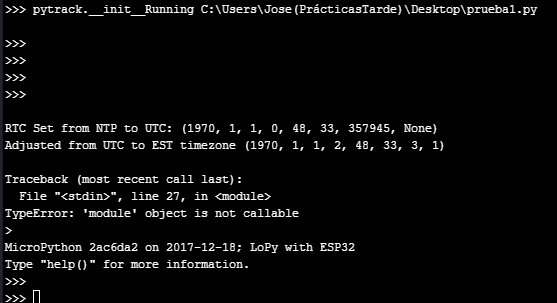
      0_1516037077867_Captura5.PNG

      code: prueba1.py

      0_1516035880488_prueba1.py

      L 1 Reply Last reply Reply Quote 0
      • L Offline
        livius @zceld
        last edited by

        @zceld

        That has already cost me a lot since I did not let myself use the shutil library

        I do not use it self then can not talking if it is easy ;-)

        but - try to use modified file L76GNSS.py
        https://github.com/pycom/pycom-libraries/pull/43/files

        I also tried to execute this code and it gives me an error.
        but I do not know what it means?

        change
        from L76GNSS import L76GNSS to import L76GNSS
        and also
        l76 = L76GNSS(py, timeout=30) to l76 = L76GNSS.L76GNSS(py, timeout=30)

        think about people first, then computers

        1 Reply Last reply Reply Quote 0
        • C Offline
          crumble @zceld
          last edited by

          @zceld is the micropythnGPS library written for the pytrack? First lines of your screenshot let me assume that it was written for another board. So if you cannot simply configure it to use the pytrack, you have to rewrite some parts.

          You should not use L76Gnss.py and this MicropythonGPS library at the same time. They may not interfere each other, but compiling them will need some RAM, which you need for other stuff.

          Z 1 Reply Last reply Reply Quote 0
          • sebS Offline
            seb
            last edited by

            You also now have to include the pycoproc.py file from here: https://github.com/pycom/pycom-libraries/tree/master/lib/pycoproc

            This contains common code between the pysense and pytrack and was refactored into its own library to reduce duplication of code.

            1 Reply Last reply Reply Quote 0
            • Z Offline
              zceld @crumble
              last edited by

              @crumble Hi, thanks for your recommendations. I really do not know how micropyGPS is for my chip which is a pycom Lopey 1.0 with the pytrack board. I am new in this world of plates. Then use both libraries I do not think it happens, because at the moment my procedure to prove it is having the board connected by USB to ATOM executing code like the one that I attached "micropyGPS" with the hope of obtaining coordinates. I have added in the directory '/ lib' the files L76GNSS.py, pycoproc.py and Pytrack.py. I understand that I complete the necessary libraries to get coordinates with the GPS chip, right? So now I would have to do a small program that connects with the GPS chip and get the coordinates of the location.

              0_1516113906139_microGPS.py

              1 Reply Last reply Reply Quote 0
              • Z Offline
                zceld
                last edited by

                @seb I have already added the file to the directori '/ lib' now I would need to know how to get the gps position using the libraries.

                1 Reply Last reply Reply Quote 0
                • Z Offline
                  zceld @livius
                  last edited by

                  @livius

                  Good afternoon, I followed your steps to the detail.

                  I have updated the pytrack.
                  I updated the pycom Lopy.
                  I have added the libraries within the directory '/ lib' as they are in this post:

                  https://github.com/pycom/pycom-libraries/tree/master/pytrack

                  Then the main file has not been modified because I run it from Atom connected by usb and execute it like this:
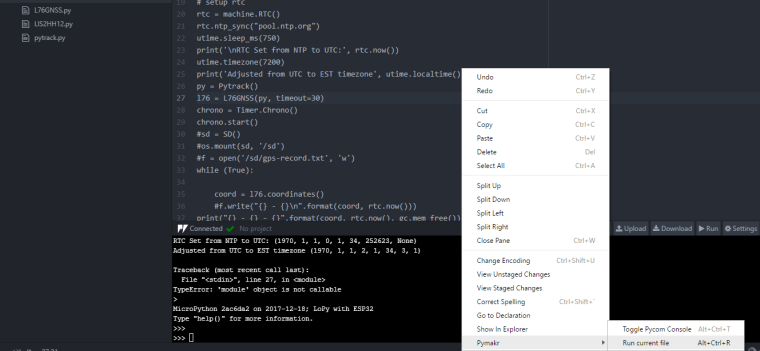
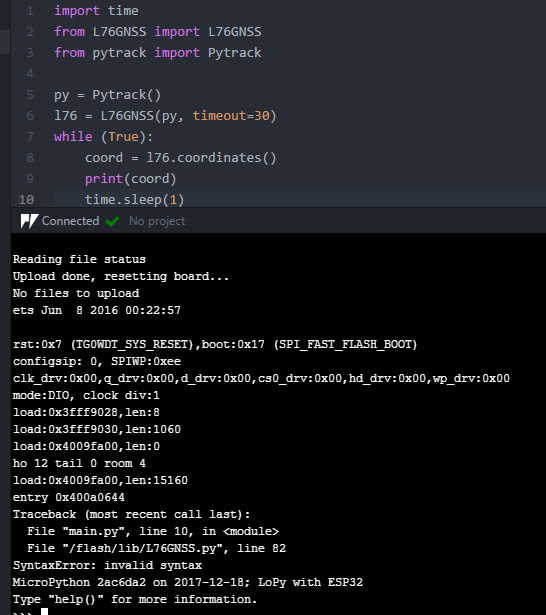
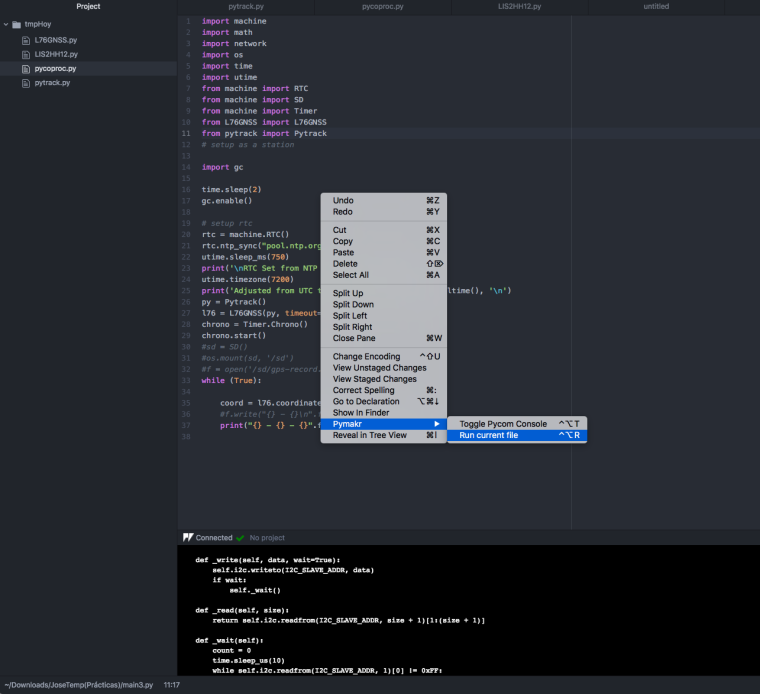
                  0_1516121214253_Captura.PNG

                  this main.py : 0_1516121243856_main1.py

                  The original is extracted from here:
                  https://github.com/pycom/pycom-libraries/blob/master/pytrack/main.py

                  but modifying the lines 8,10,11;

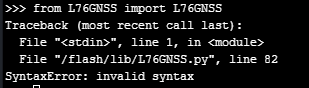
                  He always tells me the same thing:
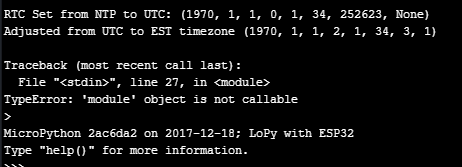
                  0_1516121390558_1.PNG

                  I run out of ideas to make it work. :-(

                  L 1 Reply Last reply Reply Quote 0
                  • sebS Offline
                    seb
                    last edited by

                    @zceld said in Lopy with pytrack, how connect/use GPS?:

                    https://github.com/pycom/pycom-libraries/blob/master/pytrack/main.py

                    Here is a simplified version of that main.py file, does this work for you:

                    import time
                    from L76GNSS import L76GNSS
                    from pytrack import Pytrack
                    
                    py = Pytrack()
                    l76 = L76GNSS(py, timeout=30)
                    while (True):
                        coord = l76.coordinates()
                        print(coord)
                        time.sleep(1)
                    
                    Z 1 Reply Last reply Reply Quote 0
                    • Z Offline
                      zceld @seb
                      last edited by

                      @seb

                      I'm sorry, but it does not work:
                      0_1516122707841_2.PNG

                      sebS 1 Reply Last reply Reply Quote 0
                      • L Offline
                        livius @zceld
                        last edited by

                        @zceld said in Lopy with pytrack, how connect/use GPS?:

                        but modifying the lines 8,10,11;

                        why do you modified those lines?
                        better change this:
                        https://github.com/pycom/pycom-libraries/pull/43/files

                        think about people first, then computers

                        Z 1 Reply Last reply Reply Quote 0
                        • Z Offline
                          zceld @livius
                          last edited by

                          @livius said in Lopy with pytrack, how connect/use GPS?:

                          why do you modified those lines?
                          better change this:

                          Just remove them for testing because with the original I get this another error:0_1516123767559_3.PNG

                          The suggested change is to add the 'if' no?
                          It would be like this the file I suppose:
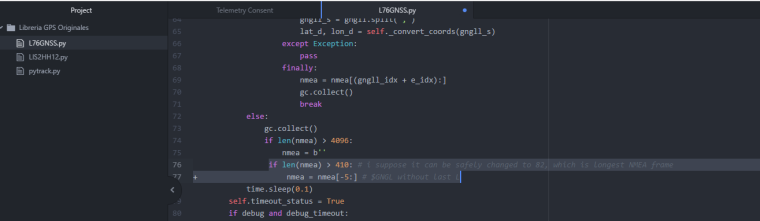
                          0_1516123958631_4.PNG

                          L 1 Reply Last reply Reply Quote 1
                          • sebS Offline
                            seb @zceld
                            last edited by

                            @zceld

                            That error means that there is something wrong with /flash/lib/L76GNSS.py, Can you please reformat your device by running the following in the REPL:

                            import os
                            os.mkfs('/flash')
                            

                            And then download a fresh copy of all the files from git to make sure they are not currupt, you should have:

                            main.py
                            lib/L76GNSS.py
                            lib/pytrack.py
                            lib/pycoproc.py

                            Z 1 Reply Last reply Reply Quote 0
                            • L Offline
                              livius @zceld
                              last edited by

                              @zceld
                              go to advice provided by @seb (remember that this clear your device flash completly)
                              and if you need to use microGPS.py
                              then you need to change line in L76GNSS.py

                               nmea += self._read().lstrip(b'\n\n').rstrip(b'\n\n')
                              

                              and feed microGPS object with chars from nmea e.g.

                              create first microGPS object somwhere in the file `L76GNSS.py` that it will be accessible (best is add it as property)
                              mgps = MicropyGPS()
                              .....
                              nmea = self._read().lstrip(b'\n\n').rstrip(b'\n\n')
                              for c in nmea:
                                 sentence = mgps.update(c)
                                 if sentence:
                                     do_something_here
                              

                              think about people first, then computers

                              1 Reply Last reply Reply Quote 0
                              • Z Offline
                                zceld @seb
                                last edited by

                                @seb
                                Hello again!

                                I followed your steps and used 'os.mkfs (' / flash ')'
                                I have copied again the codes of the page:
                                https://github.com/pycom/pycom-libraries/tree/master/pytrack/lib

                                From here I copied the three files and also the main.
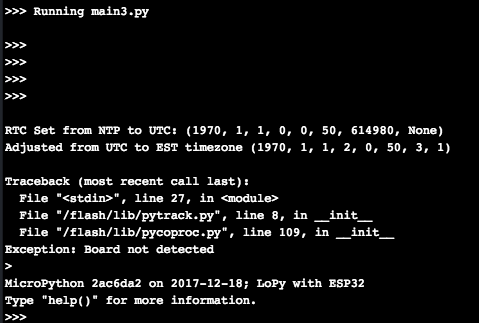
                                I tried to run and this error came out:
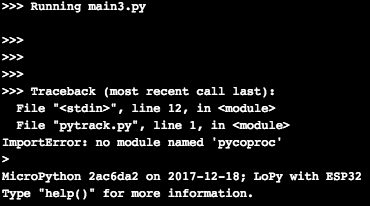
                                0_1516200697216_1.png

                                So I went to download that library to see if that solved that.
                                I copied it from here:
                                https://github.com/pycom/pycom-libraries/tree/master/lib/pycoproc

                                I have uploaded the library to the device and that problem seems to have
                                been solved.
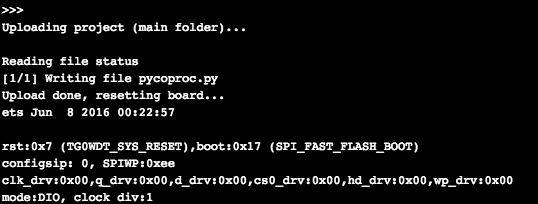
                                0_1516201140570_2.png
                                0_1516201148224_3.png

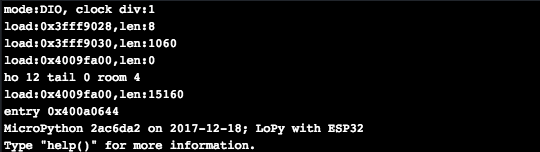
                                Then he stopped in the following:
                                0_1516201158381_4.png

                                There is something that I do not understand or that I do not do well, I do not think it is so difficult. Therefore I wanted to try to execute the code directly in the Atom console so following the example that you have put me:
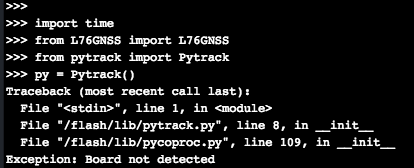
                                0_1516201404326_Captura de pantalla 2018-01-17 15.36.22.png
                                and neither.

                                So, I do not know what exactly each program is for. That is to say for example this file:
                                https://github.com/pycom/pycom-libraries/blob/master/pytrack/main.py

                                I understand that it serves to run from Atom and I print on screen the data obtained from the GPS module ?. It would be more or less what I'm looking for since what I need is for this plate to be carried by a vehicle and while it is on, keep the GPS position every 30 seconds.

                                For example, the microGPS file does not know what it is for. I was just testing everything I found to refer to the GPS to see if I could get data.

                                But I have to admit that I'm stuck. I do not know what I do wrong or what else to try.

                                1 Reply Last reply Reply Quote 1
                                • sebS Offline
                                  seb
                                  last edited by

                                  That error message means the library was not able to detect the Pytrack. Are you sure you have connected your module to your pytrack board properly, are all the pins pushed in fully? Have you updated the firmware on your Pytrack board to the latest available? (note: this is not the same as the firmware of the main pycom module)

                                  Z 1 Reply Last reply Reply Quote 0
                                  • Z Offline
                                    zceld @seb
                                    last edited by

                                    @seb

                                    Well, since you told me in the procedure to update it. Therefore I have the 'pytrack' and 'pycom' plate:
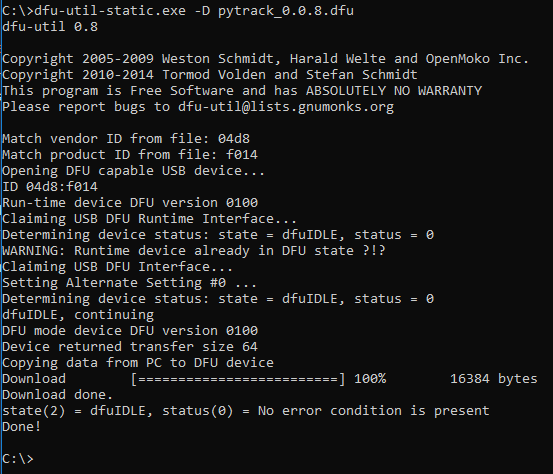
                                    0_1516203600020_Actualización firmware pytrack.PNG

                                    I understand that the board is well connected because I connect with it by the usb from pytrack to Atom and it responds to all commands os. , for example pycom.heartbeat (False) and the LED goes off. I also upload a short video and show you the directory listings.
                                    video/gif:
                                    https://imgur.com/a/eQl9h

                                    Directory:
                                    0_1516204228118_Captura de pantalla 2018-01-17 16.49.44.png

                                    Everything you need I'll show you to know or reach the solution.

                                    1 Reply Last reply Reply Quote 1
                                    • sebS Offline
                                      seb
                                      last edited by

                                      Hi,

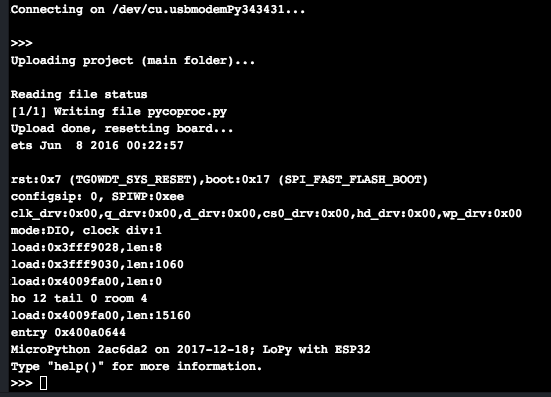
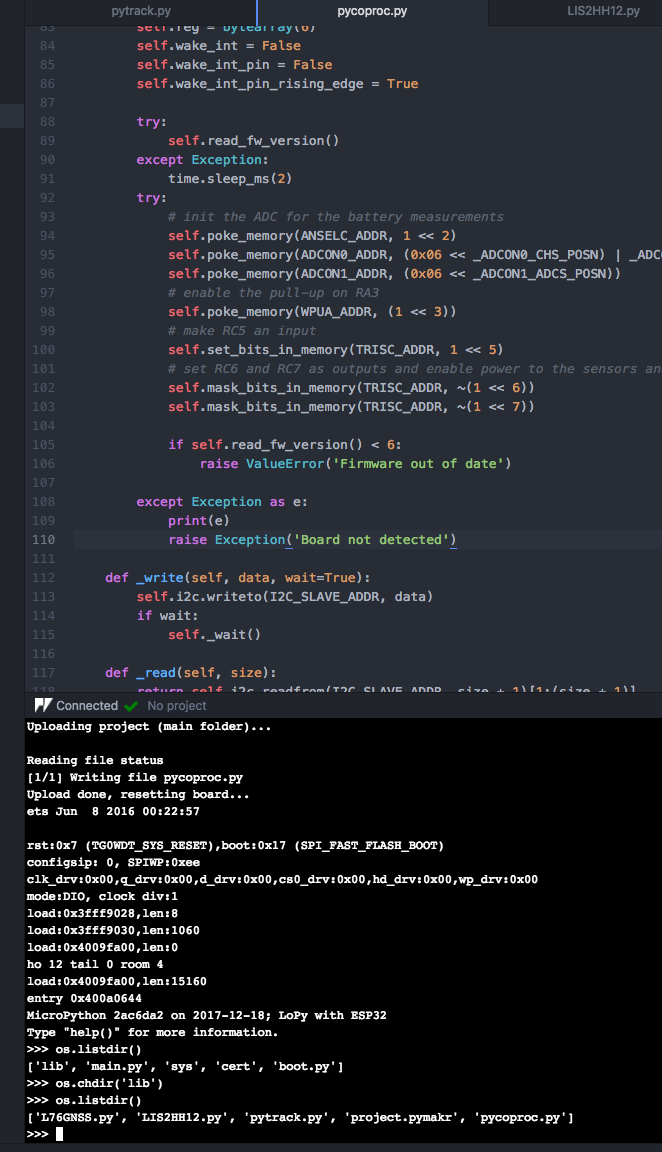
                                      Thanks for confirming all of that. To debug this further could you change the following two lines of code in pycoproc.py so we can see in more detail what error is occurring:

                                      108        except Exception:
                                      109            raise Exception('Board not detected')
                                      

                                      to

                                      108        except Exception as e:
                                      109            print(e)
                                      110            raise Exception('Board not detected')
                                      
                                      1 Reply Last reply Reply Quote 0
                                      • Z Offline
                                        zceld
                                        last edited by

                                        @seb

                                        ok, I added the line of code you indicated and updated the file on the board:0_1516205098806_Captura de pantalla 2018-01-17 17.00.48.png

                                        0_1516205130920_Captura de pantalla 2018-01-17 17.01.29.png
                                        0_1516205140663_Captura de pantalla 2018-01-17 17.02.09.png

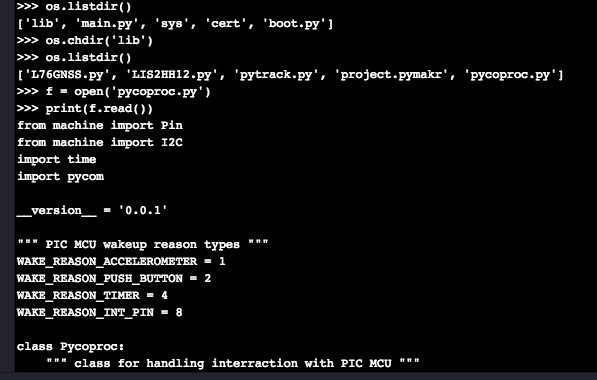
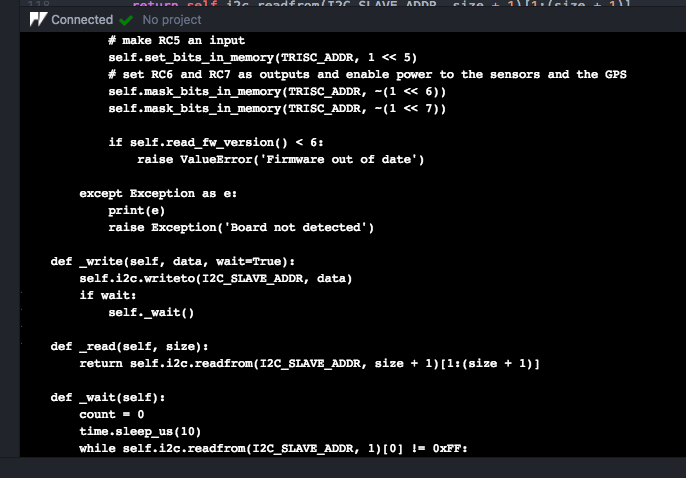
                                        I check that the lines of code are in the uploaded file:
                                        0_1516205219378_Captura de pantalla 2018-01-17 17.03.07.png

                                        0_1516205225492_Captura de pantalla 2018-01-17 17.03.22.png

                                        Bien, pues pruebo de nuevo a ejecutar el main.py:
                                        0_1516205362323_Captura de pantalla 2018-01-17 17.08.14.png

                                        Result:
                                        0_1516205390526_Captura de pantalla 2018-01-17 17.08.45.png

                                        1 Reply Last reply Reply Quote 1
                                        • sebS Offline
                                          seb
                                          last edited by

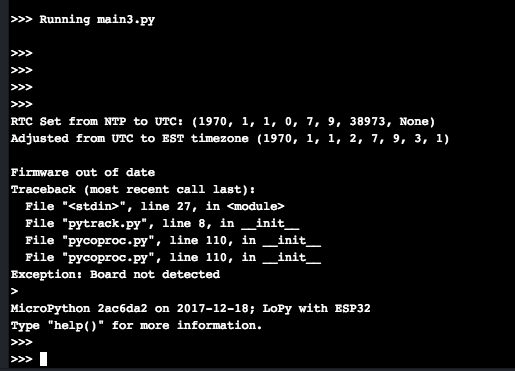
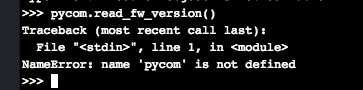
                                          Thats odd, its showing that the firmware version is outdated but you showed me the screenshot of you updating it. Can you please run the following in the REPL after the error:

                                          py.read_fw_version()
                                          

                                          and post back what it returns?

                                          Z 1 Reply Last reply Reply Quote 0
                                          • Z Offline
                                            zceld @seb
                                            last edited by

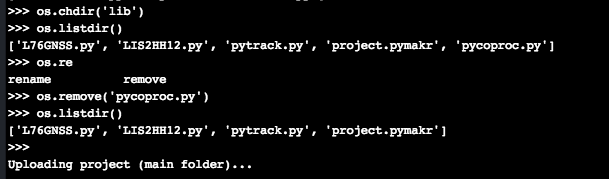
                                            @seb 0_1516206332736_Captura de pantalla 2018-01-17 17.25.13.png

                                            true !, according to the console and the screenshot I answered that it had been updated successfully. I will also do it again from this pc that is different. For trying, I lose nothing.

                                            1 Reply Last reply Reply Quote 1

                                            Hello! It looks like you're interested in this conversation, but you don't have an account yet.

                                            Getting fed up of having to scroll through the same posts each visit? When you register for an account, you'll always come back to exactly where you were before, and choose to be notified of new replies (either via email, or push notification). You'll also be able to save bookmarks and upvote posts to show your appreciation to other community members.

                                            With your input, this post could be even better 💗

                                            Register Login
                                            • 1
                                            • 2
                                            • 3
                                            • 4
                                            • 1 / 4
                                            • First post
                                              Last post

                                            Pycom on Twitter

                                            Pycom