Welcome to the Pycom forum Forum
    • \[\[global:header.categories\]\]
    • \[\[global:header.recent\]\]
    • \[\[global:header.tags\]\]
    • \[\[global:header.popular\]\]
    • Login

    Explore Pybytes | Official Documentation | Report a Firmware Bug/Issue | GitHub

    Not getting Sensor Readings in Pysense with FiPy Module

    Scheduled Pinned Locked Moved MicroPython
    fipyraspberry pipysensemicorpython
    79 Posts 6 Posters 28.0k Views 6 Watching
    Loading More Posts
    • Oldest to Newest
    • Newest to Oldest
    • Most Votes
    Reply
    • Reply as topic
    Log in to reply
    This topic has been deleted. Only users with topic management privileges can see it.
    • A Offline
      Archana Kadam @livius
      last edited by livius

      @livius
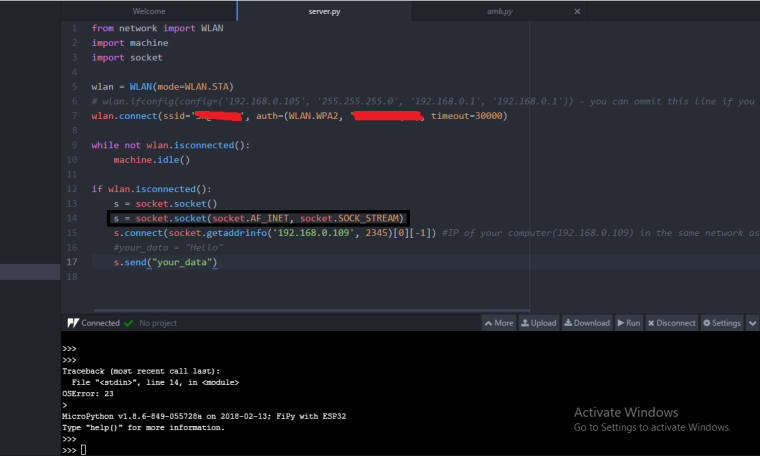
      We have successfully connected to the server by the given code, but we are getting an error in line number 14, im sending the screenshot please go through the file0_1521551509504_5596a1e4-c670-4266-b053-1b5c3d7b1205-image.png
      L 1 Reply Last reply Reply Quote 0
      • L Offline
        livius @Archana Kadam
        last edited by livius

        @archana-kadam
        remove line 13 s = socket.socket()

        P.S> i have blurred your password on the screenshot

        think about people first, then computers

        A 1 Reply Last reply Reply Quote 0
        • A Offline
          Archana Kadam @livius
          last edited by

          @livius
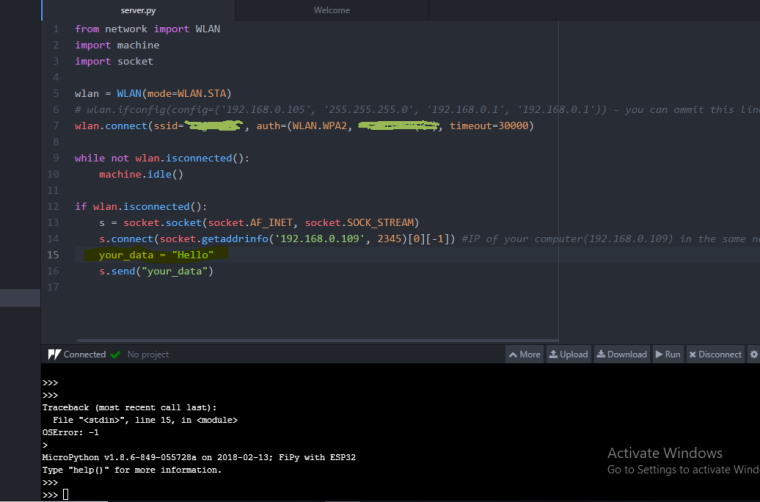
          I removed line 13 "s = socket.socket()" but also im getting an error in line number 15
          i,e #your_data = "hello"

          J 1 Reply Last reply Reply Quote 0
          • J Offline
            jcaron @Archana Kadam
            last edited by

            @archana-kadam and the error is...?

            A 2 Replies Last reply Reply Quote 0
            • A Offline
              Archana Kadam @jcaron
              last edited by

              @jcaron
              OSError -1

              1 Reply Last reply Reply Quote 0
              • A Offline
                Archana Kadam @jcaron
                last edited by

                @jcaron
                I will attach the screenshot and i have highlighted the error line.
                0_1521613824395_Capture2.PNG

                J 1 Reply Last reply Reply Quote 0
                • J Offline
                  jcaron @Archana Kadam
                  last edited by

                  @archana-kadam are you sure you correctly re-uploaded the modified file?

                  A 1 Reply Last reply Reply Quote 0
                  • A Offline
                    Archana Kadam @jcaron
                    last edited by

                    @jcaron
                    Yes i re-uploaded the modified file.
                    Earlier it was #your_data = "Hello"

                    L 1 Reply Last reply Reply Quote 0
                    • L Offline
                      livius @Archana Kadam
                      last edited by

                      @archana-kadam
                      Quite impossible on line 15 where you store text (connect to your device by ftp and look like your file really is)

                      but do you have host 192.168.0.109 and especially do you have something which listen on that host on port 2345?

                      think about people first, then computers

                      A 1 Reply Last reply Reply Quote 0
                      • A Offline
                        Archana Kadam @livius
                        last edited by livius

                        @livius
                        Here is code which im using to connect to the server.

                        from network import WLAN
                        import machine
                        import socket
                        
                        wlan = WLAN(mode=WLAN.STA)
                        # wlan.ifconfig(config=('192.168.0.105', '255.255.255.0', '192.168.0.1', '192.168.0.1')) - you can ommit this line if you need to connect by DHCP
                        wlan.connect(ssid='ssid...', auth=(WLAN.WPA2, 'passs...'), timeout=30000)
                        
                        while not wlan.isconnected():
                        	machine.idle()
                        
                        if wlan.isconnected():
                        	s = socket.socket(socket.AF_INET, socket.SOCK_STREAM)
                        	s.connect(socket.getaddrinfo('192.168.0.109', 80)[0][-1]) #IP of your computer(192.168.0.109) in the same network as your Fipy and port(80) of socket in listen mode on your computer
                        	#your_data = "Hello"
                        	s.send("your_data")
                        

                        Yes i have the same IP address and the port is 80. By using the same code im getting an error is
                        Traceback (most recent call last):
                        File "<stdin>", line 15, in <module>
                        OSError: -1

                        L 1 Reply Last reply Reply Quote 0
                        • L Offline
                          livius @Archana Kadam
                          last edited by livius

                          @archana-kadam said in Not getting Sensor Readings in Pysense with FiPy Module:

                          strange because line 15 is just comment line

                          add this lines before socket connect

                          print(str(socket.getaddrinfo('192.168.0.109', 80)))
                          print(str(socket.getaddrinfo('192.168.0.109', 80)[0][-1]))
                          

                          and put result here

                          think about people first, then computers

                          A 1 Reply Last reply Reply Quote 0
                          • A Offline
                            Archana Kadam @livius
                            last edited by alejandro

                            @livius said in Not getting Sensor Readings in Pysense with FiPy Module:
                            from network import WLAN
                            import machine
                            import socket
                            wlan = WLAN(mode=WLAN.STA)

                            wlan.ifconfig(config=('192.168.0.109', '255.255.255.0', '192.168.0.1', '192.168.0.1')) - you can ommit this line if you need to connect by DHCP

                            wlan.connect(ssid=‘SK@unifi’, auth=(WLAN.WPA2, '********'), timeout=30000)

                            while not wlan.isconnected():
                            machine.idle()

                            if wlan.isconnected():
                            s = socket.socket(socket.AF_INET, socket.SOCK_STREAM)
                            print(str(socket.getaddrinfo('192.168.0.109', 80)))
                            print(str(socket.getaddrinfo('192.168.0.109', 80)[0][-1])) #IP of your computer(192.168.0.109) in the same network as your Fipy and port(80) of socket in listen mode on your computer
                            #your_data = "Hello"
                            s.send("your_data")
                            Here is and code and we are getting the same errors i,e

                            Traceback (most recent call last):
                            File "<stdin>", line 14
                            IndentationError: unindent does not match any outer indentation level

                            MicroPython v1.8.6-849-055728a on 2018-02-13; FiPy with ESP32
                            Type "help()" for more information.

                            L 1 Reply Last reply Reply Quote 0
                            • L Offline
                              livius @Archana Kadam
                              last edited by

                              @archana-kadam said in Not getting Sensor Readings in Pysense with FiPy Module:

                              IndentationError: unindent does not match any outer indentation level

                              check if you do not mix indentation as tab and space

                              PS. use forum formating http://commonmark.org/help/ e.g. triple ``` around the code

                              think about people first, then computers

                              A 2 Replies Last reply Reply Quote 0
                              • A Offline
                                Archana Kadam @livius
                                last edited by Archana Kadam

                                @livius
                                We are trying to run the LoRa Nano Gateway code provided in the pycom documentation. We are using three PC's and three fipy boards. In one pc we are running the Gateway.py , second we are running Node.py and in third pc we are running the RawLora.py codes. But we are getting an error in Gateway.py code in Line 26 i,e buffer too small. Is the procedure we are doing is correct? Please reply us soon as possible.
                                Thank You

                                1 Reply Last reply Reply Quote 0
                                • A Offline
                                  Archana Kadam @livius
                                  last edited by

                                  @livius
                                  We are trying to run the LoRa Nano Gateway code provided in the pycom documentation. We are using three PC's and three fipy boards. In one pc we are running the Gateway.py , second we are running Node.py and in third pc we are running the RawLora.py codes. But we are getting an error in Gateway.py code in Line 26 i,e buffer too small. Is the procedure we are doing is correct? Please reply us soon as possible. Its urgent
                                  Thank You

                                  L 1 Reply Last reply Reply Quote 0
                                  • L Offline
                                    livius @Archana Kadam
                                    last edited by

                                    @archana-kadam
                                    WIthout the code i can only gues that you try to send to big data throught Lora. It is very limited. Check how much data is really sending.

                                    think about people first, then computers

                                    A 1 Reply Last reply Reply Quote 0
                                    • A Offline
                                      Archana Kadam @livius
                                      last edited by

                                      @livius
                                      I used the codes from provided pycom documentation. Here are the links of the code
                                      https://docs.pycom.io/chapter/tutorials/lora/lora-mac-nano-gateway.html
                                      https://docs.pycom.io/chapter/tutorials/lora/lora-mac.html

                                      L 1 Reply Last reply Reply Quote 0
                                      • L Offline
                                        livius @Archana Kadam
                                        last edited by

                                        @archana-kadam
                                        in documentation gateway line 26 is empty...
                                        You have some modification which i do no see ;-)

                                        think about people first, then computers

                                        A 1 Reply Last reply Reply Quote 0
                                        • A Offline
                                          Archana Kadam @livius
                                          last edited by

                                          @livius
                                          recv_pkg_len = recv_pkg[1] is this declaration correct in gateway code.

                                          J 1 Reply Last reply Reply Quote 0
                                          • J Offline
                                            jcaron @Archana Kadam
                                            last edited by

                                            @archana-kadam Please share the actual code you are using, no sense trying to guess what you have in your code. In the gateway code as posted in the docs, I don't think it's possible to get that error on that line with the test just before it...

                                            Please make sure your code is properly formatted when you post it (add ``` on a line before and after the code).

                                            A 2 Replies Last reply Reply Quote 0

                                            Hello! It looks like you're interested in this conversation, but you don't have an account yet.

                                            Getting fed up of having to scroll through the same posts each visit? When you register for an account, you'll always come back to exactly where you were before, and choose to be notified of new replies (either via email, or push notification). You'll also be able to save bookmarks and upvote posts to show your appreciation to other community members.

                                            With your input, this post could be even better 💗

                                            Register Login
                                            • 1
                                            • 2
                                            • 3
                                            • 4
                                            • 2 / 4
                                            • First post
                                              Last post

                                            Pycom on Twitter

                                            Pycom