Welcome to the Pycom forum Forum
    • \[\[global:header.categories\]\]
    • \[\[global:header.recent\]\]
    • \[\[global:header.tags\]\]
    • \[\[global:header.popular\]\]
    • Login
    1. Home
    2. Tags
    3. micorpython

    Explore Pybytes | Official Documentation | Report a Firmware Bug/Issue | GitHub

    Log in to post

    • All categories
    • A

      Is there a good tool for converting C code to microPython code?

      Watching Ignoring Scheduled Pinned Locked Moved Discussion micorpython python code
      1
      0 Votes
      1 Posts
      18 Views
      No one has replied
    • A

      How to drive an LCD screen with micropython?

      Watching Ignoring Scheduled Pinned Locked Moved MicroPython lcd micorpython raspberry pi arduino
      12
      0 Votes
      12 Posts
      97 Views
      robert-hhR
      @jack-austin This is the wrong forum for Raspberry Pi Pico and MicroPython. Better go to https://forum.micropython.org/
    • T

      LTE init error

      Watching Ignoring Scheduled Pinned Locked Moved Discussion lte micorpython fipy
      4
      0 Votes
      4 Posts
      53 Views
      G
      @tttadam said in LTE init error: lte = LTE(debug=True) Traceback (most recent call last): File "<stdin>", line 1, in <module> TypeError: extra keyword arguments given Concerning this error, please update to the latest stable firmware (1.20.2.r4) as the 'debug' keyword is not supported in the version you're using. Let me know if it happens again, generally the issue is solved by either machine.reset() or a power cycle

    • I

      btree lib support

      Watching Ignoring Scheduled Pinned Locked Moved MicroPython micorpython modules
      19
      0 Votes
      19 Posts
      2k Views
      robert-hhR
      @Fakstory I made a tarball and placed it here: https://github.com/robert-hh/Shared-Stuff.git You should be able to load it with the Pycom update tools. I have no GPy here, so I cannot test, whether the firmware works.
    • N

      ssh to rpi compute module 3 over wifi using FiPy

      Watching Ignoring Scheduled Pinned Locked Moved FiPy raspberry pi fipy micorpython server
      6
      0 Votes
      6 Posts
      1k Views
      sebS
      @Nazz Will need to do the opposite of what you've done here, send from the RPi, recvieve on the FiPy (see here: https://docs.pycom.io/chapter/firmwareapi/pycom/machine/UART.html#uartreadnbytes), and then do what ever sending you require.
    • A

      Not getting Sensor Readings in Pysense with FiPy Module

      Watching Ignoring Scheduled Pinned Locked Moved MicroPython fipy raspberry pi pysense micorpython
      79
      0 Votes
      79 Posts
      28k Views
      J
      @archana-kadam Normal LTE no.. unless you use a WiFi-LTE router (MiFi) or external LTE modem.
    • M

      How to run a code in lopy stored on SD card?

      Watching Ignoring Scheduled Pinned Locked Moved MicroPython lopy sd card micorpython
      3
      0 Votes
      3 Posts
      1k Views
      M
      @robert-hh great thank you it worked perfectly!
    • T

      Converting sensor data to byte

      Watching Ignoring Scheduled Pinned Locked Moved MicroPython micorpython ttn lora lopy
      4
      0 Votes
      4 Posts
      2k Views
      T
      Thanks for the suggestions! Still looking to get some examples how to serialize sensor data with MicroPython for TTN. All examples I found are for Arduino. Maybe @bucknall has some nice examples around?
    • I

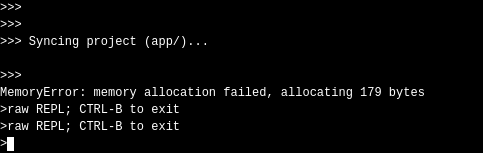
      Pymakr error on sync

      Watching Ignoring Scheduled Pinned Locked Moved Issues & Bugs pymakr sync err sync error esp8266 micorpython
      5
      1
      0 Votes
      5 Posts
      2k Views
      I
      @Ralph Thanks a lot for your quick answer. i will keep going with rshell.
    • 1 / 1