Welcome to the Pycom forum Forum
    • \[\[global:header.categories\]\]
    • \[\[global:header.recent\]\]
    • \[\[global:header.tags\]\]
    • \[\[global:header.popular\]\]
    • Login

    Explore Pybytes | Official Documentation | Report a Firmware Bug/Issue | GitHub

    Updating LoPy4 with updater 1.14.1

    Scheduled Pinned Locked Moved Issues & Bugs
    firmware updatelopy4upgrade
    13 Posts 4 Posters 2.4k Views 4 Watching
    Loading More Posts
    • Oldest to Newest
    • Newest to Oldest
    • Most Votes
    Reply
    • Reply as topic
    Log in to reply
    This topic has been deleted. Only users with topic management privileges can see it.
    • B Offline
      bjsi9
      last edited by

      I can't firmware update my LoPy4, i dont have a Pybytes token, and i cant skip the screen. I'm using Mac version 1.14.1 and trying to update to stable version firmware for LoPy4.
      First steps goes okay, but gets stuck on token screen.
      Thank you

      J 1 Reply Last reply Reply Quote 1
      • J Offline
        jmarcelino @bjsi9
        last edited by

        Hi @bjsi9

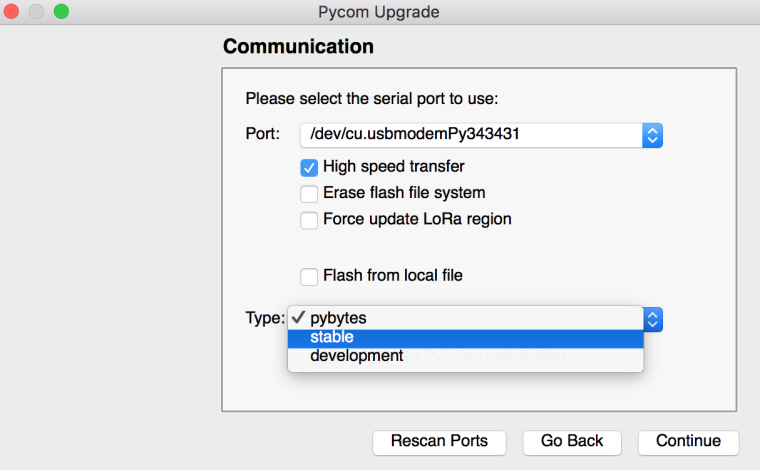
        This is because the new firmware updater defaults to Pybytes, please select "stable" from the type list as below:
        0_1525681302689_Screen Shot 2018-05-07 at 09.20.50.png

        B 1 Reply Last reply Reply Quote 1
        • B Offline
          bjsi9 @jmarcelino
          last edited by

          @jmarcelino thanks for reply. I have tried that, still the same problem.

          J 1 Reply Last reply Reply Quote 1
          • J Offline
            jmarcelino @bjsi9
            last edited by

            @bjsi9
            Where does it get stuck if you choose "stable"?

            Does it still ask for a Pybytes token?

            B 1 Reply Last reply Reply Quote 0
            • B Offline
              bjsi9 @jmarcelino
              last edited by

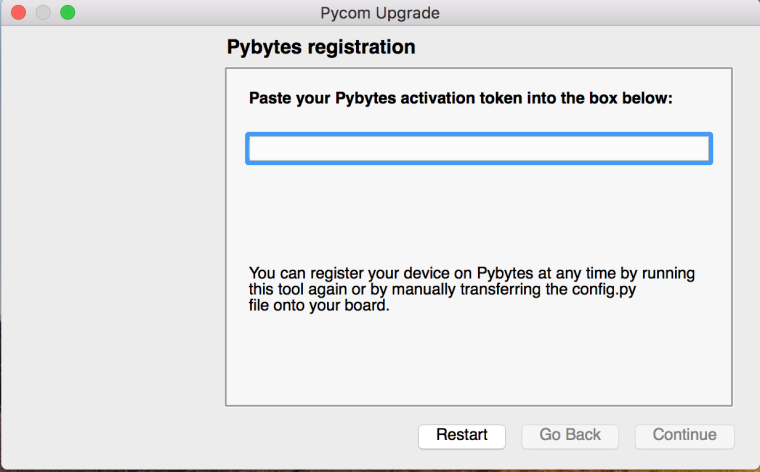
              @jmarcelino yes, still same. Picture is from now:
              0_1525683668971_Skærmbillede 2018-05-07 kl. 11.00.25.png

              J 1 Reply Last reply Reply Quote 0
              • J Offline
                jmarcelino @bjsi9
                last edited by

                @bjsi9
                Thanks, can you download and install the official Updater again from:

                https://pycom.io/downloads/

                I think you may have a different version.
                Thanks.

                B 1 Reply Last reply Reply Quote 0
                • B Offline
                  bjsi9 @jmarcelino
                  last edited by

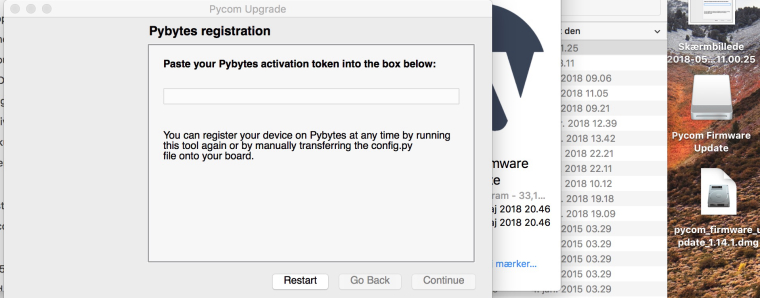
                  @jmarcelino Hi, thanks. Still same. See picture for version, and pybytes screen:
                  0_1525685464423_Skærmbillede 2018-05-07 kl. 11.27.10.jpg

                  J 1 Reply Last reply Reply Quote 1
                  • J Offline
                    jmarcelino @bjsi9
                    last edited by

                    @bjsi9
                    Could you try the beta updater please and let us know if it solves the problem?

                    https://forum.pycom.io/topic/3163/new-beta-firmware-updater-1-13-1-b5

                    Thank you

                    B 1 Reply Last reply Reply Quote 0
                    • B Offline
                      bjsi9 @jmarcelino
                      last edited by

                      @jmarcelino Hi, that link gives me the 1.14.1 version. Both for Mac and Windows. Please give another link.

                      J X 2 Replies Last reply Reply Quote 1
                      • J Offline
                        jmarcelino @bjsi9
                        last edited by

                        @bjsi9
                        Sorry about that could you download the beta from https://software.pycom.io/downloads/pycom_firmware_update_1.13.1.b2.dmg please

                        Thank you

                        1 Reply Last reply Reply Quote 0
                        • X Offline
                          Xykon administrators @bjsi9
                          last edited by

                          @bjsi9 Could you please open "About This Mac" (Apple Icon in top left corner) and make a screenshot of the Overview tab?

                          Please send the screenshot to cehlers@pycom.io

                          Thanks a lot.

                          Christian Ehlers

                          B 1 Reply Last reply Reply Quote 0
                          • T Offline
                            thingomat
                            last edited by

                            If it helps:
                            I experienced the exact same behaviour with the Linux version of the tool. Selecting "stable" still asks for pybytes token and is stuck there, I can only close the whole application. The CLI version works, this is what I did to work around it.

                            1 Reply Last reply Reply Quote 0
                            • B Offline
                              bjsi9 @Xykon
                              last edited by

                              @xykon Works now with the new 1.14.2. Thank you!

                              1 Reply Last reply Reply Quote 1

                              Hello! It looks like you're interested in this conversation, but you don't have an account yet.

                              Getting fed up of having to scroll through the same posts each visit? When you register for an account, you'll always come back to exactly where you were before, and choose to be notified of new replies (either via email, or push notification). You'll also be able to save bookmarks and upvote posts to show your appreciation to other community members.

                              With your input, this post could be even better 💗

                              Register Login
                              • 1 / 1
                              • First post
                                Last post

                              Pycom on Twitter

                              Pycom