Welcome to the Pycom forum Forum
    • \[\[global:header.categories\]\]
    • \[\[global:header.recent\]\]
    • \[\[global:header.tags\]\]
    • \[\[global:header.popular\]\]
    • Login

    Explore Pybytes | Official Documentation | Report a Firmware Bug/Issue | GitHub

    Firmware upgrade troubleshooting - checklist/procedure

    Scheduled Pinned Locked Moved Firmware
    lopy
    24 Posts 13 Posters 16.5k Views 14 Watching
    Loading More Posts
    • Oldest to Newest
    • Newest to Oldest
    • Most Votes
    Reply
    • Reply as topic
    Log in to reply
    This topic has been deleted. Only users with topic management privileges can see it.
    • R Offline
      rskoniec
      last edited by rskoniec

      I've noticed that problems with xPy's firmware upgrade is quite regular issue on the forum, so maybe this kind of checklist/procedure would be helpful:

      Checklist:
      0. Check whether your PC has access to the Internet, because the firmware image is retrieved on-the-fly during update procedure.

      1. Make sure you are using full communication USB cable (4-wire) not just charging USB cable (2-wire).
      2. Check if xPy board is fitting Expansion Board in right position. For example: LoPy RGB LED should be above Expansion Board microUSB port.
      3. What kind of G23-GND connection is used? Male-male breadboard connector or just ordinary wire? The first one is preffered, I've experienced problems with UTP wire connection (was unstable causing connection errors).
      4. It's a good habit that G23-GND cross-wire connection should be the only one on the Expansion Board. Without Expansion Board make sure you have nothing connected to the xPy board other than the serial, power and GND-G23 connection.
      5. Uncheck "fast connection" option in f/w updater tool is helpful.
      6. Have a look at the jumpers on the Expansion Board (especially RX/TX). Generally they should be all in place (EB+WiPy picture below - borrowed from @bucknall).
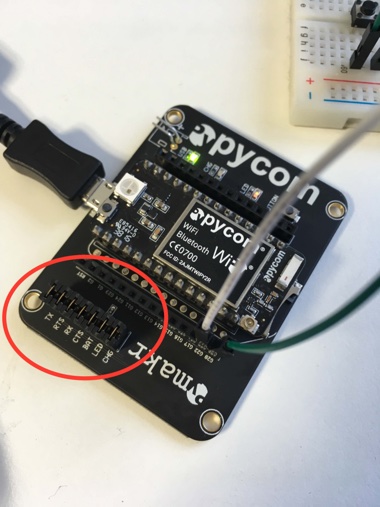
        0_1487862576597_eb_jumpers.jpg

      Upgrade procedure:

      1. Unconnect (USB) xPy board from PC.
      2. Connect wire G23+GND.
      3. Connect the xPy board (USB) to PC by data USB cable.
      4. Use the RESET button on the xPy board. (issue confirmed for LoPy, not necessary for the WiPy2)
      5. Run the Update.
      6. After sucessfull update unconnect the xPy board (USB) from PC.
      7. Remove G23+GND wire.
      8. Connect the xPy board (USB) to PC.
      9. Check f/w release with os.uname() command.

      Linux Tips:

      1. From @Frida - Remember to update/place a file in: /etc/udev/rules.d
        I have these in my: 45-espruino.rules, then you don't have to use sudo su
      # To go in /etc/udev/rules.d/
      # Makes Espruino's serial port accessible to non-SU users, and stops the Modem Manager trying to enumerate it
      ATTRS{idProduct}=="5740", ATTRS{idVendor}=="0483", ENV{ID_MM_DEVICE_IGNORE}="1", MODE="0666", GROUP="plugdev"
      # Nordic kits
      ATTRS{idProduct}=="1015", ATTRS{idVendor}=="1366", ENV{ID_MM_DEVICE_IGNORE}="1", MODE="0666", GROUP="plugdev"
      # Microbit
      ATTRS{idProduct}=="0204", ATTRS{idVendor}=="0d28", ENV{ID_MM_DEVICE_IGNORE}="1", MODE="0666", GROUP="plugdev"
      # Propeller
      ATTRS{idProduct}=="6001", ATTRS{idVendor}=="0403", ENV{ID_MM_DEVICE_IGNORE}="1", MODE="0666", GROUP="plugdev"
      # Pycom
      ATTRS{idProduct}=="6015", ATTRS{idVendor}=="0403", ENV{ID_MM_DEVICE_IGNORE}="1", MODE="0666", GROUP="plugdev"
      

      Maybe I've missed something, so feel free to join in expanding this checklist and/or procedure. :o)

      The machine is working as good as it's code.

      M L M 3 Replies Last reply Reply Quote 5
      • J Offline
        jmarcelino
        last edited by

        Great list! Thanks for making it, definitely should go into the documention.

        I'd add making sure you have nothing connected to the board other than the serial, power and GND-G23 connection.

        In particular disconnect anything on the strapping pins:

        G16 / P9 • MTDI/GPIO12: internal pull-down
        G15 / P8 • GPIO2: internal pull-down
        G24 / P3 • GPIO4: internal pull-down
        G11 / P4 • MTDO/GPIO15: internal pull-up
        G12 / P5 • GPIO5: internal pull-up

        Source: https://espressif.com/sites/default/files/documentation/esp32_datasheet_en.pdf#page16

        R B 2 Replies Last reply Reply Quote 2
        • R Offline
          rskoniec @jmarcelino
          last edited by

          @jmarcelino said in Firmware upgrade troubleshooting - checklist:

          I'd add making sure you have nothing connected to the board other than the serial, power and GND-G23 connection.

          Point 4 added. :)

          The machine is working as good as it's code.

          1 Reply Last reply Reply Quote 0
          • M Offline
            mmarkvoort @rskoniec
            last edited by

            @rskoniec

            Very good list, certainly useful for beginners like me!

            I don't know if it is relevant but when i wanted to update/connect through USB I had to install the USB driver manually. Mine called FTDI driver where VCP or D2XX are types of drivers. With one of the two it said it was installed but still i coudn't update/connect.

            R 2 Replies Last reply Reply Quote 0
            • L Offline
              livius @rskoniec
              last edited by

              @rskoniec
              you can somehow merge this post:
              https://forum.pycom.io/post/2655

              think about people first, then computers

              R 1 Reply Last reply Reply Quote 1
              • R Offline
                rskoniec @livius
                last edited by rskoniec

                @livius said in Firmware upgrade troubleshooting - checklist:

                @rskoniec
                you can somehow merge this post:
                https://forum.pycom.io/post/2655

                Good tip! Done! :)

                The machine is working as good as it's code.

                1 Reply Last reply Reply Quote 0
                • R Offline
                  rskoniec @mmarkvoort
                  last edited by

                  @mmarkvoort said in Firmware upgrade troubleshooting - checklist:

                  I don't know if it is relevant but when i wanted to update/connect through USB I had to install the USB driver manually. Mine called FTDI driver where VCP or D2XX are types of drivers. With one of the two it said it was installed but still i coudn't update/connect.

                  But you were trying to update using Expansion Board USB or xPy board + USB2TTL serial converter?

                  The machine is working as good as it's code.

                  M 1 Reply Last reply Reply Quote 0
                  • D Offline
                    dClaus
                    last edited by

                    For Lopy "Connecting ......... Failure !"
                    see post https://forum.pycom.io/post/4518

                    between 3 and 4 : use the RESET buttom on the Lopy

                    ;-)

                    R 1 Reply Last reply Reply Quote 0
                    • R Offline
                      rskoniec @dClaus
                      last edited by

                      @dClaus One more time - thanx! It's already updated. :)

                      The machine is working as good as it's code.

                      1 Reply Last reply Reply Quote 0
                      • M Offline
                        mmarkvoort @rskoniec
                        last edited by

                        @rskoniec
                        Update using Expansion Board USB.

                        R 1 Reply Last reply Reply Quote 0
                        • B Offline
                          bucknall @jmarcelino
                          last edited by

                          @jmarcelino This is going into Docs with the next update :)

                          Developer Evangelist - Pycom

                          R 1 Reply Last reply Reply Quote 3
                          • R Offline
                            rskoniec @bucknall
                            last edited by

                            @bucknall said in Firmware upgrade troubleshooting - checklist:

                            @jmarcelino This is going into Docs with the next update :)

                            Nice! :)

                            The machine is working as good as it's code.

                            1 Reply Last reply Reply Quote 0
                            • R Offline
                              rskoniec @mmarkvoort
                              last edited by rskoniec

                              @mmarkvoort said in Firmware upgrade troubleshooting - checklist:

                              @rskoniec
                              Update using Expansion Board USB.

                              OK. In a free time (I hope this weekend) I'll grab a fresh install Windows machine and try to investigate FTDI driver issue.

                              The machine is working as good as it's code.

                              1 Reply Last reply Reply Quote 0
                              • FridaF Offline
                                Frida
                                last edited by

                                On linux remember to update/place a file in: /etc/udev/rules.d

                                I have these in my: 45-espruino.rules, then you don't have to use sudo su

                                # To go in /etc/udev/rules.d/
                                # Makes Espruino's serial port accessible to non-SU users, and stops the Modem Manager trying to enumerate it
                                ATTRS{idProduct}=="5740", ATTRS{idVendor}=="0483", ENV{ID_MM_DEVICE_IGNORE}="1", MODE="0666", GROUP="plugdev"
                                # Nordic kits
                                ATTRS{idProduct}=="1015", ATTRS{idVendor}=="1366", ENV{ID_MM_DEVICE_IGNORE}="1", MODE="0666", GROUP="plugdev"
                                # Microbit
                                ATTRS{idProduct}=="0204", ATTRS{idVendor}=="0d28", ENV{ID_MM_DEVICE_IGNORE}="1", MODE="0666", GROUP="plugdev"
                                # Propeller
                                ATTRS{idProduct}=="6001", ATTRS{idVendor}=="0403", ENV{ID_MM_DEVICE_IGNORE}="1", MODE="0666", GROUP="plugdev"
                                # Pycom
                                ATTRS{idProduct}=="6015", ATTRS{idVendor}=="0403", ENV{ID_MM_DEVICE_IGNORE}="1", MODE="0666", GROUP="plugdev"
                                
                                R 1 Reply Last reply Reply Quote 0
                                • R Offline
                                  rskoniec @Frida
                                  last edited by rskoniec

                                  @Frida Thanx for sharing! Updated!

                                  The machine is working as good as it's code.

                                  1 Reply Last reply Reply Quote 0
                                  • R Offline
                                    rskoniec @mmarkvoort
                                    last edited by rskoniec

                                    @mmarkvoort said in Firmware upgrade troubleshooting - checklist/procedure:

                                    I don't know if it is relevant but when i wanted to update/connect through USB I had to install the USB driver manually. Mine called FTDI driver where VCP or D2XX are types of drivers. With one of the two it said it was installed but still i coudn't update/connect.

                                    OK, I took my notebook with Windows 10 Pro x64 with internet access and plug LoPy on Expansion Board to it for the very first time.
                                    Here is Device Manager just after connection:
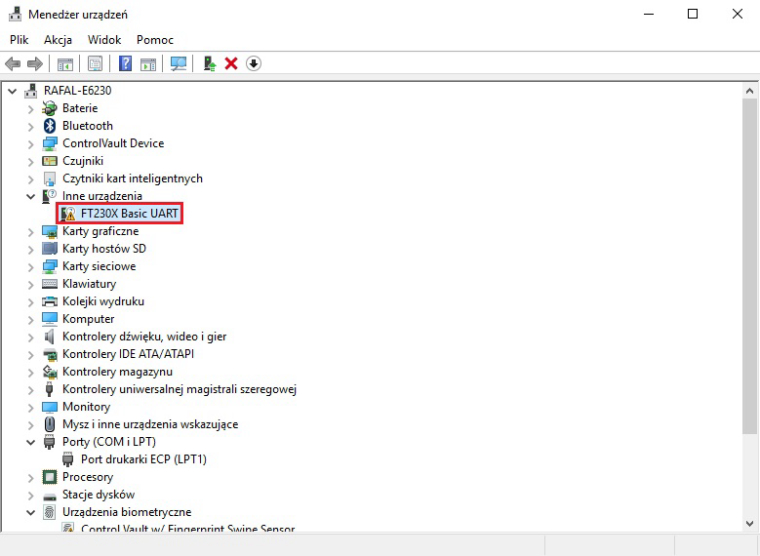
                                    0_1487970349956_1st_plug.jpg
                                    After about 30 seconds Windows Auto Update mechanism has done all the job:
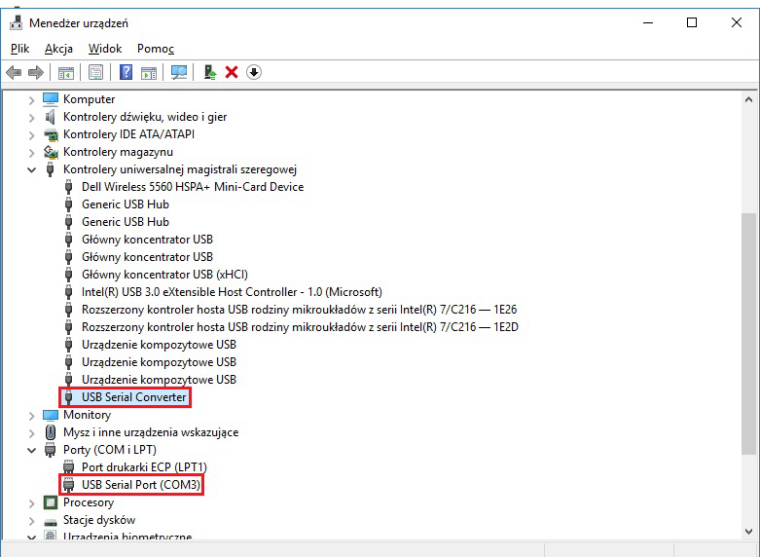
                                    0_1487970560498_1st_plug_wu.jpg
                                    As you can see it is pretty straightforward - at least on Windows 10.
                                    What OS are you using?

                                    The machine is working as good as it's code.

                                    M 1 Reply Last reply Reply Quote 1
                                    • M Offline
                                      mmarkvoort @rskoniec
                                      last edited by

                                      @rskoniec

                                      Aah thanks for the update. Really fast!!

                                      Now that u mention that windows installs the update automatic, I remember that I disabled windows update on my windows 10... that explans a lot! How stupid...

                                      Sorry for wasting your time, but thanks for the fast answer and for trying it out.

                                      R 1 Reply Last reply Reply Quote 0
                                      • M Offline
                                        maamar @rskoniec
                                        last edited by

                                        @rskoniec thank you
                                        I did my updated

                                        1 Reply Last reply Reply Quote 0
                                        • R Offline
                                          rskoniec @mmarkvoort
                                          last edited by

                                          @mmarkvoort @maamar You welcome. :o)

                                          The machine is working as good as it's code.

                                          1 Reply Last reply Reply Quote 0
                                          • Y Offline
                                            yunying
                                            last edited by

                                            Thank a lot.
                                            Reply just for feedback.

                                            Make sure your jumper at "TX"

                                            1 Reply Last reply Reply Quote 0

                                            Hello! It looks like you're interested in this conversation, but you don't have an account yet.

                                            Getting fed up of having to scroll through the same posts each visit? When you register for an account, you'll always come back to exactly where you were before, and choose to be notified of new replies (either via email, or push notification). You'll also be able to save bookmarks and upvote posts to show your appreciation to other community members.

                                            With your input, this post could be even better 💗

                                            Register Login
                                            • 1
                                            • 2
                                            • 1 / 2
                                            • First post
                                              Last post

                                            Pycom on Twitter

                                            Pycom