BME280 on the LoPy
-
@ledbelly2142 That makes it into a package: https://docs.python.org/2/tutorial/modules.html#packages
-
@Butch
I still have the same issue, just updated to the latest firmware 1.7.5.b2
In the main.py I'm just trying to print out values in the console, I have:import pycom from machine import I2C import time import bme280 # from bme280 i2c = I2C(0, I2C.MASTER, baudrate=100000) i2c.scan() #i2c = machine.I2C(0, pins=('GP11', 'GP10')) bme = bme280.BME280(i2c=i2c) pycom.heartbeat(False) temp = BME280.temperature() humid = BME280.humidity() press = BME280.pressure() alti = BME280.altitude() #for cycles in range(10): # stop after 10 cycles while(true): print(temp) # read temperature time.sleep(2) print(humid) # read humidity time.sleep(2) print(press) # read Pressure time.sleep(2) print(alti) # read altitude time.sleep(2) -
@ledbelly2142 Try following the line of logic I tried in the python REPL: import, instantiate, and initialize:
>>> from machine import I2C
>>> import bme280
>>> i2c = I2C(0, I2C.MASTER, baudrate=100000)
>>> bme = bme280.BME280(i2c=i2c)
See where that takes you.
The original problem I ran into and ultimate fixed was that the 8- and 16-bit writes needed the value to be written to be a bytearray, not the raw value. Beyond that, all I added was a wrapper for altitude.
-
For me, the issue comes up from :
bme = bme280.BME280(i2c=i2c)Thats where I get the errors indicating an I2C bus error.
I SDA on pin 9 and SCL on pin 10.
Could it be a bad sensor?
So I unplugged the BME280 sensor and got the same error.
-
@ledbelly2142 It's possible that it's a bad sensor. Do you have another one to try? You might also check to make sure that i2c.scan() is returning the same address that is used in the BME280 library. If it isn't, you'll have to change the address in the library.
-
@Butch
That looks to be it. The I2C address was 77, not 76... weird. I did not think to check the I2C address.Thanks!
-
Hello Everyone,
I'm using LoPy and I've got the similar type of error as @binux got.I'm getting the following error:

This is my code:
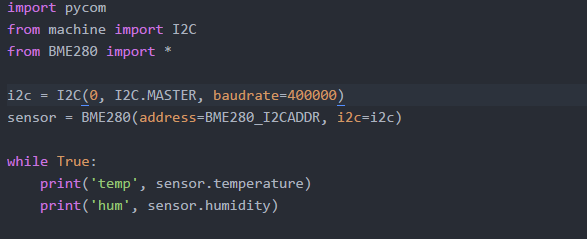
Please guide me solving this!
Thank You. -
@devang-sharma The required positional argument is 'little' in the call of from_bytes(). The API was changed a while ago. You have to modify the script BM280.py into:
        result = int.from_bytes(
            self._i2c.readfrom_mem(self._address, register, 2), little) & 0xFFFF
The same in function readU8().
-
@robert-hh I've done changes as you said but got the NameError as:
"name 'little' is not defined". How can I solve it?
Thank You. -
@devang-sharma Sorry, it should be a string:
result = int.from_bytes( self._i2c.readfrom_mem(self._address, register, 2), 'little') & 0xFFFF -
@robert-hh, that worked! Thanks, but the same error for write8:


Is there any link to the changed API or library? That would be better than posting every single error! :'D
EDIT: Solved the error. Replaced value.to_bytes(1) with "value"! No more Errors!
-
@devang-sharma No specific API doc needed, since it is standard Python behaviour now. It was incompatible before, but I'm not shure, for which MicroPython version. It may be that the Pycom branch always was compatible to the Standard.
And yes, even in that case changes toward language compliance may break code, so it should be noted. -
Hello,
There are quite a few entries on the BME280.
I have been reading them and I am still not able to fix my issues.
I have tried several of the libraries and I am just at a stand still.
When I do a scan of the I2C port I get 0x76 so I know that the sensor is there.
What I get is as follows (firmware rev 1.10.2.b1)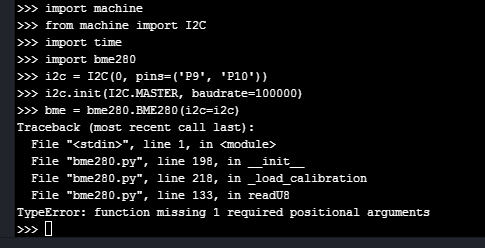
Thank you,
-
@robd Actually, which bme280 code are you using at the moment? I'm a little bit lost too.
-
@robd I've faced a similar issue and added argument 'little' as @robert-hh suggested which worked for me. I don't know which library you're using. But I've been using this:
https://github.com/LoRaWeather/BME280-LoPy-TTN/tree/master/Program/lib
-
This post is deleted! -
@devang-sharma thank you for the link. I really hate learning curves. I tried the TTN libraries and I still have issues. How are you calling the library?
I am trying with (firmware version 1.10.2.b1)from machine import I2C
import BME280
i2c = I2C(0,I2C.MASTER, baudrate=100000)
bme = bme280.BM280(i2c=i2c)print('Temp = ', bme280.temperate())
the errors I am getting are
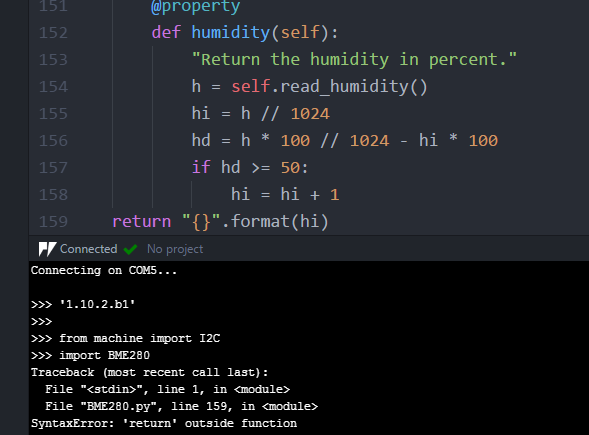
I then tried to see if my sensor was readable and I did
from machine import I2C
i2c = I2C(0, I2C.MASTER, baudrate=100000)
i2c.scan()which returned 118 (0x76)
then I did the following
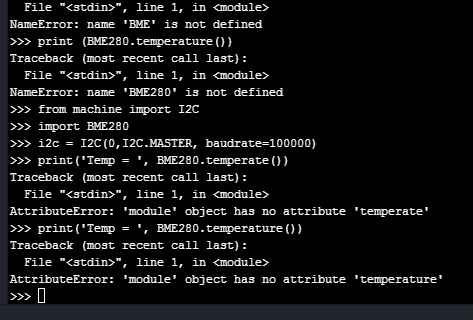
Any pointers to my errors?
Thank you
-
@robert-hh I have tired several libraries, LoPy_BME280, oscarBravo-wipy_bme280, and mpy_bme280_esp8266.
https://github.com/ButchAnton/LoPy_BME280
https://github.com/catdog2/mpy_bme280_esp8266
https://bitbucket.org/oscarBravo/wipy_bme280/src/7c03d16f48154a55a9c09af65049b0f03ef6c005?at=defaultand thank you to @devang-sharma
https://github.com/LoRaWeather/BME280-LoPy-TTN/tree/master/Program/libI must be doing something really wrong for nothing to work correctly.
I switched over to a Si7021 and I was able to get that to work but I need to use the BME280.Thanks,
-
@robd The first error you're getting is because of indentation of the
returnfunction. Write it withindef humidity(self). I guess you're new to python, it'd be better if you read docs properly.The second error is due to the way you've used
import BME280. The library has a class BME280. There are 2 ways to solve this:- You can import it as
from BME280 import *and make a constructor just after i2c something like this:bme = BME280(address=BME280_I2CADDR, i2c=i2c)
OR
2. keep it asimport BME280and constructor as:
bme = BME280.BME280(address=BME280_I2CADDR, i2c=i2c)Make sure to use the same name as defined in the library.
I hope this helps you.
- You can import it as
-
@devang-sharma the code used was from https://github.com/LoRaWeather/BME280-LoPy-TTN/tree/master/Program/lib
I copied everything over as it was and didn't modify anything.
The code which I tried to write and didn't work wasfrom machine import I2C
import BME280
i2c = I2C(0,I2C.MASTER, baudrate=100000)print('Temp = ', BME280.temperature())
Yes I am new to python and right now it is kicking me, I didn't see any docs other than small comments in the code. So it was me trying to feel around and get this sensor working.
I was able to get a SI7021(different code) to work but not the BME280.
I will look at and try to understand your suggestions.
Thank you for your help



Hello! It looks like you're interested in this conversation, but you don't have an account yet.
Getting fed up of having to scroll through the same posts each visit? When you register for an account, you'll always come back to exactly where you were before, and choose to be notified of new replies (either via email, or push notification). You'll also be able to save bookmarks and upvote posts to show your appreciation to other community members.
With your input, this post could be even better 💗
Register Login