• Problem in recovering LoPy board

    2
    0 Votes
    2 Posts
    23 Views
    robert-hhR
    @Diego-Cardoso You could try to do a full flash erase using esptool.py. esptool.py -b 460800 -p /dev/ttyUSB0 --chip esp32 erase_flash esptool.py is the core app inside pycom-fwtool-cli. You may as well try the erase_all option of pycom-fwtool-cli.
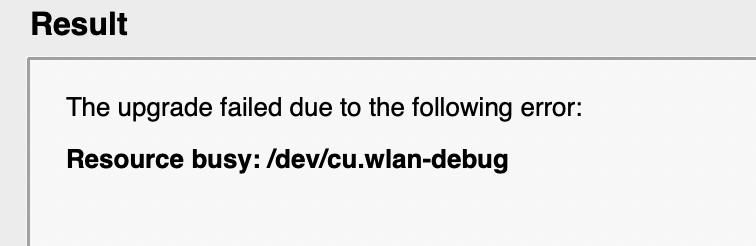
  • Error updating firmware: "Resource busy: /dev/cu.wlan-debug"

    1
    1
    0 Votes
    1 Posts
    19 Views
    No one has replied
  • How Do You Read/Interpreted Core Dumps?

    2
    0 Votes
    2 Posts
    36 Views
    L
    @Eric-Arnoldy https://docs.pycom.io/advance/coredump/#app
  • New crash: assertion "pbuf_free: p->ref > 0"

    3
    0 Votes
    3 Posts
    16 Views
    J
    @troy-salt You actually already had issues with it a year ago: https://forum.pycom.io/topic/6344/pbuf_free-crash-cause Someone needs to decode the core dump to try to get to the root cause.
  • This topic is deleted!

    1
    0 Votes
    1 Posts
    2 Views
    No one has replied
  • GPy Modem Firmware 48829 problems attaching

    1
    0 Votes
    1 Posts
    28 Views
    No one has replied
  • Complete Factory Reset following

    2
    0 Votes
    2 Posts
    97 Views
    R
    Since posting I have figured out both issues. For some reason, Pybytes modified my LTE modem to LR6.xx for NB-IoT from LR5.xx is for CAT-M1. My carrier requires CAT-M1. The heartbeat issue was corrected by using pycom.heartbeat_on_boot(True). BUT - this is the default setting- so I don't understand why this was not reset when I reloaded all firmware with the Pycom utility. My continuing question is how do you perform a Full factory reset if the reload of firmware does not seem to do this. Is there a list of all default settings so this could be manually done if necessary?
  • WLAN AP stops working after STA becomes disconnected

    1
    0 Votes
    1 Posts
    8 Views
    No one has replied
  • MAJOR ISSUE: MQTT library blocking when Subscribe

    5
    0 Votes
    5 Posts
    425 Views
    S
    Hello, Did you find the solution? I faced with the same issue
  • 1.20.2.r4 GPy Core Panic Uploading FTP

    4
    0 Votes
    4 Posts
    53 Views
    G
    Perhaps the flash on your device is already full (1.9MB is quite a large file, two of those will probably not fit). Note that we also place the firmware in the 4MB flash. I think the issue is with flash space running out for this GPy. You could try to do an erase-all in the CLI updater, or os.fsformat("/flash") to empty the flash.
  • firmware update

    1
    0 Votes
    1 Posts
    21 Views
    No one has replied
  • 0 Votes
    4 Posts
    77 Views
    C
    I never managed to reproduce the Core Dump but I found this : https://github.com/pycom/pycom-micropython-sigfox/commit/3f690a5733d31ff938aad6219c498f7d1bf98346 A bug fix, the issue was not resolved in the version I used. This issue could explain the core dump I encountered. The issue is fixed in the last beta version (v1.20.3.b3) and in the last release (1.20.2.r4) of the firmware.
  • OSError: no network card available after newest firmware update

    2
    0 Votes
    2 Posts
    67 Views
    G
    It seems you never instantiate a network. Perhaps in 1.18 you were using the pycom.wifi_on_boot (etc. from here: https://docs.pycom.io/firmwareapi/pycom/pycom/#pycomwifi_on_bootboolean) settings which might have been erased when you did the firmware update? In any case, you should be able to add the example from here: https://docs.pycom.io/tutorials/networks/wlan/#connecting-to-a-router to your main() to resolve the issue.
  • 0 Votes
    9 Posts
    1k Views
    S
    @livius I am using the official library taken from here https://github.com/pycom/pycom-libraries/blob/master/shields/lib/LTR329ALS01.py which indeed as you noticed does not contain the ALS_STATUS status register reading logic. According to the datasheet https://www.mouser.com/datasheet/2/239/Lite-On_LTR-329ALS-01 DS_ver1.1-348647.pdf Page 22 the Device operation flow chard shows indeed kind of a loop until that status register indicate a new data is available. on Page 24 it shows a pseudo code mentioning what you are suggesting (which is checking the data readiness before performing the actual read). Page 21 it describe how to perform the check of the validity of the read. I can try to patch the lib according to such information and push a PR to the official repo if this is solving the problem :-). Keep You posted and thanks for your help! Stef
  • FiPy and GiPy Dropping Bluetooth Writes

    4
    0 Votes
    4 Posts
    47 Views
    M
    @Joshua-Biggs I have the same version on FiPy. You expect the following result and it doesn't work for you, right? >>> os.uname() (sysname='FiPy', nodename='FiPy', release='1.20.2.r4', version='v1.11-ffb0e1c on 2021-01-12', machine='FiPy with ESP32', lorawan='1.0.2', sigfox='1.0.1', pybytes='1.6.1') Pycom MicroPython 1.20.2.r4 [v1.11-ffb0e1c] on 2021-01-12; FiPy with ESP32 Type "help()" for more information. >>> >>> connected two one three Can you try same operations on other firmware versions? Maybe you have another issue? BR, Meric
  • GPy Incorrect Firmware Version

    4
    0 Votes
    4 Posts
    62 Views
    G
    Good to see the LTE modem is back to being connected. There can be several solutions, mainly a reset of the GPy or using lte.reset() can help you out of the situation. It depends on what caused the disconnect to find out what can solve it. In the worst case scenario you'll have to do a complete power cycle, as the LTE modem is not connected on the reset circuitry of the GPy microcontroller.
  • Pymesh seems to ignore 'key' in configuration

    2
    0 Votes
    2 Posts
    14 Views
    A
    OK, I think loramesh.py, in _lora_init method needs: self.mesh = self.lora.Mesh(key = self.key) #start Mesh where the key has been derived by self.key = ubinascii.unhexlify(config.get('Pymesh').get('key').replace('-','')) in the init method of Loramesh If I am correct, I am frankly surprised that such a fundamental part of Pymesh has not been implemented correctly in the sample code!
  • Broadcast message on Pymesh

    1
    0 Votes
    1 Posts
    16 Views
    No one has replied
  • 0 Votes
    6 Posts
    33 Views
    A
    Dear all I found the core of the problem and solution. The problem cames from the fact that I was broadcasting the frames from the wipys to the PC. I did it, since I also can have 2 PCs, one as a logger, and the other as a controller which takes the measurements from the wipy, and both PCs must be different due to the project requirements. Broadcasting to the 255.255.255.255 address works DIRECTLY on legacy 1.20.0r13, BUT not on pybytes 1.20.2.r4 I remove broadcasting, giving as socket_adress just the logger PC and port socket_addr = (PC_IP_Address, Socket_port) This way, on both firmware versions, the transmission works correctly!!! I look for more information on Broadcasting problems with UDP sockets and micropython. Initially it seems that for python: socketUDP.setsockopt(socket.SOL_SOCKET, socket.SO_BROADCAST, 1) should enable broadcast if it was disabled. However, this option is NOT implemented for micropython. I found this post: https://forum.micropython.org/viewtopic.php?t=8342 where they talked about this problem, and they said that adding socketUDP.setsockopt(socket.SOL_SOCKET, socket.SO_REUSEADDR, 1) solves the problem for broadcasting... and IT WORKS I also tried this: socketUDP.setsockopt(socket.SOL_SOCKET, socket.SO_REUSEADDR, 0) which must means that "don't resuse" the address, and I thought was the default if not settled, and it also works, even better... CONCLUSION: For broadcating with UDP sockets, implicit declaration of socket option SO_REUSEADDR is required. My working socket set-up is: # Set-up UDP socket socketUDP = socket.socket(socket.AF_INET, socket.SOCK_DGRAM) socketUDP.setsockopt(socket.SOL_SOCKET, socket.SO_REUSEADDR, 0) socketUDP.setblocking(False) # Non-blocking socket socketUDP.settimeout(1.0) # timeout every 1 second t0 = chrono.read() I post this as solution, since maybe someone else might have the same problem as I had. Thanks to all who replied to me and tried to help!

  • Unable to update GPy modem firmware

    firmware update gpy lte m1 lte nb iot
    34
    2 Votes
    34 Posts
    6k Views
    G
    @bqpd Thank you from the future.

Pycom on Twitter