I2C accelerometer model MMA7455
-
Hi all!
This time i'm trying to make work the accelerometer MMA7455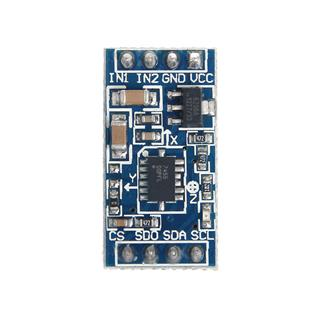
The MMA7455 schematics are this:
http://www.geeetech.com/Documents/MMA7455_Schematic Download PDF .pdfAnd the specs of the sensor (ADXL345) that carries the MMA7455 is this:
https://www.sparkfun.com/datasheets/Sensors/Accelerometer/ADXL345.pdfI've been trying to do every kind of things to make this little chip work, but no success at all. Almost always getting OSError: I2C bus error
I'd like to start with a very basic test i'm doing, reading from the DEVID registry of the ADXL345 sensor.
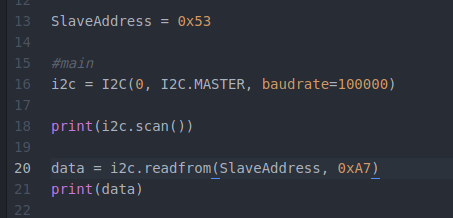
What i get after doing that is:
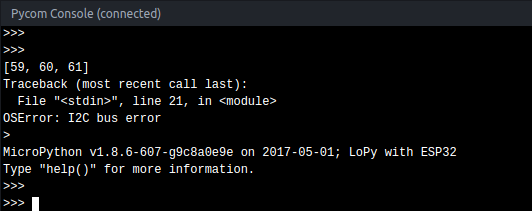
Based on the sensor documentation i think that my previous code is fine:
An alternate I2C address of 0x53 (followed by the R/W bit) can
be chosen by grounding the SDO/ALT ADDRESS pin (Pin 12).
This translates to 0xA6 for a write and 0xA7 for a readIf someone understands what's happening please share that precious knowledge.
I still dont understand what [59, 60, 61] means by the way... -
@pablocaviglia
It is important how do you connect it. Especially CS pin
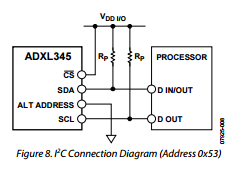
And address pin low or high
[59, 60, 61]mean that you have 3 "devices" with address decimal 59, 60, 61 (3B,3C,3D) -
@livius CS must be pulled low, to VSS, not high to VDD.
-
@robert-hh
in documentation isWith CS tied high to VDD I/O, the ADXL345 is in I2C mode
-
@livius Ok, got it.That's an unusual use of CS. The module which is used here has an internal pull-up for CS, as far as I recall.
-
Correct address for that board (SDO pulled high) is the alternate address: 0x1D
-
Thx all for your interest. I've not get home yet, i'll do some tests based on what you said once there.
Anyway before leaving i took a picture of the current connections of the chip. Let me show you how does it looks now: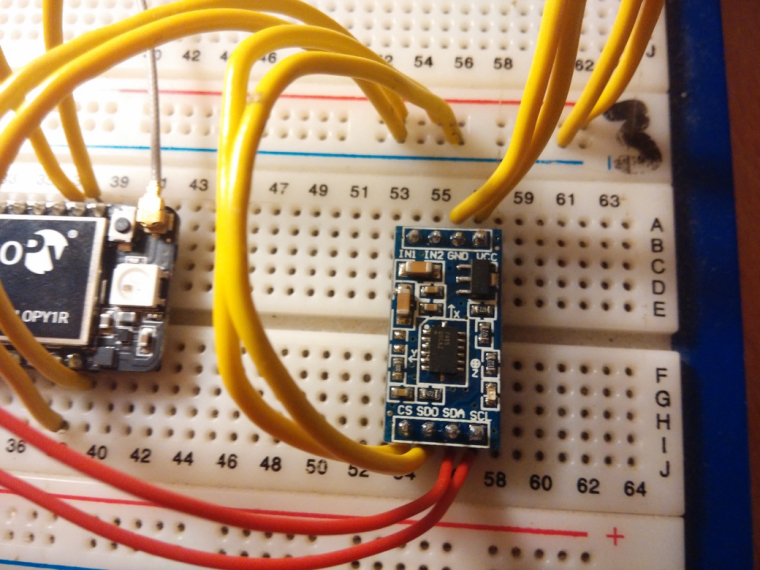
UP
GND -> GND
VCC -> 5VDOWN
CS -> 5v
SDO ->GND
SDA SCL -> both to idem on pycomHope it helps to deduce something!
-
@jmarcelino yes, but i have sdo pulled down
-
@pablocaviglia
Why 5V?
in documentation is
Supply voltage range: 2.0 V to 3.6 Vand all Pycom boards are 3V3. 5V can crash your Lopy.
And about other connections
Where do you conect your SDA, SCL. Which pins on Lopy?
You use default initialization then i suppose P9 - SDA, P10-SCL? -
@livius said in I2C accelerometer model MMA7455:
Why 5V?
The module has an internal 3.3V regulator RT9161.
-
@robert-hh said in I2C accelerometer model MMA7455:
RT9161
Ah - i see now i ommit this on the first link with schematic
Then two things @pablocaviglia
Where do you conect your SDA, SCL. Which pins on Lopy?
You use default initialization of i2c then i suppose P9 - SDA, P10-SCL?I see on schematic that there is pull up resistor already on i2c
This is better picture of it
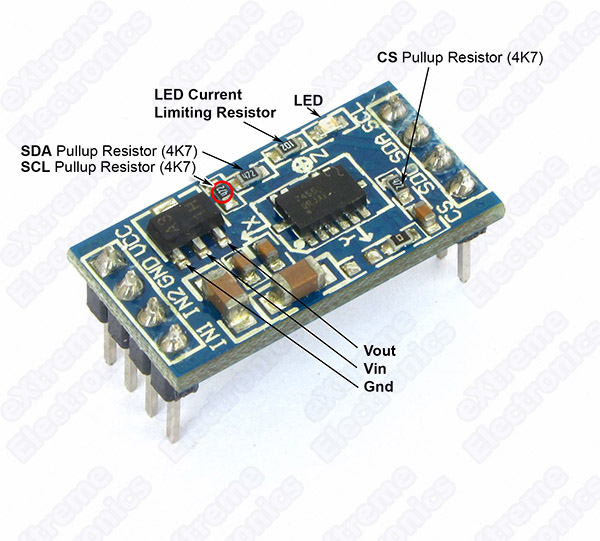
-
If you look at the the schematic the CS pin on the board shouldn't be connected to 5V. It's comes from 3.3V.
The chip pin is not made for that and also you're connecting the 5V supply to a regulated 3.3V via the 4.7K pull up...
-
@livius
Yes, just using the default initialization, P9 - SDA, P10-SCL -
@jmarcelino
Very good point man! I've pulled up P23 on pycom to get 3.3v, then i plugged CS and SDO in there, and things got changed a lot.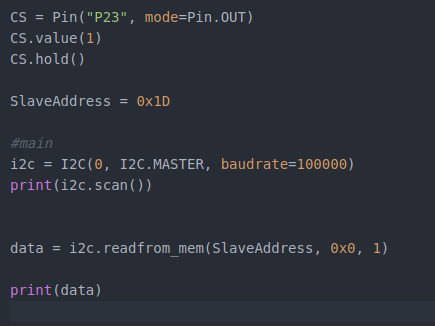
And i got this when running:
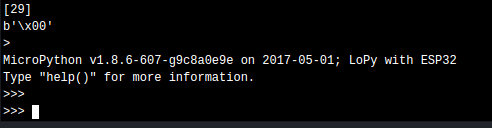
Much much better, no I2C Bus Error anymore.
Just to be sure i tried to pull down the pin P23 to verify if it stops working, and it does stop effectively.
Also another very good thing is that based on documentation, the slave port to start using is '1D', and now i'm effectively getting 29 (1D) while scaning ports, instead of 59,60,61.<><><><><><><><><><><><><><><><><><><><><><><><><><><><><><>
 <><><><><><><><><><><><><><><><><><><><><><><><><><><><><><>
There's something that i dont understand from that document section. It says that the 0x1D followed by the R/W bit translates to 0X3A for write and 0x3B for read.... what does that mean?
-
@pablocaviglia The I2C address is located in bits 1..7. Bit 0 is the R/W bit.
0x3a (58) is 0x1d (29) * 2, and 0x3b simply adds 1 in bit 0. -
@robert-hh So you say that the slave address would change from read to write.
If i want to read/write it would be:i2c.readfrom_mem(0x3B, 0x0, 1)
i2c.writeto_mem(0x3A, 0x0, value)Is that what you mean?
-
@pablocaviglia No. It's just the way it has to be coded at the physical interface, not the API you are using. Setting the R/W bit is done by the underlying functions. All you have to do is use the address 29 in the call of python methods.
-
@pablocaviglia
to not starting from scratch try adapt this
https://github.com/alexismeneses/py-adxl345/blob/master/lib/adxl345/base.py -
@robert-hh :+1:
-
@livius
I've checked that code, really nice!
I'm not receiving the i2c bus error anymore, but based on docs, when querying the the DEVID registry i should get this: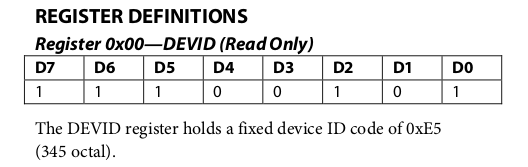
My code does this:
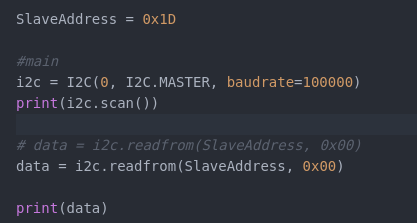
And i got this:
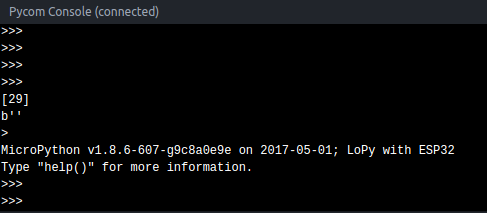
PD: By the way, how do i earn reputation points in this forum? I can only send 1 message each 10 minutes... boring!

Hello! It looks like you're interested in this conversation, but you don't have an account yet.
Getting fed up of having to scroll through the same posts each visit? When you register for an account, you'll always come back to exactly where you were before, and choose to be notified of new replies (either via email, or push notification). You'll also be able to save bookmarks and upvote posts to show your appreciation to other community members.
With your input, this post could be even better 💗
Register Login