Welcome to the Pycom forum Forum
    • \[\[global:header.categories\]\]
    • \[\[global:header.recent\]\]
    • \[\[global:header.tags\]\]
    • \[\[global:header.popular\]\]
    • Login

    Explore Pybytes | Official Documentation | Report a Firmware Bug/Issue | GitHub

    Not getting Sensor Readings in Pysense with FiPy Module

    Scheduled Pinned Locked Moved MicroPython
    fipyraspberry pipysensemicorpython
    79 Posts 6 Posters 28.0k Views 6 Watching
    Loading More Posts
    • Oldest to Newest
    • Newest to Oldest
    • Most Votes
    Reply
    • Reply as topic
    Log in to reply
    This topic has been deleted. Only users with topic management privileges can see it.
    • L Offline
      livius @Archana Kadam
      last edited by livius

      @archana-kadam said in Not getting Sensor Readings in Pysense with FiPy Module:

      Could you please share us the code to how to read other sensors and store the readings in csv file in fipy device memory using Pysense expansion board.

      This is not good to store frequently changed data to flash (limited write cycles)
      but if you really need you can use obvious python code

      with open("/flash/myfile.xyz", "ab") as f:   
          f.write(data)
      

      for sensors look at library sample
      https://github.com/pycom/pycom-libraries/blob/master/pysense/main.py

      How to access the inbuilt file structure of FiPy.

      connect to it by ftp - look into online documentation about this basic step

      FiPy serial connection with RaspberryPi Compute Module.

      search on the forum, e.g.:
      https://forum.pycom.io/topic/2514/lopy-to-raspberry-pi-3-serial-connection

      think about people first, then computers

      1 Reply Last reply Reply Quote 0
      • sebS Offline
        seb @Archana Kadam
        last edited by

        @archana-kadam

        When you say "we are unable to read the other sensors", could you provide more details? Was there an error occuring? If so what did it say?

        1 Reply Last reply Reply Quote 0
        • A Offline
          Archana Kadam
          last edited by

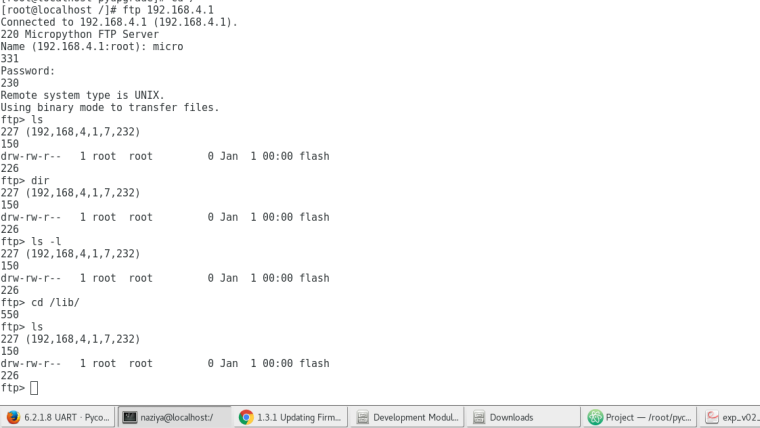
          0_1520023605701_Screenshot from 2018-03-02 10-53-44.png
          We are not able to fetch the list of files which are stored in the pysense board

          L 1 Reply Last reply Reply Quote 0
          • L Offline
            livius @Archana Kadam
            last edited by livius

            @archana-kadam
            Do you use passive mode and do you limit connection to only one?
            Many ftp clients use many connection at one time.

            think about people first, then computers

            A 1 Reply Last reply Reply Quote 0
            • A Offline
              Archana Kadam @livius
              last edited by

              @livius
              Yes Passive mode is on and we did not do any limited settings for client connection

              L 1 Reply Last reply Reply Quote 0
              • L Offline
                livius @Archana Kadam
                last edited by

                @archana-kadam said in Not getting Sensor Readings in Pysense with FiPy Module:

                and we did not do any limited settings for client connection

                I do not know if understand this correctly
                but you must limit connections to only one a a time in ftp client config

                below is a sample for Filezilla
                https://docs.pycom.io/chapter/toolsandfeatures/FTP.html#filezilla

                think about people first, then computers

                A 1 Reply Last reply Reply Quote 0
                • A Offline
                  Archana Kadam @livius
                  last edited by

                  @livius
                  How to get current time stamp in fipy module after ejecting and reconnecting again. We tried with utime and rtc examples provided in the pycom documentation, but when we eject the module and reconnect the time is getting reset. how to get only current year,month date and time

                  Thank You

                  L 1 Reply Last reply Reply Quote 0
                  • L Offline
                    livius @Archana Kadam
                    last edited by

                    @archana-kadam said in Not getting Sensor Readings in Pysense with FiPy Module:

                    ejecting

                    By ejecting do you mean remove power competly? Or only deepsleep?
                    If the first then how do you thing the time can be preserved?
                    Thing about your wath on the hand if you remove battery and you place it after month do you see current time?
                    If you are interested in starting time from point before reset - and loosing e.g. month is not problem for you - you can save current time to non-volatile memory. You can use pycom.nvs_set or save data to the SD card or not recommended write it to the flash.

                    Only way to have time - is deepsleep with battery.

                    think about people first, then computers

                    J 1 Reply Last reply Reply Quote 0
                    • J Offline
                      jcaron @livius
                      last edited by

                      @livius Using deep sleep via a Pysense, Pytrack or deep sleep shield, you should be able to get the remaining time. If you save the time before going to sleep, and on boot, load that time, add the value of the deep sleep time and subtract the remaining sleep time, you should get an approximate real time.

                      Haven't tried it yet, and I believe on the Pysense/Pytrack the remaining sleep is slightly off, but it should be possible.

                      A 1 Reply Last reply Reply Quote 0
                      • A Offline
                        Archana Kadam
                        last edited by

                        @livius
                        we have made a parts in main.py program. In each part of program we have declared the string and tried combine all the strings into one by giving a time limit of 30 seconds, after two readings we are an error called OSError: [Errno 22] EINVAL .Would you please give us the sloution for this error. I have attached a code also please go through the code0_1520554484439_tempHum.py

                        Thanking You

                        L 1 Reply Last reply Reply Quote 0
                        • L Offline
                          livius @Archana Kadam
                          last edited by livius

                          @archana-kadam
                          you concat strings always and never clear it
                          string1 +=
                          you probably consume max buffer..

                          think about people first, then computers

                          A 1 Reply Last reply Reply Quote 0
                          • A Offline
                            Archana Kadam @jcaron
                            last edited by

                            @jcaron
                            Can you please send us the code to read current time stamp with fipy board

                            sebS 1 Reply Last reply Reply Quote 0
                            • sebS Offline
                              seb @Archana Kadam
                              last edited by seb

                              @archana-kadam

                              Please check the documentation: https://docs.pycom.io/chapter/firmwareapi/micropython/utime.html

                              https://docs.pycom.io/chapter/firmwareapi/pycom/machine/RTC.html

                              1 Reply Last reply Reply Quote 0
                              • A Offline
                                Archana Kadam @livius
                                last edited by

                                @livius
                                Thank you for this help now we are getting a proper output.

                                1 Reply Last reply Reply Quote 0
                                • A Offline
                                  Archana Kadam
                                  last edited by

                                  We are trying to connect to the station and access media using the procedure given the documentation. We are unable to connect to the accurate station and access point to specified IP address and ssid.
                                  Could you please help to this problem

                                  Thank You

                                  L 1 Reply Last reply Reply Quote 0
                                  • L Offline
                                    livius @Archana Kadam
                                    last edited by livius

                                    @archana-kadam
                                    Do you mean Wifi?
                                    How your trying looks like? Any sample code. And if this is Wifi - what are your security settings on your router - WPA2 or something different?

                                    think about people first, then computers

                                    A 1 Reply Last reply Reply Quote 0
                                    • A Offline
                                      Archana Kadam @livius
                                      last edited by

                                      @livius
                                      Yes, We are trying to connect WiFi and our router is setup at WPA2 configuration.We tried with sample code provided in the pycom documentation.
                                      We want fipy board to be worked as both station and access point

                                      Thank You

                                      L 1 Reply Last reply Reply Quote 0
                                      • L Offline
                                        livius @Archana Kadam
                                        last edited by

                                        @archana-kadam
                                        Did you fallowed both samples?
                                        https://docs.pycom.io/chapter/tutorials/all/wlan.html
                                        https://docs.pycom.io/chapter/firmwareapi/pycom/network/wlan.html

                                        better show the code and then we can help more -of course without passwords ;-)

                                        think about people first, then computers

                                        A 1 Reply Last reply Reply Quote 0
                                        • A Offline
                                          Archana Kadam @livius
                                          last edited by

                                          @livius
                                          https://docs.pycom.io/chapter/firmwareapi/pycom/network/wlan.html
                                          we tried with this sample examples.

                                          L 1 Reply Last reply Reply Quote 0
                                          • L Offline
                                            livius @Archana Kadam
                                            last edited by livius

                                            @archana-kadam

                                            1. what you get when you do
                                            nets = wlan.scan()
                                            print(nets)
                                            
                                            1. is there your net ssid? and is there info about WPA2?
                                            2. do you use static IP?
                                              this line is for static ip settings - but you must change it to follow your router settings
                                            wlan.ifconfig(config=('192.168.0.107', '255.255.255.0', '192.168.0.1', '192.168.0.1'))

                                            

                                            think about people first, then computers

                                            A 1 Reply Last reply Reply Quote 0

                                            Hello! It looks like you're interested in this conversation, but you don't have an account yet.

                                            Getting fed up of having to scroll through the same posts each visit? When you register for an account, you'll always come back to exactly where you were before, and choose to be notified of new replies (either via email, or push notification). You'll also be able to save bookmarks and upvote posts to show your appreciation to other community members.

                                            With your input, this post could be even better 💗

                                            Register Login
                                            • 1
                                            • 2
                                            • 3
                                            • 4
                                            • 2 / 4
                                            • First post
                                              Last post

                                            Pycom on Twitter

                                            Pycom