Welcome to the Pycom forum Forum
    • \[\[global:header.categories\]\]
    • \[\[global:header.recent\]\]
    • \[\[global:header.tags\]\]
    • \[\[global:header.popular\]\]
    • Login

    Explore Pybytes | Official Documentation | Report a Firmware Bug/Issue | GitHub

    SDI-12 Soil Moisture Probe Help
    Scheduled Pinned Locked Moved LoPy
    sdi-12rs485lopy
    38 Posts 4 Posters 3.3k Views 4 Watching
    Loading More Posts
    • Oldest to Newest
    • Newest to Oldest
    • Most Votes
    Reply
    • Reply as topic
    Log in to reply
    This topic has been deleted. Only users with topic management privileges can see it.
    • J Offline
      jimpower @robert-hh
      last edited by

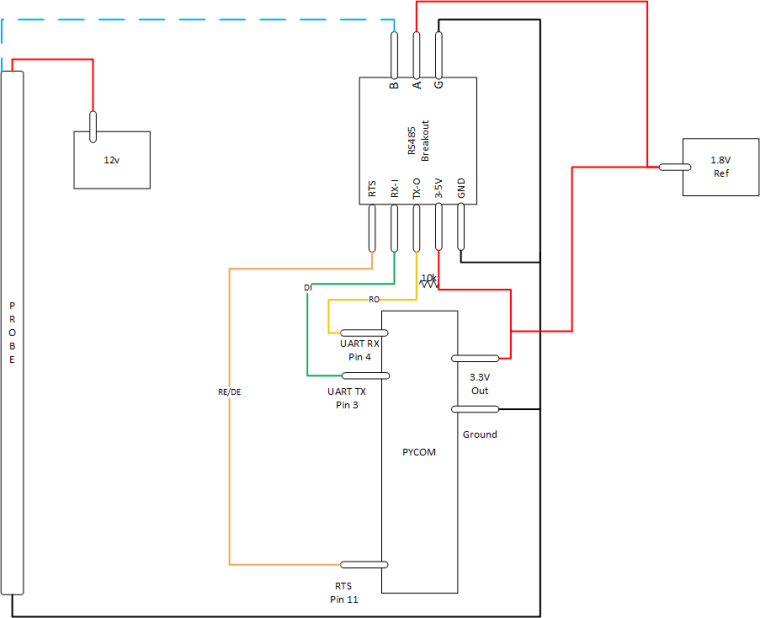
      @robert-hh This could be an issue, only having 12v and 3.3v sources, I thought the RS-485 breakout could do 5v to 3.3v step down but not the other way. I may have to build a 12v to 5v step down circuit.

      robert-hhR 1 Reply Last reply Reply Quote 0
      • robert-hhR Offline
        robert-hh @jimpower
        last edited by robert-hh

        @jimpower RS485 is a symmetrical differential interface of at least +/- 200 mV The SDI-12 uses 5V logic levels, the xxPys a 3.3 V level. The RS485 is (mis-)used to create a half duplex interface AND to do the level transformation.
        Looking at the data sheet It is now clear to me why the 1.8 V is needed. The max output level of the RS485 to the sensor is 3.3 V. To achieve 5V, the 1.8 V is added.

        J 1 Reply Last reply Reply Quote 0
        • J Offline
          jimpower @robert-hh
          last edited by

          @robert-hh

          Updated, does this look correct?

          0_1525385572033_40ebf708-7761-4251-af56-fa8d7c5bf413-image.png

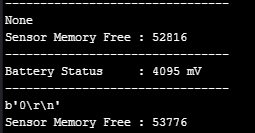
          With this I did manage to receive something although not correct I am getting closer
          0_1525385694132_a9564345-ab2e-4072-ac71-a40f3d200ce3-image.png

          B 1 Reply Last reply Reply Quote 0
          • J Offline
            jimpower @robert-hh
            last edited by

            @robert-hh I am getting responses from the SDI-12 Probe now, the reading of the sensors is working I just can't get the full read (maybe due to the size of it) could you help me to understand how to increase the buffer size to get all readings. Please see below the commands and their expected responses.

            This works correctly

            CMD - '?!' (Probe Address)
            RES - '0'

            This works correctly

            CMD - '02C' (Take Temp Reading)
            RES - '000312' (1-4 is the time taken to read sensors 5-6 is the amount of sensors read)

            This doesn't show all readings

            CMD - '0D0' (Show Temp Readings first 8 sensors)
            RES - '0+028.12+027.24+027.03+026.78+026.65+025.45+023.34+021.21' (temp readings after each +0)
            ***Only some of the readings show I have never been able to get more then 6 show at a time.

            This doesn't seem to work yet

            CMD - '0D1' (Show temp readings last 4 sensors)
            RES - '0+028.12+027.24+027.03+026.78'

            Hopefully it is just a buffer size issue and the payload is not too large.

            robert-hhR 1 Reply Last reply Reply Quote 0
            • robert-hhR Offline
              robert-hh @jimpower
              last edited by

              @jimpower Code and exact sensor product name would be helpful. I found a data sheet telling that the longest response string is 80 bytes. That should not be a problem with the UART. The Rx buffer length is set to 512 bytes.

              J 1 Reply Last reply Reply Quote 0
              • J Offline
                jimpower @robert-hh
                last edited by

                @robert-hh

                I'm using an Enviropro EP100G-12 which has 12 rows of sensors at 10cm intervals, each row contains a temp, moisture and ec sensor.

                http://enviroprosoilprobes.com/Files/EnviroPro_SDI-12_CommandsV2.pdf

                http://enviroprosoilprobes.com/Files/EnviroPro_EPCU_User_ManualV3.pdf

                import network
                import time
                import pycom
                import machine
                import gc
                import socket
                import utime
                from machine import RTC
                from machine import ADC
                from machine import Pin
                from machine import UART
                from network import LoRa
                
                execfile('/flash/Network/LoRa.py')
                
                f_device = open('/flash/Config/Device_Details.txt', 'r')
                
                device_setting = f_device.readline()
                device_strings = [i.strip() for i in device_setting.split(',')]
                f_device.close()
                
                pycom.heartbeat(False)
                rtc = RTC()
                adc = ADC()
                lora = LoRa()
                uart = UART(1, baudrate=1200)
                p_tx = Pin('P3', mode=Pin.OUT)
                p_dir = Pin('P11', mode=Pin.OUT)
                
                
                def SDI12(cmd):
                    uart.deinit()
                    p_tx.value(0)
                    p_dir.value(1)                                                          # set output dir
                    utime.sleep_us(14000)                                                   # send BREAK
                    p_tx.value(1)
                    utime.sleep_us(8333)                                                    # send MARK
                    uart.init(1200, bits=7, parity=UART.EVEN, stop=1, timeout_chars=75)     # init with given parameters
                    uart.write(cmd)                                                         # send command
                    utime.sleep_us(8333 * len(cmd))                                         # wait to send command (byte time * command lenght)
                    p_dir.value(0)                                                          # output set to read
                    line = uart.read(75)                                                   # read data from UART
                    return line;
                
                time.sleep(2)
                
                while True:
                    batt = adc.channel(attn=1, pin='P16')
                    #s = socket.socket(socket.AF_LORA, socket.SOCK_RAW)
                    #s.setsockopt(socket.SOL_LORA, socket.SO_DR, 5)
                    #s.setblocking(True)
                    #s.send("Battery Status : " + str(batt.value()) + " mV")
                    #s.setblocking(False)
                    print('--------------------------------')
                    print("Battery Status     : " + str(batt.value()) + " mV")
                    print('--------------------------------')
                ##########################################################
                #                   Measure Temperature                  #
                ##########################################################
                    utime.sleep(2)
                    line = SDI12('?!')              #Wake Up Sensor
                    print(line)                     #Print Sensor Response
                    utime.sleep(3)                  #Wait before Next Cmd
                    line = SDI12('0C2!')            #Probe Temp Measure
                    print(line)                     #Print Time/Sensors
                    utime.sleep(5)                  #Wait before Next Cmd
                    data = SDI12('0D0!')            #Probe Temp Readings
                    print(data)                     #Print Temp Readings
                    #utime.sleep(10)
                    #data = SDI12('0D1!')            #Probe Temp Readings
                    #print(data)                     #Print Temp Readings
                
                ##########################################################
                #                     Garbage Collect                    #
                ##########################################################
                    gc.enable()
                    gc.collect()
                    print("Sensor Memory Free : " + str(gc.mem_free()))
                    time.sleep(30)```
                robert-hhR B 2 Replies Last reply Reply Quote 0
                • robert-hhR Offline
                  robert-hh @jimpower
                  last edited by

                  @jimpower Thanks. The code looks principly OK. What happens if you increase the receive timeout?

                  The documentation of the product is weird. Why cannot they include a proper protocol definition? Did you see b.t.w. CR/LF transmitted at the end of response messages?

                  J 1 Reply Last reply Reply Quote 0
                  • J Offline
                    jimpower @robert-hh
                    last edited by

                    @robert-hh

                    yes it says technical document "coming soon"

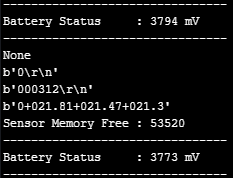
                    here is a snippet of my uart.readline()
                    0_1525864184011_ddb7c828-d942-44ba-9bc5-e1cc5bd7501c-image.png

                    Do you think this timeout_chars is correct? I wasn't sure what to put in here.

                    uart.init(1200, bits=7, parity=UART.EVEN, stop=1, timeout_chars=75)```
                    robert-hhR 1 Reply Last reply Reply Quote 0
                    • robert-hhR Offline
                      robert-hh @jimpower
                      last edited by

                      @jimpower SInce the length of the response is not known, you need astrategy to tell when the respons eis complete:

                      • either the response has a known terminal symbol, like ! in the command, or \r\n, then you can read until you see that symbol, and wait as second condition for a long timeout. Waitung for \r\n is done by uart.readline().
                      • or you have to wait for a timeout.
                        The 75 char timeout seems reasonable, but to sort out implementation errors in Micropython, you could increase that for testing and see, if you receive a longer message. Thre reason I ask is, taht I faintly remember some discussion around the rx timeout of uart.read.
                      J 1 Reply Last reply Reply Quote 0
                      • J Offline
                        jimpower @robert-hh
                        last edited by

                        @robert-hh I'm not sure what happened but I changed my code back to the way it was before playing around with break times, uart timeout etc and it works.
                        A note for anyone wanting to interface with SDI-12 with a LoPy you need to perform a gc.collect() after every read and then wait for 30secs before you can read from any other sensors.
                        @robert-hh thanks for your help with this it was pivotal to getting a working SDI-12 interface.
                        @AntonioValente thanks for your initial concept which lead to this solution.

                        1 Reply Last reply Reply Quote 0
                        • B Offline
                          Bryan Hom @jimpower
                          last edited by

                          @jimpower I know this is an old thread but where are you getting the 1.8V ref from?

                          robert-hhR 1 Reply Last reply Reply Quote 0
                          • robert-hhR Offline
                            robert-hh @Bryan Hom
                            last edited by

                            @Bryan-Hom Yuo can use a small voltage regulator and derive it from 3.3V. If

                            B 1 Reply Last reply Reply Quote 1
                            • B Offline
                              Bryan Hom @robert-hh
                              last edited by

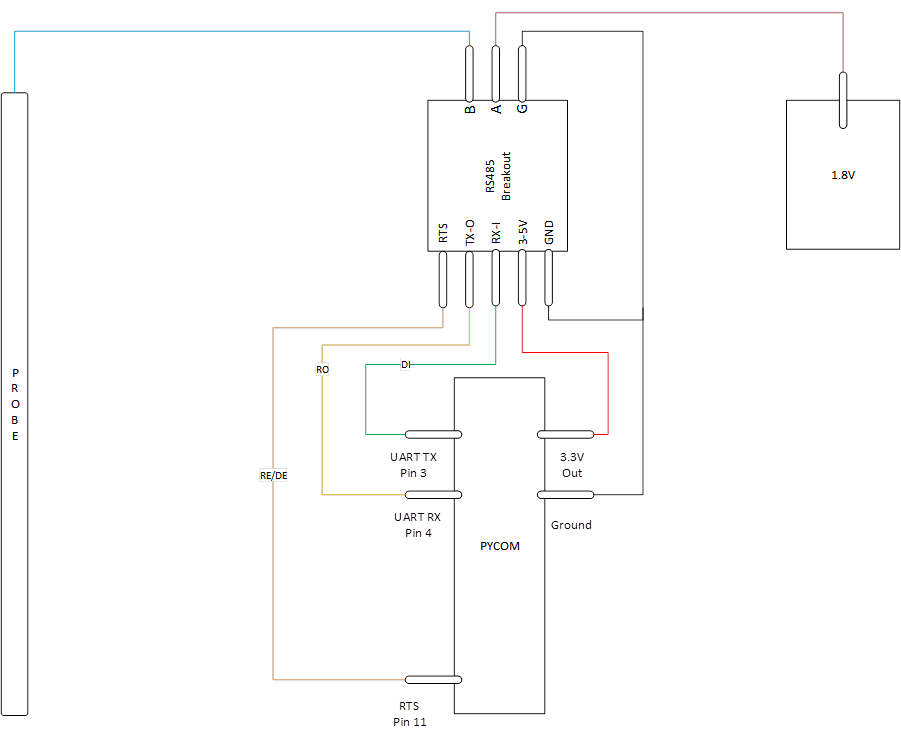
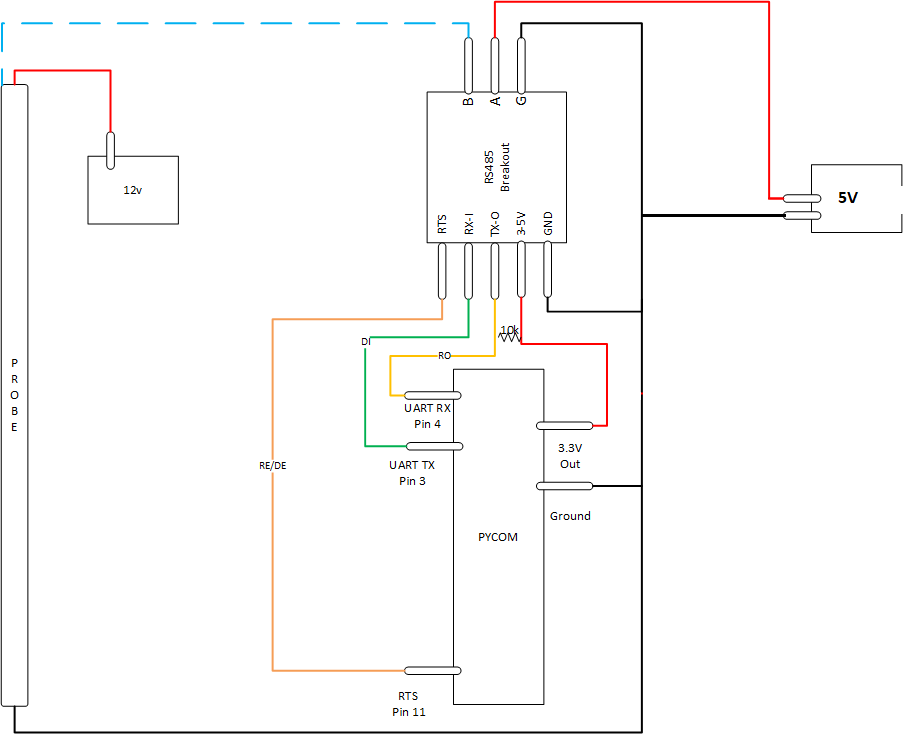
                              @robert-hh Thank you. 1 other question, am i looking at the diagram correctly that the 1.8V + should also be tied in with the 3.3v line? Wouldn't that mean the voltage going into A is 3.3V?

                              robert-hhR 1 Reply Last reply Reply Quote 0
                              • robert-hhR Offline
                                robert-hh @Bryan Hom
                                last edited by robert-hh

                                @Bryan-Hom That's looks wrong. You can consider the 1.8V source as a function block with 3.3V/GND as input and 1.8v/GND as output.

                                I tried also some other circuits for a SDI-12 connection, but never connected them to real sensors. https://forum.pycom.io/topic/4827/teros-12-and-sdi-12?_=1640181173389

                                B 1 Reply Last reply Reply Quote 0
                                • B Offline
                                  Bryan Hom @robert-hh
                                  last edited by Bryan Hom

                                  @robert-hh Thanks, so it should actually look more like this? pycom SDI-12 schematic.png
                                  robert-hhR 1 Reply Last reply Reply Quote 0
                                  • robert-hhR Offline
                                    robert-hh @Bryan Hom
                                    last edited by

                                    @Bryan-Hom Yes.

                                    B 1 Reply Last reply Reply Quote 1
                                    • B Offline
                                      Bryan Hom @jimpower
                                      last edited by

                                      This post is deleted!
                                      1 Reply Last reply Reply Quote 0
                                      • B Offline
                                        Bryan Hom @robert-hh
                                        last edited by Bryan Hom

                                        @robert-hh

                                        Hi Robert, you seem to be the right person to be asking these questions to, but im using @jimpower's code and i followed the drawing exactly, but i cannot seem to get any reply from the sensor. Probing around my setup it looks like i have all the grounds properly connected, 5v going into to A. I made sure to put the 10k resistor between the 3.3v and the pin 4 (rx) of the pycom. Any thoughts or suggestions? I'm trying to read SDI-12 from a Campbell Scientific AVW200 https://s.campbellsci.com/documents/es/manuals/avw200 - 772.pdf Thank you

                                        import network
                                        import time
                                        import pycom
                                        import machine
                                        import gc
                                        import socket
                                        import utime
                                        from machine import RTC
                                        from machine import ADC
                                        from machine import Pin
                                        from machine import UART
                                        
                                        
                                        pycom.heartbeat(False)
                                        rtc = RTC()
                                        adc = ADC()
                                        #lora = LoRa()
                                        uart = UART(1, baudrate=1200)
                                        p_tx = Pin('P3', mode=Pin.OUT)
                                        p_dir = Pin('P11', mode=Pin.OUT)


                                        def SDI12(cmd):
                                            uart.deinit()
                                            p_tx.value(0)
                                            p_dir.value(1)                                                          # set output dir
                                            utime.sleep_us(12500)                                                   # send BREAK
                                            p_tx.value(1)
                                            utime.sleep_us(8333)                                                    # send MARK
                                            uart.init(1200, bits=7, parity=UART.EVEN, stop=1, timeout_chars=75)     # init with given parameters
                                            uart.write(cmd)                                                         # send command
                                            utime.sleep_us(8333 * len(cmd))                                               # wait to send command (byte time * command lenght)
                                            p_dir.value(0)                                                          # output set to read
                                            line = uart.readline()                                                  # read data from UART
                                            return line;
                                        
                                        time.sleep(2)
                                        
                                        while True:
                                        
                                        ##########################################################
                                        #                   Measure Temperature                  #
                                        ##########################################################
                                            utime.sleep(2)
                                            command = SDI12('V!')
                                            utime.sleep(10)
                                            print(command)                  #Print Sensor Response
                                            utime.sleep(2)
                                            command2 = SDI12('0V!')
                                            utime.sleep(10)
                                            print(command2)
                                        
                                        ##########################################################
                                        #                     Garbage Collect                    #
                                        ##########################################################
                                            gc.enable()
                                            gc.collect()
                                            print("Sensor Memory Free : " + str(gc.mem_free()))
                                            time.sleep(15)```
                                        robert-hhR 1 Reply Last reply Reply Quote 0
                                        • robert-hhR Offline
                                          robert-hh @Bryan Hom
                                          last edited by

                                          @Bryan-Hom Sorry, I misread you diagram. Pin A has to be at a level between 0 and 3.3 V, like 1.8 V in the first diagram. You asked from where to get it, I recommended an 1.8V regulator which in turn gets it power from 5V or 3.3V. For a fist test, you should also be able to use a 1.5V battery.

                                          B 1 Reply Last reply Reply Quote 0
                                          • B Offline
                                            Bryan Hom @robert-hh
                                            last edited by Bryan Hom

                                            @robert-hh Thank you! i rigged up the battery and got the response. I also just tried used a DAC output on Pin22 set at 55% which is roughly 1.77V and it seems to work as well without any special power supply

                                            dac = machine.DAC('P22') # create a DAC object
                                            dac.write(0.55) # set output to 55% ~1.77V

                                            Gusti Made Arya WijayaG 1 Reply Last reply Reply Quote 0

                                            Hello! It looks like you're interested in this conversation, but you don't have an account yet.

                                            Getting fed up of having to scroll through the same posts each visit? When you register for an account, you'll always come back to exactly where you were before, and choose to be notified of new replies (either via email, or push notification). You'll also be able to save bookmarks and upvote posts to show your appreciation to other community members.

                                            With your input, this post could be even better 💗

                                            Register Login
                                            • 1
                                            • 2
                                            • 2 / 2
                                            • First post
                                              Last post

                                            Pycom on Twitter

                                            Pycom