Fipy, no FTP, Atom no project, no files on Fipy.
-
This is a follow up on: https://forum.pycom.io/topic/3667/ftp-access-device-is-seen-but-doesn-t-asnwer
Seems I have more issues, will try to explain in detail what goes wrong.
What does work is that the firmware did update. (And not having it open anymore, no worries.) I also seem to connect properly is Atom as the '>>>' show, running code also seems to work fine. But once trying to upload it, it seems to be on it, as when I delete all my files and choose download, all is back. However, when doing the same but before downloading I close the program, empty the project folder in Explorer and restart it, downloading yields empty files.
Also, in the documentation, it says above the console next to the connection status, it should show your project, but no matter what I do, it will always say 'No project', tried Ctrl-C in the console, double-clicking the project files, nothing works.
And of course, no FTP connection luck, so can't even see what is truly on the Fipy...
Can anyone help? This device is making me pull my hair out...
-
Hi @NickBoots,
Could you share the version number of the Pymakr plugin and Atom? Also, could you upload a screenshot of the window? If you open a folder, it should display that folder's name as the project name.
-
Hello @dan, thanks for your reply, I actually figured it out in the mean time. First one is really silly, it turns out that when copying the files from the tutorial it snuck an invisible character along. I found it out when reading the log and it showed an error on a line where seemingly nothing was going on.
Second thing, the documentation is honestly not clear about this, but FTP seems to be not possible over a COM connection, only over WiFi. Maybe this is expected to be known, honestly I think it's bad practice to assume this.
Everything works now, and uploading files works and get executed. The window does keep saying 'no project' though.
My version of Atom is 1.29.0, and the PyMakr plug-in is at 1.4.1.
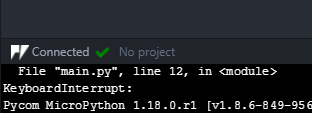
And sadly, opening the folder does not make it the active project.
-
@nickboots Great! I'm glad you sorted it out. The project name label might be related to this issue, you should be still able to upload/run your project, it's just the label that doesn't update. FTP only works with WiFi, if you want to use the serial connection, you can use Pymakr with Atom/VSCode, or rshell.

Hello! It looks like you're interested in this conversation, but you don't have an account yet.
Getting fed up of having to scroll through the same posts each visit? When you register for an account, you'll always come back to exactly where you were before, and choose to be notified of new replies (either via email, or push notification). You'll also be able to save bookmarks and upvote posts to show your appreciation to other community members.
With your input, this post could be even better 💗
Register Login