Welcome to the Pycom forum Forum
    • \[\[global:header.categories\]\]
    • \[\[global:header.recent\]\]
    • \[\[global:header.tags\]\]
    • \[\[global:header.popular\]\]
    • Login

    Explore Pybytes | Official Documentation | Report a Firmware Bug/Issue | GitHub

    Firmware Release v1.20.1

    Scheduled Pinned Locked Moved Announcements & News
    firmware
    68 Posts 18 Posters 11.4k Views 19 Watching
    Loading More Posts
    • Oldest to Newest
    • Newest to Oldest
    • Most Votes
    Reply
    • Reply as topic
    Log in to reply
    This topic has been deleted. Only users with topic management privileges can see it.
    • robert-hhR Offline
      robert-hh @oligauc
      last edited by

      @oligauc I think i did that in my code, which is the abp_node example. I'll repeat it.

      1 Reply Last reply Reply Quote 0
      • robert-hhR Offline
        robert-hh @oligauc
        last edited by

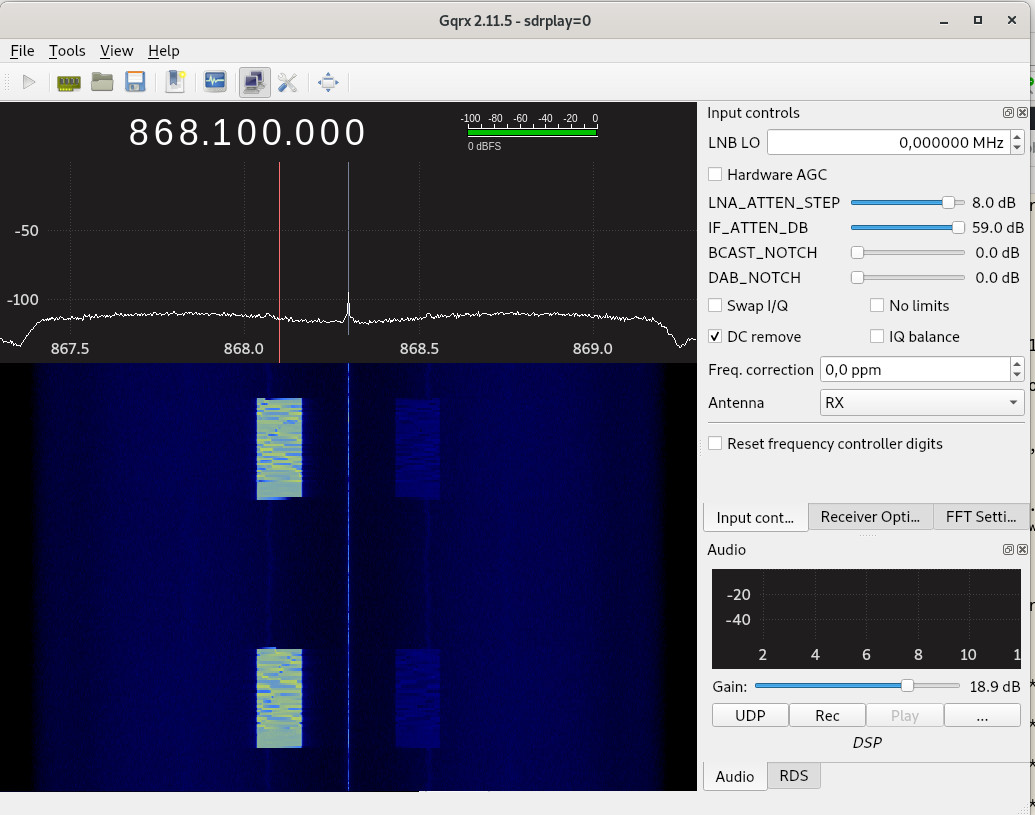
        @oligauc I just verified that, after a clean erase & upload. Then only one frequency is used. There may have been a modified set-up. I purchased a SDR recently, which allows to see the frequencies used. It's interesting to see all the different activities in the 868 band.

        1 Reply Last reply Reply Quote 0
        • robert-hhR Offline
          robert-hh @oligauc
          last edited by

          @oligauc I tried another device, a LoPy now, and that one was completely messy. After setting a Lora parameter wrong, I could not change that any more. Only erasing flash and re-installing the firmware made it working again. Besides that, below is a nice picture showing how a message with DR=0 looks in the waterfall diagram.
          lora_waterfall_DR0.jpg

          1 Reply Last reply Reply Quote 0
          • B Offline
            berni @oligauc
            last edited by

            Thank you @oligauc!

            This fixed the issue with lora.nvram_erase(). Also, I was having troubles deleting the flash from the pycom firmware upgrade software (it will time out if I select that option, working fine if I just upgrade the FW).

            I have observed that having pybytes active and doing my own LoRa OTTA (saving on nvram after joining the network) caused that the join flag was deleted and never connected again. I have disabled the pybytes in the pybytes_config.jsonfile adding {"pybytes_autostart": false} and that fixed the issue.

            I have been running the program on v1.20.1.r1 without pybytes and haven't had any Guru Meditation errors for a while. I'll keep trying...

            A 1 Reply Last reply Reply Quote 1
            • C Offline
              cmisztur @robert-hh
              last edited by

              @robert-hh said in Firmware Release v1.20.1:

              I build the image myself

              Right.

              pyexec_frozen_module("_main.py");

              robert-hhR 1 Reply Last reply Reply Quote 0
              • robert-hhR Offline
                robert-hh @cmisztur
                last edited by

                @cmisztur It's not that _main.py or _boot.py are executed, it's what is frozen into the image as _boot.py or _main.py.

                1 Reply Last reply Reply Quote 0
                • S Offline
                  serafimsaudade
                  last edited by serafimsaudade

                  pycom_.png

                  I'm getting this error when compiling.
                  I clone the repo and try to compile.

                  robert-hhR 1 Reply Last reply Reply Quote 0
                  • robert-hhR Offline
                    robert-hh @serafimsaudade
                    last edited by

                    @serafimsaudade IOt may be a problem with the pycom esp-idf.
                    in the folder pycom-esp-idf, execute the command:

                    git checkout idf_v3.2
                    git submodule sync
                    git submodule update --init
                    

                    Also, in you pycom esp32 source directory, issue the commands:

                    git checkout Dev
                    git submodule sync
                    git submodule update --init
                    

                    Then, a

                    make BOARD=WIPY clean
                    make BOARD=WIPY
                    
                    S 1 Reply Last reply Reply Quote 0
                    • S Offline
                      serafimsaudade @robert-hh
                      last edited by

                      @robert-hh Tks for the tip.

                      That was the idf submodules.
                      problem solve. :)

                      D 1 Reply Last reply Reply Quote 0
                      • S Offline
                        serafimsaudade
                        last edited by

                        Hi again,
                        I'm trying to connect gpy to wireless, but when I do wlan.scan() get this error:

                        wlan = WLAN(mode=WLAN.STA_AP,ssid="teste", auth=(WLAN.WPA2, 'pass'))
                        nets = wlan.scan()
                        OSError: Scan operation Failed!
                        

                        This work on others fw version.

                        robert-hhR A 2 Replies Last reply Reply Quote 0
                        • robert-hhR Offline
                          robert-hh @serafimsaudade
                          last edited by

                          @serafimsaudade The following sequence works for me:

                          from network import WLAN
                          wlan = WLAN(WLAN.STA_AP)
                          wlan.scan()
                          
                          S robert-hhR 2 Replies Last reply Reply Quote 0
                          • S Offline
                            serafimsaudade @robert-hh
                            last edited by serafimsaudade

                            @robert-hh but I need to set a custom ssid and password.

                            1 Reply Last reply Reply Quote 0
                            • robert-hhR Offline
                              robert-hh @robert-hh
                              last edited by

                              @robert-hh This sequence works too, after setting the password to a length of 8 min.:

                              from network import WLAN
                              wlan=WLAN(mode=WLAN.STA_AP, ssid="teste", auth=(WLAN.WPA2, 'passpass'))
                              wlan.scan()
                              

                              Pycom MicroPython 1.20.1.r1 [d4b4717] on 2019-10-09; LoPy4 with ESP32
                              Type "help()" for more information.

                              I do not expect that the GPY is different with respect to WiFi.

                              S 1 Reply Last reply Reply Quote 0
                              • S Offline
                                serafimsaudade @robert-hh
                                last edited by

                                @robert-hh

                                from network import WLAN
                                import time
                                wlan=WLAN(mode=WLAN.STA_AP, ssid="teste", auth=(WLAN.WPA2, 'passpass'))
                                time.sleep(3)
                                wlan.scan()
                                

                                If I put a delay >= 3 seconds, works as espected, strange.

                                1 Reply Last reply Reply Quote 0
                                • C Offline
                                  crumble
                                  last edited by

                                  Running 1.20.1r1 I am impressed of the boot performance.

                                  But in combination with a pytrack there are a lot of i2c errors. I am not amused to figure out new timings which may result in less errors, but will never remove them all.

                                  Additionally I run now into i2c that can only be resolved by cutting the power suply. Would be great, if the PIC has a watchpig function. So I can track down with less efford, if this is caused by the LoPy or the Pytrack.

                                  C 1 Reply Last reply Reply Quote 0
                                  • A Offline
                                    andreas @berni
                                    last edited by andreas

                                    Hi there,

                                    @berni said in Firmware Release v1.20.1:

                                    I have disabled the pybytes in the pybytes_config.json file by adding {"pybytes_autostart": false} and that fixed the issue.

                                    We are able to confirm the new firmware obtained from [0] and bundled and flashed to a FiPy device through the process outlined on [1] works flawlessly. Before adding the pybytes_config.json file, we also experienced Guru Meditation errors like outlined above (bad00bad bad00bad bad00bad). We didn't even use LoRa, just WiFi.

                                    @crumble said in Firmware Release v1.20.1:

                                    Running 1.20.1r1 I am impressed of the boot performance.

                                    We are running the Terkin Datalogger [2] and are also very happy about the performance improvements through the efficiency gains of the new mpy file format shipped with MicroPython 1.11 [3] when loading the py/mpy files into memory. On MicroPython 1.9.4, this took about 30(!) seconds and now we are down to 5 seconds [4].

                                    Thanks to all people involved in this release, turtles all the way down to the MicroPython core maintainers - you know who you are!

                                    With kind regards,
                                    Andreas.

                                    [0] https://github.com/pycom/pycom-micropython-sigfox/releases/tag/v1.20.1.r1
                                    [1] https://forum.pycom.io/topic/4518/firmware-update-elf-vs-tar/13
                                    [2] https://github.com/hiveeyes/hiveeyes-micropython-firmware
                                    [3] https://github.com/micropython/micropython/releases/tag/v1.11
                                    [4] https://community.hiveeyes.org/t/micropython-module-freezing/2445/10

                                    1 Reply Last reply Reply Quote 1
                                    • T Offline
                                      t0000899
                                      last edited by t0000899

                                      Wlan connection has turned to really unreliable in 1.20 version. In 1.18 connection was instant and never disconnected but in the 1.20 version wlan.connect(...) timeout most of the time and if connection is made it disconnects randomly.
                                      If connection get broken wlan.ifconfig() show (0.0.0.0,0.0.0.0,0.0.0.0,0.0.0.0).

                                      Pycom MicroPython 1.20.1.r1 [v1.11-3138a13] on 2019-10-08; LoPy4 with ESP32
                                      Pybytes Version: 1.1.3
                                      Smart config auto-start is disabled.

                                      Sometimes during FTP transfer there is an unhandled exception and flash memory is formatted:

                                      Memory dump at 0x4020234c: bad00bad bad00bad bad00bad
                                      Guru Meditation Error: Core  0 panic'ed (IllegalInstruction). Exception was unhandled.
                                      

                                      From my boot.py file:

                                      if useWlan == True:
                                      	print('Configure WLAN')
                                      	
                                      	from network import WLAN
                                      	wlan = WLAN(mode=WLAN.STA, power_save=True)
                                      	wlan.ifconfig(config='dhcp')
                                      	wlan.connect(AP_name, auth=(WLAN.WPA2, AP_password), timeout=30000)
                                      
                                      	del AP_name
                                      	del AP_password
                                      
                                      A 2 Replies Last reply Reply Quote 2
                                      • rcolisteteR Offline
                                        rcolistete @rcolistete
                                        last edited by

                                        @rcolistete said in Firmware Release v1.20.1:

                                        Please update the links for all Pycom devices in :
                                        https://docs.pycom.io/advance/downgrade/
                                        to include the version 1.20.1 for manual firmware download.

                                        Repeating my request.

                                        My "MicroPython Samples". My "MicroPython Firmwares" with many options (double precision, ulab, etc).

                                        1 Reply Last reply Reply Quote 1
                                        • B Offline
                                          benc
                                          last edited by

                                          Hi, the release notes mention that uasyncio is included in this release, but I can't find it when I run help('modules').
                                          Any tips of how to import it?
                                          Thanks

                                          robert-hhR 1 Reply Last reply Reply Quote 0
                                          • robert-hhR Offline
                                            robert-hh @benc
                                            last edited by

                                            @benc You have to go to this lib https://github.com/micropython/micropython-lib and get: uasyncio/uasyncio/init.py and uasyncio.core/uasyncio/core.py. Copy it to the board, best under lib/uasyncio. Then you should have the files:

                                            lib/uasyncio/init.py
                                            lib/uasyncio/core.py

                                            You may also copy the files upip.py and upip_utarfile.py from https://github.com/micropython/micropython/tree/master/tools. If you install these on your board (e.g. to lib), you can use that via REPL to install modules from https://micropython.org/pi or https://pypi.org/pypi with the commands:

                                            import upip
                                            upip.install("micropython-uasyncio", "lib")

                                            The status of micropython-lib is somewhat unclear. Not all modules from that lib work with any micropython board. But it is always a good source of inspiration.


                                            1 Reply Last reply Reply Quote 2

                                            Hello! It looks like you're interested in this conversation, but you don't have an account yet.

                                            Getting fed up of having to scroll through the same posts each visit? When you register for an account, you'll always come back to exactly where you were before, and choose to be notified of new replies (either via email, or push notification). You'll also be able to save bookmarks and upvote posts to show your appreciation to other community members.

                                            With your input, this post could be even better 💗

                                            Register Login
                                            • 1
                                            • 2
                                            • 3
                                            • 4
                                            • 2 / 4
                                            • First post
                                              Last post

                                            Pycom on Twitter

                                            Pycom
