Welcome to the Pycom forum Forum
    • \[\[global:header.categories\]\]
    • \[\[global:header.recent\]\]
    • \[\[global:header.tags\]\]
    • \[\[global:header.popular\]\]
    • Login

    Explore Pybytes | Official Documentation | Report a Firmware Bug/Issue | GitHub

    Firmware update, not possible on either windows or mac osx...

    Scheduled Pinned Locked Moved LoPy
    lopyfirmwarefirmware updatefirmware upgradusb
    32 Posts 5 Posters 14.2k Views 5 Watching
    Loading More Posts
    • Oldest to Newest
    • Newest to Oldest
    • Most Votes
    Reply
    • Reply as topic
    Log in to reply
    This topic has been deleted. Only users with topic management privileges can see it.
    • R Offline
      rskoniec
      last edited by rskoniec

      With W10 installation of the VCP (Virtual COM Port) driver is pretty straightforward.

      @mmarkvoort said in Firmware upgrade troubleshooting - checklist/procedure:

      I don't know if it is relevant but when i wanted to update/connect through USB I had to install the USB driver manually. Mine called FTDI driver where VCP or D2XX are types of drivers. With one of the two it said it was installed but still i coudn't update/connect.

      OK, I took my notebook with Windows 10 Pro x64 with internet access and plug LoPy on Expansion Board to it for the very first time.
      Here is Device Manager just after connection:
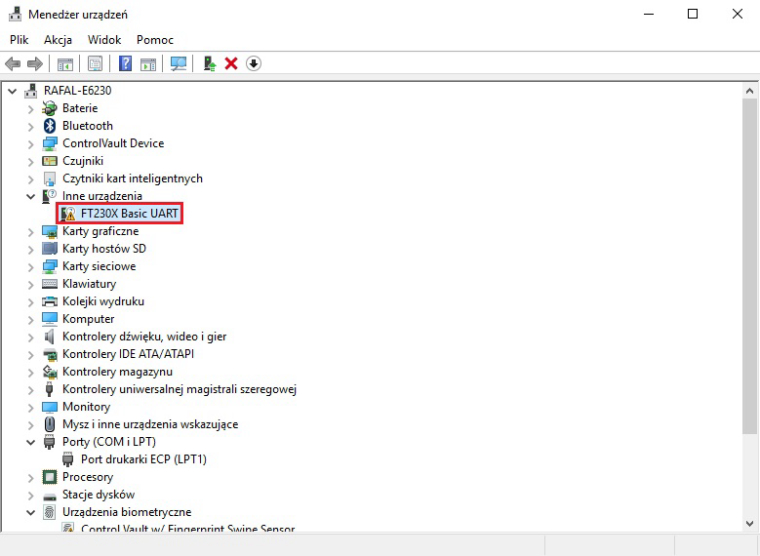
      0_1487970349956_1st_plug.jpg
      After about 30 seconds Windows Auto Update mechanism has done all the job:
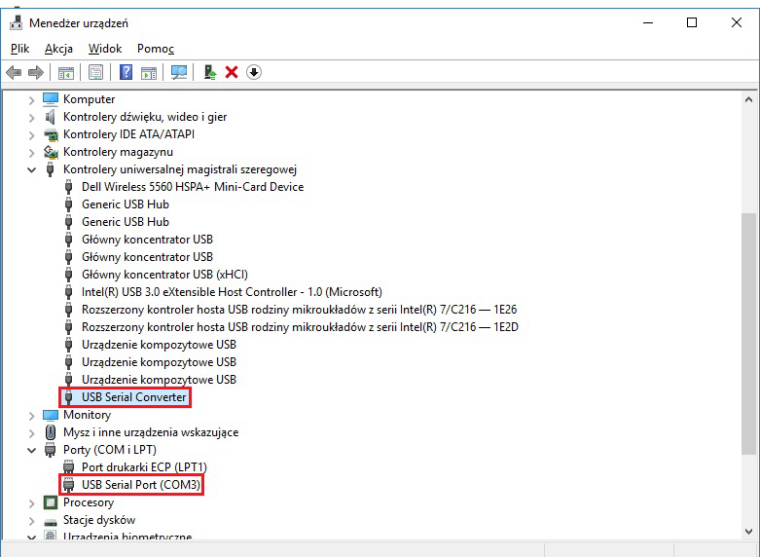
      0_1487970560498_1st_plug_wu.jpg

      The machine is working as good as it's code.

      M 1 Reply Last reply Reply Quote 0
      • J Offline
        jmarcelino @soren
        last edited by jmarcelino

        @soren
        You posted a few days ago in another thread saying you were trying to use the cu.lpss-serial2 device to access the REPL on your Mac and I replied saying that wasn't the correct device.

        Are you still trying to use cu.lpss-serial2 in the firmware upgrade tool? Have you found the correct device ?

        sorenS 1 Reply Last reply Reply Quote 0
        • sorenS Offline
          soren @jmarcelino
          last edited by

          @jmarcelino Hi, i did not see your reply in that thread sorry.
          Looking into it now. I didn't realize the REPL and firmware update was related so closely

          J 1 Reply Last reply Reply Quote 0
          • J Offline
            jmarcelino @soren
            last edited by jmarcelino

            @soren
            Yes both firmware update and REPL are done over the UART serial.

            If you're not seeing the correct device try installing the FTDI drivers from http://www.ftdichip.com/Drivers/VCP/MacOSX/FTDIUSBSerialDriver_v2_3.dmg

            sorenS 2 Replies Last reply Reply Quote 0
            • R Offline
              rskoniec
              last edited by

              @soren Or http://www.ftdichip.com/Drivers/CDM/CDM v2.12.26 WHQL Certified.zip For Windows. ;o)

              The machine is working as good as it's code.

              1 Reply Last reply Reply Quote 0
              • M Offline
                mmarkvoort @rskoniec
                last edited by mmarkvoort

                @rskoniec @soren My problem why I had to install manually was probably because I had my windows updates shut down. So it wouldn't update automatically. So probably installing it manually will help.

                1 Reply Last reply Reply Quote 0
                • sorenS Offline
                  soren @jmarcelino
                  last edited by

                  @jmarcelino Right!

                  I installed FTDI drivers on windows now which made it possible to update on my windows PC (actually thought that was only necessary for mac), but having installed ftdi drivers on my mac doesn't make any difference unfortunately..

                  1 Reply Last reply Reply Quote 0
                  • sorenS Offline
                    soren @jmarcelino
                    last edited by

                    @jmarcelino I do have ftdi drivers installed, but that does not seem to make a difference on my osx system. It shouldn't be the USB C dongle obscuring things, because it's working just fine with eg. Arduino boards

                    J 1 Reply Last reply Reply Quote 0
                    • J Offline
                      jmarcelino @soren
                      last edited by jmarcelino

                      @soren
                      Try looking in  (Apple) menu -> About This Mac -> press System Report and then choose USB from the list

                      If your Mac can see the Expansion Board you'll have a device saying FT230X Basic UART , like this:
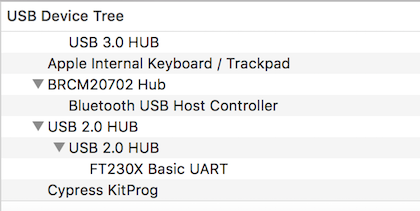
                      0_1490263549065_Screen Shot 2017-03-23 at 10.02.12.png

                      sorenS 1 Reply Last reply Reply Quote 0
                      • sorenS Offline
                        soren @jmarcelino
                        last edited by soren

                        @jmarcelino yes, my mac see's the unit as a ft230x basic UART.

                        EDIT: I also tried a different USB cable now, just for the sake of excluding that.. no difference

                        J 1 Reply Last reply Reply Quote 0
                        • J Offline
                          jmarcelino @soren
                          last edited by jmarcelino

                          @soren
                          Ok that looks good, so what do you get from a ls -l /dev/cu.* ?

                          Is there a line with /dev/cu.usbserial-xxxxxxxx ? (the xxxxxxxx part doesn't really matter)

                          EDIT Also can you post the result of

                          kextstat -b com.FTDI.driver.FTDIUSBSerialDriver

                          sorenS 1 Reply Last reply Reply Quote 0
                          • sorenS Offline
                            soren @jmarcelino
                            last edited by soren

                            @jmarcelino

                            EDIT EDIT
                            Now it freakin works.. SOooo, there's a difference between vcp and the dxx ftdi drivers.. i did not know about the vcp before until just now. installing the vcp seems to be working now. also, i have currently unloaded the apple ftdi driver which might also be necessary but i'm not sure. phew, this is a rather frustrating process to go through.. thanks so much for the help @jmarcelino though!

                            I don't see a cu.usbserial-xxxx... no, sorry. this is what i get:

                            crw-rw-rw- 1 root wheel 20, 3 Mar 23 10:41 /dev/cu.Bluetooth-Incoming-Port

                            crw-rw-rw- 1 root wheel 20, 5 Mar 23 10:41 /dev/cu.JabraStylev130-CSRGAIA

                            crw-rw-rw- 1 root wheel 20, 7 Mar 23 10:41 /dev/cu.iPhone-WirelessiAP

                            crw-rw-rw- 1 root wheel 20, 1 Mar 23 10:41 /dev/cu.lpss-serial2

                            here's my result of kextstat -b com.FTDI.driver.FTDIUSBSerialDriver:

                            list itemIndex Refs Address Size Wired Name (Version) UUID <Linked Against>

                            EDIT
                            so.. this looks like the ftdi driver is not being found at all, right?

                            J 1 Reply Last reply Reply Quote 0
                            • J Offline
                              jmarcelino @soren
                              last edited by jmarcelino

                              @soren
                              Yes it's not loading the driver for some reason. Can you post the result of:

                              kextfind -case-insensitive -bundle-id -substring 'FTDI' -print

                              to see if it's correctly installed and if there's any conflicts?

                              you can also try manually loading it with

                              sudo kextload -bundle-id com.FTDI.driver.FTDIUSBSerialDriver

                              sorenS 2 Replies Last reply Reply Quote 1
                              • sorenS Offline
                                soren @jmarcelino
                                last edited by

                                @jmarcelino said in Firmware update, not possible on either windows or mac osx...:

                                kextfind -case-insensitive -bundle-id -substring 'FTDI' -print

                                kextfind gives me:
                                /System/Library/Extensions/AppleUSBFTDI.kext
                                /Library/Extensions/D2xxHelper.kext
                                /Library/Extensions/FTDIKext.kext
                                /Library/Extensions/FTDIUSBSerialDriver.kext

                                this is so weird though. trying to unload the mac ftdi driver with:

                                sudo kextunload -b com.apple.driver.AppleUSBFTDI

                                just gives me:

                                Can't create –b.
                                Can't create com.apple.driver.AppleUSBFTDI.

                                1 Reply Last reply Reply Quote 0
                                • sorenS Offline
                                  soren @jmarcelino
                                  last edited by

                                  @jmarcelino
                                  so, after being able to connect and I synced a project several times - now I suddenly am back to being unable to connect. I did not reboot my system.. It just tells me "invalid device address.." and the lopy doesn't show up in configurations.. this has got to be the most uneasy mcu i've ever dealt with

                                  1 Reply Last reply Reply Quote 0
                                  • J Offline
                                    jmarcelino
                                    last edited by jmarcelino

                                    Just saw your edit on the original post. Glad you got it working in the end!

                                    Yeah USB serial drivers can be a confusing mess - and actually FTDI has some of the best drivers.

                                    1 Reply Last reply Reply Quote 0
                                    • robert-hhR Offline
                                      robert-hh
                                      last edited by

                                      When you say: "synched a project", does thar mean you#re using Pymakr? If yes, don't do that. Pymakr simply adds another layer of strange issues. Better use basic tools, like an ftp client of your choice, screen or telnet, ...
                                      There you have much better response, and if you have issues, the reason is obvious.

                                      J sorenS 2 Replies Last reply Reply Quote 0
                                      • J Offline
                                        jmarcelino @robert-hh
                                        last edited by

                                        I agree, stick with telnet + ftp for development and leave the serial connection for firmware upgrades and debugging.

                                        I do think you have too many serial drivers installed and active and - as they say, too many serial drivers in the kitchen spoils the broth - you'll need to actually disable or delete the ones you don't need.

                                        1 Reply Last reply Reply Quote 0
                                        • sorenS Offline
                                          soren @robert-hh
                                          last edited by soren

                                          @robert-hh hi Robert, thanks for your reply.

                                          So I managed to get an FTP access up and running (awesome!!) but I also managed to try and change the server and wlan login credentials, which now resulted in the lopy not showing up as a wlan.. (well f*'** done soren).. so now I literally have no idea how to get access to my lopy with USB not working propperly.. any ideas ?

                                          EDIT
                                          did a factory reset, but this did not seem to change my boot and main files.. which means i still can't see the lopy on wifi

                                          J 1 Reply Last reply Reply Quote 0
                                          • robert-hhR Offline
                                            robert-hh
                                            last edited by

                                            You could try the safe boot procedure https://docs.pycom.io/pycom_esp32/_downloads/wipy_pinout.pdf. But I'm not sure whether that brings you back to the standard WiFi credentials. I think so, but cannot remember, whethe rI've gone this path once.
                                            You mentioned to have tried Windows. You need the VCP driver von Windows too. But that should be less of a problem. The easient choice is Linux! You could try to boot a PC (or MAC?) with a Linux test image. Most distributions have images which you can boot from USB or DVD. Try Ubuntu, Lint or Knoppix.


                                            1 Reply Last reply Reply Quote 0

                                            Hello! It looks like you're interested in this conversation, but you don't have an account yet.

                                            Getting fed up of having to scroll through the same posts each visit? When you register for an account, you'll always come back to exactly where you were before, and choose to be notified of new replies (either via email, or push notification). You'll also be able to save bookmarks and upvote posts to show your appreciation to other community members.

                                            With your input, this post could be even better 💗

                                            Register Login
                                            • 1
                                            • 2
                                            • 1 / 2
                                            • First post
                                              Last post

                                            Pycom on Twitter

                                            Pycom