• This topic is deleted!

    2
    0 Votes
    2 Posts
    13 Views
  • Connecting to wifi upon boot

    5
    0 Votes
    5 Posts
    54 Views
    robert-hhR
    @cbourne Wifi connection is not always immediate. It may take a few seconds after the wlan.connect() statement until the connection is settled and the dhcp server submitted an IP address. So better code a loop after the connect statements, which checks with wlan.isconnected(), whther the connection is established. Add a short sleep into the loop, like sleep_ms(100).
  • Neep Help to send current sensor data to Thingsboard

    wipy3.0
    1
    0 Votes
    1 Posts
    24 Views
    No one has replied
  • Stability of WiPy

    3
    0 Votes
    3 Posts
    32 Views
    S
    Thank you, Gijs. That was actually my idea too. Creating a new file every day (perhaps) for instance, so the file, which gets written to at the moment won't get touched. I also thought, that this mostlikely will cause issues. Thank you for the additional information about filesize too! Thanks for the help! Kind regards, SciWax
  • 0 Votes
    2 Posts
    20 Views
    robert-hhR
    @hrish-kumar The documentation is clear about it, e.g. for WiPy3: https://docs.pycom.io/datasheets/development/wipy3/ The 3.3vV Pin is OUTPUT ONLY. The external antenna can be selected using the wlan.antenna() method. See here: https://docs.pycom.io/tutorials/networks/wlan/#using-an-external-antenna So never forget to look into the documentation first. it's made for that
  • memory allocation failed - why?

    7
    0 Votes
    7 Posts
    53 Views
    L
    @Gijs I also overlooked that you do not simply allocate new block but you add it to dict thing[i]. Then even if gc collect something, then test itself was ok as reference exists. We are sometimes too fast when we work on "simple" things ;-)
  • [SOLVED] Add flash to WiPy2?

    4
    0 Votes
    4 Posts
    26 Views
    B
    Thanks all. Ordered some WiPy3 and I'm making do with a slightly older firmware (1.20.2.r4) until they arrive. The WiPy2 boots and connects to Pybytes but it often hits memory limits. I will disable everything including Pybytes in the meantime.
  • ImportError: no module named 'pytrack'

    5
    0 Votes
    5 Posts
    60 Views
    L
    @NITIN-Shivaraman if you have files which require import you must add it to search path as only /flash, /flash/lib are initially in the path e.g. import sys sys.path.append('/flash/shields') and all other folders sometimes easier life is to have all in max 2 folders as flat ;-)
  • building firmware 1.18.2.r7 errors

    4
    0 Votes
    4 Posts
    49 Views
    J
    Hi, I have a similar issue. What I found was that the paths in the pycom-esp-idf master branch is different from what I get when I clone with this branch idf_v3.3.1 (as stated in the readme). E.g. there was an additional level with mbedtls in the idf_v3.3.1 compared to the master. I then tried to checkout the master branch of pycom-esp-idf and it build ok. I haven't check if the actual image/bin file is working / equal to the released version. [image: 1618382052294-87bf23af-0b3e-48e9-8331-a6373771de97-image.png]
  • Pygate custom firmware

    12
    0 Votes
    12 Posts
    76 Views
    G
    @Stefano-Floriani Please also have a look at the suggestions @jcaron made which I did not think about. Im not aware of any LNS implementations on Micropython, but the raw LoRa solution could be viable for your situation If, after that, you're still looking to compile your own firmware, have a look at the readme page on the github repository: https://github.com/pycom/pycom-micropython-sigfox. If you have no experience writing C code its going to be a steep hill to climb and I would suggest to make use of a local Chirpstack server, or using LoRa raw instead, we have some examples there: https://docs.pycom.io/tutorials/networks/lora/lora-mac/, https://docs.pycom.io/tutorials/networks/lora/lora-mac-nano-gateway/
  • build firmware on Ubuntu

    3
    1
    0 Votes
    3 Posts
    26 Views
    L
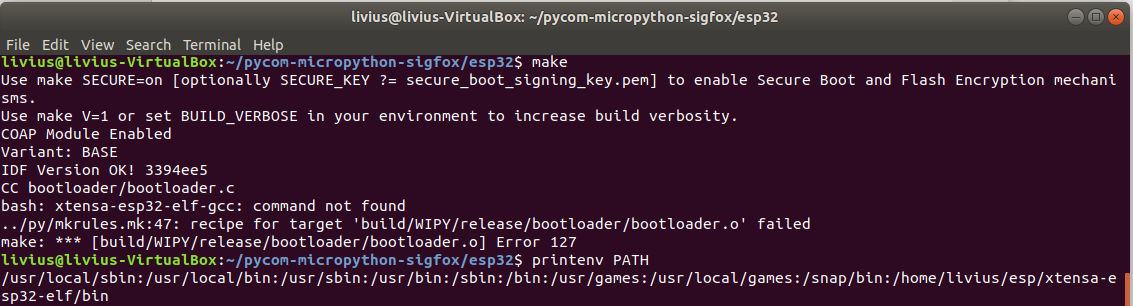
    @robert-hh xtensa-esp32-elf-gcc is ok - but now i have realized that i wrongly unpack archive ;-) i have checked working file in oryginal location but unpacked was esp/xtensa-esp-elf/bin and it looked ok at first look but this was 'xtensa-esp-elf from esp/xtensa-esp-elf/xtensa-esp-elf/bin ;-) Thank you for the help PS. i am really new to Ubuntu world - 2 days experience ^^
  • Http Post and PHP GET

    wipy 3.0 http post lopy4
    4
    0 Votes
    4 Posts
    530 Views
    C
    Bist du weitergekommen? Ich suche vergebens nach einer Lösung die API von pushsafer anzusprechen. Leider kann der Betreiber von Pushsafer hier nicht unterstützen.. Grüße Clyde
  • WiPy re-use UART-REPL ports P0/P1 for other purpose

    3
    1
    0 Votes
    3 Posts
    38 Views
    K
    Thanks, that really did the trick. I added it in the boot.py together with 3 sec sleep period in order to interrupt it if I need to load new code. time.sleep(3) uos.dupterm(None) This way both P0 and P1 pins were released and can be re-used
  • ETH() catch exception on missing PyEthernet module

    2
    1 Votes
    2 Posts
    17 Views
    G
    Fixing this is on the list! Though the PyEthernet is not (meant to be) hot swappable anyways :)
  • PyEthernet and SD card

    4
    0 Votes
    4 Posts
    30 Views
    G
    Yea I dont know either. You would probably need to edit the library and build it into the firmware, while selecting the Pybytes variant. The readme https://github.com/pycom/pycom-micropython-sigfox has a guide on how to build the firmware from source. Let me know if you run into issues! Gijs
  • External Flash lose files

    wipy3.0 flash
    93
    0 Votes
    93 Posts
    351 Views
    G
    @robert-hh Many thanks for this detailed analysis and testing. The results are promising, based on your tests and also information from others I think it is clear that enabling wear-leveling does not have any significant negative effect.
  • 'module' object has no attribute 'BH1750FVI'

    4
    0 Votes
    4 Posts
    22 Views
    S
    @livius Thank you very much for your answer. I have WiPy 3.0 and Expansion board 3.0. I 'run' the code(run button click) Today(2021-02-19) I uploaded the code(main.py and bh1750fvi.py). It works!! Thank you.
  • Update Firm wipy3 with expansionboardV3.1

    firmware update
    3
    1
    -1 Votes
    3 Posts
    36 Views
    J
    thanks I tried firstly the second option you told and it worked well.
  • Guru Meditation Error: Core 1 panic'ed (LoadProhibited) on WiPy 3.0

    3
    0 Votes
    3 Posts
    82 Views
    S
    That worked flawlessly! Thank u so much!
  • OSError: [Errno 202] EAI_FAIL

    5
    5
    0 Votes
    5 Posts
    324 Views
    G
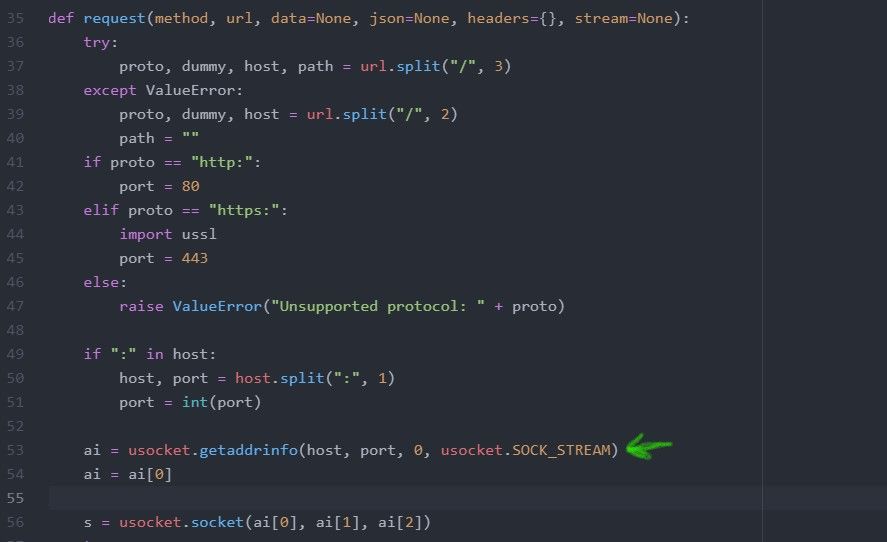
    Do you wait in the boot.py until the connection is established, or simply use wlan.connect(...) and then end the file? As far as I know, the statement you mention should be true, and the connection you made in the boot.py file should hold. You should be able to test this though, through using from network import WLAN wlan = WLAN() print(wlan.isconnected()) in the main.py to test if we are connected to a wifi network. If this returns false, there is no connection. This should also hold True if the connection was created in previous 'session' that you ctrl+c'd out of, which is, to my understanding, very similar to the transfer between boot.py and main.py.

Pycom on Twitter