• 0 Votes
    3 Posts
    83 Views
    T
    @jcaron Thanks for the clarification. Okay, Then how about the second part of my question? If I import a library, does the whole library (including unused functions) get loaded into / waste memory? Thanks, Troy
  • Memory consumptions increases after some time

    Issues & Bugs memory garbage
    6
    0 Votes
    6 Posts
    1k Views
    J
    @egimbernat I fully understand that GC need to kick in and that it is a resource intensive task. The question remains, why does Work A and Work B start to take more time after appr 18 minutes runtime? I added a gc.collect() to run every 10 iteration in the loop (appr every 10 ms). But no change, after 18 minutes it slows down.
  • 0 Votes
    4 Posts
    2k Views
    robert-hhR
    @gruia-nichita I do not work with the pymakr plugin. It's too obscure for my opinion. You can always copy the file to the board with ftp, using FileZilla or FireFTP. Instructions on how to do that are in the docs: https://docs.pycom.io/chapter/toolsandfeatures/FTP.html
  • "Not enough memory available on the board"

    LoPy memory lopy
    3
    0 Votes
    3 Posts
    2k Views
    robert-hhR
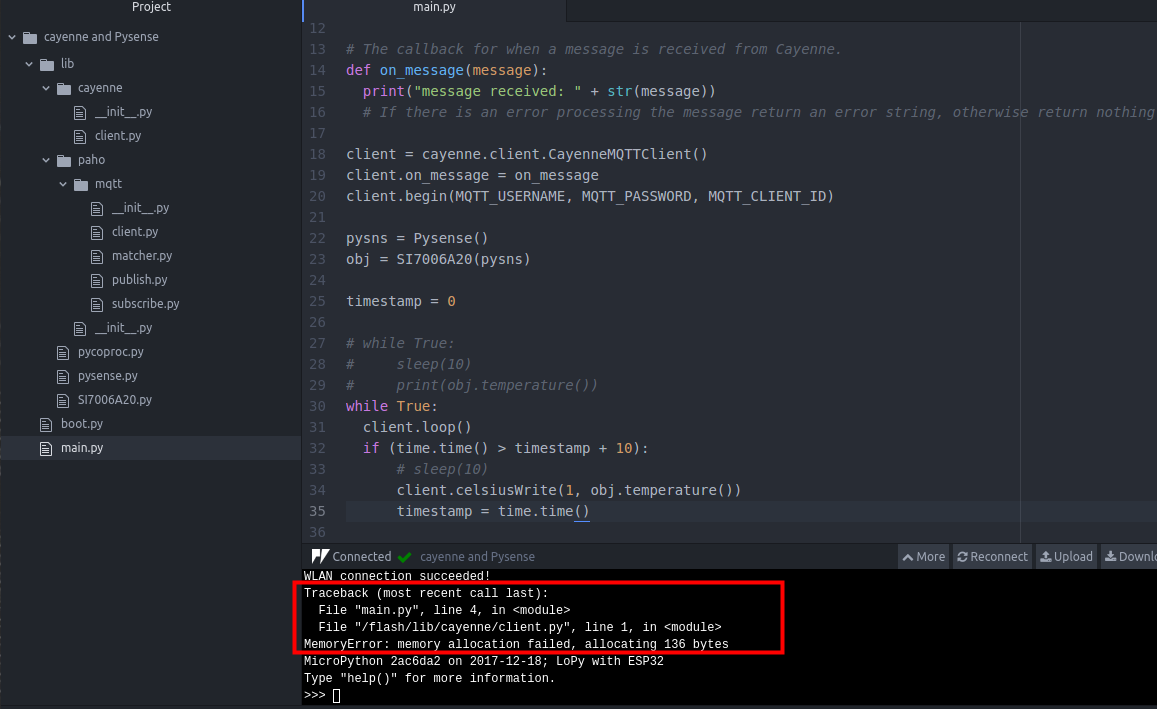
    @soren I do not know which program flags this error: "An error occurred: Not enough memory available on the board. Synchronizing failed. Please reboot your device manually". May atom+Pymakr plugin. But besides that: There is a difference between the free memory in the flash file system, which is reported by os.getfree("/flash"), and the RAM, which is reported by gc.free_mem(). gc.collect() only affects the RAM and performs a garbage collection there. The error message you flag sounds more like being caused by file system problems, and maybe it's not even the free area, which is the reason, but some other file related error, which is faulty reported as "out of free space", since that is the most common reason. You could try to use simple methods like ftp and terminal emulator to upload and run your files. The visibility of what's going on is much better in case of problems Errors allocating RAM are reported like: "MemoryError: memory allocation failed, allocating xxxx bytes".
  • Loading pyc Files

    LoPy lopy memory
    14
    0 Votes
    14 Posts
    4k Views
    S
    @robert-hh That worked great. I'm now able to build the FW with our frozen bytecode. Next step is to figure out the OTA
  • L01 Memory

    Getting Started memory l01
    3
    0 Votes
    3 Posts
    1k Views
    robert-hhR
    @eric24 You have to use the recent firmware. The extended RAM is supported from 1.10.0.b1 on.
  • Memory leak using Pin (callback)

    Issues & Bugs memory leak lopy
    1
    0 Votes
    1 Posts
    764 Views
    No one has replied
  • Memory leak using timers

    Moved Issues & Bugs memory leak lopy
    3
    0 Votes
    3 Posts
    1k Views
    C
    The issue was posted on github.
  • 0 Votes
    19 Posts
    5k Views
    robert-hhR
    @Marco-den-Hartog Micropython itself implements Version 3.4, but the scripts used in the build procedures on PC are a mix of Python2/Python3 code. For some branches you need Python2, for others Python3. for instance esptool.py was only recently Ported to Python3.
  • 1 Votes
    1 Posts
    844 Views
    No one has replied