• while True and serial/telnet connectivity

    3
    0 Votes
    3 Posts
    369 Views
    C
    @robert-hh Thank You. mqtt_client_lock = _thread.allocate_lock() def mqtt_check_msg_thread(client,lock): while True: try: #utime.sleep(1) with lock: client.check_msg() except OSError: print('MQTT failed to check_msg') with lock: if client.connect() != 0: utime.sleep(1) except: print('MQTT check_msg thread failure') def mqtt_setup(): global mqtt_client global l99_serial is_mqtt_connected = False with mqtt_client_lock: mqtt_client = MQTTClient(l99_serial, '192.168.2.107', 1883) mqtt_client.set_last_will('L99/{}/io/state/offline'.format(l99_serial), '', qos=1) mqtt_client.set_callback(mqtt_output_command_callback) is_mqtt_connected = mqtt_client.connect() == 0 if is_mqtt_connected: #Timer.Alarm(handler=mqtt_check_msg, ms=1000, arg=None, periodic=True) on_mqtt_connected(True) else: on_mqtt_connected(False) if is_mqtt_connected: _thread.start_new_thread(mqtt_check_msg_thread, (mqtt_client, mqtt_client_lock))
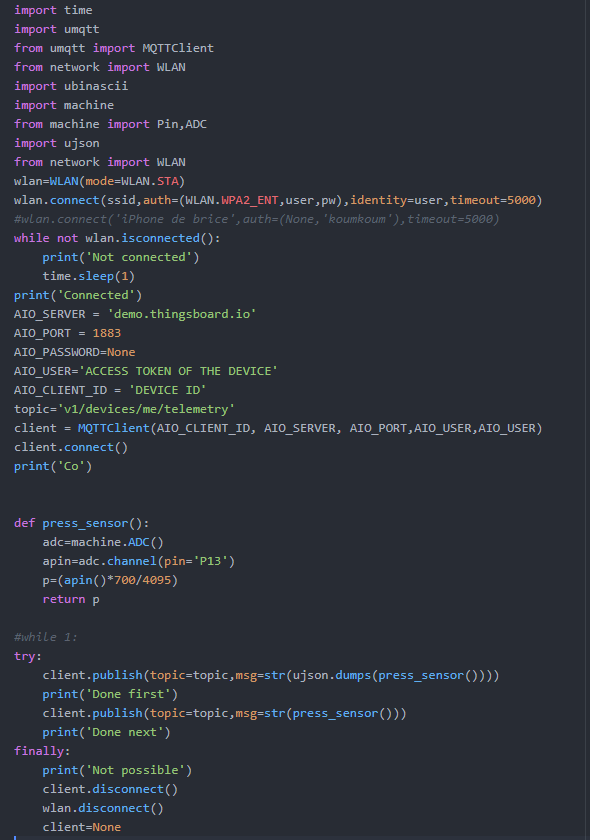
  • Communicate with Thingsboard using UMQTT

    umqtt iot send data
    3
    1
    0 Votes
    3 Posts
    504 Views
    mfalkviddM
    @brossingo what was the output if the program when you ran it? Checking the return value of client.connect() might yield useful information.
  • lora.stats(), ACK packet

    3
    0 Votes
    3 Posts
    464 Views
    J
    @jcaron Many thanks for the detailed explanation. Very helpful.
  • socket timeout

    lte gpy hologram socket
    1
    1 Votes
    1 Posts
    365 Views
    No one has replied
  • Exceptions in micro python

    micropython exceptions
    12
    0 Votes
    12 Posts
    2k Views
    K
    Thnx again Robert, for anyone else with a similar requirement I ended up with.... except Exception as e: import sys; from uio import StringIO s=StringIO(); sys.print_exception(e, s) s=s.getvalue(); s=s.split('\n') line=s[1].split(','); line=line[1]; error=s[2]; err=error+line; print(err) with open ('error.log', 'a') as f: f.write(err)
  • OSError: -29312

    oserror urequests
    2
    0 Votes
    2 Posts
    265 Views
    M
    Where did you get the urequests library from? You'll need to check the source code and search for that error code.
  • How to display last traceback

    traceback exception error
    5
    0 Votes
    5 Posts
    559 Views
    A
    @crumble Not a bad work around! Thanks for your help.
  • External SD Card

    sd card
    22
    0 Votes
    22 Posts
    9k Views
    robert-hhR
    @edward-dimmack That should work. I'm using this wiring on my homebrew interface boards.
  • data consumption

    data consuption fipy gpy lte
    1
    0 Votes
    1 Posts
    270 Views
    No one has replied
  • weird behaviour with function

    python
    2
    0 Votes
    2 Posts
    343 Views
    J
    @misterlisty The second error is from another call somewhere inside your function (line 852 of main.py).
  • Pycom + Azure IoT Hub SDK

    azure library pycom micropython
    1
    0 Votes
    1 Posts
    353 Views
    No one has replied
  • 0 Votes
    8 Posts
    780 Views
    P
    You can try something like this: https://github.com/jczic/MicroWebSrv looks like the author explicitly supports pycom modules. (Please note this isnt an official pycom recommendation. I've never used it. we dont support the library. I just found it in my travels and thought it might be usefull) @jczic if you happen to stumble across this. Good work. Look's like a neat project!
  • wlan.isconnected() always False in AP mode.

    fipy ap mode bug
    3
    0 Votes
    3 Posts
    853 Views
    A
    @dan, how did you fix this problem? Would you please post the code on both devices that you used? I am running in to the same issue. Thanks
  • WDT Reset, RTC also reset

    pycom gpy micropython watchdog rtc
    1
    0 Votes
    1 Posts
    464 Views
    No one has replied
  • This topic is deleted!

    1
    0 Votes
    1 Posts
    13 Views
    No one has replied
  • Assembler in micropython

    micropython assembler functions ws2812 ws2812b
    10
    0 Votes
    10 Posts
    1k Views
    M
    @robert-hh, @jcaron Thanks again for the reply. I knew about the possability to build own firmware but i don't know how to do that and it's going way to far. So i will use the RTM module and multiplex the pins. Haven't tried it yet because actual i'm doing my Bachelor Thesis and i don't have much time for personal projects.
  • wlan.isconnected() not working in AP mode

    wlan ap mode lopy4
    2
    0 Votes
    2 Posts
    381 Views
    P
    Do the connected clients also return false or is it just the node setup as an AP
  • write word with I2C

    i2c bit shift
    5
    0 Votes
    5 Posts
    838 Views
    C
    @robert-hh Thanks for the tips. I ended up doing below, which does save 32bytes over struct.pack. self.tempBuff = bytearray(3) def _writeWord(self,address,data): #self.i2c.writeto_mem(self.address, address, struct.pack(">H", data), addrsize=8 ) self.tempBuff[0] = address self.tempBuff[1] = data >> 8 self.tempBuff[2] = data & 0xff self.i2c.writeto(self.address, self.tempBuff)
  • How to pass lte cmds to a fn?

    lte commands functions
    3
    0 Votes
    3 Posts
    413 Views
    K
    My problem with attach & connect is that examples in the docs like lte.attach() while not lte.isattached(): time.sleep(0.5); print('Attaching...') can get stuck looping forever, the modem never actually attaches or connects. I wanted to write a function that I can call when I want to attach or connect that tries a fixed number of times then resets the modem &/or the gpy. To do this I need a way to pass the attach or connect cmd to the function. Speaking more broadly I would have thought that the basic requirements of something like a gpy in a battery powered application were pretty obvious. Wake up, use the lte to upload some data, quit if you can't get a connection in a reasonable time, sleep, repeat. After a month with this device I'm still no closer to that basic objective.
  • question about I2C address BUS.

    i2c address i2c i2c.scan i2c address bus
    5
    3
    0 Votes
    5 Posts
    799 Views
    L
    very, very thanks mates!! now i understand fine!!

Pycom on Twitter