• Bypassing a polarity protection diode with a part of a circuit

    1
    0 Votes
    1 Posts
    8 Views
    No one has replied
  • Feedback on Pymesh without cloud

    1
    0 Votes
    1 Posts
    15 Views
    No one has replied
  • How to contact pycom

    2
    0 Votes
    2 Posts
    46 Views
    P
    Hi Michael, Sorry that you've had trouble getting through. If you have queries you can email sales@pycom.io or ask here.
  • Pysense Board is not connecting

    5
    0 Votes
    5 Posts
    53 Views
    P
    Alejo, Tiffany and Serenabilly: The blue light blinking indicates the micropython is running correctly on your board, so you definitely have it powered and the firmware is not corrupted. It most likely means you have a serial port issue. On Linux (Alejo) it would be worth trying with a different serial port program (putty, screen, minicom) and see if it gives an error message. On other platforms we would need some more details: what platform you are on, what you have tried, and what software versions you are using.
  • Flash encryption and JSON files

    2
    0 Votes
    2 Posts
    27 Views
    P
    Hi Marco, Normal file operations should work: f = open('node_config.json', 'w') f.write('some data') f.close() and import os for more.
  • Delete my account

    3
    0 Votes
    3 Posts
    38 Views
    robert-hhR
    @livius That does not seem to exist. As a deputy sheriff, I can ban an account, or block the user, but I cannot delete an account.
  • Bricked?

    fipy
    8
    0 Votes
    8 Posts
    491 Views
    C
    I had the same issue on LOPY4 boards and seems is related with the watchdog. If the watchdog is started and you do P2+GND (bootloader mode) then press reset... always you got this cycled error. The workaround is to put P2+GND (bootloader mode) and unplug then plug power The issue is reproduced on several boards with LOPY4. [image: 1656139844090-fd87a3a3-94d5-4889-9855-3eab286dec51-image.png]
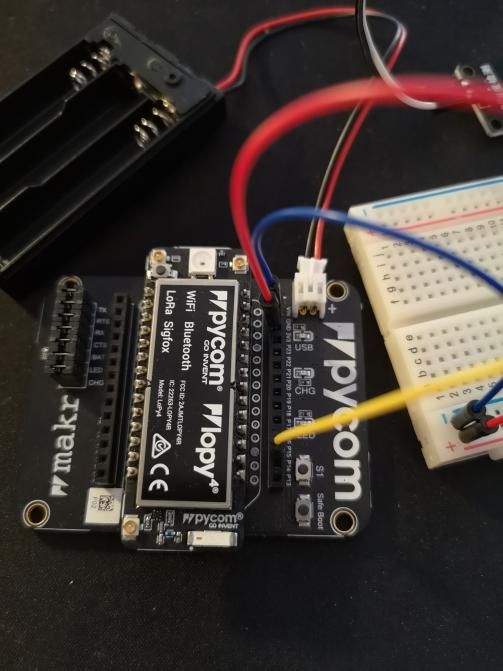
  • Basic setup for a simple IoT project

    3
    3
    0 Votes
    3 Posts
    36 Views
    T
    @livius Thank you for response! Much appreciated :)
  • Wlan communication problems

    21
    0 Votes
    21 Posts
    672 Views
    B
    it works on the 1.19.x firmware, but not on the 1.20.x, wl.scan() finds 0 networks.
  • deepsleep wifi bug?

    5
    0 Votes
    5 Posts
    39 Views
    B
    Update to my issue. So far a combination of modem firmware update (48829) and also reinitializing all of my used GPIO pins to floating inputs (this was a suggestion i found floating around on this forums) at the end of my program has seemed to resolve my deep sleep power consumption issues. Deep sleep hovers around 0.04mA
  • how to check if a non-existing key in nvs ?

    dict key value nvs nvsget
    13
    0 Votes
    13 Posts
    912 Views
    M
    import pycom the_value = pycom.nvs_get('the_key',None) if the_value: print(the_value)
  • PyGate discontinued?

    3
    0 Votes
    3 Posts
    65 Views
    D
    So, for early buyers can we exchange the "Old" Pygate card with an "Hélium" box as it's not possible to upgrade the Pygate?
  • File from internal FTP can't be downloaded with Filezilla

    7
    0 Votes
    7 Posts
    35 Views
    S
    @jcaron thank you for the suggestion. The WiPy receives every few seconds data and parses it and saves it on a SD Card. I access this SD Card through the internal FTP server. So I mostlikely would have to interrupt its operation using your suggestion I guess. I would like to change the filename live without interrupting the script, which is running on the WiPy. In the end, this issue is bearable (outlier), but it is bugging me and I find it quite odd, that this happened in the first place.... Kind regards, SciWax
  • How to change the role of a leader router in a pymesh network ?

    1
    0 Votes
    1 Posts
    22 Views
    No one has replied
  • This topic is deleted!

    Locked
    1
    0 Votes
    1 Posts
    8 Views
    No one has replied
  • Pygate non available for shopping

    1
    0 Votes
    1 Posts
    29 Views
    No one has replied
  • Using LoPy/LO1/WiPy as iBeacon

    2
    0 Votes
    2 Posts
    27 Views
    J
    @Brian-Wyld AFAIK, the ESP32 does not support advertising in sleep modes, so battery-powered beacons (or peripherals waiting for a central to connect to them) are not quite viable, especially given the time and power cost of a wake up. Not sure if anything has changed in that respect in more recent iterations of the ESP32 (not used in the Pycom devices anyway), but you'll probably have to consider alternate platforms if that's a requirement for you.
  • FiPy Sending Text Messages

    2
    0 Votes
    2 Posts
    30 Views
    Yusuf BAYLAVY
    Hello Benjamin, That should be possible. And I do agree you assumption. Please let us know about the results as well. Thanks,
  • https client using Let's Encrypt certs throws error

    11
    0 Votes
    11 Posts
    55 Views
    Edward JohnstoneE
    @Edward-Johnstone hmmm, so I fixed it on the server (using renew --preferred-chain "ISRG Root X1") and that didn't help. Thank you for reminding me about openssl s_client. I had forgotten to think about that. Anyway, that didn't fix it, ... hmmm. openssl s_client -connect www.johnedstone.net:443 -showcerts < /dev/null CONNECTED(00000003) depth=2 C = US, O = Internet Security Research Group, CN = ISRG Root X1 verify return:1 depth=1 C = US, O = Let's Encrypt, CN = R3 verify return:1 depth=0 CN = www.johnedstone.net verify return:1 --- Certificate chain 0 s:CN = www.johnedstone.net i:C = US, O = Let's Encrypt, CN = R3 -----BEGIN CERTIFICATE----- MIIEYjCCA0qgAwIBAgISA6qvfw4VmogisNpdOd/AaTrQMA0GCSqGSIb3DQEBCwUA MDIxCzAJBgNVBAYTAlVTMRYwFAYDVQQKEw1MZXQncyBFbmNyeXB0MQswCQYDVQQD EwJSMzAeFw0yMjAzMDIwMDE2MDBaFw0yMjA1MzEwMDE1NTlaMB4xHDAaBgNVBAMT E3d3dy5qb2huZWRzdG9uZS5uZXQwWTATBgcqhkjOPQIBBggqhkjOPQMBBwNCAAQ1 tClbocSYmpmnvI+p12J9Fm8hbfcNVs06YlMVIqXxYP9xLKyCzaedLUqv8EqyQdk/ EotPQH5KdUSXlBp4hcnyo4ICTzCCAkswDgYDVR0PAQH/BAQDAgeAMB0GA1UdJQQW MBQGCCsGAQUFBwMBBggrBgEFBQcDAjAMBgNVHRMBAf8EAjAAMB0GA1UdDgQWBBQd AMYcsjSsSaonQs+eLX9zeSRjhzAfBgNVHSMEGDAWgBQULrMXt1hWy65QCUDmH6+d ixTCxjBVBggrBgEFBQcBAQRJMEcwIQYIKwYBBQUHMAGGFWh0dHA6Ly9yMy5vLmxl bmNyLm9yZzAiBggrBgEFBQcwAoYWaHR0cDovL3IzLmkubGVuY3Iub3JnLzAeBgNV HREEFzAVghN3d3cuam9obmVkc3RvbmUubmV0MEwGA1UdIARFMEMwCAYGZ4EMAQIB MDcGCysGAQQBgt8TAQEBMCgwJgYIKwYBBQUHAgEWGmh0dHA6Ly9jcHMubGV0c2Vu Y3J5cHQub3JnMIIBBQYKKwYBBAHWeQIEAgSB9gSB8wDxAHYAKXm+8J45OSHwVnOf Y6V35b5XfZxgCvj5TV0mXCVdx4QAAAF/SDLDygAABAMARzBFAiEAkY5SnweMC+RM pNTWoa26sXTeo/PClIHoCb+hrH5KzpkCIDmeWW9rMyRjdupwkLOsNNVleGp+i0b0 qLRX4F8LcMRUAHcAb1N2rDHwMRnYmQCkURX/dxUcEdkCwQApBo2yCJo32RMAAAF/ SDLE0QAABAMASDBGAiEAlhihXbLej5uCFhexXZrKDhJiF9Qk5MPfLDvrUj7zepkC IQD/9ryzlhBSuqcqomc1T4HBwwN8Yx5CFyJ5yQKPiLZP4TANBgkqhkiG9w0BAQsF AAOCAQEAXbVZCSkfUhiIb3uZjF/5QlNxqM8mdKeAzA77hYzFQDzpngZDN9jG45VA FAKymKITH6VO2lXx8U+qBgc7ri7y3ZeQX3hKRn4j3ps9L3RTU9KdtdsU/GPIM2zp pLqNnBWEQsnYmJQF2NkVPjXJzStUkBW+EzyrYoOVyLn0u6iRvXTALM7XQ1vNVSqC S1uxAWsSBoWZvjeETlBUPKfjTSmkVMvYc1X2er+cH7HWktn35hQ3KFBruYWy+mEG x5xe/aXjH0VIht6tmDGDeM6PIxiXACeScIIHLmNVQM/J6duKLcswszD2eV7M9FNQ kjTUu2C5wlGAEXXCZJzHSg8XiMpRfA== -----END CERTIFICATE----- 1 s:C = US, O = Let's Encrypt, CN = R3 i:C = US, O = Internet Security Research Group, CN = ISRG Root X1 -----BEGIN CERTIFICATE----- MIIFFjCCAv6gAwIBAgIRAJErCErPDBinU/bWLiWnX1owDQYJKoZIhvcNAQELBQAw TzELMAkGA1UEBhMCVVMxKTAnBgNVBAoTIEludGVybmV0IFNlY3VyaXR5IFJlc2Vh cmNoIEdyb3VwMRUwEwYDVQQDEwxJU1JHIFJvb3QgWDEwHhcNMjAwOTA0MDAwMDAw WhcNMjUwOTE1MTYwMDAwWjAyMQswCQYDVQQGEwJVUzEWMBQGA1UEChMNTGV0J3Mg RW5jcnlwdDELMAkGA1UEAxMCUjMwggEiMA0GCSqGSIb3DQEBAQUAA4IBDwAwggEK AoIBAQC7AhUozPaglNMPEuyNVZLD+ILxmaZ6QoinXSaqtSu5xUyxr45r+XXIo9cP R5QUVTVXjJ6oojkZ9YI8QqlObvU7wy7bjcCwXPNZOOftz2nwWgsbvsCUJCWH+jdx sxPnHKzhm+/b5DtFUkWWqcFTzjTIUu61ru2P3mBw4qVUq7ZtDpelQDRrK9O8Zutm NHz6a4uPVymZ+DAXXbpyb/uBxa3Shlg9F8fnCbvxK/eG3MHacV3URuPMrSXBiLxg Z3Vms/EY96Jc5lP/Ooi2R6X/ExjqmAl3P51T+c8B5fWmcBcUr2Ok/5mzk53cU6cG /kiFHaFpriV1uxPMUgP17VGhi9sVAgMBAAGjggEIMIIBBDAOBgNVHQ8BAf8EBAMC AYYwHQYDVR0lBBYwFAYIKwYBBQUHAwIGCCsGAQUFBwMBMBIGA1UdEwEB/wQIMAYB Af8CAQAwHQYDVR0OBBYEFBQusxe3WFbLrlAJQOYfr52LFMLGMB8GA1UdIwQYMBaA FHm0WeZ7tuXkAXOACIjIGlj26ZtuMDIGCCsGAQUFBwEBBCYwJDAiBggrBgEFBQcw AoYWaHR0cDovL3gxLmkubGVuY3Iub3JnLzAnBgNVHR8EIDAeMBygGqAYhhZodHRw Oi8veDEuYy5sZW5jci5vcmcvMCIGA1UdIAQbMBkwCAYGZ4EMAQIBMA0GCysGAQQB gt8TAQEBMA0GCSqGSIb3DQEBCwUAA4ICAQCFyk5HPqP3hUSFvNVneLKYY611TR6W PTNlclQtgaDqw+34IL9fzLdwALduO/ZelN7kIJ+m74uyA+eitRY8kc607TkC53wl ikfmZW4/RvTZ8M6UK+5UzhK8jCdLuMGYL6KvzXGRSgi3yLgjewQtCPkIVz6D2QQz CkcheAmCJ8MqyJu5zlzyZMjAvnnAT45tRAxekrsu94sQ4egdRCnbWSDtY7kh+BIm lJNXoB1lBMEKIq4QDUOXoRgffuDghje1WrG9ML+Hbisq/yFOGwXD9RiX8F6sw6W4 avAuvDszue5L3sz85K+EC4Y/wFVDNvZo4TYXao6Z0f+lQKc0t8DQYzk1OXVu8rp2 yJMC6alLbBfODALZvYH7n7do1AZls4I9d1P4jnkDrQoxB3UqQ9hVl3LEKQ73xF1O yK5GhDDX8oVfGKF5u+decIsH4YaTw7mP3GFxJSqv3+0lUFJoi5Lc5da149p90Ids hCExroL1+7mryIkXPeFM5TgO9r0rvZaBFOvV2z0gp35Z0+L4WPlbuEjN/lxPFin+ HlUjr8gRsI3qfJOQFy/9rKIJR0Y/8Omwt/8oTWgy1mdeHmmjk7j1nYsvC9JSQ6Zv MldlTTKB3zhThV1+XWYp6rjd5JW1zbVWEkLNxE7GJThEUG3szgBVGP7pSWTUTsqX nLRbwHOoq7hHwg== -----END CERTIFICATE----- --- Server certificate subject=CN = www.johnedstone.net issuer=C = US, O = Let's Encrypt, CN = R3 --- No client certificate CA names sent Peer signing digest: SHA256 Peer signature type: ECDSA Server Temp Key: X25519, 253 bits --- SSL handshake has read 2811 bytes and written 391 bytes Verification: OK --- New, TLSv1.3, Cipher is TLS_AES_256_GCM_SHA384 Server public key is 256 bit Secure Renegotiation IS NOT supported Compression: NONE Expansion: NONE No ALPN negotiated Early data was not sent Verify return code: 0 (ok) --- DONE

  • PyNode+

    3
    0 Votes
    3 Posts
    48 Views
    M
    Hi Michael, Pynode+ comes with firmware inside the OTP memory of the DA14531 chip. The usage of the sensor is stated in the docs. There are three states such as connectable, non-connectable(beacon), and sleep. https://docs.pycom.io/tutorials/pynode/ We publish more explanations about those pynode+ sensors in near future. Best regards, Meric

Pycom on Twitter