Welcome to the Pycom forum Forum
    • \[\[global:header.categories\]\]
    • \[\[global:header.recent\]\]
    • \[\[global:header.tags\]\]
    • \[\[global:header.popular\]\]
    • Login
    1. Home
    2. Popular

    Explore Pybytes | Official Documentation | Report a Firmware Bug/Issue | GitHub

    Log in to post
    • All Time
    • Day
    • Week
    • Month
    • All Topics
    • New Topics
    • Watched Topics
    • Unreplied Topics

    • All categories
    • D

      New firmware release 1.0.0.b1

      Watching Ignoring Scheduled Pinned Locked Moved Announcements & News
      41
      1 Votes
      41 Posts
      17k Views
      D
      @livius regarding your problem trying to connect 2 WiPy's together, please check my reply in: https://forum.pycom.io/topic/376/interim-update/6 Thanks. Cheers, Daniel
    • D

      SiPy firmware update tool now available with ID and PAC for activation

      Watching Ignoring Scheduled Pinned Locked Moved Announcements & News
      41
      6 Votes
      41 Posts
      15k Views
      J
      @ricardo-m hola Ricardo, estoy intentado conectarme por sigfox en Cali, sigfox = Sigfox(mode=Sigfox.SIGFOX, rcz=Sigfox.RCZ4) pero no puedo ver el dispositivo en el backend, podrías darme alguna indicación, muchas gracias.
    • M

      Firmware Update Fails

      Watching Ignoring Scheduled Pinned Locked Moved WiPy 2&3 wipy 2.0 debian update failed
      41
      0 Votes
      41 Posts
      21k Views
      M
      @bucknall Thanks for your help the other evening - I'm up and running now, though I'm no closer to being able to update the firmware myself. For linux users I have a (useful?) bash script that beings up a console window and then waits up to 15s for me to plugin the device (that way I see any boot messages). I don't know if this will work on OSX as I don't have a Mac. I need to update my blog post as I've recently modified the script to allows me to select the which serial device to connect to and baud rate to use. Mike T.
    • B

      BME280 on the LoPy

      Watching Ignoring Scheduled Pinned Locked Moved Issues & Bugs bme280 lopy i2c
      41
      0 Votes
      41 Posts
      16k Views
      robert-hhR
      @Lucas_Vieira Yes, just change the last line of the method values() to: return t, p, h I never had sent values directly to cayenne, only through TTN. Which cayenne LPP module are you using? Edit: In my tests, the value for humidity was the one with the largest error, but still not 0. Are you sure that you have a BME280 device and not an BMP280? If you look at the package, there are two lines of letters BME280: xxx Ux BMP280: xxx Kx The difference is U vs. K
    • B

      Pytrack and Pysense Libraries Release 1.0.0

      Watching Ignoring Scheduled Pinned Locked Moved Announcements & News pytrack pysense library
      41
      1 Votes
      41 Posts
      20k Views
      IplookyI
      @daniel you where right, I had all the libraries outside the lib folder and that's why it did not work. still: import sys sys.path.append('/flash/my_folder') helped me a lot! Thank you!
    • D

      New firmware release 1.10.1.b1

      Watching Ignoring Scheduled Pinned Locked Moved Announcements & News firmware
      41
      2 Votes
      41 Posts
      14k Views
      robert-hhR
      @devinv What is happening?
    • T

      TEROS 12 and SDI-12

      Watching Ignoring Scheduled Pinned Locked Moved MicroPython teros12 sdi-12
      41
      0 Votes
      41 Posts
      6k Views
      robert-hhR
      @tttadam I think it because there may be values in the read buffer, which are discarded when you init the device. You could try to call tou.read() to flush the buffer instead of re-initing the UART. if that does not work, it's no big harm. Reestablising the UART does not harm.
    • T

      Pygate - ethernet reliability issues

      Watching Ignoring Scheduled Pinned Locked Moved Discussion
      41
      0 Votes
      41 Posts
      528 Views
      G
      Hi @Richard-Martineau Over the last weeks we did some tests with the method you describe, but unfortunately no resolution there :(
    • T

      Method To Take Control of Cell Modem

      Watching Ignoring Scheduled Pinned Locked Moved GPy
      41
      0 Votes
      41 Posts
      845 Views
      T
      @Petteri-Salo The g.modem_state global variable is used in a timer interrupt routine to control the blinking and color of the LED on the GPY. This gives the user a visual indication of what state the modem is in. This variable is not critical to using the supplied code. Unfortunately the code I have published is just snippets of my production code. It was not designed to be a general purpose library (although I believe it comes close). Without publishing the entire application, there will be pieces that are missing. Your message has motivated me to add a few random notes. We had production, shipping GPy based systems that were experiencing reliability issues. Upgrades to newer versions of the OS seemed to make the problems worse. There was considerable evidence that the problems were caused by the LTE module. For months I waited hoping that Pycom would make the existing product more robust. Instead they seemed to be going in all directions introducing new products but not improving the fundamental building blocks of the GPy. I was especially concerned when we purchased a new batch of chips and they came by default with a version of the OS which would not run our application for more than a few minutes without crashing. In addition Pycom seemed to be moving in a direction requiring our code in the future to be dependent on a cloud based system (Pybytes). This seemed to be making everything even more complex. We couldn't even get the simple things to work reliably. In principle our application was not complex. We just needed to transmit a few packets of data to a web site periodically over the LTE network reliably without crashing the system. It was also desired that the communication would not interfere with the real time task of sampling data. After looking at the C/C++ source code to the LTE module, it seemed way too complex. I had no good way to make changes, improvements, or bug fixes (assuming I could find the problem). If we moved the modem code to Python, we could bypass the usage of the LTE module and use the TCP/IP stack included in the Sequans modem. Maybe by pushing the communication load to the Sequans modem, the MicroPython would be more reliable and responsive to real time tasks. Maybe by publishing the code more people could observe and help to improve the code. We desperately needed a reliable method of communication. Since converting our code to controlling the cell modem directly in Python code, I can now say the random crashes have been solved. The real time task is more responsive. I hope that someday the LTE module will be improved so that it can be used again. Having a TCP/IP stack that is usable by both WIFI and LTE is certainly an advantage. Can it be made reliable? Can the ESP32 chip smoothly multitask while using LTE methods? I wish I knew of a method to marry our higher level Python calls for modem management with the TCP/IP stack of MicroPython. I think such a technique could make the LTE module code simpler. I think the dream of most application developers is to have simple reliable software methods to connect/disconnect to the network. The fact that we are connected using the cell network, WIFI, or whatever should be mostly transparent. We all want Pycom to be successful. They have developed a good product. We did what we did because their priorities were not ours at the time.
    • S

      Send data requests http post. **SOLVED**

      Watching Ignoring Scheduled Pinned Locked Moved LoPy http post post request.py urequest.py ubidots
      40
      1 Votes
      40 Posts
      22k Views
      W
      @wolli01 Hier mein Code import urequests userdata = {"p1": "Wohnzimmer", "p2": "24.12.2018", "p3": "23.97"} url = 'https://Homepage.de/live1.php' res = urequests.post(url, headers={"Content-Type": "application/json", "Accept": "application/json"}, data= str(userdata)) res.close() auf den PHP Server: <?php //Sensor1 $p1 = $_GET["p1"]; $p2 = $_GET["p2"]; $p3 = $_GET["p3"]; $inhalt = array($p1, $p2, $p3); // Speichern der Datei $eintrag = implode(";", $inhalt); file_put_contents("sensor1.txt", $eintrag); ?>
    • D

      New firmware release v1.16.0.b1 (LoRaWAN 1.0.2 multi-region support)

      Watching Ignoring Scheduled Pinned Locked Moved Announcements & News firmware
      40
      2 Votes
      40 Posts
      12k Views
      R
      The command line updater failed (Debian) with this error: "Something failed trying to connect to the device." After this step: "Connecting to the device to get it's information, please wait." Also saw this error message: "Exception: Failed to connect to ESP32: Timed out waiting for packet header, on line 351" With the gui version everything worked fine. I had to install python-qt4 to get the gui version working. Edit: same issue as below
    • C

      Lost PyMakr in VSCode

      Watching Ignoring Scheduled Pinned Locked Moved Issues & Bugs vscode pymakr
      40
      0 Votes
      40 Posts
      6k Views
      J
      @crumble and @Paul Thornton Switching on 'show hidden devices' in the Device manager (Windows 7) did not reveal anything new. Only COM1, Dell COM3 and Dell COM5 showed up (see screenprint in earlier post). What finally worked to solve my problem is to install the driver file pycom.inf downloaded from https://github.com/pycom/pycom-micropython-sigfox/blob/master/docs/pycom_esp32/tutorial/includes/downloads/pycom.inf from within the device manager (Action >> Add Legacy Hardware >> Search for and install the hardware automatically >> Ports (COM & LPT) >> Have disk >> Browse to pycom.inf file). I installed the 'Expansion 3' option. That installed the expansion board 3 driver, but it showed an error in the device manager (device cannot start). But when I next connected an expansion board V3.1 (with lopy4) to the laptop with usb, a new COM port ('Expansion 3 COM 19') appeared in the device manager, and this one allows me to connect from Atom. Also an Expansion board V2.1A with a lopy can now be connected. So problem solved. Although I still do not know what caused the connection problem. Auto connect does still not work because the working driver is at the bottom of the serial devices list, and the auto-connect takes the first one in the list, that one does not work. But anyway, PROBLEM SOLVED, I can connect manually by selecting the right COM port. Thanks for all the help!
    • S

      How to handle a LTE Connectivity loss

      Watching Ignoring Scheduled Pinned Locked Moved GPy
      40
      0 Votes
      40 Posts
      390 Views
      S
      My minimal setup worked on my breadboard. Today, I've integrated that initially separated structure into my big prototype on my other breadboards. It is really weird. The Pull-up doesn't work always. When I use my minimal example code on my big prototype setup it works as on my minimal breadboard setup. The Pull-up works and the GPy doesn't boot up, so the GPy is powered off while the Arduino is booting. The Pull on the Gate is high enough in that case. When I use my real prototype code, where every sensor gets setup, the pull-up doesn't work anymore though. I can't explain why. I didn't change anything on my big prototype setup and I can't control a passive element like a simple pull-up setup via code. It must be related to the Voltage on my 5V-Pin on the Arduino then I guess? But why is the minimal example code on the same big prototype setup working as expected (the GPy is turned off at the beginning) ... While the Pull-up doesn't work on the big prototype setup, I can power cycle the GPy. When I pull the GPIO HIGH, which is connected to the Gate, I power the GPy off. When I set the GPIO to LOW, the GPy turns on again. I just can't explain why the Pull-Up doesn't work, while power cycling with the GPIO of the Arduino seems to be working? I've connected a 10k Ohm resistor to one of the 5V Pins of the Arduino, which is connected to the gate. I use this site as a reference: https://www.gammon.com.au/motors Would shifting the threshold by the forward voltage of the diode help, so I get consistency into my setup @robert-hh ? Kind regards, SciWax

    • X

      Firmware source code?

      Watching Ignoring Scheduled Pinned Locked Moved LoPy
      39
      0 Votes
      39 Posts
      18k Views
      J
      @jeremy I'm considering developing a proof of concept for a possible commercial product, and the LoPy 4 board would be an ideal choice for a POC demo. I'm just concerned with what the LoPy board has for battery management for both our back pack units and relay stations. It's the relay stations that has to be smart on battery management, although we think we can get away with 1 watt solar panels for the relay stations, both initially designed around the LoPy, but who do we talk to to at PyCom to talk about licensing the LoPy for commercial use?
    • R

      Pymakr cannot connect after firmware upgrades

      Watching Ignoring Scheduled Pinned Locked Moved MicroPython
      39
      1 Votes
      39 Posts
      17k Views
      R
      Good to hear @livius and @rogierb! Sounds like we can close this topic now. If anyone still has similar issues, please create a new topic.
    • D

      Firmware release 1.0.0.b2

      Watching Ignoring Scheduled Pinned Locked Moved Announcements & News
      38
      1 Votes
      38 Posts
      15k Views
      D
      @rskoniec thanks. I'll correct that immediately.
    • F

      LoPy deep sleep mode ?

      Watching Ignoring Scheduled Pinned Locked Moved LoPy
      38
      1 Votes
      38 Posts
      21k Views
      F
      Hello, The schematics for the deep sleep shield are now available here: https://docs.pycom.io/pycom_esp32/_downloads/Deep-Sleep-Shield_Schematic.pdf Thanks Fred
    • B

      [SOLVED] WiPy firmware to a standard WROOM-32?

      Watching Ignoring Scheduled Pinned Locked Moved Firmware esp32
      38
      0 Votes
      38 Posts
      17k Views
      P
      @robert-hh Thanks, You helped me a lot!
    • S

      GPy and LTE

      Watching Ignoring Scheduled Pinned Locked Moved Getting Started gpy lte mqtt internet
      38
      0 Votes
      38 Posts
      13k Views
      N
      @jmarcelino Done ;)
    • J

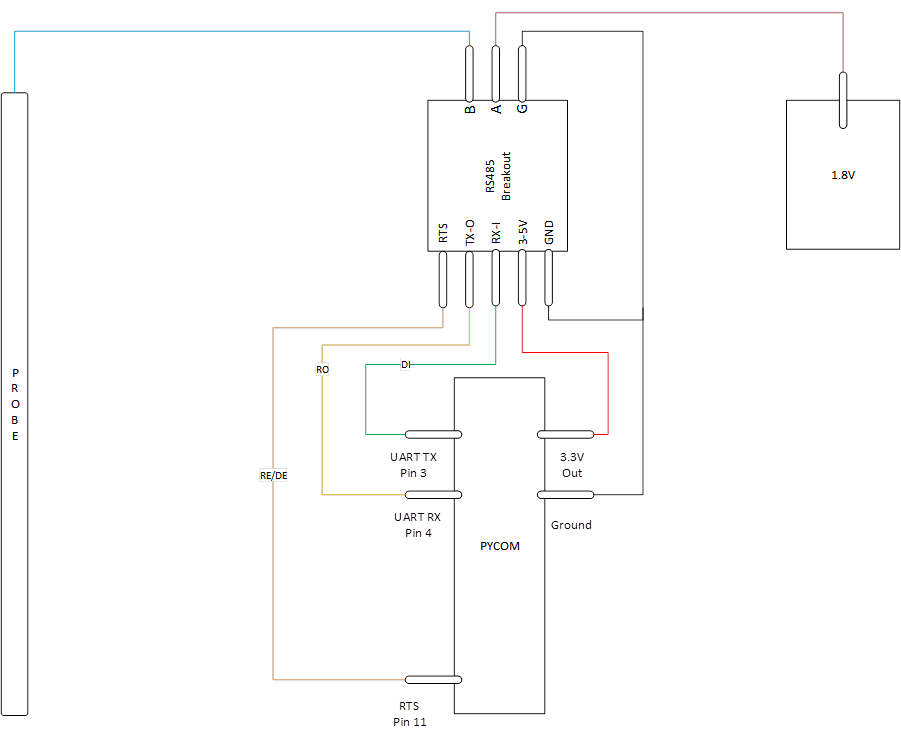
      SDI-12 Soil Moisture Probe Help

      Watching Ignoring Scheduled Pinned Locked Moved LoPy sdi-12 rs485 lopy
      38
      1
      0 Votes
      38 Posts
      3k Views
      Gusti Made Arya WijayaG
      @Bryan-Hom oh okay thanks for your advice. I only have max485 and max3485 now
    • 1
    • 2
    • 3
    • 4
    • 5
    • 9
    • 10
    • 3 / 10