• lopy sigfox know if message is sent

    LoPy lopy4 sigfox gps callback
    2
    0 Votes
    2 Posts
    365 Views
    E
    @raaden89 Simply you can't. Sigfox as very very low downlink ability ( network to your device as 4*8 bytes limits per day!) . You just can't design this functionnality as is, and you need to think to another way to work. exemple:wait in your device for a downlink coming from sigfox with a sequencial number index, send after that the gps pos with following index and so on. On the next download your device will receive a new index (or the same at the last time if no uplink as been successfull) and your device will restart to send the gps pos following the index recevied.
  • 0 Votes
    5 Posts
    716 Views
    G
    @paul-thornton ... and in the boot.py file I have this code: # boot.py -- run on boot-up import os from machine import UART uart = UART(0, 115200) os.dupterm(uart) #disable the wifi radio from network import WLAN wlan=WLAN() wlan.deinit() #disable the bluetotth radio from network import Bluetooth blt=Bluetooth() blt.deinit()
  • 0 Votes
    12 Posts
    1k Views
    C
    @einarj said in Expansion board 3.0 power consumption: @crumble Your initial answer was using the Pycoproc together with the expansion board 3? Yes. You came back with i2c problems. The Pycoproc is used by pysense and pytrack as well. All 3 boards use the PIC for handling firmware update, deepsleep and so on. But there is a chance to run into this i2c problem - depending on firmware version and your hard-/software setup.
  • Some confusion on the Pin_out layout.

    LoPy lopy4 pinouts pinout firmware
    4
    0 Votes
    4 Posts
    550 Views
    M
    See also my post here https://forum.pycom.io/topic/4130/pinout-pysense-etc
  • Connect a pytrack and a pysense to a single Lopy4.

    LoPy lopy4 pysense pytrack
    1
    0 Votes
    1 Posts
    255 Views
    No one has replied
  • Power on without reset

    LoPy lopy4 expansion board reset reset button reed switch
    11
    0 Votes
    11 Posts
    1k Views
    J
    @paloma https://forum.pycom.io/topic/3834/lopy4-will-not-boot-via-battery-power-on-expansion-board/3 https://forum.pycom.io/topic/3436/expansion-board-3-0-battery-power-not-enough-juice/13 https://github.com/pycom/pycom-micropython-sigfox/issues/167 It seems connecting P8 to 3V3 solves the issue (or an issue which is similar to yours, at least). Don't ask me why.
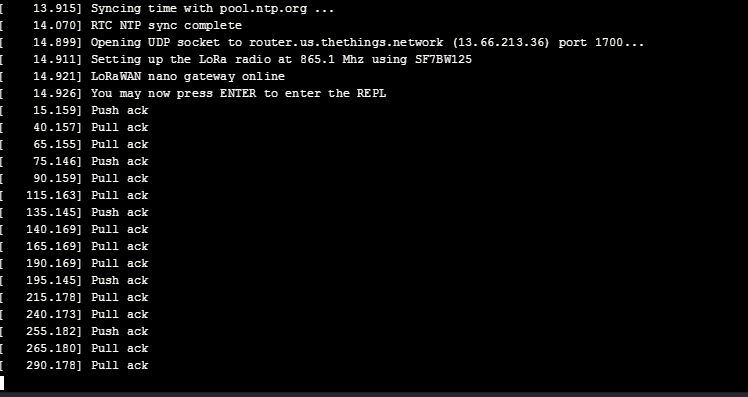
  • Lopy4 Lorawan nanogateway OTA method

    LoPy lopy4 nano gateway
    2
    1
    0 Votes
    2 Posts
    352 Views
    robert-hhR
    @shiva-shankar Do you see uplink messages from your node? Downlink messages, if any, follow uplink messages from the node.
  • 0 Votes
    5 Posts
    781 Views
    I
    @robert-hh Thanks Robert! Its working now
  • Copy Files to Flash

    LoPy wipy 3.0 lopy4 fipy copy file
    12
    0 Votes
    12 Posts
    1k Views
    W
    @robert-hh Top
  • 0 Votes
    3 Posts
    519 Views
    rcolisteteR
    @protonx Look at : microsd-power-consumption-on-expansion-board-pytrack-pysense-etc "Conclusions to save power during deep sleep with Expansion Board : it is important to use only TX/RX jumpers, or else we will have extra 0.06 mA; large voltage values implies some extra (e.g., 0.02) mA; avoid using uSD cards, because even just inserting a uSD card, not mounted, without open files before deep sleeping, there is an increase in deep sleep current, depending on the type of uSD, e. g., extra 0.21-0.24 mA for a 8GB uSD, extra 0.12-0.14 mA for a 32GB uSD."
  • FSK mode on LoPy4

    Comments & Feedback lopy4 fsk question
    8
    1 Votes
    8 Posts
    907 Views
    bmarkusB
    @catalin said in FSK mode on LoPy4: We are compliant with LoRaWAN specifications, as we have certified our modules, and FSK mode is optional. Just fyi, the SX drivers are here: https://github.com/pycom/pycom-micropython-sigfox/tree/master/drivers/sx127x/sx1272 @catalin Where do you see in the Lora Alliance specification DR7 is optional in EU868? BTW, is DR6 implemented? Well, certification means you passed the test but doesn't guarantee full compatibility. Also, on the competitive side you are missing a feature supported by nearly all others.
  • wlan.isconnected() not working in AP mode

    MicroPython wlan ap mode lopy4
    2
    0 Votes
    2 Posts
    406 Views
    P
    Do the connected clients also return false or is it just the node setup as an AP
  • Http Post and PHP GET

    WiPy 2&3 wipy 3.0 http post lopy4
    4
    0 Votes
    4 Posts
    578 Views
    C
    Bist du weitergekommen? Ich suche vergebens nach einer Lösung die API von pushsafer anzusprechen. Leider kann der Betreiber von Pushsafer hier nicht unterstützen.. Grüße Clyde
  • Sigfox error numbers

    LoPy sigfox lopy4 antenna
    6
    0 Votes
    6 Posts
    711 Views
    robert-hhR
    @tttadam No, not compatible. The pigtails have either a male or female (tech speak) SMA plug. The one with the rod is the male one. There are adapters available, but better get another pigtail. P.S.: That happened to me too. I ended up in having all sorts of pigtails and adapters in my drawer.
  • Post mortem analysis ?

    Getting Started lopy4 watchdog exception log reboot log
    1
    0 Votes
    1 Posts
    401 Views
    No one has replied
  • How to use deep sleep in a loop

    Discussion deep sleep lopy4 pytrack
    11
    0 Votes
    11 Posts
    1k Views
    D
    @rcolistete I did. And here is the result : https://forum.pycom.io/topic/4153/sipy-pytrack-deepsleep-and-power-consumption-problem Can you help me?
  • Experiences with Lopy4

    LoPy lopy4 use experiences power supply deepsleep
    1
    0 Votes
    1 Posts
    370 Views
    No one has replied
  • LoPy 4 in a factory

    LoPy lopy4 factory signal
    20
    0 Votes
    20 Posts
    2k Views
    robert-hhR
    @william About topic 1: I do not know that the LoPy has any of that by itself. There is a 3.3V power regulator, but thta cannot handle string interference, which may com in at each and every signal line. Topic 2: The watchdog is software, can handle some run-away software situation. You might need a separate hardware watchdog which pulls reset.
  • Demo - Pymesh using LoPy4

    Pylife pymesh lopy4 messaging lora lorawan
    5
    2 Votes
    5 Posts
    1k Views
    B
    Pycom is a global Internet of Things technology company with a vision to give all connected ideas an opportunity to succeed. We've pioneered an innovative and highly scalable IoT platform that brings developers from idea to manufacture in months.
  • GY-87 micropython library

    Discussion micropython gy-80 lopy4
    32
    0 Votes
    32 Posts
    5k Views
    robert-hhR
    @tttadam Updated code. The name of the methods are changed to reflect PEP8. SO readRaw() -> read_raw and a new read_scaled(), which returns the values as Gauss and °C. The constructor has an optional second argument for the temperature offset in °C . # # initial code by Sebastian Folz, M.Sc. at # http://nobytes.blogspot.com/2018/03/qmc5883-magnetic-field-sensor.html # which, I assume, was itself ported from C-Code # See also https://github.com/RigacciOrg/py-qmc5883l # # Changes and Additions: # - port to micropython's I2C methods # - add method read() for scaled values # - reading register values into a static buffer # - parsed register values in one single struct call # - changed method names according to PEP8 # - apply PyLint and fixed bugs & warnings reported by it # import time import struct from machine import idle class QMC5883: #Default I2C address ADDR = 0x0D #QMC5883 Register numbers X_LSB = 0 X_MSB = 1 Y_LSB = 2 Y_MSB = 3 Z_LSB = 4 Z_MSB = 5 STATUS = 6 T_LSB = 7 T_MSB = 8 CONFIG = 9 CONFIG2 = 10 RESET = 11 STATUS2 = 12 CHIP_ID = 13 #Bit values for the STATUS register STATUS_DRDY = 1 STATUS_OVL = 2 STATUS_DOR = 4 #Oversampling values for the CONFIG register CONFIG_OS512 = 0b00000000 CONFIG_OS256 = 0b01000000 CONFIG_OS128 = 0b10000000 CONFIG_OS64 = 0b11000000 #Range values for the CONFIG register CONFIG_2GAUSS = 0b00000000 CONFIG_8GAUSS = 0b00010000 #Rate values for the CONFIG register CONFIG_10HZ = 0b00000000 CONFIG_50HZ = 0b00000100 CONFIG_100HZ = 0b00001000 CONFIG_200HZ = 0b00001100 #Mode values for the CONFIG register CONFIG_STANDBY = 0b00000000 CONFIG_CONT = 0b00000001 # Mode values for the CONFIG2 register CONFIG2_INT_DISABLE = 0b00000001 CONFIG2_ROL_PTR = 0b01000000 CONFIG2_SOFT_RST = 0b10000000 def __init__(self, i2c, offset=50.0): self.i2c = i2c self.temp_offset = offset self.oversampling = QMC5883.CONFIG_OS64 self.range = QMC5883.CONFIG_2GAUSS self.rate = QMC5883.CONFIG_100HZ self.mode = QMC5883.CONFIG_CONT self.register = bytearray(9) self.reset() def reset(self): self.i2c.writeto_mem(QMC5883.ADDR, QMC5883.RESET, 0x01) time.sleep(0.1) self.reconfig() def reconfig(self): # print("{0:b}".format(self.oversampling | self.range | self.rate | self.mode)) self.i2c.writeto_mem(QMC5883.ADDR, QMC5883.CONFIG, self.oversampling | self.range | self.rate | self.mode) time.sleep(0.01) self.i2c.writeto_mem(QMC5883.ADDR, QMC5883.CONFIG2, QMC5883.CONFIG2_INT_DISABLE) time.sleep(0.01) def set_oversampling(self, x): self.oversampling = x self.reconfig() def set_range(self, x): self.range = x self.reconfig() def set_sampling_rate(self, x): self.rate = x self.reconfig() def ready(self): status = self.i2c.readfrom_mem(QMC5883.ADDR, QMC5883.STATUS, 1)[0] # prevent hanging up here. # Happens when reading less bytes then then all 3 axis and will end up in a loop. # So, return any data but avoid the loop. if status == QMC5883.STATUS_DOR: print("Incomplete read") return QMC5883.STATUS_DRDY return status & QMC5883.STATUS_DRDY def read_raw(self): try: while not self.ready(): idle() self.i2c.readfrom_mem_into(QMC5883.ADDR, QMC5883.X_LSB, self.register) except OSError as e: print ("OSError", e) pass # just silently re-use the old values # Convert the axis values to signed Short before returning x, y, z, _, t = struct.unpack('<hhhBh', self.register) return (x, y, z, t) def read_scaled(self): x, y, z, t = self.read_raw() scale = 12000 if self.range == QMC5883.CONFIG_2GAUSS else 3000 return (x / scale, y / scale , z / scale, (t / 100 + self.temp_offset))