• 0 Votes
    4 Posts
    2k Views
    S
    @jcaron Thanks for the tip. Output below. from pytrack import Pytrack py = Pytrack() py.read_fw_version() 4 Which I think means it had flashed successfully (partly as my previously loaded libs had disappeared!). I had tried to connect the External I/O header as an alternative but had similar lack of luck. Tried High speed transfer both ticked and unticked based on reading another similar post. Just tried this again with same result. Flash tool states it is connecting... then shows a Failure! warning. The only COM port in the drop down is COM3 but I am not sure that's the attached PyTrack as removing the PyTrack from USB doesn't de-list the item listed in Device Manager. I am still concerned that it is more related to not having the correct Windows drivers in place that's preventing things from working as they should. Thanks again for the response. Regards Shaun
  • 0 Votes
    5 Posts
    2k Views
    T
    By the way, one error which presists is, that I get a lot of false interrupts especially during wifi activity. The only workaround I found was to check in the isr if the pin really is low.. Not sure if this is an electrical problem or an sw problem...
  • Pytrack GPS API

    Enhancements pytrack
    51
    2 Votes
    51 Posts
    16k Views
    A
    I have done more testing and the call is actually working, I'm just not able to catch the confirmation reply. @jcaron Thanks for the suggestion with the PMTK353. I changed these around and discovered my antenna is not reading anything but GPS. When I turn on Glonass only, I get nothing returned, so I must have a hardware issue.
  • PPS from gps on Pytrack board

    WiPy 2&3 pytrack pps schematics
    3
    0 Votes
    3 Posts
    1k Views
    J
    @bigboy20769 As far as I can see the PPS pin is unconnected
  • Using P9 as ADC input when using PyTrack

    LoPy adc pytrack pins
    3
    0 Votes
    3 Posts
    1k Views
    L
    @tholden To see some info about problems with ADC which @jmarcelino pointed here is the link to issue report https://github.com/espressif/esp-idf/issues/164 and also interesting https://github.com/espressif/arduino-esp32/issues/92
  • Deep Sleep Summary

    Discussion deep sleep pysense pytrack deepsleep
    34
    7 Votes
    34 Posts
    11k Views
    philwilkinsonP
    @tuftec, yes you are correct, the machine.deepsleep() machine.remaining_sleep_time() and pin_deepsleep_wakeup() functions all work fine. I have isolated my problem was with the LoRa publishing code. When I commented out the lora_publish in my code below everything worked fine. The bug must be something to do with nvram functions i am using in my lora_publish function. Perhaps this bug is best published in a new thread. Thanks for the comment. Code published to allow others a quick start! import machine import utime from machine import Pin import pycom import config #user defined #import LoRa_publish #user defined rst=machine.reset_cause() if rst != 3: # if not woken from deepsleep utime.sleep(10) #to allow ctrl+C pycom.nvs_set('counter', 0) #button = Pin('P23', mode = Pin.IN, pull = Pin.PULL_UP) machine.pin_deepsleep_wakeup(pins = ['P23'], mode = machine.WAKEUP_ALL_LOW, enable_pull = True) machine.deepsleep(60000) else: if (machine.wake_reason()[0])==1: #pin wakeup total_count = pycom.nvs_get('counter') +1 pycom.nvs_set('counter', total_count) print('remaining deepsleep time is {}'.format(machine.remaining_sleep_time())) machine.pin_deepsleep_wakeup(pins = ['P23'], mode = machine.WAKEUP_ALL_LOW, enable_pull = True) machine.deepsleep(machine.remaining_sleep_time()) elif (machine.wake_reason()[0])==2: #RTC timer complete print('timer completed') total_count = pycom.nvs_get('counter') print('counted {} button presses'.format(total_count)) #LoRa_publish.publish(total_count) #INT published to TTN pycom.nvs_set('counter', 0) machine.pin_deepsleep_wakeup(pins = ['P23'], mode = machine.WAKEUP_ALL_LOW, enable_pull = True) machine.deepsleep(60000) #this does not restart a new interval!!
  • 0 Votes
    3 Posts
    2k Views
    J
    @joeri How accurate does it need to be? You could store the time before entering deep sleep and then when the board comes back you'd know it's the stored value + your deep sleep time + small adjustment to account for boot-up (which on my tests is about 1.9s but you should check for yourself) That should quickly give you a good approximation. Of course on the Pytrack you can get then get the GPS time.
  • Pytrack, usb serial communication and REPL

    Getting Started uart repl usb pytrack
    1
    0 Votes
    1 Posts
    1k Views
    No one has replied
  • 0 Votes
    12 Posts
    4k Views
    B
    @chrisi Or what about good old UART?
  • what "read_battery_voltage()" do ?

    Discussion pytrack pysense
    5
    0 Votes
    5 Posts
    1k Views
    J
    @Jiemde It's working here >>> py = Pysense() >>> print (py.read_battery_voltage()) 4.11466 Make sure you have everything up to date: the Pycom board, the pycom-libraries and Pysense/Pytrack firmware
  • 0 Votes
    8 Posts
    3k Views
    B
    @OPCDF Unfortunately there isn't a way to mark it as resolved (we're looking into other forums that allow you to do it). The best thing you can do right now is to modify the title of this post to add '[SOLVED]' to the end of it! Thanks!
  • pysense firmware upgrade

    Issues & Bugs pysense pytrack
    3
    0 Votes
    3 Posts
    1k Views
    A
    @constantinos Just in case this is still a problem. I couldn't upgrade the pysense firmware at all in Windows or Linux using the instructions here until I used 'sudo' in Linux. I've not tried it yet but I imagine running the Windows command prompt in administrator mode may work.
  • External IO Header connections

    Moved Comments & Feedback pytrack pin
    9
    2 Votes
    9 Posts
    3k Views
    G
    @jcaron Ahhhhhhh. Thanks. I have been using this; https://pycom.io/product/pytrack/ "PIN OUT" link
  • 2 Votes
    24 Posts
    12k Views
    P
    @dbrgn Thanks for the notification, I can confirm that it works!
  • 0 Votes
    6 Posts
    2k Views
    T
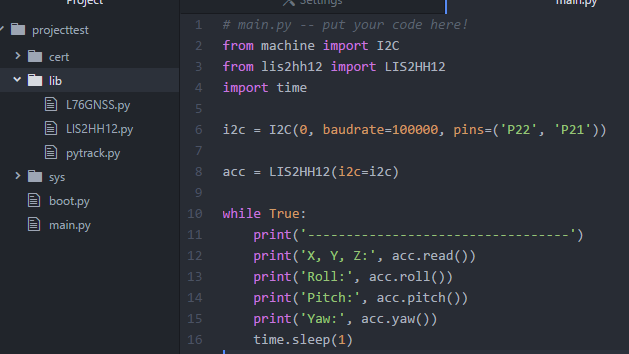
    @bucknall : @chrisi runned into one of your documentation errors: https://docs.pycom.io/pycom_esp32/pycom_esp32/tutorial/includes/pytrack-examples.html#axis-accelerometer you might adapt the example as mentioned above.
  • Problem with Sigfox Payload

    SiPy pytrack sipy sigfox
    21
    0 Votes
    21 Posts
    8k Views
    J
    @livius Hi livius, That's work!, now I need to understand how work the "format" of the "pack" function and specialy "little and big-endian. Best regards Jiemde
  • 0 Votes
    3 Posts
    2k Views
    O
    @livius os.uname()                                                                                                           (sysname='WiPy', nodename='WiPy', release='1.7.5.b2', version='v1.8.6-694-g25826866 on 2017-06-29', machine='WiPy with E SP32')    pytrack firmware: pytrack_0.0.3.dfu yes I git-pulled the lastest library
  • 1 Votes
    9 Posts
    4k Views
    J
    @chrisi if you are using the Deep Sleep shield, then you have the relevant functions in the library that goes with it. If you are using a Pysense (and I believe the same applies to the Pytrack), then it's a lot more complex. There's only one usable pin on the I/O header, you need to patch the Pysense firmware, isolate a pin between the module and the Pysense, and change a few things in the sleep process. But it does work. Refer to https://forum.pycom.io/topic/1673/pysense-pinout-wake-on-pin/16 for details.
  • 0 Votes
    3 Posts
    2k Views
    joeriJ
    Is there an update on the availability of the interrupts? I would like to use to it in my next project.