• PyTrack CORE DUMP LOOP

    pytrack coredump bootloop
    4
    0 Votes
    4 Posts
    490 Views
    P
    @glagnar Hey, Pretty sure I just responded to your rma a short while ago you can go ahead and ignore my request to confirm its running the latest firmware in that now I realise its linked to this thread :). Ill update the RMA shortly :) Paul
  • 0 Votes
    15 Posts
    2k Views
    P
    @crumble Thanks for the info. I've subsequently acquired the Particle Boron LTE boards which can actually accomplish my live streaming requirement over LTE with MQTT - and they are way lower power usage than Pycom boards, and it only takes 12 seconds to connect to the network, and it's cheaper. Currently looks like I'll be switching to Particle because of the LTE deficiencies with Pycom, unfortunately. The Cortex M4 power consumption situation (down to 17ma/5V WHILE connected to LTE, idle, zero sleep modes active) blows the Pycom ESP-32 out of the water anyways. Yes, ESP32 is at 240Hz and the Particle Boron is 64Hz. But I will never in a million years need beyond even 24Mhz, and Pycom doesn't give me a way to underclock and match the current consumption. Kind of frustrating/suprising that I can accomplish my task by radio-ing to a cell-tower and back with Particle, but with Pycom short-range LoRa, no-can-do.
  • wlan.ifconfig() sometimes not working (AP mode)

    wifi wlan ifconfig
    5
    0 Votes
    5 Posts
    885 Views
    P
    @martijnthe Intresting. my guess would have been a weird thread race between your thread and our code that deals with setting up wifi on boot. But if its still happening with that's disabled I'd guess its something else. Ill raise it in tomorrows standup and see if anyone else know's anything about it.
  • lte.isattached() is always false

    lte telstra
    1
    1 Votes
    1 Posts
    344 Views
    No one has replied
  • 0 Votes
    6 Posts
    602 Views
    robert-hhR
    @robi90 I misunderstood your first post, assuming a hard crash. I just tried your example and agree, that this is not good and must be fixed, because the device locks up in an unresponsive state. I tried that with version 1.20.0.rc4. The situation is a little bit better with Ctrl-F, because then the device falls at least back to safe boot, from which it can be restarted with machine.reset(). But only from the USB port. Using telnet is only possible then, if you use the default settings for WiFi.
  • LTE init/ deinit freezes the entire board for some seconds

    thread lte-m freeze
    3
    0 Votes
    3 Posts
    540 Views
    P
    @paul-thornton Thanks for the response and information to this important thread. Just to let you know, the blocking and unstable lte.init()/deinit() behavior is forcing me to consider totally switching platforms, and abandoning Pycom. I am running the newest modem firmware.
  • The State of MQTTS

    mqtt tls mqtt mqtt bugs
    2
    0 Votes
    2 Posts
    405 Views
    P
    Re 1) Soon. Rewriting is slow going as I want to confirm all the code examples and lib's actually function as the documentation states. Im on it. Re 2) I shall see what I can find out. responses may be a little slow whilst people are away for christmas.
  • micropython round

    upython on gpy rounding
    7
    0 Votes
    7 Posts
    786 Views
    robert-hhR
    @kjm This is a recurring discussion in Micropython. See also for instance: https://forum.micropython.org/viewtopic.php?f=2&t=802 https://github.com/micropython/micropython/issues/3516 But still, the number which the raspi (C-Python) displays is not the number internally stored. However, using a 64 bit float representation, the error is way smaller. Note also, that rounding was improved in the micrpython.org branch: https://github.com/micropython/micropython/commit/b768cc6ca8ed6d7430b86dc7ccb9ee2391b3a251 For the esp8266 build, I get: MicroPython v1.9.4-704-g62b4bebf-dirty on 2018-12-04; ESP module with ESP8266 Type "help()" for more information. >>> round(691.59, 1) 691.6 But not so for the ESP32 build. The loboris branch again delivers 691.6 But, so sum up: it is not the rounding, that "fails", it's the display of decimal fractions. If you just enter 691.6, REPL will show 691.5999. Similar with other numbers, but not every number.

  • if lte.is attached() makes it think it's not

    if lte.isattach gpy
    1
    0 Votes
    1 Posts
    385 Views
    No one has replied
  • 0 Votes
    2 Posts
    921 Views
    C
    Resolved... diff --git a/py/mkrules.mk b/py/mkrules.mk index 633b0df..b9b235c 100644 --- a/py/mkrules.mk +++ b/py/mkrules.mk @@ -115,6 +115,13 @@ FROZEN_MPY_PY_FILES += $(shell find -L $(FROZEN_MPY_DIR)/Common/ -type f -name ' ifeq ($(BOARD), $(filter $(BOARD), GPY FIPY)) FROZEN_MPY_PY_FILES += $(shell find -L $(FROZEN_MPY_DIR)/LTE/ -type f -name '*.py' | $(SED) -e 's/$(FROZEN_MPY_DIR)\/LTE\///') endif +else ifeq ($(findstring MINGW32,$(OS_NAME)),MINGW32) +# make a list of all the .py files that need compiling and freezing +FROZEN_MPY_PY_FILES := $(shell find -L $(FROZEN_MPY_DIR)/Base/ -type f -name '*.py' | $(SED) -e 's/$(FROZEN_MPY_DIR)\/Base\///') +FROZEN_MPY_PY_FILES += $(shell find -L $(FROZEN_MPY_DIR)/Common/ -type f -name '*.py' | $(SED) -e 's/$(FROZEN_MPY_DIR)\/Common\///') +ifeq ($(BOARD), $(filter $(BOARD), GPY FIPY)) +FROZEN_MPY_PY_FILES += $(shell find -L $(FROZEN_MPY_DIR)/LTE/ -type f -name '*.py' | $(SED) -e 's/$(FROZEN_MPY_DIR)\/LTE\///') +endif else # make a list of all the .py files that need compiling and freezing FROZEN_MPY_PY_FILES := $(shell find -L $(FROZEN_MPY_DIR)/Base/ -type f -name '*.py' | $(SED) -e 's=^$(FROZEN_MPY_DIR)\/Base\//==')
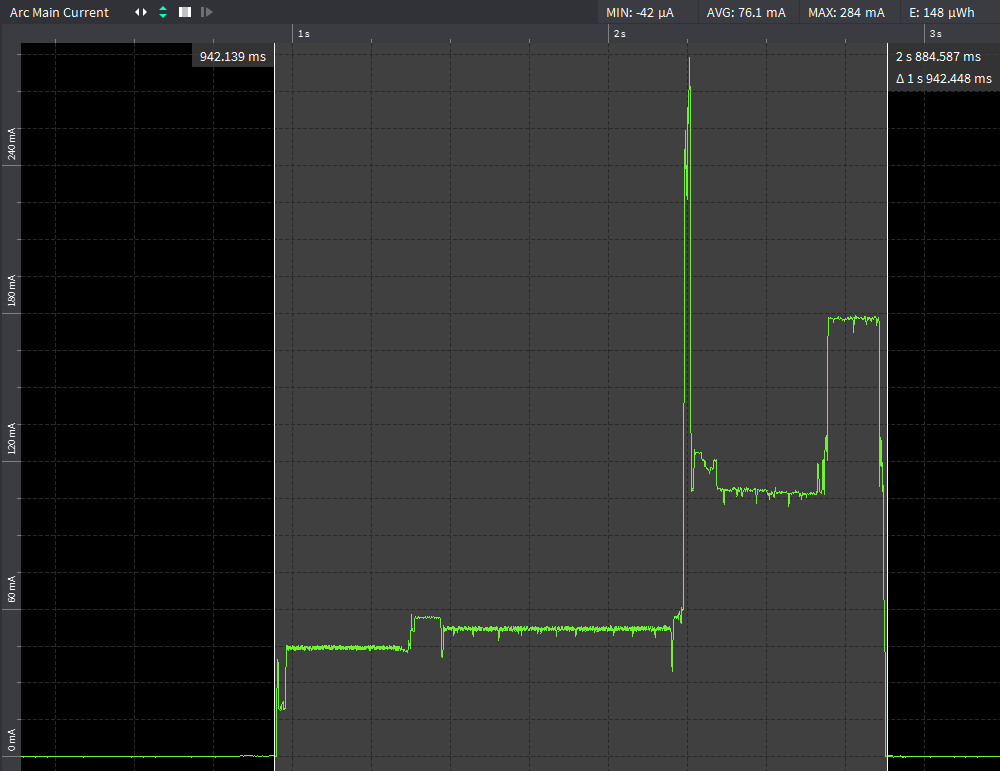
  • FW 1.18.0 - increased boot time / power consumption?

    bug consumption boot
    7
    2
    1 Votes
    7 Posts
    2k Views
    D
    @catalin I finally managed to perform tests of releases between 1.14.0.b1 and 1.18.0.b1. Otii ARK traces are available here: https://drive.google.com/open?id=1kIZL0HJHn_dEIPDM_jv6fEhDhb_Ukfqj Significant execution time increase occured between versions: 1.17.0.b1: MP: d0dc708a0197d2900a5620648725794a1fb5c8f3 IDF: 3b54cd7473aefdb8b75531a21ce340c4bd2221da and 1.17.2.b1: MP: 1bf377b08e2162e8534b6cbe78dcdeeb930f64b8 IDF: 4eab4e1b0e47c73b858c6b29d357f3d30a69c074
  • AWSIoTMQTTClient keepalive interval?

    aws mqtt aws iot bandwidth lte-m lte m1
    4
    0 Votes
    4 Posts
    925 Views
    C
    @reidfo Sure looks like it. Change line 294, see if you get a different behavior. http://docs.oasis-open.org/mqtt/mqtt/v3.1.1/os/mqtt-v3.1.1-os.html#_Toc385349238 https://github.com/pycom/pycom-micropython-sigfox/blob/f517b1df5083ddc158c075852d7f2497480b0d84/esp32/frozen/Common/MQTTClient.py#L294
  • 1 Votes
    2 Posts
    586 Views
    J
    @tom You should probably instead do the following set socket to blocking send set socket to non-blocking receive save config Otherwise you actually try to receive, save, and deep sleep before the packet has actually been (completely) sent. An alternative is to add a manual sleep, but remember that the time between send and receive is variable (the network can change the RxDelay).
  • STM LoRa Discovery to LoPy nano gateway

    lopy gateway stm lorawan server connect issues
    1
    0 Votes
    1 Posts
    407 Views
    No one has replied
  • Pysense accelerometer wake up issues

    pysense accelerometer library wake up
    13
    0 Votes
    13 Posts
    3k Views
    D
    Hi @jcaron, yesterday I posted some findings about this issue. Today I've discovered that if I comment the line: self.set_register(CTRL3_REG, 1, 5, 1) in LIS2HH12.py, then my multimeter shows the accelerometer works as its supposed in terms of current consumption: ~130 µA for 5 seconds (inactivity duration) and then ~60 µA. If I shake a little bit the board then the current rises up to ~130 µA (activity detection) and after 5 seconds lowers to ~60 µA again. Off course, the SiPy doesn't wake up because accelerometer's inactivity interrupt (INT1_INACT bit in CTRL3 register) is not enabled (the line I commented), but this reinforces my theory that there is a problem regarding to the way the PIC handles the interruption. I.e., an issue in Pysense/Pytrack firmware or in pycoproc.py library.
  • Heart beat missing after firmware upgrade.

    gpy
    2
    0 Votes
    2 Posts
    474 Views
    danD
    Hi @ckellow, What code are you running on it? It is possible that you've turned it off with pycom.heartbeat(False). Can you test the LED to see if it works?
  • Memory consumptions increases after some time

    memory garbage
    6
    0 Votes
    6 Posts
    997 Views
    J
    @egimbernat I fully understand that GC need to kick in and that it is a resource intensive task. The question remains, why does Work A and Work B start to take more time after appr 18 minutes runtime? I added a gc.collect() to run every 10 iteration in the loop (appr every 10 ms). But no change, after 18 minutes it slows down.
  • WiPy broadcasts AP when in STA mode

    wipy wlan wifi ap mode sta mode
    3
    0 Votes
    3 Posts
    618 Views
    H
    @jcaron Thank you very much for your reply. Turning off WiFi on boot seems to fix the issue. Apparently it was related to the PyCom starting in AP mode for telnet.
  • Wipy 3 irregularly crashes after deepsleep

    wipy deepsleep crash
    3
    1 Votes
    3 Posts
    726 Views
    M
    As of last week, I cannot reproduce the error anymore... . If I encounter the issue again, I will write here again.
  • Still no directories in lib?

    lib library wheel directory egg
    2
    0 Votes
    2 Posts
    591 Views
    danD
    Hi @brady-aiello, You can add folders to lib/ to your project. You can import them with from folder import file.

Pycom on Twitter