• Pytrack 2.0: firmware update

    5
    0 Votes
    5 Posts
    103 Views
    F
    Everything works fine now with the 2.0 firmware. The default PyTrack 2 example also works fine now (just forgot the jumper to use the external antenna and pluging the external antenna without jumper seems to impair the internal antenna).
  • Connecting pytrack

    1
    0 Votes
    1 Posts
    31 Views
    No one has replied
  • Pytrack 2.0X and GPy not detected on Atom

    3
    0 Votes
    3 Posts
    66 Views
    A
    @Gijs Hi, thanks a lot! I wasn't aware that certain micro-usb cables are like that. After some searching, I found one cable that worked. Thanks again!
  • Fipy & Expansion board 3.1 - deepsleep power consumption

    12
    0 Votes
    12 Posts
    191 Views
    rcolisteteR
    Posted a new topic, "Guide/Tutorial/Reference about Expansion Board", which includes the measurements cited above by me and many other current, voltage and power measurements about all Expansion Board models.
  • My PySense 2 boards are not working

    1
    0 Votes
    1 Posts
    15 Views
    No one has replied
  • I2C startup probelm

    1
    0 Votes
    1 Posts
    24 Views
    No one has replied
  • Firmware upgrade expansion board v 3.2 manjaro

    2
    0 Votes
    2 Posts
    37 Views
    P
    Never mind, I found the solution. For anyone who faces this same problem: you have to add yourself to the "storage" group to solve this problem :)
  • Serial USB Issue on Linux

    8
    0 Votes
    8 Posts
    190 Views
    B
    @DavidGW Hope you are doing well. That's sound cool. I kinda need something similar. I was wondering, if the script/ code is available publicly. If not, would you be happy to share it? If that's fine. Yours Sincerely, Vijay
  • Detect when battery is charging.

    2
    0 Votes
    2 Posts
    60 Views
    J
    @dkbyrne just check the battery voltage. It is significantly higher when charging than at any time when running from the battery. Find the right threshold for your setup (probably between 4.3 and 4.7V IIRC).
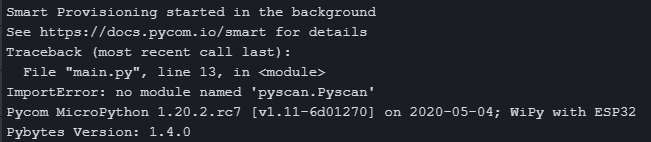
  • Pyscan module cannot load

    1
    2
    0 Votes
    1 Posts
    28 Views
    No one has replied
  • Pycom support response time

    4
    1 Votes
    4 Posts
    83 Views
    F
    Hi, after eventually getting a response from Pycom support (which actually, was yet another administration step of filling out an RMA request), and then 2 week later having to ask again what is happening when you closed the request, I am STILL waiting for SOME information as to what is happening!! Rarely have I come across such useless support, the response time is ridiculous, - almost non-existant.. The board you sent me last year was one of a faulty batch, why on earth didn't you then pro-actively inform your customers instead of waiting for them to have to figure out for themselves that the hardware is faulty?! This has been dragging on now for a month, for something that should be a simple "click" on your side, to send a replacement board.., dispapointing..

  • Expansion board v1.2.3a pinout and specs?

    2
    0 Votes
    2 Posts
    38 Views
    N
    Aha, I've answered my own question: I just needed to switch to an earlier revision of the manual on the github site: https://github.com/wipy/wipy/blob/v1.1.0/docs/User_manual_exp_board.pdf
  • Power the expansion board with alternative 5V

    5
    1
    0 Votes
    5 Posts
    93 Views
    A
    @robert-hh Sorry for my late answer I did not see yours. I measured 5V between GND and VUSB so that I powered the expansion board with these 2 points. It works the lopy is running but it has a consequence on the pin effects. It is not a reliable solution.[image: 1588325082649-eb.jpg]
  • 0 Votes
    3 Posts
    303 Views
    P
    Same topic: https://forum.pycom.io/topic/2469/easy-way-to-tell-what-expansion-board-is-in-use Here's a method to create a generic exp. board object: from pycoproc import Pycoproc from pysense import Pysense from pytrack import Pytrack # create exp board object using unknown board type pyexp = Pycoproc(1) if pyexp.read_product_id() == 61458: print("Using Pysense") pyexp = Pysense() if pyexp.read_product_id() == 61459: print("Using Pytrack") pyexp = Pytrack() Later on use eg: if pyexp.board_type == pyexp.PYSENSE: si7006 = SI7006A20() Perhaps someone can tell us the id for the Pyscan board.
  • V3.1 Expansion board and Debian Linux

    11
    0 Votes
    11 Posts
    130 Views
    N
    @robert-hh I was able to flash both expansion boards using the dfu-util tool. I was able on osx to only update firmware with the pycom gui prebuilt code. Later I managed to get the github repo code to work for flashing both modules. I truly appreciate you showing me this repo. Many thanks.
  • Connecting an external sensor to the Pysense

    5
    0 Votes
    5 Posts
    79 Views
    robert-hhR
    @linucks Whatever you like. You can solder an angled 10 double row pin header into the holes, or two 5 pin single row angled headers, whatever matches best physically. I personally would prefer the 2x5 angled male pin header version, placed at the bottom side.
  • pycoproc.py and Expansion board 3

    expansionboard pycoproc.py deepsleep lopy4
    2
    0 Votes
    2 Posts
    362 Views
    F
    @Giorgio Did you find out how? I have the same problem here, using a gPy+Expansion Board V3.1. I can't find a way to put the board in deepsleep mode. It is currently using 14mA. I can only find documentation for Pysense/Pytrack/DSboard, etc.. but nothing for the Expansion Board!? :\ Where's the info I am missing? Fakstory
  • Expansion board 3.1 firmware zadig HELP

    3
    1 Votes
    3 Posts
    242 Views
    E
    I find the update procedure on docs.pycom.io fuzzy. At least it is not in sync with what I experience with my Expansion board. In Zadig I activate Options -> List All Devices. [image: 1586804274292-f4181765-b371-4c7e-bec7-56404beb5d07-image.png] Before (!) updating driver I select my Expansion board. [image: 1586804338587-867e9d6e-5fe6-4c5d-85c0-7bfbe1cd79f4-image.png] Ok, now that the libusbK driver is in, the dfu-util should find its job - but it does not!? The S1 connecting procedure doesn't seem to put the boad into update mode? And after dfu-util is trough I should run Zadig again and install USB Serial (CDC) in order to get REPL connectivity - did I understand that correctly? ds
  • expansionV3 + lopy4, P2 during RST

    5
    0 Votes
    5 Posts
    169 Views
    F
    @frecfrec said in expansionV3 + lopy4, P2 during RST: .\pycom-fwtool-cli.exe -p COM9 -s 115200 --pic flash -f .\firmware.bin finally done creating a tar.gz file containing: firmware.bin (our firmware compiled with platformIO) bootloader.bin (copied from a tar.gz sample) partition.bin (copied from a tar.gz sample) sample used for bootload.bin and partition.bin: https://packages.hiveeyes.org/hiveeyes/foss/pycom/official/pybytes/LoPy4-1.20.2.rc3.tar.gz
  • 0 Votes
    2 Posts
    68 Views
    P
    Hello All, Replying to myself :-). I've tested with Pin G22, (instead of G28 in my initial post).. and all works as a charm.. ... let's turn it into an advantage.. i now know when the USB is powered (from the mains) or not... and can trigger another alarm with "Power has disappeared".. @Pycom : if you could release/share more details on each PIN Status/Usage (it may exist already, but did not find it myself). Thanks in advance for your help.

Pycom on Twitter