• Expansion Board 3.0 Vin (3.5-5.5V) pin

    battery voltage vin input voltage power supply
    2
    0 Votes
    2 Posts
    326 Views
    robert-hhR
    @KiraKiraSoul said in Expansion Board 3.0 Vin (3.5-5.5V) pin: In other words, is the input voltage regulated in any way on the expansion board? No. It's the same signal, just differently labeled. When connected to USB, you should see 5V at that pin coming from USB. Otherwise you can supply a xxPy device at that pin with input voltages from 3.5-5.5 V.
  • Button presses register multiple times

    8
    1
    0 Votes
    8 Posts
    383 Views
    R
    @robert-hh Thanks! I tried pulling a cable between two pins using the following code. count = 0 def rnd_triage(arg): global count print("callback fired", count) count += 1 p = Pin('P13', mode=Pin.IN, pull=Pin.PULL_DOWN) p.callback(trigger=Pin.IRQ_RISING, handler=rnd_triage) t = Pin('P12', mode=Pin.OUT, pull=None, alt=-1) while True: time.sleep(3) t.value(0) time.sleep(3) t.value(1) It seems to be working quite well at least, so maybe I will just endure the button performance for now. Thanks a lot for the help!

  • Updating firmware on Pycom Expansion Board 3.1

    expansion board
    4
    0 Votes
    4 Posts
    551 Views
    G
    You can check if the board is affected by sending the S/N to Pycom support (see the link to Expansion Board 3.1 issues). I have 2 boards with DFU lock in, but Pycom support already sent the replacements. You don't get a serial connection via USB with these boards, but besides that still are functional. Pymakr connection via WLAN and FTP are working (Lopy4 powered up and running). AFAIK - and proved by buying another board some weeks ago - if you now buy an EXP 3.1 you will not run into that problem. If your board is older, just check with support before trying to update it.
  • MQTTClient + GPS + adafruit IO

    2
    0 Votes
    2 Posts
    254 Views
    T
    got it working https://learn.adafruit.com/adafruit-io/mqtt-api https://io.adafruit.com/api/docs/mqtt.html?python
  • Exit from DFU Mode

    18
    3 Votes
    18 Posts
    2k Views
    P
    I have exactly the same problem. Unfortunately, I don't know if it was introduced by the firmware update or already existed before. The first thing I did after receiving the board was to execute the update... If I now check my usb devices (on ubuntu) with lsubs it gives: Bus 001 Device 070: ID 04d8:ef99 Microchip Technology, Inc. The part ef99 indicates firmware update mode as decribed here. Interestingly, the device doesn't really seem to be in update mode, as trying to execute: sudo dfu-util -D expansion31_0.0.11.dfu yields: dfu-util 0.9 Copyright 2005-2009 Weston Schmidt, Harald Welte and OpenMoko Inc. Copyright 2010-2016 Tormod Volden and Stefan Schmidt This program is Free Software and has ABSOLUTELY NO WARRANTY Please report bugs to http://sourceforge.net/p/dfu-util/tickets/ Match vendor ID from file: 04d8 Match product ID from file: ef99 dfu-util: Cannot open DFU device 04d8:ef99 dfu-util: No DFU capable USB device available To perform a proper firmware update I still have to press and hold the S1 button while connecting the Expansion Board. Hopefuly Pycom is working on a solution ...
  • Use Battery (Pull P8 high)

    2
    0 Votes
    2 Posts
    174 Views
    robert-hhR
    @max You have to pull up P8 physically, because that sensing is done before MicroPython gets active.
  • Fipy, pytrack and arduino

    2
    0 Votes
    2 Posts
    184 Views
    robert-hhR
    @iamnewtopycom At least, P10 and P11 are available and can be assigned to UART1. Which other pins can be used depends on whether you use the for other tasks.
  • 0 Votes
    3 Posts
    283 Views
    philwilkinsonP
    thanks for the response @jcaron. Unfortunately all the methods you suggest only work on the expansion board types, not the deepsleep shield. The only way I can see to do this is to use an exception handler. Not very pythonic, but it does work. import deepsleep ds = deepsleep.DeepSleep() try: ds.get_wake_status() shield = True except: shield = False print(shield)
  • PyScan User Push Button

    pyscan button expansion board wakeup user button
    8
    1
    0 Votes
    8 Posts
    1k Views
    B
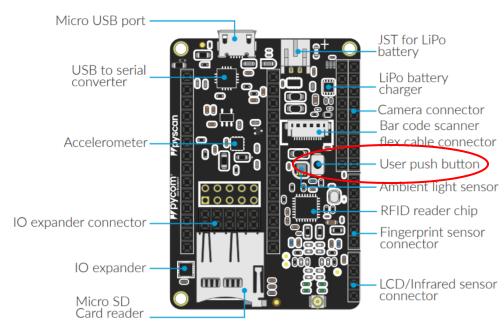
    @GreenGrouch Try to move the line "p_inP14 = Pin ..." before the while instruction
  • 5 volt pressure sensor on Pysense or Expansion Board

    6
    0 Votes
    6 Posts
    438 Views
    S
    @svonbentzel how are you powering the Pycom board? Is the Pycom device standalone or on an expansion board? 5V power from a separate DC supply (to the VIN pin) or from USB to the socket on the board? Whichever you are using, you should be able to extend that to the sensor without too much difficulty - from the sensor specs it doesn't seem to draw much DC power. If you are using any deep sleep type function, then that might need to be looked at.
  • Expansion Board V3.1 connecting to Raspberry Pi 3

    7
    0 Votes
    7 Posts
    309 Views
    Z
    @protean thx! it is working now.
  • board and pycom deep sleep

    lopy4 deepsleep
    8
    1 Votes
    8 Posts
    576 Views
    M
    I have noticed that upon wake up, that *.py files randomly get errors but when i reset its fine. Didn't know I had to do machine.deepsleep first to close down OS! I really enjoy the pycom ecosystem BUT the effort should be on a robust OS and not extra hardware. This will bite them...Reliability always win in the long term..
  • Fried two lopy4 and pytrack

    4
    0 Votes
    4 Posts
    278 Views
    J
    @River Vin on the module pin header is the input for the module, but the output of the Expansion board or Pytrack... My guess is that the modules are possibly OK (what happens if you power them this way, without inserting them into the expansion board or Pytrack?), and it's probably just the expansion board/Pytrack which have an issue, is that not the case? Not sure what the best option is to power the Expansion Board or Pytrack this way. Usually it's done via either the USB port or with a battery. You could probably use the battery connector (just make sure you do not connect USB at the same time, otherwise the board may try to "charge" the power supply...). An alternative cold be to use a USB connector. Not sure if there is any other access to the board's power input.
  • Alternate xPy powering from USB/Battery using Expansion Board 3

    3
    0 Votes
    3 Posts
    230 Views
    A
    @jcaron I tried and indeed seems to be ok. I remembered from an old post tha this was not supported, but probably this is something from the old expansion board 2.0/lopy1 era.
  • pyscan EXPANDER IO BUT0-BUT7

    pyscan 5v tolerance external pins
    11
    0 Votes
    11 Posts
    1k Views
    John BairdJ
    @Paul-Thornton Thanks for the pointers and @theshade thanks for the library. Can we find out how this works in deepsleep? Questions such as: Does the PCA remain powered up? Can we choose to power it down if we aren't using it? Can the PCA interrupt line be used? If so how? Can the PCA interrupt signal the PIC to wake the main processor from deepsleep? If so, how do we establish why we woke from deepsleep? Can the PIC tell us? Or perhaps you could just give us the schematics/PIC code and we could figure it out ;-) Thanks!!
  • This topic is deleted!

    1
    1
    0 Votes
    1 Posts
    6 Views
    No one has replied
  • Headers not in correct row - Expansion Board 3

    4
    1
    0 Votes
    4 Posts
    327 Views
    B
    @crumble Hi, send an email to support@pycom.io. We’ll give you an RMA number and send you a new one the same day we receive it. With apologies :-/
  • External Watchdog

    watchdog reliablitty unattended pic
    1
    7 Votes
    1 Posts
    267 Views
    No one has replied
  • Exp Board 3 - Charge LED flash codes

    expansion board
    1
    0 Votes
    1 Posts
    220 Views
    No one has replied
  • PWR_EN pin as GPIO (output)

    1
    1 Votes
    1 Posts
    253 Views
    No one has replied

Pycom on Twitter