• Li-ion battery discharge

    battery power iot charging
    3
    0 Votes
    3 Posts
    1k Views
    sebS
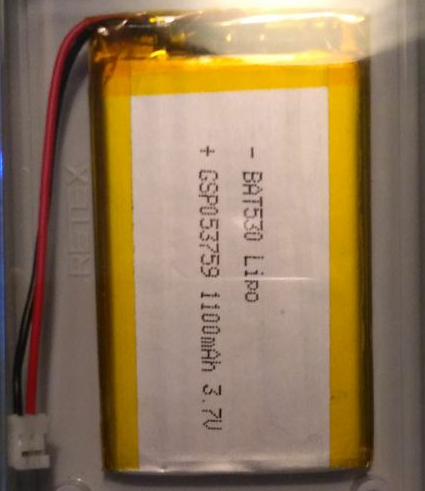
    @robert-hh said in Li-ion battery discharge: bq24040 All of our boards use the same bq24040 circuit, therefore it is recommended to use batteries with a PCM to protect the battery from over discharge
  • PyTrack GPS Lock

    pytrack gps accuracy
    14
    0 Votes
    14 Posts
    4k Views
    J
    @robert-hh Thx, work kept me a bit busy but found some time to play today. I went the micropyGPS frozen module route. I've been running into issue after issue trying to get the dev environment up on OSX. So had to deploy a ubuntu box with all the tools first and flashed the new firmware from there. Preliminary tests show that the frozen module and the code works. Obtaining a GPS lock indoors not really yet however I need to look into it further. At least now I have more data/cmds to start troubleshooting. I have a Pi Zero with attached GPS module, 3G dongle and external GPS antenna which gets a GPS lock indoors fairly quickly and is using 3G to transmit coords so that's my benchmark. My goal is to downsize this tracker to sipy-pytrack-sigfox. Thx all for the pointers and support.
  • 0 Votes
    3 Posts
    525 Views
    G
    @seb said in Macosx: cannot reconnect the lopy with serial USB after removing the usb cable: It is best to just use the default driver provided Thanks a lot ! It is working now
  • 0 Votes
    4 Posts
    1k Views
    J
    @fsergeys yes, we physically cut the header for that pin, so the only things that remain connected are the sensor and the PIC on the Pysense in our case. The LoPy was just bringing havoc when in deep sleep mode. You may want to experiment by using jumper cables between the WiPy and PyTrack at first, connecting everything but that pin, but I’m pretty sure you’ll get better results that way. Of course things would be very different with a WiPy 3, LoPy 4 or any of the other modules that implement deeep sleep directly rather than having to rely on an external board.
  • PyScan availability

    pyscan
    1
    1 Votes
    1 Posts
    449 Views
    No one has replied
  • Creating a JSON structure for PySense

    json
    10
    0 Votes
    10 Posts
    2k Views
    J
    @smbunn It's probably much easier if you use a single pack with a single format string and all the values you want to pack in there. Otherwise you'll end up with issues of incorrect offsets or lengths at some point when you'll edit formats.
  • Sensor JSON Post stops after a few hours

    json uart post
    14
    1
    0 Votes
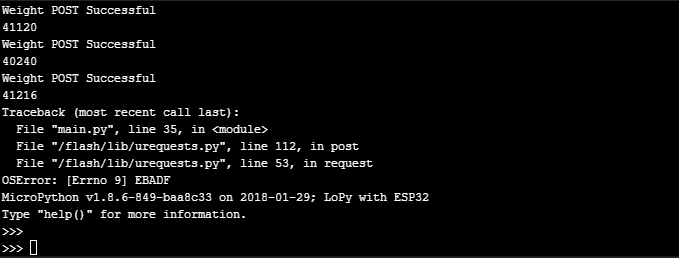
    14 Posts
    2k Views
    T
    @jimpower ok, so why do you get no module found when you call urequests.post now when you didn't before. I can't see all your code, just snippets. The vaious sample bits of code are being changed. Oh I see now what the problem is, when you import urequests you are importing as requests hence the module not found error. You will need to change the sample to requests.post Also as an aside why do you execfile('/flash/Wi-Fi/Wi-Fi.py') rather than importing. This seems odd thing to do.
  • Can I use a 5V Solar panel on the USB Input to Charge

    lopy battery
    3
    0 Votes
    3 Posts
    1k Views
    P
    Yes I have done this with this board and others that need a 5V input. It was as simple as putting in a zener diode in between the panel and board as a cheap, simple voltage limiter cheers Paul
  • 0 Votes
    5 Posts
    1k Views
    M
    @xykon Hi I didnt't told you but have tried 1.16.0.b1 and 1.15.0.1 with both the same results. But with some wires soldered it is working fine. The following schema now is running: External IO Header : PIN 1 - GND PIN 4 - VCC 3V3 SENSORS Header(connected a wire underneath the board) P22 - SDA P21 - SCL I have now a working demo device for this week :)
  • I2C bus error after sending standby cmd to GPS

    i2c bus error gps standby pmtk
    2
    0 Votes
    2 Posts
    869 Views
    sebS
    Once the GPS module goes into standby the i2c stops working, you can no longer wake it up via i2c, all you can do is a reset via the pytracks deep sleep function.
  • 1 Votes
    8 Posts
    3k Views
    T
    @fsergeys said in Changing the GPS frequency and configuring which NMEA sentences the gps posts.: GALILEO and GALILEO Full satellites Do you know what the difference between the two is? Also I wonder what is the default configuration for the tracking system? I think the application note regardig I2c mentions to perform a dummy write after each command prior to get back to reading see my example here: https://forum.pycom.io/topic/2442/pytrack-and-gps-balloon-mode/3 and the sequence chart in the application note: http://www.quectel.com/UploadImage/Downlad/Quectel_L76-L_I2C_Application_Note_V1.0.pdf <- requires login. and here is the code to perform checksum testing yourself: requires the sentence to be a bytes object. def _checksum(self, sentence): l = sentence[0] for c in sentence[1:]: l = l ^ c return l def _test_checksum(self, sentence): if self._checksum(sentence[1:-3]) == int(sentence[-2:], 16): return True return False
  • Expansion board

    deep sleep expansion board lopy
    5
    1
    0 Votes
    5 Posts
    923 Views
    R
    @jmarcelino Thanks
  • CompOrt for Pysense

    pysense
    9
    0 Votes
    9 Posts
    1k Views
    J
    @misterlisty just to be clear, do you still have the issue (and you are connecting via Wi-Fi / telnet), or is the USB issue resolved?
  • Pysense deep sleep issues

    pysense
    1
    0 Votes
    1 Posts
    547 Views
    No one has replied
  • PySense nonsense altitude readings

    lopy pysense modules
    7
    0 Votes
    7 Posts
    2k Views
    J
    @catalin said in PySense nonsense altitude readings: You could look into datasheet for better explanations: https://www.nxp.com/docs/en/data-sheet/MPL3115A2.pdf Yet another data sheet with complete non-sense... It's saying you should use OFF_H, when really the registers to use are BAR_IN_MSB/BAR_IN_LSB. @seb or @catalin, it would probably be a good idea to add a function in PL3115A2.py to set this value. self.i2c.writeto_mem(MPL3115_I2CADDR, MPL3115_BAR_IN_MSB, bytes([int(qnh*100/2) >> 8, int(qnh*100/2) & 255])) Note that even with this, one should not expect a very precise altitude indication, it can vary several meters up or down. If you want a more precise altitude (and independence from the weather), you probably need to use a GPS.

  • This topic is deleted!

    1
    1
    0 Votes
    1 Posts
    1 Views
    No one has replied
  • New Expansion Board

    expansion board
    2
    1 Votes
    2 Posts
    678 Views
    sebS
    I believe is is being worked on as we speak. I cannot provide any specific details unfortunately.
  • Anyone with a good compressed payload for PySense

    pysense lora
    5
    0 Votes
    5 Posts
    1k Views
    J
    @smbunn Not sure how you want to send the data, but if you're Wi-Fi for instance you usually don't care much about saving every bit you can, convenience is key, and JSON is probably your best friend. If you intend to use LoRaWAN on the other hand, you really want to save every bit you can, but using deltas is probably not a good idea as packets are usually unconfirmed and can thus be lost, which would break all subsequent readings.
  • Serial to UART POST JSON

    uart1 json post
    5
    0 Votes
    5 Posts
    1k Views
    J
    @livius I added tmp = uart1.readall() and it works thanks again I managed to do this before your reply thanks again you are always very helpful
  • Adding a magnetometer to PyTrack + LoPy?

    pytrack lopy gps expansion board magnetometer
    4
    0 Votes
    4 Posts
    1k Views
    sebS
    @jonasde On the bottom of your Pysense board you will find a 5x2 header you can solder to (see: https://docs.pycom.io/chapter/datasheets/downloads/pysense-pinout.pdf) When I connected it I used P8 and P4 which are availble on pins 9 and 10 of the external header. You will also need to connect to GND and 3V3_Sensor to the modules GND and Vdd pins.

Pycom on Twitter