• VL6180X on LoPy I2C sensor driver

    LoPy lopy i2c sensor
    13
    1
    0 Votes
    13 Posts
    4k Views
    K
    @chumelnicu Hey, you can look it up here (scroll down) or try to transcribe the Adafruit library
  • 0 Votes
    8 Posts
    2k Views
    A
    @jorismathijssen Hi Joris. Did you tried tot upload thé firmware again? Be sure to powercycle your device. Did you run dfu utils with elevated rights? (Admin on Windows of sudoku on Linux?) Good luck
  • how to change some bits in an byte result

    MicroPython micropython i2c
    6
    0 Votes
    6 Posts
    2k Views
    L
    @jiemde bytes is immutable you must first convert it to mutable type like bytearray e.g. a=bytes([1,2,3]) #create bytes in your case steep not needed you have it already as result from readfrom_mem b=bytearray(a) #convert it to bytearray b[1]=11 #change value to what you need a=bytes(b) #change it back to bytes if you need to
  • CCS811 library ?

    MicroPython ccs811 micropython i2c
    6
    0 Votes
    6 Posts
    2k Views
    ledbelly2142L
    @jiemde Thanks! I forked it. Cheers!
  • i2c.deinit() and machine.deepsleep() on L01

    Issues & Bugs deep sleep i2c
    6
    0 Votes
    6 Posts
    2k Views
    D
    Guys, thanks for the valuable input. We will create the "best practices for deepsleep" section in the docs and also improve the behaviour of the deinit() methods. Cheers, Daniel
  • I2C sensor with WiPy2

    WiPy 2&3 wipy2.0 i2c sensor
    28
    0 Votes
    28 Posts
    12k Views
    C
    @chumelnicu @JasonTimmins , @iotmaker Any update with VL53L0X library ? Thank you !
  • Additional I2C device on pytrack

    Discussion pytrack i2c
    3
    0 Votes
    3 Posts
    1k Views
    K
    Thanks for the input. However, i already did use P9 en P10 for buttons. I'm using the pytrack for a movable cache (geocaching) and need some more user interaction than - probably - normaly would be used with an iot-device.
  • I2C and 24LC512 memory devices

    WiPy 2&3 i2c serialeeprom 24lc512
    14
    0 Votes
    14 Posts
    4k Views
    R
    @jmarcelino Thank you so much - it is surprising though. I had got majorly confused with if the memory comand actually sent out the proper sequence or not etc. It seems it does. I've been away with other things this last month or so (earning money). Now it is time to come back to it. I'll get the breadboard happening again shortly.
  • SiPy and BME280

    SiPy bme280 sipy i2c i2c bus error
    6
    0 Votes
    6 Posts
    2k Views
    A
    @robert-hh said in SiPy and BME280: i2c = I2C(0, I2C.MASTER, pins=(Pin("G9"), Pin("G10"))) Thank you soooo much, correct syntax for me is: i2c = I2C(0, I2C.MASTER, pins=("G9", "G10")) and thanks @bucknall for the library ;)
  • LoPy and LIDAR-Lite v2 I2C

    LoPy lopy i2c
    5
    0 Votes
    5 Posts
    2k Views
    L
    @kingj first change your init to only one line - i do not suppose that this matter but... i2c = I2C(0, I2C.MASTER, baudrate=100000) and try to add first default config i2c.writeto_mem(addr,0x00,bytes([0x00]))
  • 1 Votes
    25 Posts
    11k Views
    P
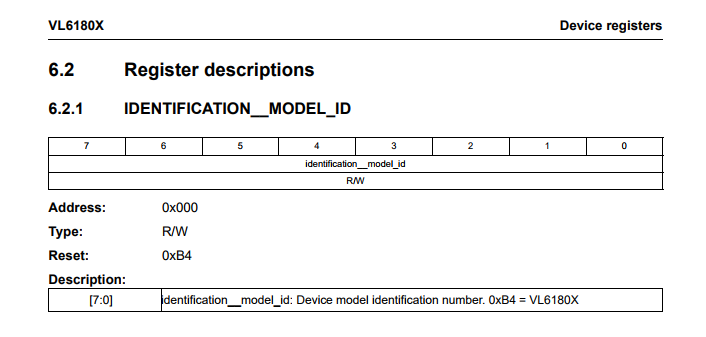
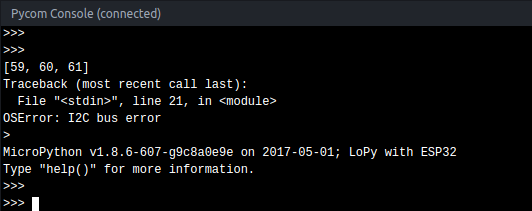
    @jmarcelino @livius @robert-hh Hey all, thx a lot for helping me this last days with this driver. This is the code i have until now... it's a shame that i didn't make it, but i think that i could have broken the sensor when i plugged CS to 5v instead of 3V3. I think i will buy another one, that will take some weeks until it gets to Uruguay :P Anyway, this is the code we've made until now, maybe it's useful for someone else. It's not throwing the ugly i2c bus error anymore, but the device id registry is returning always zero, and that's bad... not sure if the device is broken or what, but comparing this code with the implementation @livius has referenced, and with other implementations i found on google for other languages, it looks like the retrieval of the device id is the first action almost everyone does, so... i dont know. from machine import I2C from machine import Pin from machine import Timer import time def DelayUs(us): Timer.sleep_us(us) #i2c slave address SLAVE_ADDRESS = 0x1D #registers REG_POWER_CTL = 0x2D REG_BW_RATE = 0x2C #connected to SDO and CS of MMA7455 CS = Pin("P23", mode=Pin.OUT) CS.value(1) CS.hold() DelayUs(1000) #main i2c = I2C(0, I2C.MASTER, baudrate=100000) print(i2c.scan()) def setPowerCtrl(measure, wake_up=0, sleep=0, auto_sleep=0, link=0): power_ctl = wake_up & 0x03 if sleep: power_ctl |= 0x04 if measure: power_ctl |= 0x08 if auto_sleep: power_ctl |= 0x10 if link: power_ctl |= 0x20 i2c.writeto_mem(SLAVE_ADDRESS, REG_POWER_CTL, bytes([power_ctl])) #***************************** #******* main logic ********** #***************************** data = i2c.readfrom_mem(SLAVE_ADDRESS, 0x00, 1) print("DEVID: " + str(bin(data[0]))) #set power characteristics setPowerCtrl(1, wake_up=0, sleep=0, auto_sleep=0, link=0)

  • I2C Pullup Resistors

    Discussion i2c
    12
    0 Votes
    12 Posts
    5k Views
    robert-hhR
    @Eric24 For what it's worth, I repeated the test with a 10nF capacitor and a test code, which switches the output value high/low. To my surprise, the figure looks as if the capacitor is charged with a constant current. The calculation gave a current of ~47 µA, which matches the 1.53V seen across the 33k resistor. [image: 1494346300020-10n_charge_opendrain-resized.jpeg]
  • Strange I2C Bus Behavior

    LoPy i2c
    3
    0 Votes
    3 Posts
    1k Views
    E
    @robert-hh Thank you, that makes perfect sense. I knew that (the 7-bit address), but it didn't register with me because the datasheet for the PCF8593 says it's I2C address is 0xA2, but now that I look at it again, they are including the R/W bit. To much late-night prototyping. :o
  • Using MLX90614 temperature sensor

    Moved MicroPython i2c temperature pin
    20
    1
    0 Votes
    20 Posts
    6k Views
    S
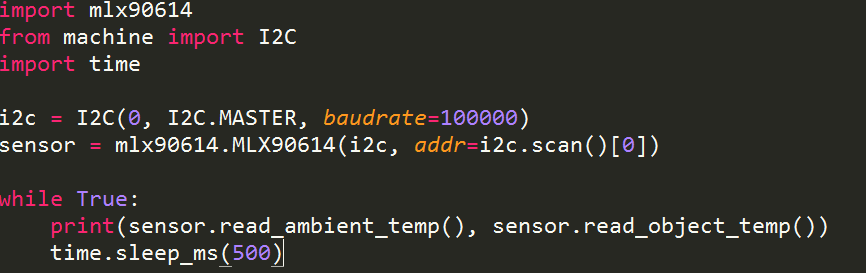
    I have been working on the mlx90614 for the last day and can communicate successfully with 6 on an I2C bus, but am am receiving an overwhelming number of errors. Right now it hovers around 25% of attempts to read the sensor. I believe it could be related to a timing issue of the I2C communication in micropython. Some errors are the result of a bad read of the I2C data, which can be verified if you read the PEC byte after the data. The third byte should come back with a crc-8 value, but sometimes it comes back as 0xFF, as if the mlx90614 is one byte ahead of the lopy. The other error is related to readfrom_mem function in i2c. This error produces an OSError exception about every one in four attempts. In other mlx90614 libraries the flow for reading bytes is slightly more complicated, for example // send the slave address then the command and set any // error status bits returned by the write Wire.beginTransmission(_addr); Wire.write(cmd); _rwError |= (1 << Wire.endTransmission(false)) >> 1; // experimentally determined delay to prevent read errors // (manufacturer's data sheet has left something out) delayMicroseconds(30); // resend slave address then get the 3 returned bytes Wire.requestFrom(_addr, (uint8_t)3); // data is returned as 2 bytes little endian val = Wire.read(); val |= Wire.read() << 8; // read the PEC (CRC-8 of all bytes) _pec = Wire.read(); return val; Is there anyway to imitate this flow control? Using the above style code on an Arduino I receive no errors and do not have to do coding gymnastics to control errors.
  • I2C PINOUT QUESTION

    Expansion Board wipy 2.0 i2c expansionboard
    6
    0 Votes
    6 Posts
    2k Views
    M
    @jmarcelino Thanks - that worked a treat (pull ups on P9/10 seem to be enabled by default which made life easier)
  • 0 Votes
    6 Posts
    2k Views
    C
    @livius the reason why I wanted to use the Other function is having Control of the stop Bit. I know "your" function Works, but does it Send a stop Bit When it's done? Thank you for your help!
  • WiPy LoPy I2C with ATMEGA

    Moved MicroPython wipy 2.0 lopy i2c
    5
    0 Votes
    5 Posts
    2k Views
    C
    @jmarcelino Cables are really very short. Can't be shorter... Baud rate is 100000. I tried different baud rates but this value seems to be the correct. I will try the pullup resistors today
  • List of supported pins for various interfaces

    LoPy pins documentation i2c spi uart
    9
    0 Votes
    9 Posts
    3k Views
    J
    @RobTuDelft said in List of supported pins for various interfaces: TSL2591 The Adafruit board (or a clone)? https://www.adafruit.com/product/1980 If so then yes Adafruit added pull-up resistors which you don't really need on the Pycom boards.
  • I2C interface

    LoPy lopy connection i2c d6f-ph diff pressure
    5
    0 Votes
    5 Posts
    2k Views
    E
    Thanks a lot ! Now I must translate ARDUINO code
  • 0 Votes
    7 Posts
    3k Views
    I
    @robert-hh A usage of the I2C hardware implementation was just a guess because I2C with the 8266 was such a mess. I wanted to use a MPU9250 and checked the clock bus using an TDS2024B oscilloscope. Every pulse of the clock signal was a mess (and different from each other!) so I thought that the WiPy with the ESP32 uses the hardware implementation because it worked out of the box. @jmarcelino Thank you for clearing things up!